









・
AI Employees for Sales, Customer Support, and Operations

The way modern organizations manage workload is undergoing a fundamental shift. Rather than relying on simple text-box chatbots that answer isolated questions, growing businesses are adopting AI Employees assigned to own, manage, and complete multi-step tasks across everyday software applications.
Unlike standard conversational assistants, an AI Employee operates like a dedicated AI colleague: it reads incoming documents, updates database records, conducts market research, and coordinates actions across your team's existing software tools.
To help decision-makers evaluate their options, this guide compares the leading AI Employee platforms and analyzes real operational metrics from over 1,600 business teams to show how companies successfully "hire" and onboard AI colleague.
How Teams "Hire" AI Employees | Insights from 1,600+ Workspaces
Analyzing operational data across 1,600+ business workspaces reveals clear patterns in how AI employees are being integrated into real-world work environments.
When Do AI Employees Work? 26.9% of Work Runs Off-Hours
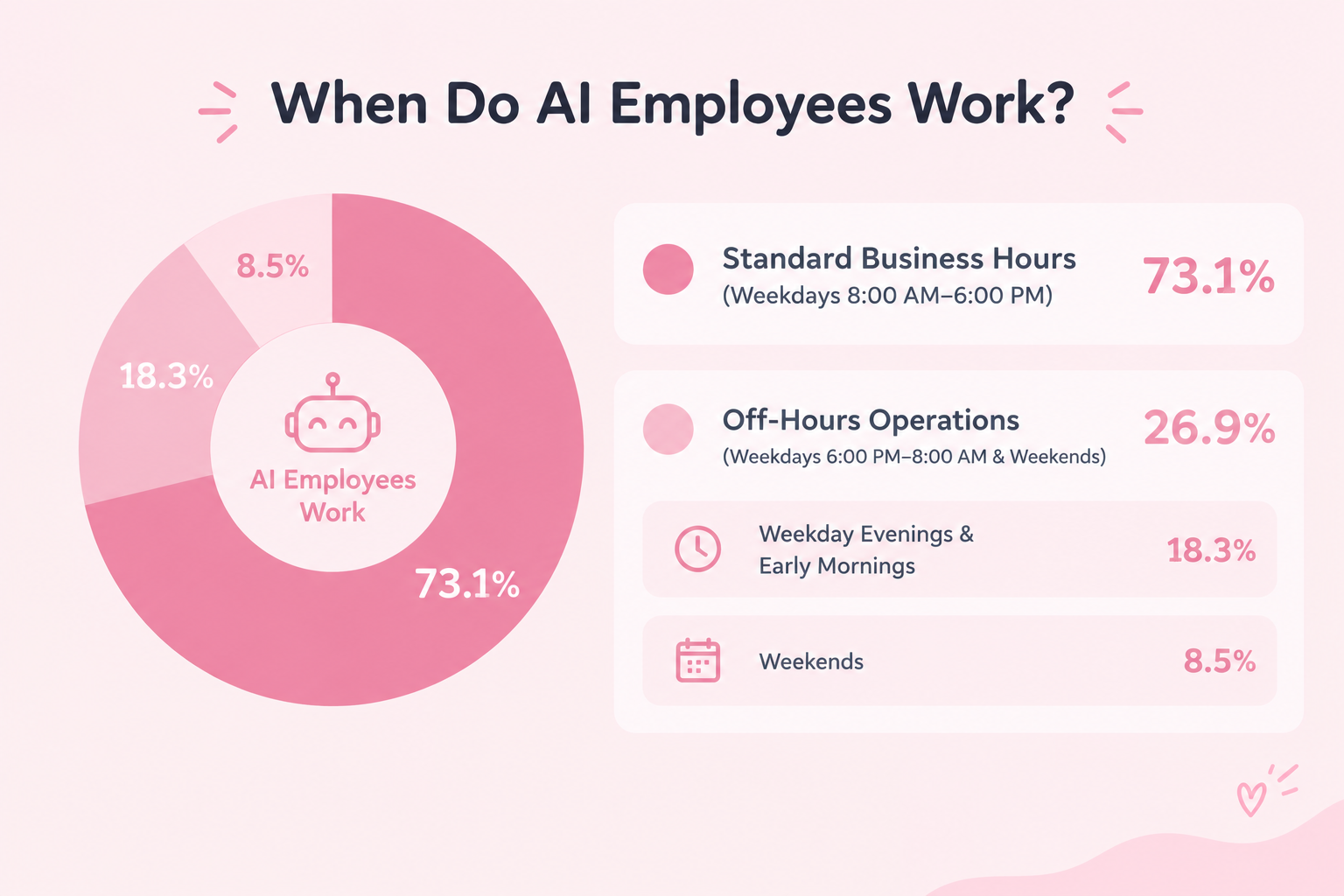
Analyzing 141,194 operational sessions highlights a primary advantage of AI employees: they work around the clock.
A breakdown of session initiation times across active workspaces shows how business tasks are distributed throughout the day:
- Standard Business Hours (Weekdays 8:00 AM–6:00 PM): 73.1%
- Off-Hours Operations (Weekdays 6:00 PM–8:00 AM & Weekends): 26.9%
- Weekday Evenings & Early Mornings: 18.3%
- Weekends: 8.5%
Data reveals that over 1 in 4 workflows (26.9%) are initiated outside standard business hours. While human staff log off for the day, AI employees continue processing invoices, extracting web insights, and updating database records uninterrupted.
Top 5 Departments Hiring AI Employees
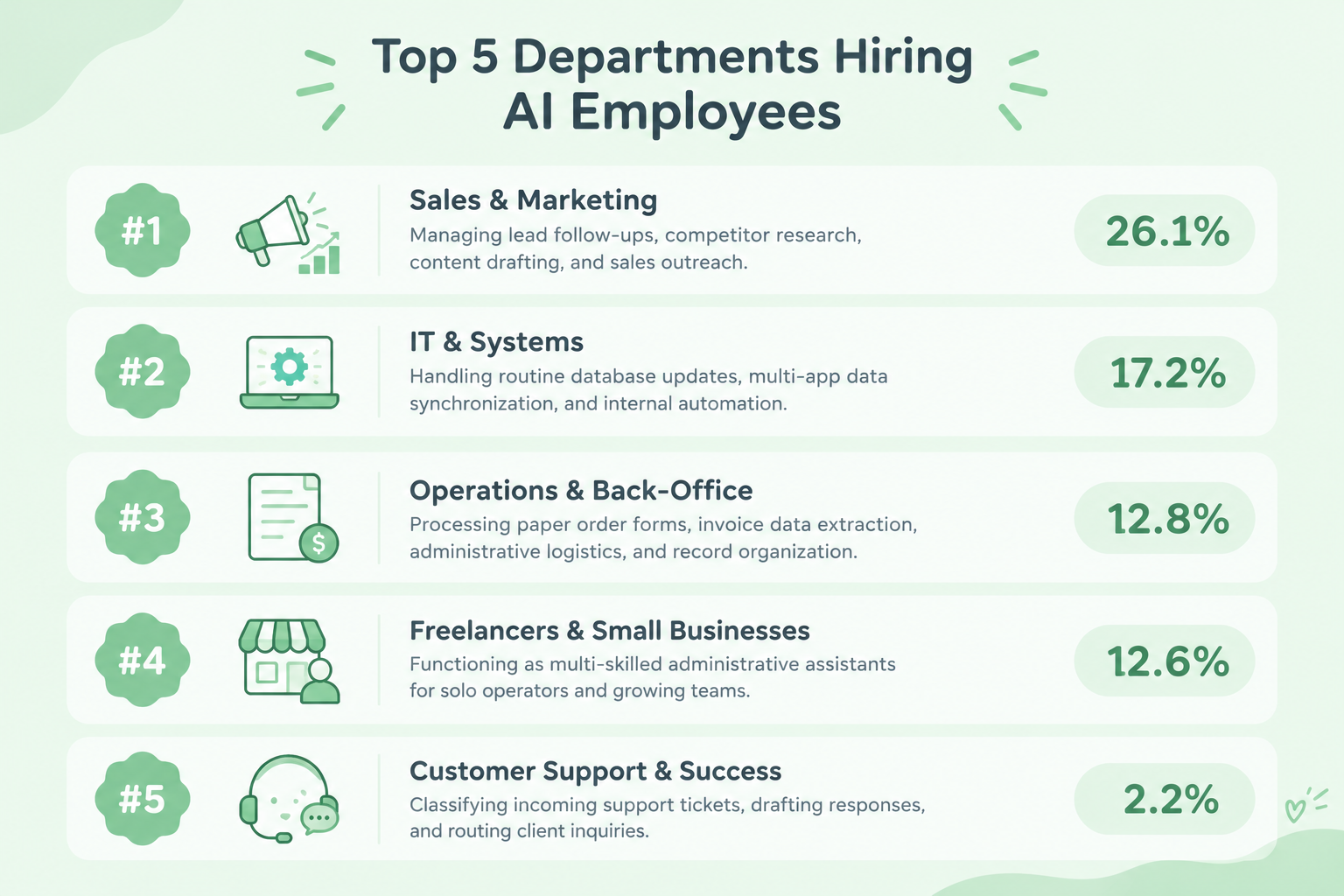
Based on workspace adoption metrics across active business teams, the top departments "hiring" AI Employees rank as follows:
- Sales & Marketing (26.1%)
Managing lead follow-ups, competitor research, content drafting, and sales outreach. - IT & Systems (17.2%)
Handling routine database updates, multi-app data synchronization, and internal automation. - Operations & Back-Office (12.8%)
Processing paper order forms, invoice data extraction, administrative logistics, and record organization. - Freelancers & Small Businesses (12.6%)
Functioning as multi-skilled administrative assistants for solo operators and growing teams. - Customer Support & Success (2.2%)
Classifying incoming support tickets, drafting responses, and routing client inquiries.
Related AI Worker Templates:

An AI worker that analyzes customer inquiries, past usage history, and the latest trends to create personalized proposal drafts. Increase response speed while reducing variations in proposal quality across team members—ideal for sales professionals and team leaders looking to streamline proposal workflows and maintain consistent quality.
- What are "Skills"?
- They are the instructions the AI worker follows to perform tasks. For detailed setup instructions, see "[AI worker] How to Create Skills (Formerly Manuals)."
- What are "Tools"?
- These are the tools the AI worker uses to perform tasks. Simply tell the AI which tools your company normally uses, and you can freely change where data is retrieved from and where it is sent.
- The number of AI workers that can run simultaneously, the number of AI workers you can create, and the AI models available to you vary depending on your plan.
- The apps and operations available within AI workers are subject to the same usage limits as Flowbot.
- AI workers consume tasks during test runs just as they do during production runs. For details, see "[AI worker] How Task Usage Is Calculated."

An AI worker that analyzes provided resource utilization data to assess CPU, memory, and storage health, then generates a status report with clear Safe, Caution, and Warning indicators. It also detects early signs of capacity pressure from time-series trends and presents risks and recommended actions—ideal for system administrators looking to reduce daily monitoring effort and IT teams manually identifying signs of potential issues.
- What are “Skills”?
- Instructions that guide the AI worker through its tasks. For detailed configuration instructions, see [AI worker] How to Create Skills (formerly Manuals).
- What are “Tools”?
- Tools used by the AI worker to perform tasks. Simply tell the AI which tools your organization typically uses, and you can freely customize where data is retrieved from and where it is sent.
- The number of AI workers that can run simultaneously, the number of AI workers you can create, and the AI models available to you depend on your plan.
- Apps and operations available within AI workers are subject to the same usage limitations as Flowbots.
- AI workers consume tasks during test runs just as they do during production runs. For details, see [AI worker] How Task Execution Counts Are Calculated.

Calculate payment due dates based on each client’s payment terms using billing data, then log them in management sheets such as Google Sheets and create notification messages for Slack, Chatwork, and more. Ideal for accounting and finance teams looking to prevent late payments before they happen.
- What are “skills”?
- They are the instructions the AI worker follows to process tasks. For detailed configuration instructions, see [AI worker] How to Create Skills (Formerly Manuals).
- What are “tools”?
- These are the tools the AI worker uses to process tasks. Simply tell the AI which tools your organization normally uses, and you can freely configure where data is retrieved from and where it is output.
- The number of AI workers that can run simultaneously, the number of AI workers you can create, and the AI models available to you vary by plan.
- The apps and operations available within AI workers are subject to the same usage limits as Flowbot.
- AI workers consume tasks during test runs just as they do during production runs. For details, see [AI worker] How to Calculate the Number of Tasks Executed.

Analyze past contract terms and negotiation approaches to understand each client relationship and its patterns, then draft contract renewal emails in the right tone for your goals. Reduce the time spent fine-tuning wording and tone for price increases or term changes. Ideal for sales teams managing client-specific communication or anyone looking to streamline renewals across multiple clients.
- Sales professionals who spend too much time creating messages tailored to each business partner and find contract renewals burdensome
- Professionals who struggle to choose the right words and maintain a respectful tone when writing negotiation emails involving price increases or changes to terms
- Professionals who want to smoothly manage contract renewals with multiple business partners while preserving the relationships they have built
- “Skills”:
- Instructions that define how the AI worker performs tasks. For detailed setup instructions, see “[AI worker] How to Create Skills (formerly Manuals).”
- “Tools”:
- Tools the AI worker uses to perform tasks. Simply instruct the AI which tools your organization normally uses, and you can freely change where data is retrieved from and where outputs are sent.
- The number of AI workers that can run simultaneously, the number of AI workers you can create, and the AI models available to you vary depending on your plan.
- The apps and operations available within AI workers are subject to the same usage limits as Flowbot.
- Please note that AI workers consume tasks during test runs just as they do during production runs. For details, see “[AI worker] How Task Execution Counts Are Calculated.”
Best AI Employee Platforms Compared
Choosing the right platform depends on whether you need a dedicated sales rep, a marketing specialist, or a multi-talented operational colleague. Below is an overview of the top platforms for hiring AI colleagues today.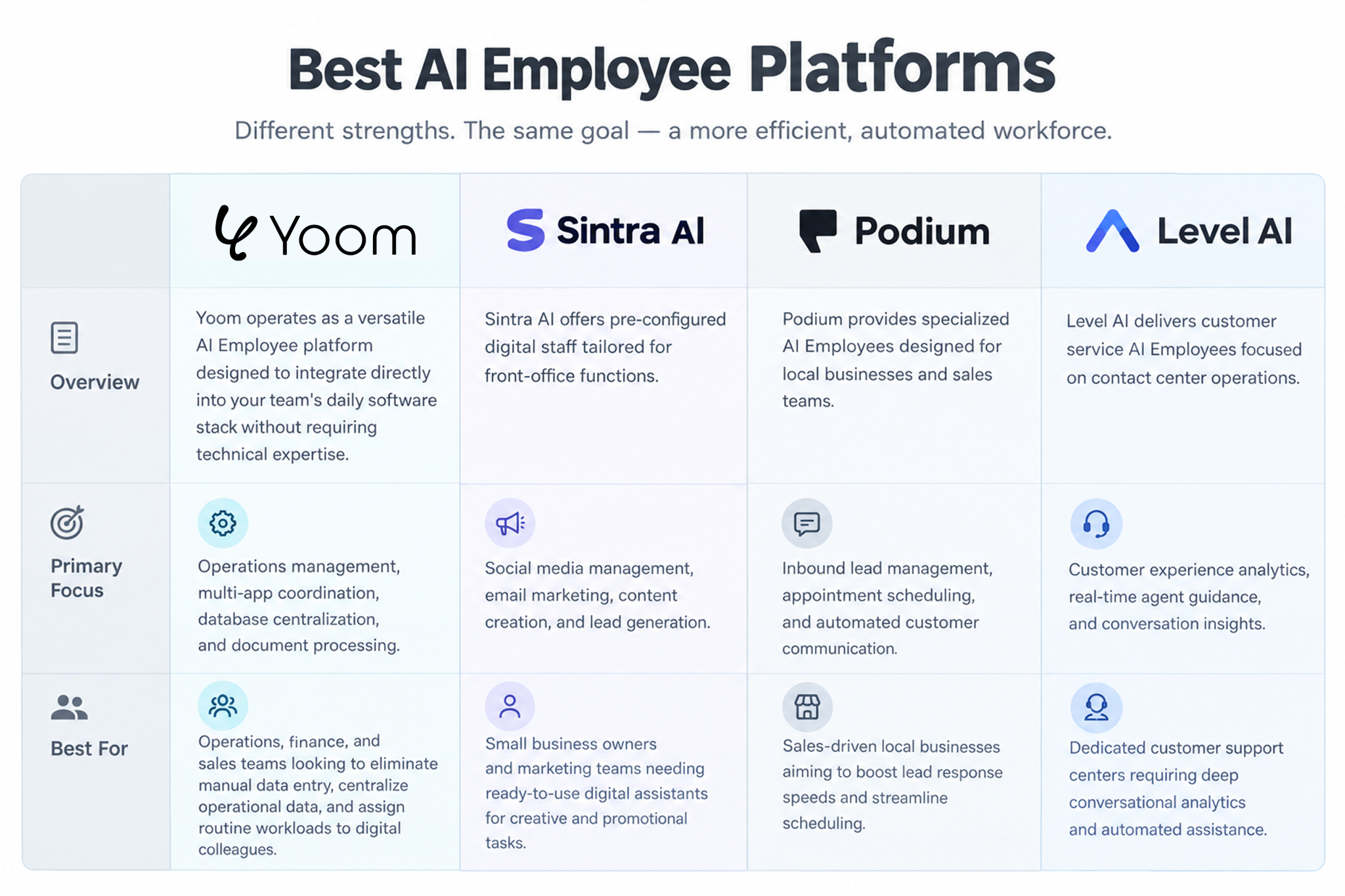
1. Yoom
Yoom operates as a versatile AI Employee platform designed to integrate directly into your team's daily software stack without requiring technical expertise.
- Primary Focus: Operations management, multi-app coordination, database centralization, and document processing.
- Key Advantage: Includes native OCR document extraction, web research, and database management inside assigned tasks. Teams can centralize company data without subscribing to separate third-party AI services.
- App Ecosystem: Connects seamlessly with Google Workspace, Slack, Salesforce, Microsoft Excel, Instagram, X, YouTube and cloud accounting tools.
- Best For: Operations, finance, and sales teams looking to eliminate manual data entry, centralize operational data, and assign routine workloads to AI employees.
2. Sintra AI
Sintra AI offers pre-configured AI employees tailored for front-office functions.
- Primary Focus: Social media management, email marketing, content creation, and lead generation.
- Key Advantage: Provides out-of-the-box "AI Personas" mapped to specific job roles (such as social media manager or email copywriter).
- Best For: Small business owners and marketing teams needing ready-to-use AI assistants for creative and promotional tasks.
3. Podium
Podium provides specialized AI Employees designed for local businesses and sales teams.
- Primary Focus: Inbound lead management, appointment scheduling, and automated customer communication.
- Key Advantage: Operates 24/7 across text messages, web chat, and phone calls to respond instantly to customer inquiries and lock in appointments.
- Best For: Sales-driven local businesses aiming to boost lead response speeds and streamline scheduling.
4. Level AI
Level AI delivers customer service AI Employees focused on contact center operations.
- Primary Focus: Customer experience analytics, real-time agent guidance, and conversation insights.
- Key Advantage: Analyzes customer interactions as they happen to build automated support flows and provide quality management feedback.
- Best For: Dedicated customer support centers requiring deep conversational analytics and automated assistance.
Why App-Integrated AI Employees Outperform Standalone AI
A major limitation of standalone AI tools is isolation. While standard chatbots and standalone AI software can summarize text or draft replies, they live in a vacuum. Team members are still forced to manually copy and paste prompts, download attachments, and re-key data between separate digital tools.
When an AI Employee is directly connected to your company’s application ecosystem (Slack, Salesforce, Google Workspace, cloud databases etc), its value multiplies. Rather than simply generating text, an app-integrated AI Employee executes complete, end-to-end business operations.
Customer Stories: The Power of App-Integrated AI
Here is what organizations report after moving from isolated chatbots to app-integrated AI Employees:
- Overcoming the "AI Chat Tools" Limit: "Standalone AI gave us answers, but it couldn't manage our actual business processes. Connecting AI directly with our daily SaaS tools enabled non-technical staff to bridge disconnected systems and drive real operational transformation." — Legal & Admin Teams
- Real-Time Status Summaries & Process Intelligence: " By embedding an AI Employee directly into our CRM, incoming sales updates are automatically summarized and refreshed on a central dashboard in real time. Our team gets immediate visibility into live business activity without digging through individual records."— Sales & Operations Teams
- Unifying E-Commerce & 2,000 Hours Saved / Year: "Automating customer data syncs between our e-commerce platform (Shopify) and fulfillment system eliminated manual data re-keying and saved us 2,000 hours annually. It allowed our Customer Success team to take on shipping management and focus on service quality without increasing headcount."— Executive & Operations Teams
Meet Your First AI colleague with Yoom
Adding an AI colleague to your team does not require a software background or complex setup. With Yoom, hiring a dedicated AI Employee takes nothing more than your own words and ideas.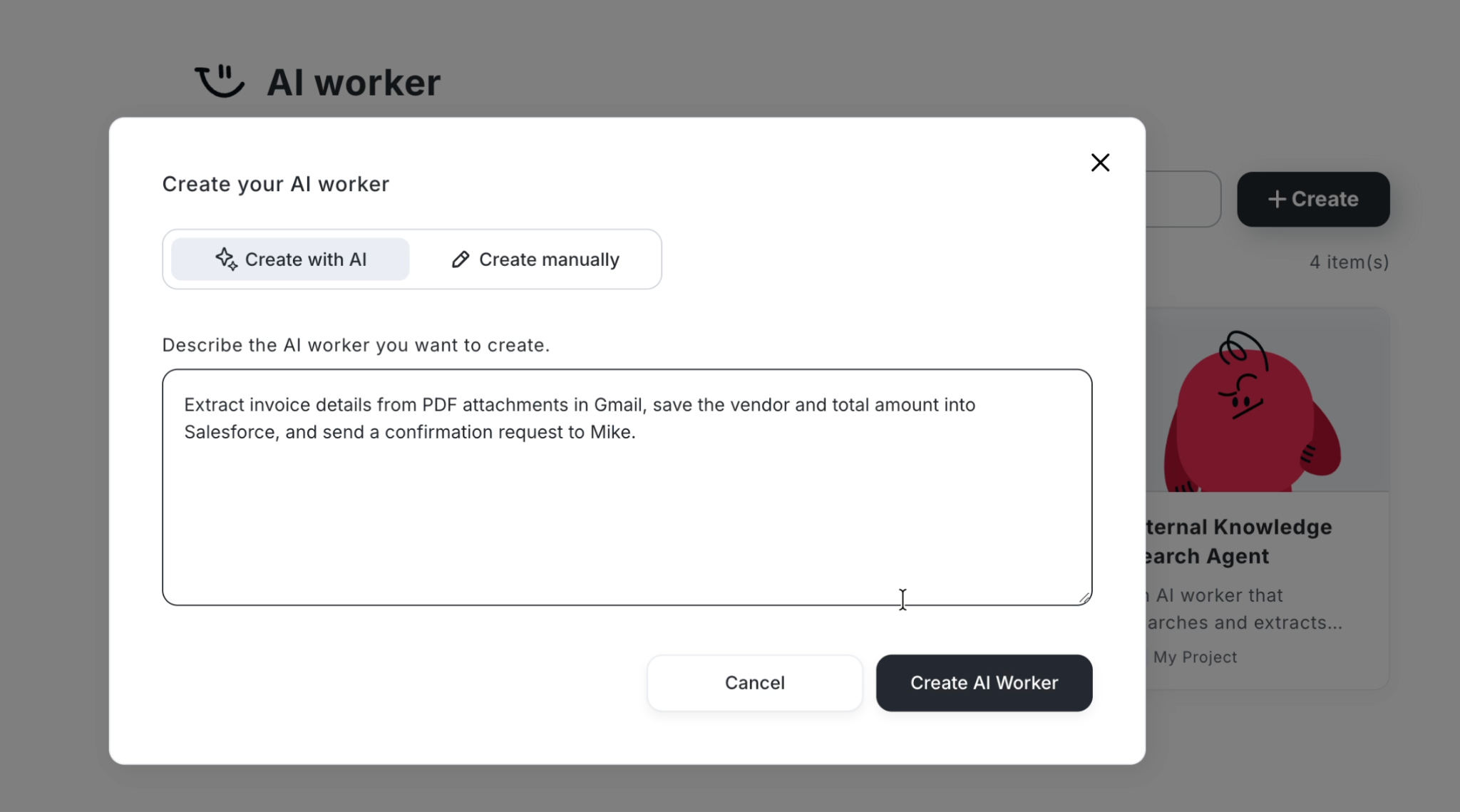
- Assign Tasks in Plain English: Simply tell Yoom what role you want your AI employee to fulfill—for example:
"Extract invoice details from PDF attachments in Gmail, save the vendor and total amount into Salesforce, and send a confirmation request to Mike on Slack." - Automatic Routine Setup: Yoom translates your instructions into a ready-to-run assignment, instantly configuring document reading, validation, and delivery steps.
- Smart App & Database Guidance: Not sure which software tools or database tables to connect? Describe your goal, and Yoom will automatically recommend and map out the ideal applications (such as Salesforce, Google Sheets, or Yoom Database) for the job.
Basic Setup Guide:https://intercom.help/yoom/en/articles/13234477-ai-worker-basic-setup-guide#h_9a7abb6770
See It in Action: How the AI colleague Works
Whether you work in sales, marketing, HR, finance, IT, or any other department, AI Employees can help improve digital workflows across industries by reducing manual work and streamlining everyday processes.
With Yoom, you get more than AI Employees in one platform. Built-in database, workflow automation, and OCR capabilities let you manage data, automate routine tasks, and process documents all in one place.
If you're looking to centralize your digital workplace and manage your team's operations from a single platform, Yoom brings everything together.