


・
10 Best AI Software for Business in 2027: What People Wanted from AI in 2026

AI software is evolving rapidly, with new tools and products emerging every day. From writing and data analysis to business automation, there are now countless ways to put AI to work.
With so many options available, almost everyone has probably asked the same question at some point:
"Which AI software is actually the best?"
In this article, we take a closer look at what people used AI for in 2026, what they were dissatisfied with, and what they expect from AI software. Based on data from Reddit discussions, we'll explore the insights behind these trends and share tips to help you choose the right AI software for your needs in 2027.
What Did People Want from AI Software in 2026?
Our analysis of user discussions revealed that people expect more from AI software than simply generating answers or content.
Here are the six most common expectations.
*A single post could belong to multiple categories, so the percentages do not add up to 100%.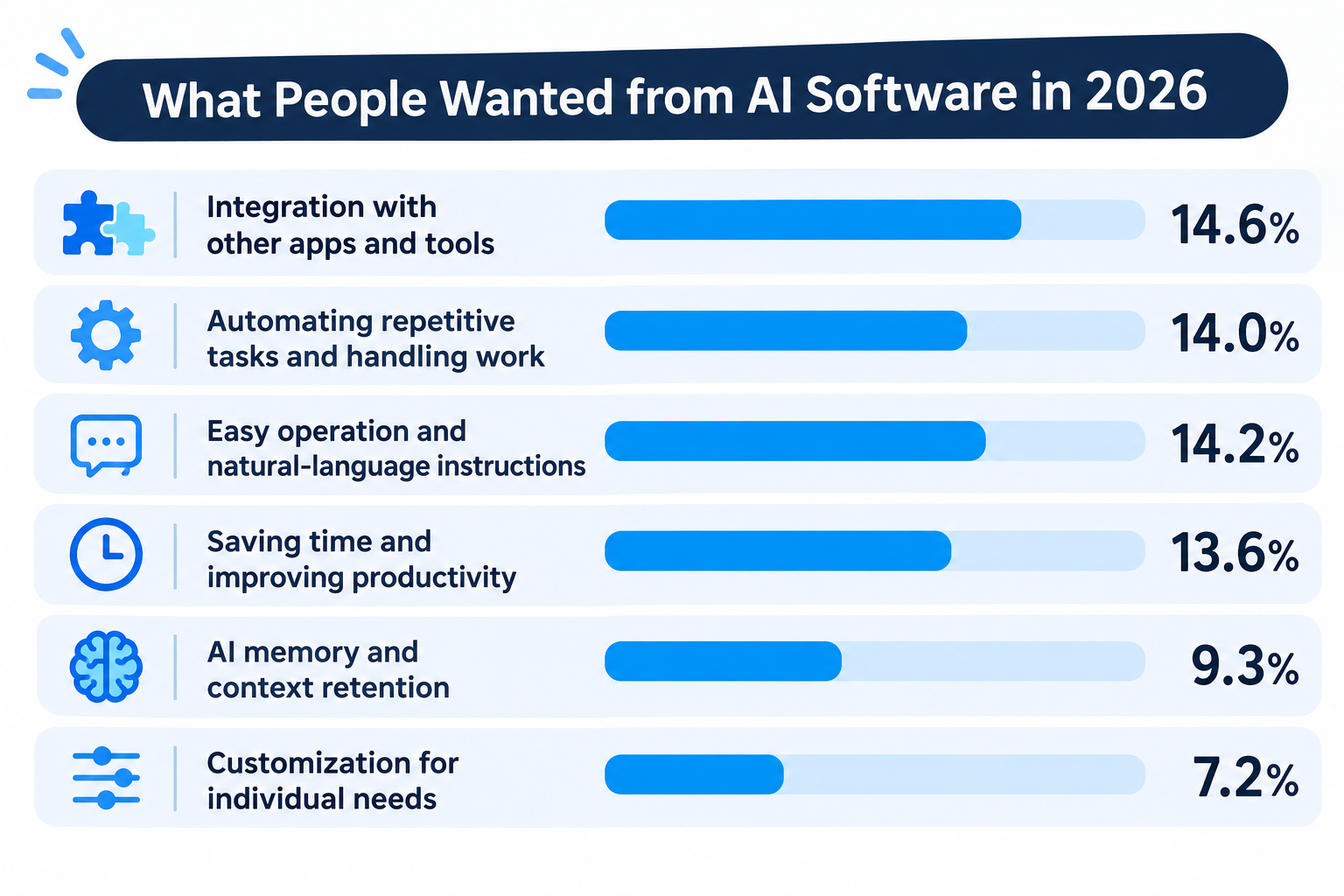
- Integration with other apps and tools: 14.6%
- Automating repetitive tasks and handling work: 14.0%
- Easy operation and natural-language instructions: 14.2%
- Saving time and improving productivity: 13.6%
- AI memory and context retention: 9.3%
- Customization for individual needs: 7.2%
1. Integration with Other Apps and Tools
Users want AI software that works with the tools they already use.
Rather than switching between multiple applications, they want AI to access information, exchange data, and perform actions across different services.
For example, users are interested in AI that can:
- Retrieve information from business applications.
- Update records in an ERP or CRM system.
- Interact with websites through a browser.
- Connect multiple apps to complete a business task.
This suggests that integration is becoming an important factor when choosing AI software.
An AI assistant that can only provide instructions may not be enough. Users increasingly want AI that can actually interact with their existing work environment.
2. Automating Repetitive Tasks
Another major expectation is having AI handle time-consuming tasks.
Users are interested in AI agents that can perform actions on their behalf, rather than simply explain how to do something.
Examples include:
- Collecting information from websites.
- Processing business documents.
- Managing routine administrative tasks.
- Handling repetitive browser operations.
- Organizing information across different applications.
The goal is not just to get help with individual tasks, but to reduce the amount of manual work involved in everyday processes.Tip💡:
If you want AI to do more than generate answers or assist with individual tasks, consider an AI-powered automation platform rather than a standalone AI agent. It can connect multiple apps and automate entire business processes, making it a better fit for users who prioritize integration and automation.
3. Easy Operation Through Natural Language
Users also want AI software that is easy to operate.
Instead of learning complicated interfaces or writing code, they want to describe what they need in plain language.
For example:
"Every Monday, collect the latest competitor updates and send me a summary."
Ideally, AI should understand the request and take care of the necessary steps.
This is one reason AI agents have attracted attention. They allow users to describe a goal conversationally instead of manually configuring every action.
4. Saving Time and Improving Productivity
Ultimately, many users adopt AI software because they want to get more done in less time.
They want to spend less time on repetitive work and more time on tasks that require human judgment and creativity.
However, simply using AI does not guarantee higher productivity.
If users have to spend too much time correcting AI-generated results or checking whether tasks were completed correctly, the productivity benefits become limited.
5. AI Memory and Context Retention
Users also want AI to remember previous conversations, instructions, and project details.
This is particularly important for long-term projects.
For example, when working on a marketing campaign over several weeks, users do not want to explain the project background every time they start a new conversation.
They want AI software that can retain relevant information and use it in future tasks.
6. Customization for Individual Needs
Finally, users want AI software that adapts to their specific needs.
Different people and businesses have different workflows, preferences, and requirements.
They want to customize AI behavior, instructions, and processes rather than rely entirely on fixed, one-size-fits-all features.
What Were the Biggest Complaints About AI Software in 2026?
While expectations for AI software are growing, users are also becoming more aware of its limitations.
Our analysis identified eight recurring complaints.
*Note: A single post could belong to multiple categories.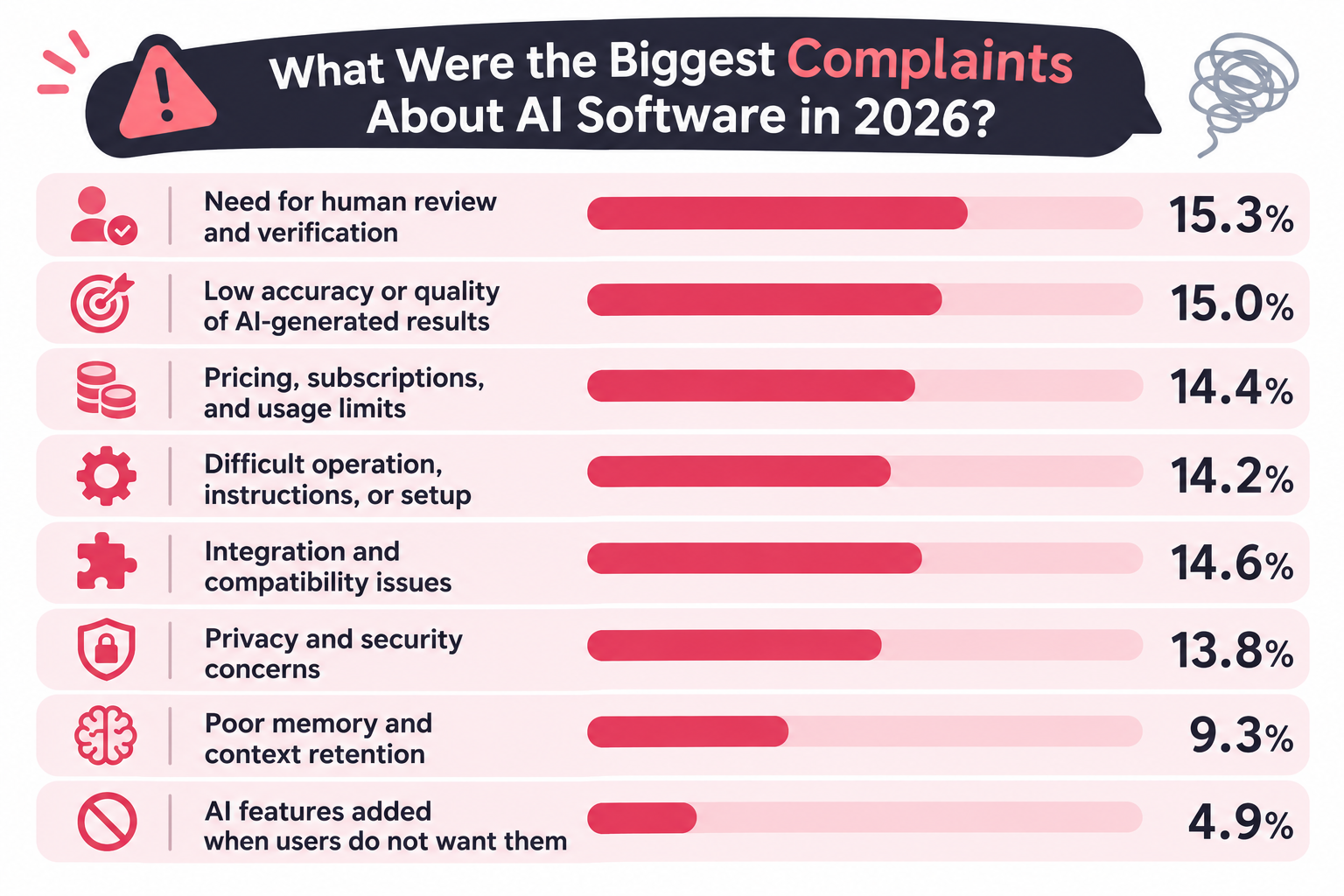
- Need for human review and verification: 15.3%
- Low accuracy or quality of AI-generated results: 15.0%
- Pricing, subscriptions, and usage limits: 14.4%
- Difficult operation, instructions, or setup: 14.2%
- Integration and compatibility issues: 14.6%
- Privacy and security concerns: 13.8%
- Poor memory and context retention: 9.3%
- AI features added when users do not want them: 4.9%
Let's look at the most important problems in more detail.
1. AI Results Still Require Human Review
One of the biggest complaints is that users cannot always trust AI-generated results without checking them.
Even when AI completes a task, people may need to review, correct, or verify the output.
This issue is particularly noticeable in software development.
AI can generate large amounts of code quickly, but if the code contains bugs or creates maintenance problems, developers still have to spend time fixing it.
The same applies to business operations.
For example, users working with OCR want accurate data extraction that can actually be used for inventory management or other business processes. Simply extracting text is not enough if the results require extensive manual correction.
This creates an important distinction between AI that can generate an output and AI that can reliably complete a task.
2. Low Accuracy and Inconsistent Output Quality
Closely related to human verification is the problem of output quality.
Users expect AI software to produce accurate, relevant, and consistent results.
However, AI-generated content, code, and other outputs may contain mistakes or fail to meet specific requirements.
For business use, consistency is especially important.
If the same process produces significantly different results each time, it becomes difficult to rely on AI for important operations.
Tip💡
If you want to improve the accuracy of AI-generated results, consider connecting AI tools to your internal knowledge. For example, linking company FAQs, internal documents, or Slack conversations can give AI more context about your business, helping it make judgments and generate responses that better reflect your company's specific environment, rules, and values.
3. Pricing and Usage Limits
Another common frustration is the cost of AI software.
Some users complain about expensive subscriptions, unexpected additional charges, or usage limits that interrupt their work.
For example, users may pay for a subscription but still reach weekly usage limits before completing their projects.
This makes it important to consider not only the subscription price but also how much users can actually accomplish within each plan.
4. Difficult Setup and Operation
Although AI is often marketed as an easy-to-use technology, some users still find it difficult to configure and operate.
They may need to write detailed prompts, repeatedly adjust instructions, or troubleshoot unexpected behavior.
This creates a gap between the promise of simple natural-language interaction and the actual experience of using AI software.
5. Integration and Compatibility Issues
Users want AI software to work with their existing tools, but integrations are not always straightforward.
Some applications do not support the required connections, while others have limitations in the information or actions they can exchange.
As a result, users may still need to transfer data manually between applications.
This is particularly frustrating when their original goal was to automate the entire process.
6. Privacy and Security Concerns
As AI software becomes more involved in everyday work, users are increasingly concerned about how their data is handled.
Business users may need to process customer information, internal documents, and confidential company data.
They want to understand where their information goes, who can access it, and how it is protected.
For businesses, security and data management are important considerations when selecting AI software.
7. AI Cannot Always Remember Previous Context
Despite improvements in AI memory, users still report problems with context retention.
AI may forget previous instructions, misunderstand project details, or fail to maintain consistency across conversations.
This can be frustrating when working on complex or long-term projects.
8. Unwanted AI Features
Interestingly, not everyone wants AI in every application.
Some users are frustrated when AI features are added to products they already use, especially when these features make the interface more complicated or interfere with existing workflows.
This highlights an important point: AI should solve a real problem rather than be added simply because it is a popular technology.
Tip💡
If you find AI features being added where you don't need them frustrating, consider an AI-powered automation platform rather than a standalone AI agent tool.
With AI automation tools, you can decide exactly where and when to use AI within your workflows, giving you greater control over how AI is applied to your business processes.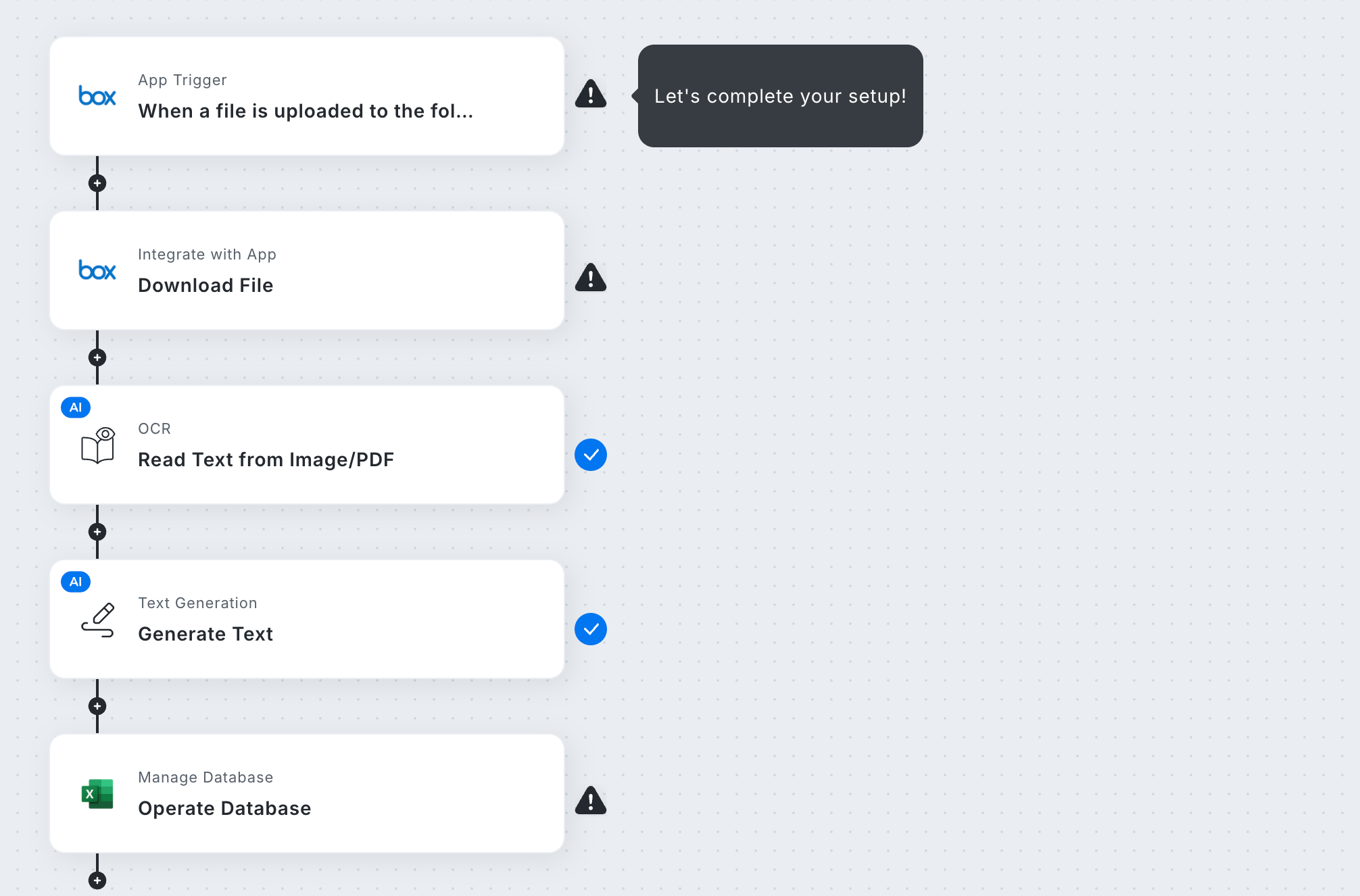
4 Key Trends in AI Software for 2027
Based on these discussions, four important trends stand out.
1. From Answering Questions to Taking Action
Users increasingly expect AI software to do more than provide information.
They want AI to interact with applications, process data, and complete tasks.
This means the value of AI software is increasingly determined by what it can accomplish, not just how intelligently it can respond.
2. Reliability Matters as Much as AI Intelligence
More advanced AI capabilities do not automatically translate into better business results.
If users constantly need to correct mistakes, the time saved by AI can quickly disappear.
For business automation, predictable execution and consistent results are just as important as flexibility.
3. Integration Is Essential for Practical AI
AI becomes more useful when it is connected to the applications and systems people already use.
Rather than operating as an isolated assistant, AI needs to fit into existing business processes.
This is particularly important for organizations that want to automate tasks across multiple departments and applications.
4. AI Should Be a Choice, Not the Goal
The ultimate goal is not to use as much AI as possible.
It is to make work easier, faster, and more reliable.
For some tasks, AI is the best approach. For others, predefined rules and human-designed processes may deliver more predictable results.
The most useful AI software will allow users to choose the right approach for each task.
Best AI Software for Businesses in 2027
Based on our analysis of Reddit discussions in 2026, we identified what users wanted from AI software, what frustrated them, and what features mattered most.
Using these insights as a guide, we've selected 10 AI software solutions worth considering for business use in 2027. Each tool offers different capabilities to address the needs and challenges users highlighted in their discussions.
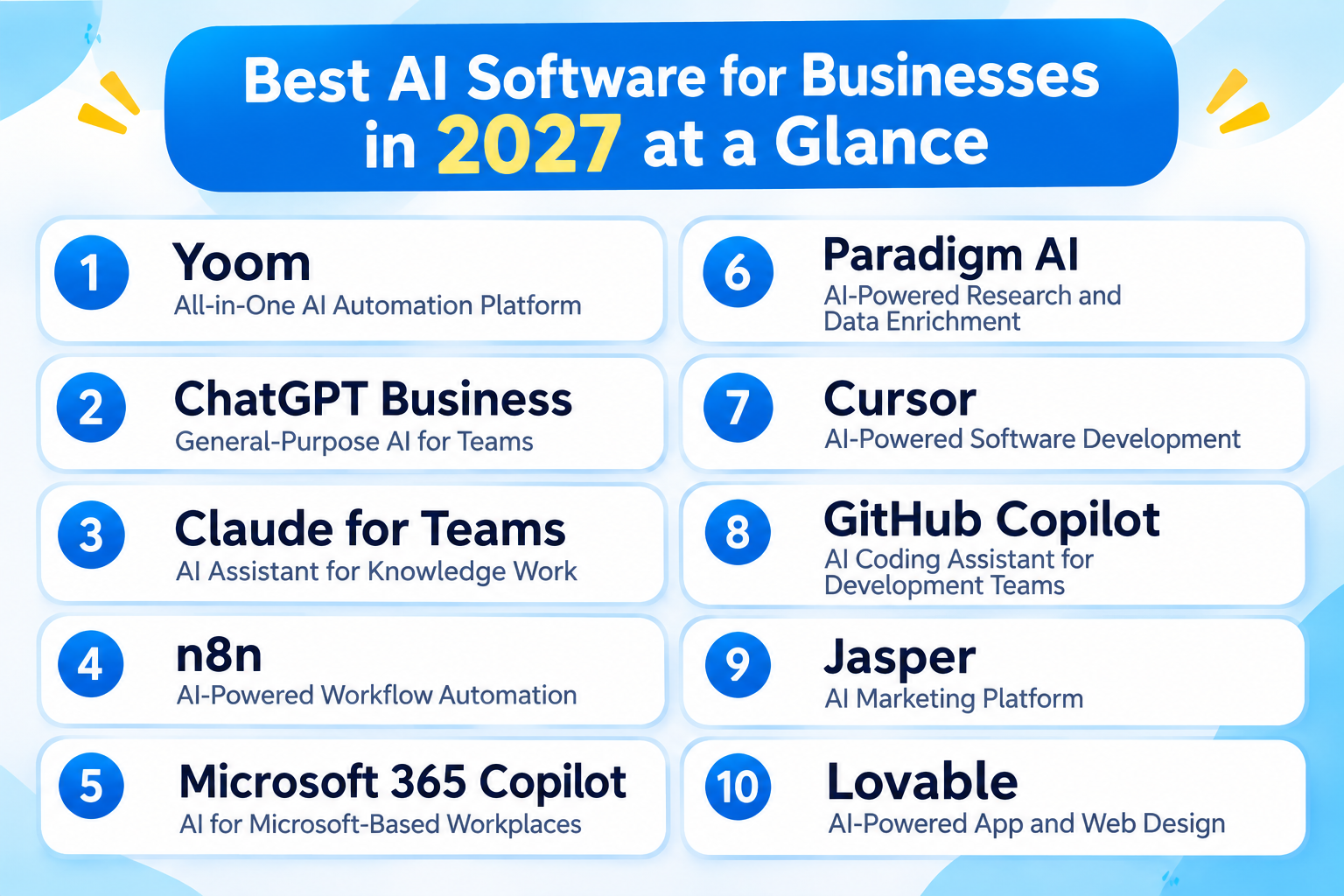
1. Yoom — All-in-One AI Automation Platform
Best for: Businesses that want both AI flexibility and reliable business process automation.
Yoom is an all-in-one AI automation platform that combines AI-powered automation with structured, rule-based workflows.
Unlike AI agent-only tools that rely on AI to determine how tasks should be performed, Yoom allows users to choose between AI-driven execution and workflows designed by humans.
Key capabilities include:
- AI-powered workflow creation: Describe what you want to automate in natural language and use AI to help build workflows.
- Visual workflow automation: Design processes with predefined triggers, actions, and conditions for consistent execution.
- Built-in database: Store and manage business information within your automation environment.
- RPA: Automate browser-based operations and tasks involving applications without suitable APIs.
- AI OCR: Extract information from documents and use it in business processes.
This hybrid approach is useful for businesses that want the flexibility of AI without relying on AI for every decision.
For example, you can use AI to interpret unstructured information or handle flexible tasks, while using predefined workflows for processes that require consistent execution.
You can also connect multiple applications to automate processes across different departments.
Yoom is particularly worth considering if you want to decide how much of a process should be handled by AI and how much should follow predefined rules.
Pricing: Free plan available.Paid plans start at $16/month with annual billing.
2. ChatGPT Business — General-Purpose AI for Teams
Best for: Businesses that want a versatile AI assistant for everyday work.
ChatGPT Business is a team-oriented AI workspace developed by OpenAI.
It helps employees use AI for a wide range of business tasks, from writing and research to data analysis and coding.
Key capabilities include:
- Generating and editing business documents.
- Summarizing reports and analyzing files.
- Conducting research and brainstorming.
- Supporting software development.
- Connecting with business applications such as Slack, Google Drive, and Microsoft 365.
- Creating custom AI assistants and workflows.
One of its main advantages is versatility. Different departments can use the same platform for different purposes, reducing the need to introduce separate AI assistants for every task.
It is a good option for organizations that want to make AI accessible across their teams.
Pricing: Business Standard seats start at $20/month with annual billing.
3. Claude for Teams — AI Assistant for Knowledge Work
Best for: Teams that handle complex documents, research, writing, and coding.
Claude, developed by Anthropic, is an AI assistant designed to help users work with information and complete complex tasks.
Its Team plan adds collaboration and administrative features for businesses.
Key capabilities include:
- Writing and editing business content.
- Analyzing long documents.
- Summarizing research and reports.
- Assisting with software development through Claude Code.
- Connecting to workplace tools.
- Searching organizational knowledge through supported integrations.
Claude is particularly useful for teams that regularly work with large amounts of information or need AI assistance with complex reasoning tasks.
Its Team plan also provides centralized billing, administrative controls, and single sign-on.
Pricing: Team Standard seats start at $22/month with annual billing.
4. n8n — AI-Powered Workflow Automation
Best for: Technical teams that want to build customizable AI agents and automated workflows.
n8n is a workflow automation platform that allows users to connect applications, APIs, and AI models.
It is particularly popular among developers and technical teams that want greater control over their automation infrastructure.
Key capabilities include:
Connecting different business applications and APIs.- Building multi-step automated workflows.
- Integrating AI models into business processes.
- Creating AI agents.
- Using custom code when needed.
- Self-hosting automation infrastructure.
One of n8n's strengths is its flexibility. Users can combine predefined workflow steps with AI-powered decisions, making it suitable for complex automation projects.
However, building and maintaining advanced workflows may require technical knowledge.
Pricing: Cloud Starter starts at €20/month with annual billing. The Business plan starts at €667/month with annual billing and is currently available for self-hosted deployments.
5. Microsoft 365 Copilot — AI for Microsoft-Based Workplaces
Best for: Organizations that rely on Microsoft 365 for everyday business operations.
Microsoft 365 Copilot brings AI assistance into Microsoft's workplace applications.
It helps employees work with documents, spreadsheets, presentations, emails, and other business information.
Key capabilities include:
- Drafting and summarizing documents in Word.
- Analyzing data in Excel.
- Creating presentations in PowerPoint.
- Summarizing meetings and conversations in Teams.
- Finding information across supported Microsoft 365 services.
- Assisting with everyday business tasks.
Its main advantage is its integration with the Microsoft ecosystem.
Rather than switching between different AI applications, employees can access AI assistance within tools they already use.
It is particularly suitable for organizations that have standardized their operations around Microsoft 365.
Pricing: Microsoft 365 Copilot Business add-on starts at $18/user/month with annual billing under the listed promotion. Eligible Microsoft 365 subscriptions are required.
View Microsoft 365 Copilot Pricing
6. Paradigm AI — AI-Powered Research and Data Enrichment
Best for: Business teams that need to research companies, enrich data, and analyze market opportunities at scale.
Paradigm AI is an AI-powered research platform that helps businesses collect, organize, and analyze information from internal data and external sources.
It uses AI agents to handle research tasks that would otherwise require hours of manual work. Teams can define what information they need, set evaluation criteria, and use AI to gather and structure relevant data.
Key features:
- Automated company research: Research companies, people, and markets using internal knowledge and external data sources.
- Data enrichment: Fill in missing information and add relevant details to existing datasets.
- AI-powered analysis: Evaluate companies and opportunities against specific business criteria.
- Market monitoring: Track important market changes and receive updates when relevant events occur.
- Team collaboration: Organize research and share insights across teams.
Use cases:
- Building and enriching sales prospect lists
- Researching potential customers and business partners
- Identifying investment opportunities
- Monitoring competitors and market trends
- Evaluating companies against internal business criteria
Paradigm is particularly useful for sales, consulting, finance, and research teams that regularly work with large amounts of business data. Instead of manually searching for information and copying it into spreadsheets, teams can use AI agents to automate much of the research process.
Pricing: Individual plans start at $200/month with annual billing. Business plans start at $1,000/month with annual billing. Enterprise pricing is available upon request.
7. Cursor — AI-Powered Software Development
Best for: Software development teams that want to accelerate coding with AI.
Cursor is an AI-powered code editor designed to help developers write, understand, and modify code more efficiently.
It can work with project context and assist developers with tasks across their codebases.
Key capabilities include:
- Generating code from natural-language instructions.
- Editing existing code.
- Explaining code and project structures.
- Identifying and fixing errors.
- Supporting AI-powered code reviews.
- Automating parts of the development process.
Cursor is particularly useful for development teams that want AI assistance directly within their coding environment.
Its team features also provide centralized administration, usage analytics, and organization-wide privacy controls.
Pricing: Teams Standard starts at $30/user/month, with Premium seats available for higher usage. Enterprise pricing is customized.
8. GitHub Copilot — AI Coding Assistant for Development Teams
Best for: Development teams that want AI assistance throughout the software development process.
GitHub Copilot is an AI coding assistant integrated into supported development environments and GitHub workflows.
It helps developers write code, understand existing projects, and work more efficiently.
Key capabilities include:
- AI-powered code completion.
- Generating code from natural-language instructions.
- Explaining and modifying existing code.
- Supporting code reviews.
- Assisting with software development tasks through AI agents.
- Integrating with GitHub development workflows.
GitHub Copilot is a strong option for organizations that already use GitHub to manage their software development projects.
It can help reduce repetitive coding work and support collaboration across development teams.
Pricing: GitHub Copilot Business starts at $19/user/month. Enterprise plans are also available.
9. Jasper — AI Marketing Platform
Best for: Marketing teams that want to create on-brand content and scale content production.
Jasper is an AI platform designed specifically for marketing teams.
Unlike general-purpose AI assistants, Jasper focuses on helping businesses create marketing content while maintaining consistent brand messaging.
Key capabilities include:
- Generating marketing copy for websites, advertisements, and social media.
- Creating and editing content based on brand guidelines.
- Managing brand voices and company knowledge.
- Building AI agents for marketing workflows.
- Supporting content research and optimization.
- Collaborating on marketing campaigns.
One of Jasper's main advantages is its focus on brand consistency. Teams can provide brand guidelines and reference materials so AI-generated content better reflects their company's tone and messaging.
It is particularly useful for marketing departments that produce large amounts of content across multiple channels.
Pricing: Pro starts at $59/month per seat with annual billing. Business pricing is customized for each organization.
10. Lovable — AI-Powered App and Web Design
Best for: Business teams, designers, and entrepreneurs who want to turn ideas into working web applications.
Lovable is an AI-powered platform that allows users to build websites and web applications using natural-language instructions.
Instead of manually writing code or creating every interface element from scratch, users can describe their ideas and let AI generate the application.
Key capabilities include:
- Creating websites and web application prototypes.
- Generating user interfaces from natural-language instructions.
- Building interactive applications.
- Refining designs through conversational instructions.
- Collaborating with team members.
- Connecting applications to databases and other services.
Lovable is particularly useful for business teams that want to quickly visualize ideas, create prototypes, or build internal tools without relying entirely on software developers.
For example, a marketing team can use it to create a campaign landing page, while a startup founder can turn a business idea into a working product prototype.
It helps bridge the gap between business ideas and actual digital products.
Pricing: Free plan available. Pro starts at $25/month, while Business starts at $50/month. Both paid plans include 100 monthly credits, with unlimited workspace members.
How to Choose the Best AI Software: 3 Things to Consider
Before choosing AI software, consider these three factors.
1. Do You Want to Chat with AI or Have AI Work Independently?
The first question is how you want to interact with AI.
Some tools are primarily designed for conversational assistance.
You ask a question, provide instructions, and receive a response.
Other tools are designed to execute tasks with less ongoing interaction.
For example, you may want AI to collect information from websites every morning and automatically send you a report.
In this case, you need software that can execute tasks independently rather than simply respond to prompts.
Consider whether you need:
- Conversational AI: AI that helps you think, write, research, and solve problems through interaction.
- Autonomous AI: AI that can perform tasks and take actions with minimal ongoing instructions.
Some platforms combine both approaches.
2. Do You Need a Specialized Tool or an All-in-One Solution?
The second factor is the range of tasks you want to handle.
Some AI software specializes in one particular area.
For example:
- Image generation and editing.
- Software development.
- Writing and content creation.
- Conversational AI.
Specialized tools can be useful when you have a specific task and want dedicated features.
However, if you want to automate different business processes, using multiple separate tools can become complicated.
For example, a business might want to:
- Automatically generate invoices.
- Collect information from websites.
- Process customer inquiries.
- Update internal databases.
- Send notifications across different applications.
In this case, an all-in-one AI automation platform may be more suitable.
Consider whether you want to solve one specific problem or manage multiple tasks in a connected environment.
3. Is It for Individual Use or Team Collaboration?
Finally, consider who will use the software.
For individual users, important factors may include:
- Ease of use.
- Personal productivity features.
- Pricing.
- Usage limits.
For teams and businesses, other requirements become important:
- Collaboration features.
- Access management.
- Security.
- Integration with existing business applications.
- Consistent execution across team processes.
A tool that works well for one person may not be suitable for an entire organization.
If you plan to introduce AI software across your business, consider how it will fit into your existing operations.
Choose AI Software That Fits the Way You Work
The discussions we analyzed reveal an important shift in what people expect from AI software.
Users no longer want AI that simply generates answers. They want tools that connect with their existing applications, automate repetitive tasks, and improve productivity.
At the same time, they are concerned about inaccurate results, inconsistent execution, complicated setup, and the need for constant human verification.
This is why choosing AI software should be about more than finding the tool with the most advanced AI features.
If you mainly want help with writing, research, or coding, a specialized AI assistant may be the right choice.
If you want to automate business processes reliably, predefined workflows can provide more predictable results than relying entirely on an AI agent to decide what to do each time.
And if you want both AI flexibility and reliable automation, consider a hybrid platform like Yoom.
With Yoom, you can use AI to handle flexible tasks while building structured workflows for processes that need consistent execution.
You do not have to choose between AI and traditional automation. You can decide how each should contribute to your work.