・
AI Worker | How 7,000+ Digital Workers Are Used & Best Platforms

The way businesses use artificial intelligence is undergoing a fundamental shift.
While early AI adoption focused on chatbots that answer user prompts in a text box, modern organizations are using AI Workers—autonomous digital features designed to own, execute, and complete multi-step business workflows across existing software tools.
Unlike standard conversational agents, an AI Worker doesn't just offer advice or write draft responses; it actively extracts data from documents, conducts web research, updates database entries, and coordinates actions across disconnected applications.
To help teams evaluate their options, this guide explores the top AI Worker platforms available today and analyzes real-world use cases from over 7,000 active AI Workers running on Yoom to uncover how businesses successfully put digital workers to work.
ーSee It in Action: How an AI Worker Automates Daily Business Workflowsー
Lessons from Analyzing 7,000+ Active AI Workers
Analyzing operational metrics across 7,000+ active AI Workers reveals clear, actionable patterns in how digital workers operate in real-world business environments.
Rather than building a single generic AI assistant, companies typically use 4 to 5 specialized AI Workers tailored to specific team roles across sales, finance, operations, and support.
1. Multi-Tool Orchestration (Average 4.84 Tools per AI Worker)
A true AI Worker rarely functions in isolation. Aggregated usage logs show that a single AI Worker connects to an average of 4.84 tools and internal capabilities to complete its assignments:
- External SaaS Applications: A single AI Worker links to an average of 2.81 external SaaS tools (e.g., Gmail + Google Sheets + Slack).
- Built-in System Capabilities: It simultaneously utilizes an average of 2.03 internal functions (such as OCR, web scraping, and database lookup).
Rather than sitting inside one application, AI Workers act as multi-app orchestrators that pass data between separate tools automatically.
2. Full Autonomy vs. Human Collaboration (24% vs. 76%)
A common concern when using AI Workers is whether they run unsupervised or require constant human oversight. The operational data shows two distinct execution styles:
- Fully Autonomous Execution (24.3%): Nearly a quarter of all AI Worker processes run continuously in the background without human intervention (e.g., automated overnight web research or document intake).
- Human Collaboration (75.7%): The remaining three-quarters operate on a collaborative model. The AI Worker executes 90% of the heavy lifting—such as parsing a PDF order form or drafting a detailed research report—and hands off the final output to a human team member for review before finalizing the task.
3. Top 5 AI Worker Use Cases
Based on Yoom user execution logs, the primary tasks delegated to AI Workers break down as follows: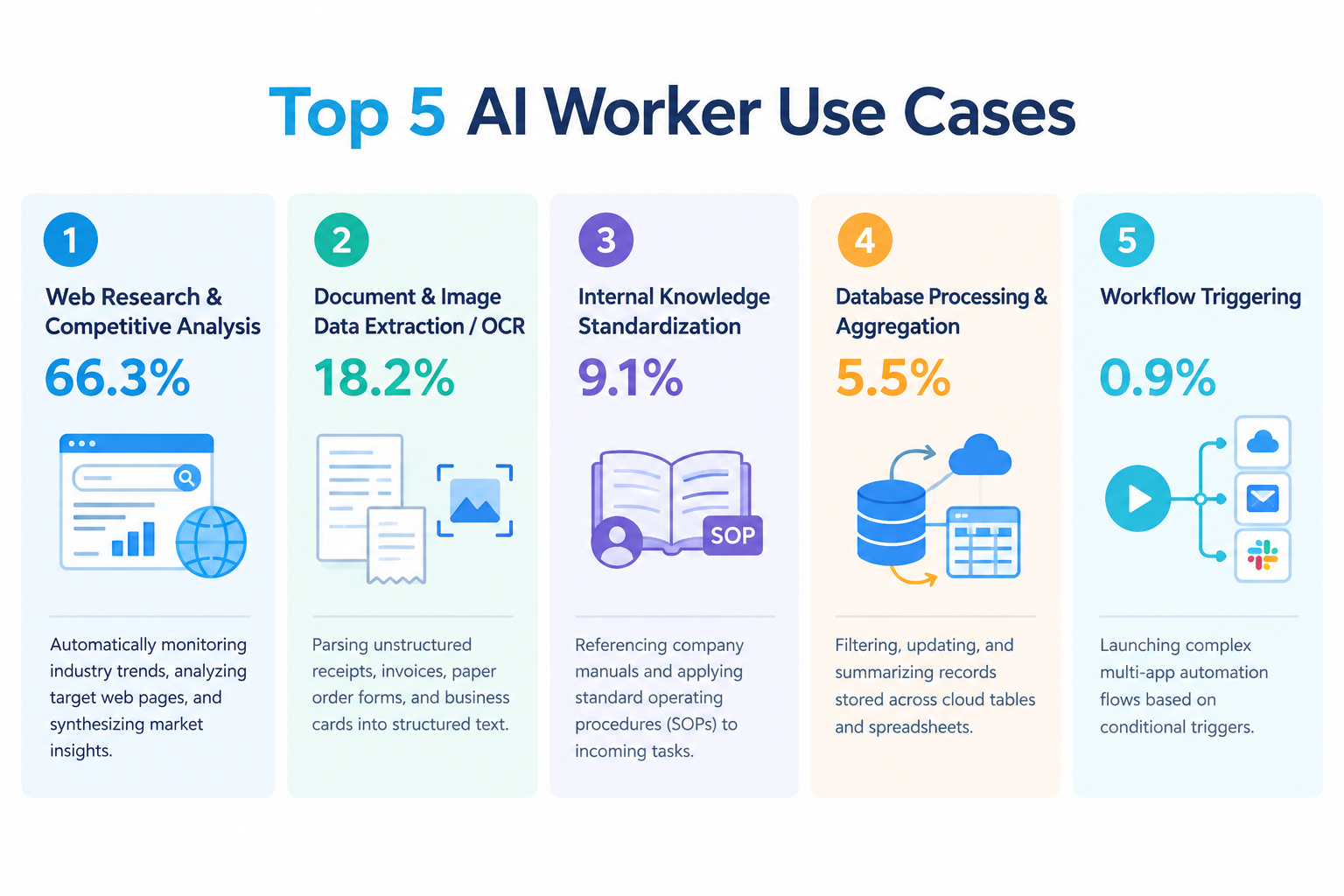
- Web Research & Competitive Analysis (66.3%): Automatically monitoring industry trends, analyzing target web pages, and synthesizing market insights.
- Document & Image Data Extraction / OCR (18.2%): Parsing unstructured receipts, invoices, paper order forms, and business cards into structured text.
- Internal Knowledge Standardization (9.1%): Referencing company manuals and applying standard operating procedures (SOPs) to incoming tasks.
- Database Processing & Aggregation (5.5%): Filtering, updating, and summarizing records stored across cloud tables and spreadsheets.
- Workflow Triggering (0.9%): Launching complex multi-app automation flows based on conditional triggers.
Related AI Worker Templates:

An AI worker that collects competitor pricing, inventory availability, shipping costs, and more from competitor URLs and product information. It also calculates differences from your own prices and previous research, and determines whether to trigger alerts. Ideal for e-commerce, sales, and marketing teams looking to streamline competitor price research and quickly refine their pricing strategy.
- What are skills?
- They are instructions that guide the AI worker through each task. For detailed setup instructions, see [AI worker] How to Create Skills (formerly Manuals).
- What are tools?
- These are the tools the AI worker uses to perform tasks. Simply tell the AI which tools your organization normally uses, and you can freely customize where data is retrieved from and where it is sent.
- The number of AI workers that can run simultaneously, the number of AI workers you can create, and the AI models available to you vary by plan.
- The apps, operations, and other features available within AI workers are subject to the same usage limits as Flowbot.
- AI workers consume tasks during test runs just as they do during production runs. For details, see [AI worker] How Task Execution Counts Are Calculated.

An AI worker that extracts required fields from data in various formats, validates numerical consistency, and converts it into structured data. Automate data entry while improving accuracy—ideal for administrative teams spending time digitizing receipts, business cards, and more, or anyone seeking more reliable data management.
- Administrative teams who spend time extracting and entering information from paper documents and text data, such as receipts and business cards
- Data management teams who want to prevent calculation errors caused by OCR misrecognition and ensure the accuracy of extracted data
- Engineers who want to streamline formatting and mapping data from different formats to match their company’s database specifications
Simply provide instructions in chat, and it will be automatically configured and updated to fit your operations. First, customize the Skills and Tools so the AI worker can perform tasks correctly.
- Skills:
- Instructions that enable the AI worker to perform tasks. For detailed setup instructions, see "[AI Worker] How to Create Skills (Formerly Manuals)."
- Tools:
- Tools the AI worker uses to perform tasks. Simply tell the AI which tools your company uses regularly, and you can freely configure where data is retrieved from and sent to.
- The number of AI workers that can run simultaneously, the number of AI workers you can create, and the AI models available depend on your current plan.
- The apps and operations available in AI workers are subject to the same usage limits as Flowbots.
- Please note that AI workers consume tasks during test runs just as they do during production runs. For details, see "[AI Worker] How Task Executions Are Calculated."

This AI worker searches and extracts relevant information from your storage when users ask a question, then responds with a summary and source URLs. It eliminates the need to review PDFs, sales meeting notes, manuals, and other internal resources one by one—ideal for sales and operations teams looking to reduce research time, or teams that want to share and log search results in chat tools, databases, and more.
- Teams with a large volume of internal documents who spend too much time searching for necessary information
- Sales and operations teams who need to reference sales meeting notes and manuals across multiple documents
- Teams that want to consolidate, share, and log knowledge search results in chat tools or databases
- "Skills" are:
- Instructions that enable the AI worker to perform tasks. For detailed setup instructions, see "[AI Worker] How to Create Skills (Formerly Manuals)."
- "Tools Used" are:
- Tools the AI worker uses to perform tasks. Simply tell the AI which tools your company regularly uses, and you can freely customize where data is retrieved from and where it is sent.
- The number of AI workers that can run simultaneously, the number of AI workers that can be created, and the available AI models vary depending on your subscription plan.
- The apps and operations available within AI workers are subject to the same usage limits as Flowbots.
- Please note that AI workers consume tasks during test runs in the same way as production runs. For details, see "[AI Worker] How Task Executions Are Calculated."

An AI worker that automatically processes CSV and Excel data by removing duplicates, standardizing inconsistent entries, categorizing data, and generating summaries. It supports complex classification rules and aggregation criteria, organizing and summarizing your data according to specified rules. Results are presented as table-based summaries and review lists, making it ideal for reducing manual errors and effort while enabling you to quickly review and use organized, aggregated data.
- What are skills?
- Skills are instructions that define how the AI worker processes tasks. For detailed configuration steps, see [AI worker] How to Create Skills (Formerly Manuals).
- What are tools?
- Tools are used by the AI worker to process tasks. Simply tell the AI which tools your organization uses regularly, and you can freely configure where data is retrieved from and where it is sent.
- The number of AI workers that can run simultaneously, the number of AI workers you can create, and the AI models available to you vary depending on your plan.
- The apps and operations available within AI workers are subject to the same usage limits as Flowbot.
- AI workers consume tasks even during test runs, just as they do during production runs. For details, see [AI worker] How Task Usage Is Calculated.
Top AI Employee Software & Platforms
Selecting the right AI Worker platform depends on whether you need a dedicated marketing agent, an enterprise RPA replacement, or an all-in-one workflow integration layer. Below is an overview of the leading tools in 2026.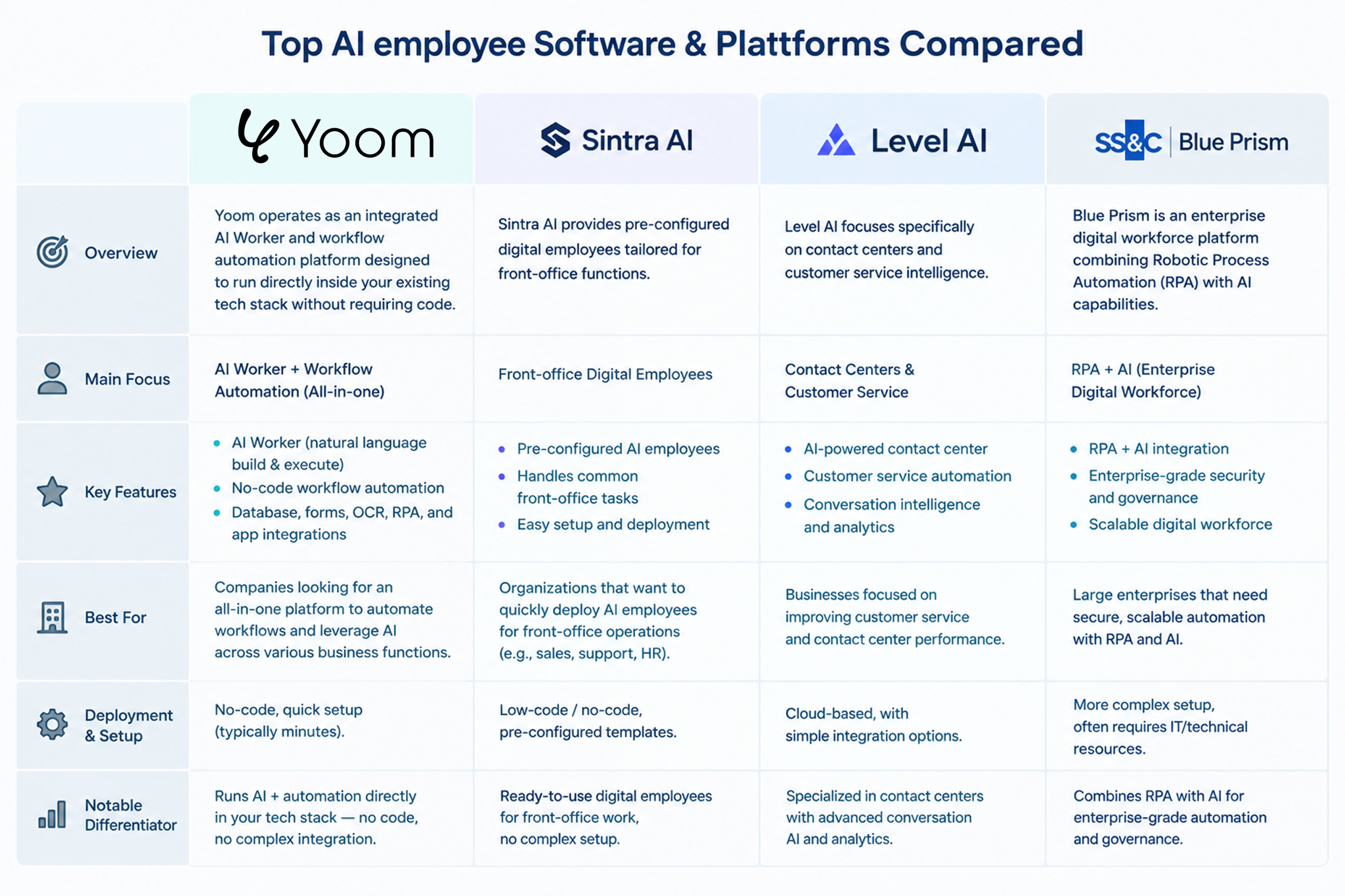
1. Yoom
Yoom operates as an integrated AI Worker and workflow automation platform designed to run directly inside your existing tech stack without requiring code.
- Core Focus: Process automation, multi-SaaS orchestration, database centralization, and document parsing (OCR).
- Key Advantage: Includes native OCR, web research, and database capabilities directly within workflow steps. Users do not need separate third-party AI subscriptions or API connections.
- Best For: Operations, finance, and sales teams looking to eliminate manual data entry, centralize operational data, and build automated digital assistants across daily tools.
2. Sintra AI
Sintra AI provides pre-configured digital employees tailored for front-office functions.
- Core Focus: Marketing, social media management, customer inbox handling, and sales outreach.
- Key Advantage: Offers out-of-the-box "AI personas" designed for specific job titles (e.g., social media manager, customer support rep).
- Best For: Small businesses and marketing teams looking for ready-to-use digital assistants for content and communication.
3. Level AI
Level AI focuses specifically on contact centers and customer service intelligence.
- Core Focus: Customer experience, agent coaching, and conversation analysis.
- Key Advantage: Parses millions of customer interactions to build real-time coaching plans and automated resolution flows.
- Best For: Customer success and contact center teams requiring deep conversational analytics.
4. SS&C Blue Prism
Blue Prism is an enterprise digital workforce platform combining Robotic Process Automation (RPA) with AI capabilities.
- Core Focus: Enterprise-grade process automation and legacy system integration.
- Key Advantage: Highly scalable governance, security, and desktop automation capabilities.
- Best For: Large enterprise organizations with dedicated IT teams seeking legacy infrastructure automation.
Why Process-Embedded AI Workers Deliver Real Impact
A major hurdle in adopting AI software is the friction of managing separate service plans, complex API keys, and isolated chat interfaces.
When AI capabilities are embedded directly into a company's routine workflow steps, operational speed improves drastically. For example, a wholesale business migrating from paper-based order processing adopted an AI Worker to handle document intake. Previously, staff manually reviewed physical orders, created Excel sheets, and typed data into their ERP system.
A company used Yoom's AI Worker to extract order data from paper documents using OCR. As a result:
- Preparation time reduced to under 5 minutes per batch
- Reading accuracy improved to over 90%.
Because the AI Worker resides inside the workflow itself, team members do not need to prompt an external AI model manually; the system simply delivers verified, structured data where it needs to go.
How to Create Your First AI Worker with Yoom
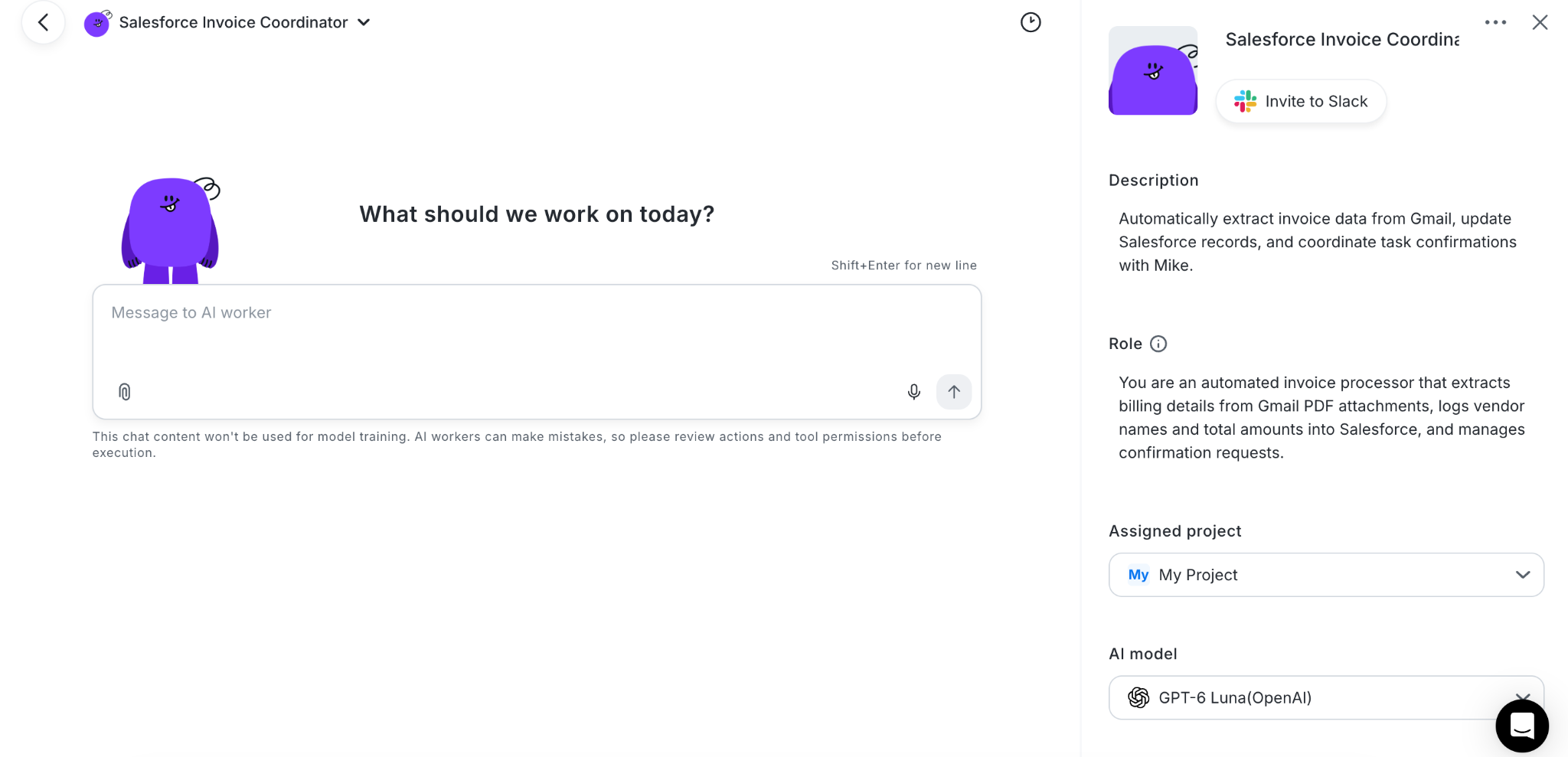
Building a functional AI Worker does not require a developer background or complex workflow setup. With Yoom, you can create an AI worker in seconds—just describe your ideas in your own words.
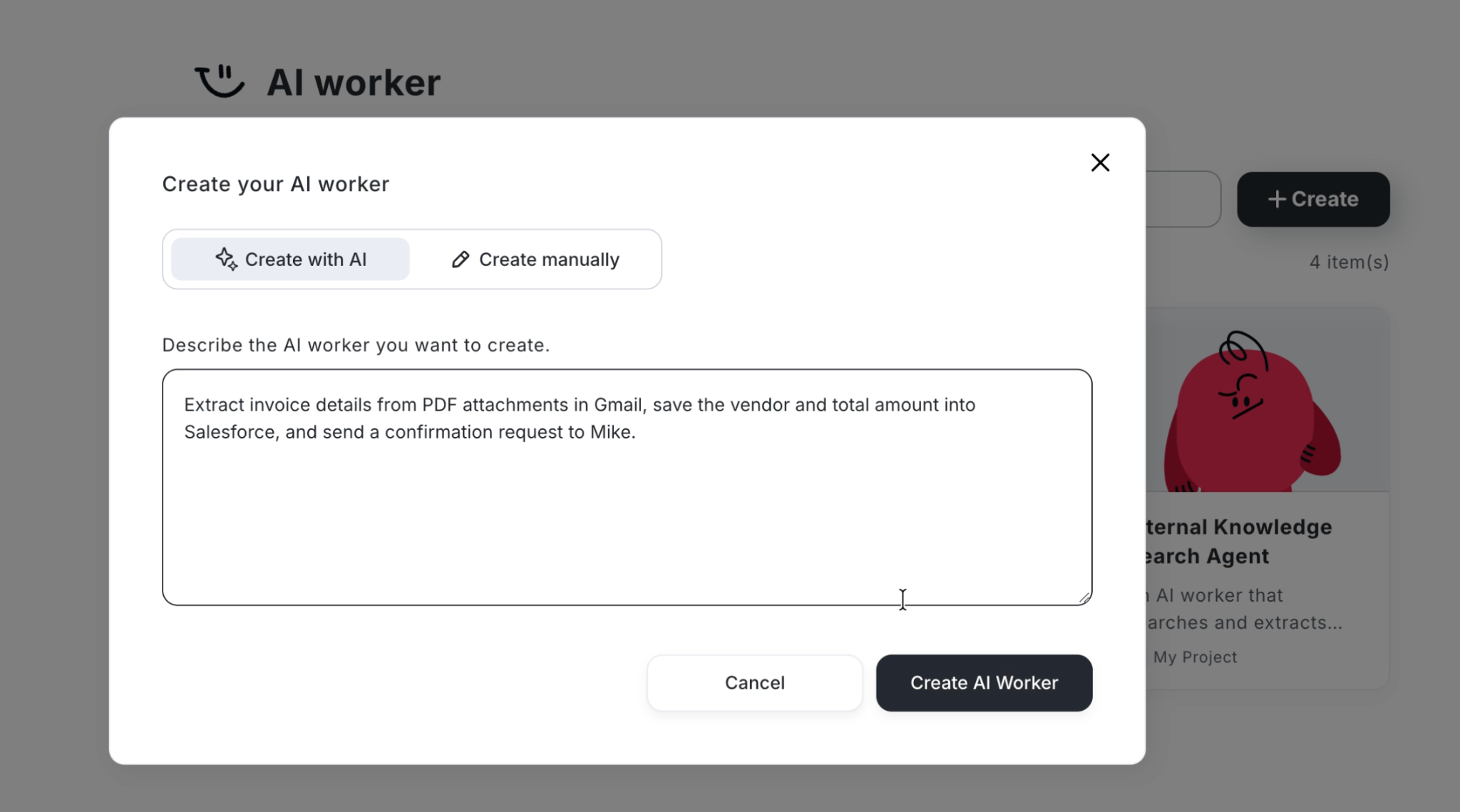
- Prompt with Your Ideas: Simply tell Yoom what you want to achieve in your own words—such as "Summarize incoming competitor newsletters and update our research database."
- Automatic Workflow Assembly: Yoom turns your words into action, instantly generating the required steps, conditions, and data transformations.
- Smart Tools Recommendations: Not sure which tools to connect? Just describe your ideal process, and Yoom will automatically suggest and map out the right SaaS applications for you.
Basic Setup Guide:https://intercom.help/yoom/en/articles/13234477-ai-worker-basic-setup-guide#h_9a7abb6770