


・
14 Best Boomi Alternatives for 2027: Why Users Switch

Boomi is an integration platform that helps businesses connect applications, synchronize data, and automate processes across cloud and on-premises environments. Its platform provides tools for application integration, API management, data management, and workflow automation.
Boomi offers a broad range of integration capabilities, but how do users actually feel about using the platform in practice? And what leads some of them to consider switching to an alternative?
To explore these questions, we analyzed reviews and discussions from Reddit, G2, and Capterra to identify the challenges users have experienced with Boomi.
Based on these findings, this guide introduces 14 Boomi alternatives for 2027, including all-in-one automation platforms, enterprise integration solutions, and developer-focused integration frameworks.
Whether you're looking for a more accessible way to automate business processes, greater flexibility for complex integrations, or a different pricing model, this list can help you find an option that fits your requirements.
Why Do Users Consider Boomi Alternatives?
To understand why users explore alternatives to Boomi, we reviewed feedback from three platforms: Reddit, G2, and Capterra.
Common Concerns About Boomi Reported by Users
- Feature Limitations, UX, and Compatibility: 32.3%
- Operations, Change Management, and Stability: 22.6%
- Learning, Setup, and Implementation Complexity: 16.1%
- Support, Monitoring, and Troubleshooting: 16.1%
- Pricing and Cost: 9.7%
- Product Development and Vendor Responsiveness: 3.2%
1. Feature Limitations, UX, and Compatibility: 32.3%
The most frequently mentioned concerns involved product functionality, usability, and compatibility with other systems.
Some users pointed out limitations in handling individual records and complex data transformations. Others mentioned difficulties with connector compatibility, custom integrations, and navigating certain parts of the interface.
These comments suggest that although Boomi offers a wide range of integration capabilities, users may encounter limitations or additional development work when implementing more specialized requirements.
2. Operations, Change Management, and Stability: 22.6%
Operational stability and managing changes were also recurring concerns.
Some users reported Atom crashes, frequent restarts, and instability following platform updates. Others mentioned difficulties managing connector configurations and maintaining integrations when the platform changed.
For organizations running business-critical integrations, these issues can increase the time and resources required for ongoing maintenance.
3. Learning, Setup, and Implementation Complexity: 16.1%
Some users found the initial setup and learning process more challenging than expected.
Feedback included difficulties getting started, complicated configuration steps, and training materials that did not provide enough practical guidance.
This may be an important consideration for teams that want business users to build and manage integrations without relying heavily on dedicated technical resources.
4. Support, Monitoring, and Troubleshooting: 16.1%
Users also raised concerns about monitoring and troubleshooting integrations.
Examples included insufficient default logging, limited debugging support, unclear error messages, and documentation that could provide more detailed examples.
When integrations fail, insufficient visibility into the root cause can make it harder for teams to identify and resolve problems quickly.
5. Pricing and Cost: 9.7%
Pricing was another concern, particularly for users who felt the platform was expensive for their needs.
Some feedback also pointed to connector-based charges and uncertainty about the number of endpoints required before signing a contract.
When comparing alternatives, it is important to look beyond the starting subscription fee and understand how usage, connectors, and implementation requirements affect the total cost.
14 Best Boomi Alternatives for 2027
The right alternative depends on what you use Boomi for and which aspects of your current setup you want to improve.
Some platforms focus on enterprise-grade application integration, while others are designed for business process automation, data integration, or developer-led implementations.
Here are 14 alternatives worth considering.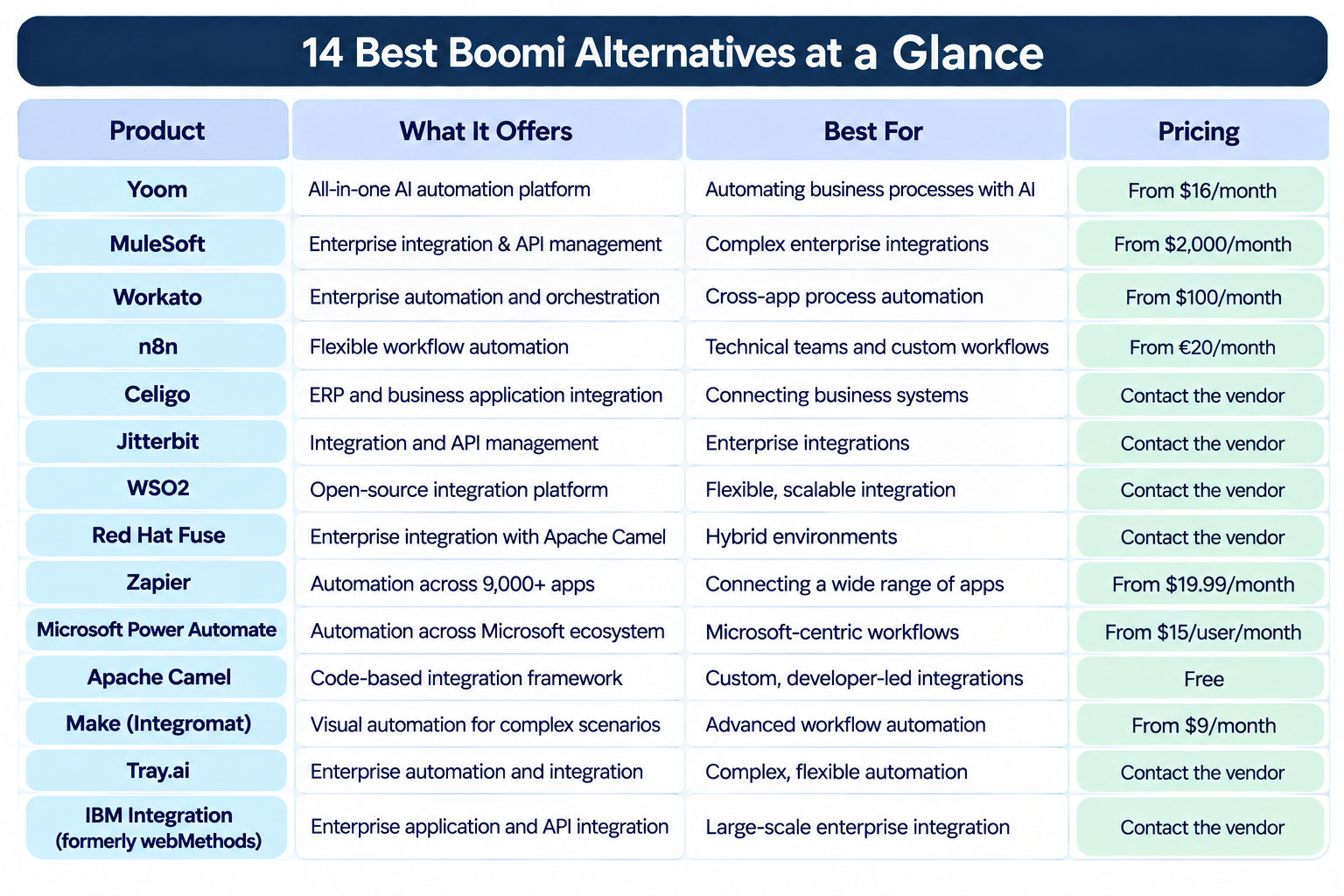
1.
Yoom
— All-in-One AI Automation
Best for: Businesses that want an accessible automation platform for both non-technical and technical teams, combining AI, app integrations, and flexible customization.
Yoom is an all-in-one AI automation platform that combines app integrations, AI-powered automation, databases, forms, AI-OCR, and browser automation in one platform.
Designed to be accessible to users without programming experience, Yoom enables teams to automate a wide range of everyday business operations. In fact, more than 80% of Yoom users are non-engineers. At the same time, its flexible customization features also make it useful for IT professionals who need more control over their automations.
Its key capabilities include:
- AI Worker: Build and execute AI-powered tasks using natural-language instructions.
- Workflow: Automate repetitive tasks, approvals, and processes based on predefined rules.
- Database: Store and manage business data without building a separate database system.
- Forms: Collect information and connect submissions to automated processes.
- AI-OCR: Extract information from documents and use it in subsequent automations.
- RPA: Automate browser-based tasks that do not have direct API integrations.
Yoom also offers custom API connections, allowing users to connect with services that are not available as standard integrations.
It provides additional flexibility without requiring users to write an entire code script from scratch. Instead, users can configure functions by entering the necessary values, making customization more accessible even for users who are not full-time developers.
This balance of accessibility and flexibility makes Yoom suitable for a wide range of teams, from non-technical business users to IT professionals looking to build and customize automations.
Pricing: A free plan is available. Paid plans start from $16/month when billed annually.
2.
MuleSoft
— Enterprise Integration and API Management
Best for: Large organizations that need enterprise-grade integration, API management, and complex system connectivity.
MuleSoft's Anypoint Platform provides tools for connecting applications, managing APIs, and orchestrating data across complex IT environments.
It supports cloud, on-premises, and hybrid integration architectures, making it suitable for organizations with diverse enterprise systems.
Key capabilities include:
- Application and data integration
- API design and lifecycle management
- Data transformation with DataWeave
- Hybrid and multi-cloud deployment
- Monitoring and management of integrations
MuleSoft is particularly relevant for businesses that need to manage APIs and integrations across multiple departments and systems.
However, organizations should consider its pricing, implementation requirements, and technical resource needs when evaluating it as an alternative to Boomi.
Pricing: Paid plans start from $2,000/month, billed annually.
3. Workato
— Enterprise Automation and Orchestration
Best for: Businesses that want to connect SaaS applications and automate complex business processes across departments.
Workato combines application integration with business process automation and orchestration.
Its low-code platform allows teams to build automated processes using prebuilt connectors and recipes. It also supports more advanced enterprise use cases, including real-time data synchronization and API management.
Key capabilities include:
- Prebuilt connectors for business applications
- Multi-step process automation
- Real-time data and event orchestration
- API management
- Enterprise governance and security features
Workato may be a suitable alternative for organizations that want to automate processes across business applications while making automation accessible to both technical and non-technical teams.
Pricing: A free plan is available. Paid plans start from $100/month for the self-service Pro plan.
4. n8n
— Flexible Workflow Automation for Technical Teams
Best for: Technical teams that want flexible automation with the option to use code and self-host their workflows.
n8n is a workflow automation platform that combines visual workflow building with code-based customization.
Users can connect applications and services through nodes, create conditional logic, and add JavaScript or Python code when more flexibility is needed.
Key capabilities include:
- Visual workflow builder
- Code-based customization
- AI and agent-related integrations
- Self-hosting options
- Workflow execution monitoring
Compared with traditional enterprise integration platforms, n8n can offer more control over how workflows are built and deployed. Its self-hosted option is particularly relevant for teams that want greater control over their infrastructure.
However, self-hosting and advanced customization may require technical resources.
Pricing: Paid cloud plans start from €20/month when billed annually. A self-hosted Community Edition is also available.
5.
Celigo
— ERP and Business Application Integration
Best for: Businesses that need to connect ERP, CRM, e-commerce, and other business applications.
Celigo is an integration platform focused on connecting business applications and automating processes across them.
It is particularly relevant for companies using systems such as NetSuite and other ERP or CRM applications.
Key capabilities include:
- Prebuilt integration flows
- ERP and CRM connectivity
- Data synchronization
- Integration monitoring
- Business process automation
Celigo can be a good option for organizations that want to simplify integrations between commonly used business systems without building every connection from scratch.
Its packaged integrations may also help reduce the effort involved in implementing standard business processes.
Pricing: Contact Celigo for pricing. Pricing depends on the required integrations and business needs.
6.
Jitterbit
— Enterprise Integration and Automation
Best for: Organizations that need to connect business applications, automate processes, and manage APIs.
Jitterbit provides an integration platform for connecting applications, data, and systems across cloud and on-premises environments.
Its Harmony platform combines application integration, API management, and automation capabilities.
Key capabilities include:
- Application and data integration
- API creation and management
- Prebuilt connectors
- Data transformation
- Workflow automation
Jitterbit may be suitable for organizations that want to integrate ERP, CRM, and other business systems while supporting broader automation requirements.
It is worth comparing its connector coverage, implementation requirements, and pricing structure with Boomi before making a decision.
Pricing: Contact Jitterbit for pricing. Pricing is customized based on the selected solution and requirements.
7. WSO2 Integration Platform
— Open-Source Enterprise Integration
Best for: Organizations that want flexible deployment options and greater control over their integration architecture.
WSO2 Integration Platform is an enterprise integration solution built around open-source technology.
It supports application integration, API management, and data connectivity, with options for SaaS and self-hosted deployment.
Key capabilities include:
- Application and API integration
- Prebuilt connectors
- Hybrid and self-hosted deployment
- Integration flow development
- Enterprise-scale data connectivity
WSO2 may be worth considering for organizations that want to avoid being tied to a single proprietary integration environment.
Its self-hosting options can provide architectural flexibility, although organizations should evaluate the technical resources required to manage and maintain the platform.
Pricing: A 30-day free trial is available. Contact WSO2 for Growth and Enterprise pricing.
8. Red Hat Fuse
— Enterprise Integration for Hybrid Environments
Best for: Organizations that need flexible integration across cloud, on-premises, and hybrid environments.
Red Hat Fuse is an integration platform built around Apache Camel and designed for enterprise application connectivity.
It supports integration patterns and application connectivity across different systems and environments.
Key capabilities include:
- Application and service integration
- API connectivity
- Data transformation
- Hybrid deployment
- Integration based on Apache Camel
Red Hat Fuse may be suitable for organizations that already use Red Hat technologies or have development teams familiar with Java-based integration.
However, it is more developer-oriented than business-user-focused automation platforms, so the team's technical capabilities should be considered.
Pricing: Contact Red Hat for subscription pricing.
9.
Zapier
— Wide App Connectivity
Best for: Teams that want to connect a wide range of SaaS applications and automate everyday tasks without coding.
Zapier is particularly worth considering if you need to connect a wide range of SaaS applications. With integrations for more than 9,000 apps, it offers extensive flexibility when choosing which tools to connect.
However, having access to more integrations does not automatically make a platform the right fit. Most teams are unlikely to need all 9,000+ integrations. Instead, consider whether Zapier supports the specific apps you use and whether its automation features, pricing, and capabilities match your actual requirements.
Key capabilities include:
- App-to-app automation
- Multi-step workflows
- Conditional logic
- AI-powered automation features
- Large app integration ecosystem
Zapier is generally easier to get started with than enterprise integration platforms. It can be a practical option for teams that mainly need to automate everyday tasks between cloud applications.
However, organizations with complex data transformations, extensive enterprise integrations, or advanced deployment requirements may need a more specialized platform.
Pricing: A free plan is available. Paid plans start from $19.99/month when billed annually.
10.
Microsoft Power Automate
— Automation Across Microsoft Environments
Best for: Organizations that rely on Microsoft 365, Dynamics 365, and other Microsoft services.
Power Automate is Microsoft's low-code automation platform for connecting applications and automating business processes.
It supports cloud-based workflows as well as desktop automation through robotic process automation (RPA).
Key capabilities include:
- Cloud flow automation
- Desktop RPA
- Microsoft 365 and Dynamics 365 integrations
- Approval workflows
- Process mining
For organizations already using Microsoft's ecosystem, Power Automate can be a convenient option for automating processes across existing business applications.
It is particularly useful for teams that want to combine cloud automation with desktop-based tasks.
Pricing: A free trial is available. Paid plans start from $15/user/month, billed annually.
11.
Apache Camel
— Code-Based Integration Framework
Best for: Development teams that need highly customizable integrations and have Java or related development expertise.
Apache Camel is an open-source integration framework that helps developers connect applications, APIs, databases, and messaging systems.
Unlike low-code integration platforms, Apache Camel provides a code-based approach to building integration routes.
Key capabilities include:
- 350+ integration components
- Java, YAML, and XML-based route definitions
- Data transformation and routing
- Enterprise Integration Patterns
- Integration with Spring Boot and Quarkus
Apache Camel offers considerable flexibility for developers who want to build custom integrations and control how data moves between systems.
However, it requires development and infrastructure resources, so it may not be the best fit for teams looking for a ready-to-use no-code platform.
Pricing: Apache Camel is free and open source under the Apache License 2.0. Infrastructure and development costs should still be considered.
12.
Make
— Visual Automation for Complex Scenarios
Best for: Teams that want a visual automation builder with flexible branching and data handling.
Make is a visual automation platform that allows users to connect applications and build multi-step scenarios.
Its visual interface makes it possible to create branching logic, filters, and data transformations without writing extensive code.
Key capabilities include:
- Visual scenario builder
- Multi-step automation
- Routers and filters
- Data transformation
- Extensive app integrations
Make may be a good alternative for teams that want more control over automation logic than simple trigger-and-action tools provide.
However, users may need time to learn its visual interface, especially when building more complex scenarios.
Pricing: A free plan is available. Paid plans start from $9/month for 10,000 credits per month.
13.
Tray.ai
— Enterprise Automation and Integration
Best for: Businesses that need flexible automation across multiple applications and enterprise systems.
Tray.ai is an automation and integration platform designed to help organizations connect applications and automate business processes.
Its platform supports complex workflows, API integrations, and AI-powered automation.
Key capabilities include:
- Visual workflow builder
- Application and API integrations
- Data transformation
- Multi-step process automation
- Enterprise automation capabilities
Tray.ai may be suitable for organizations that need to automate processes across multiple business systems while maintaining flexibility in how integrations are designed.
It is worth comparing its enterprise features and implementation requirements with Boomi, especially for organizations with complex integration needs.
Pricing: Contact Tray.ai for pricing. Pricing depends on the selected plan and usage requirements.
14.
IBM Integration(formerly webMethods)
— Enterprise Application and API Integration
Best for: Large organizations that need to connect enterprise applications, manage APIs, and integrate complex IT environments.
IBM Integration is an enterprise integration platform that supports application integration, API management, and business process connectivity.
It is designed to help organizations connect different systems and manage data flows across their IT environments.
Key capabilities include:
- Application integration
- API management
- B2B integration
- Data transformation
- Hybrid integration
IBM Integration may be worth evaluating for organizations with established enterprise integration requirements, particularly those looking for alternatives within the enterprise integration market.
4 Things to Consider Before Switching from Boomi
Choosing an alternative is not simply about finding a platform with a lower subscription fee. Before making a decision, consider the following factors.
1. Compare the Total Cost, Not Just the Starting Price
Pricing was one of the concerns identified in our review analysis. However, the subscription fee alone does not reflect the full cost of an integration platform.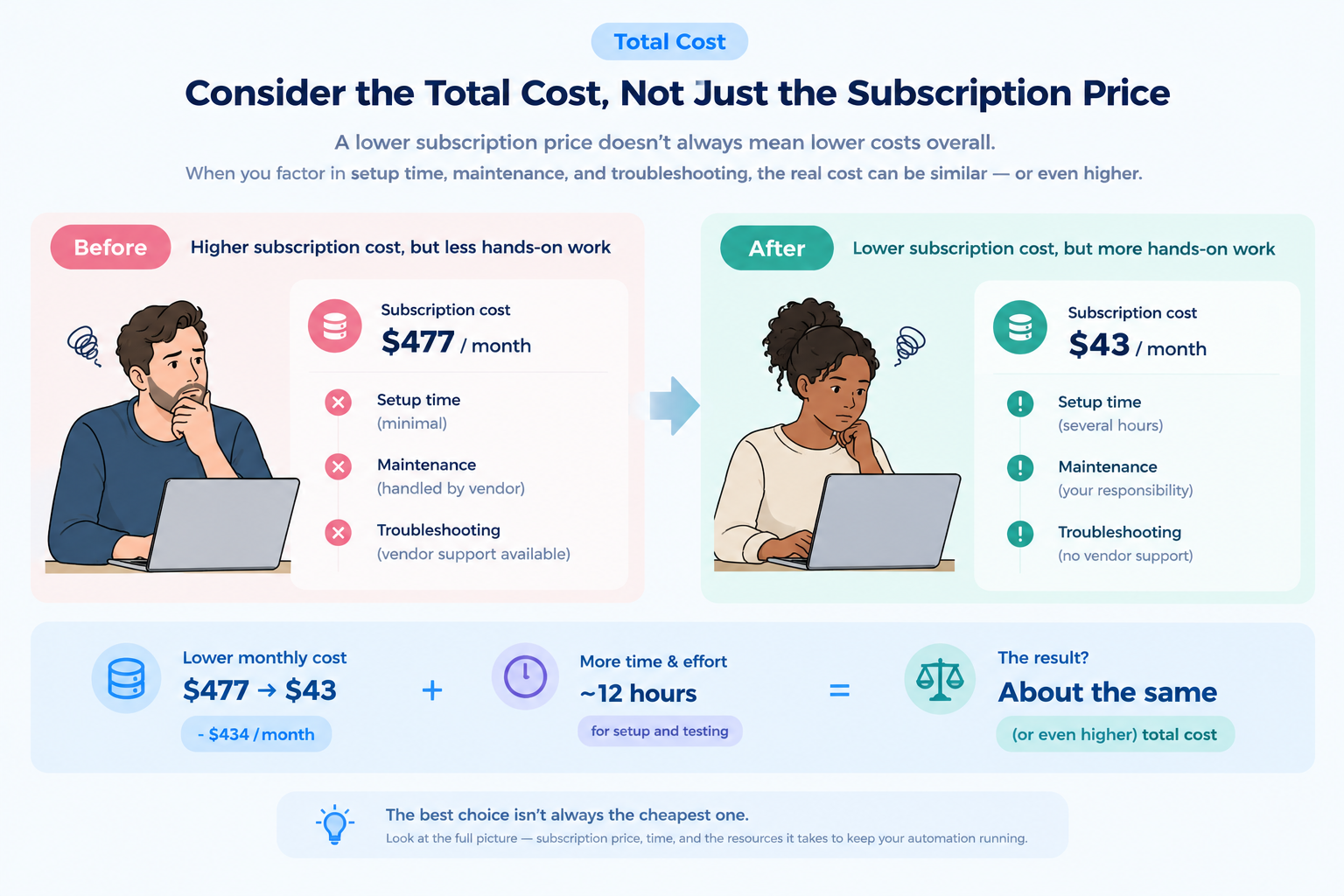
Consider the following:
- Subscription or platform fees
- Usage-based charges and transaction limits
- Costs for additional connectors or environments
- Implementation and migration expenses
- Ongoing maintenance and troubleshooting
- The time required for employees to build and update integrations
A tool with a lower starting price may still require significant technical resources. On the other hand, a platform with a higher subscription fee may reduce manual work or maintenance costs.
A lower price does not necessarily mean a better choice. For example, one Reddit user shared their experience replacing paid software with a lower-cost setup. Although the new setup reduced software costs, the user reported spending around 12 hours building and testing it. They also noted the lack of dedicated support and explained that an office manager needed two weeks to adjust to the new system.
This example highlights why it is important to consider the time, effort, and support required to operate a solution—not just its subscription price.
For a more accurate estimate, it is best to contact the vendor directly. Ask for a quote based on your expected usage, integration requirements, and plans for future growth.
The vendor's responsiveness and the quality of its support during this process are also worth considering. How clearly and promptly the vendor answers your questions can provide useful insight into the level of support you may receive after implementation.
Estimate the total cost based on your actual usage and expected growth, rather than comparing monthly prices alone.
2. Evaluate Integration Capabilities and Compatibility
Not all integration platforms support the same applications, data formats, or integration methods.
Before switching, identify the systems you currently connect through Boomi and check whether the alternative supports them.
Consider:
- Availability of native connectors
- API and webhook support
- Data transformation capabilities
- Support for cloud and on-premises systems
- Compatibility with your existing databases and applications
If your business relies on complex data transformations or specialized integrations, test these use cases before committing to a new platform.
3. Consider Implementation and Maintenance Requirements
A platform may look easy to use during a demo but require more effort when deployed in a real business environment.
Evaluate how much technical knowledge is needed to build, troubleshoot, and maintain integrations.
Consider whether your team can manage the platform independently or whether you will need dedicated developers or external implementation support.
It is also important to understand how the platform handles version control, error monitoring, updates, and deployment across environments.
4. Check Scalability and Vendor Support
Your integration requirements may change as your business grows.
A platform that works well for a small number of integrations may not be suitable when transaction volumes increase or more departments start using automation.
Check whether the platform can support:
- Increasing data and transaction volumes
- More applications and integration flows
- Additional users and departments
- Security and governance requirements
- Future changes to your IT architecture
Also, evaluate the vendor's support options, documentation, onboarding assistance, and response times.
A platform's long-term value depends not only on its technical capabilities but also on how effectively the vendor supports your organization.
Final Thoughts: No Tool Is Perfect
Boomi offers a broad range of integration capabilities, but the right platform depends on your organization's requirements, technical resources, and budget.
Before switching, identify the specific challenges you want to solve, compare the total cost of ownership, and test your most important integration use cases.
The best alternative is not necessarily the platform with the most features. It is the one that fits your team's actual needs and can support your business as it grows.