


・
Boomi vs MuleSoft: Common Drawbacks Reported by Users

Choosing an integration platform based on feature lists and pricing pages alone can be difficult. They do not always show what using a platform is like in practice.
If you are deciding between Boomi and MuleSoft, reviewing feedback from existing users can help you identify potential challenges before committing to a platform.
We reviewed public discussions and reviews on Reddit,G2 and Capterra about both platforms. The findings highlight different concerns, including feature limitations, implementation complexity, pricing, usability, and ongoing maintenance.
In this guide, we compare Boomi vs. MuleSoft across pricing, ease of use, integrations, flexibility, and reliability. We also examine the problems users have reported to help you make a more informed decision.
What Do Actual Users Complain About Boomi and MuleSoft?
Common Concerns About Boomi
To understand why users consider alternatives to Boomi, we reviewed feedback from three platforms: Reddit, G2, and Capterra.
The following figures summarize the concerns identified in the discussions and reviews we analyzed.
Common Challenges with Boomi Reported by Users
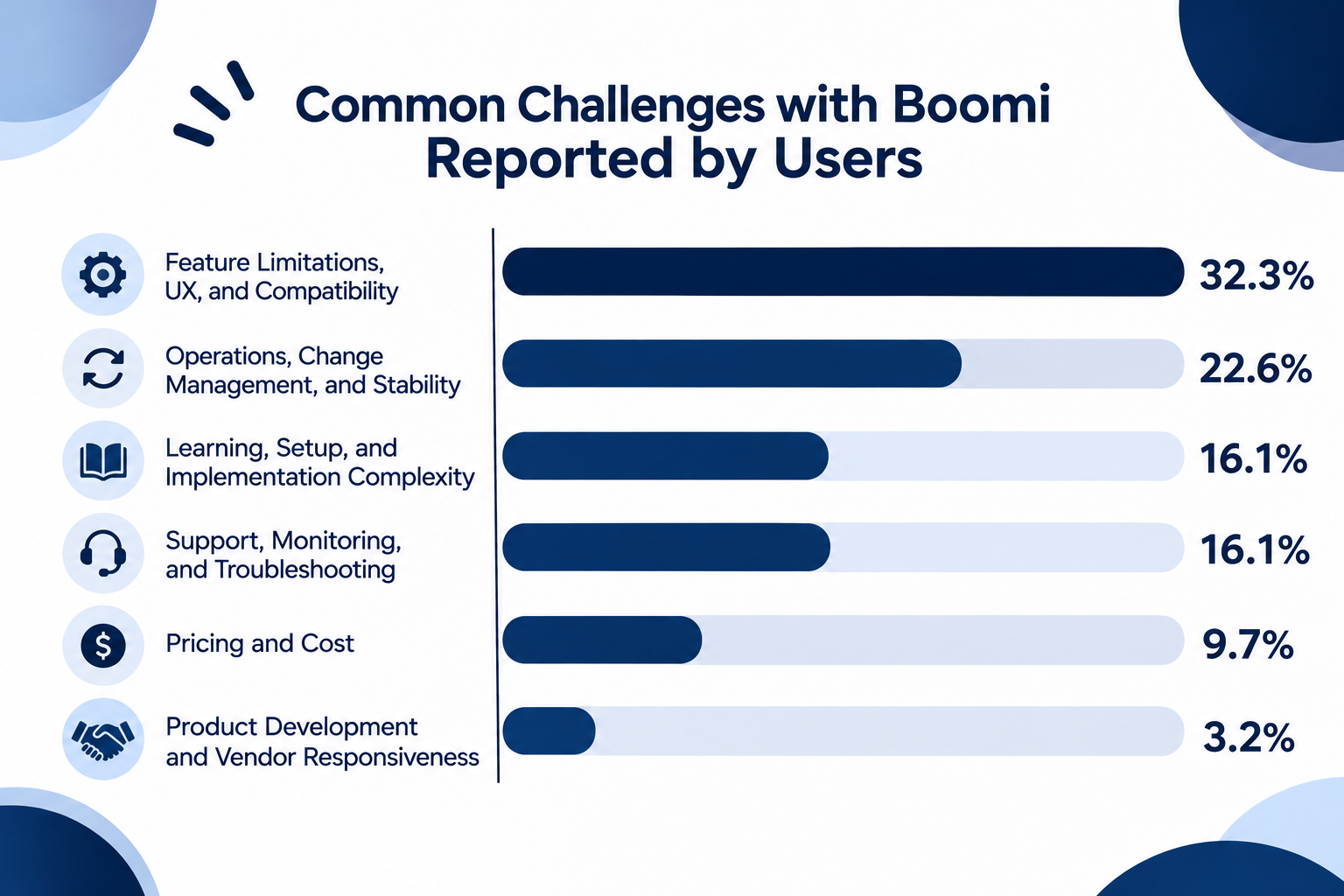
- Feature Limitations, UX, and Compatibility: 32.3%
- Operations, Change Management, and Stability: 22.6%
- Learning, Setup, and Implementation Complexity: 16.1%
- Support, Monitoring, and Troubleshooting: 16.1%
- Pricing and Cost: 9.7%
- Product Development and Vendor Responsiveness: 3.2%
1. Feature Limitations, UX, and Compatibility: 32.3%
The most frequently mentioned concerns involved product functionality, usability, and compatibility with other systems.
Some users pointed out limitations in handling individual records and complex data transformations. Others mentioned difficulties with connector compatibility, custom integrations, and navigating certain parts of the interface.
These comments suggest that although Boomi offers a wide range of integration capabilities, users may encounter limitations or additional development work when implementing more specialized requirements.
2. Operations, Change Management, and Stability: 22.6%
Operational stability and managing changes were also recurring concerns.
Some users reported Atom crashes, frequent restarts, and instability following platform updates. Others mentioned difficulties managing connector configurations and maintaining integrations when the platform changed.
For organizations running business-critical integrations, these issues can increase the time and resources required for ongoing maintenance.
3. Learning, Setup, and Implementation Complexity: 16.1%
Some users found the initial setup and learning process more challenging than expected.
Feedback included difficulties getting started, complicated configuration steps, and training materials that did not provide enough practical guidance.
This may be an important consideration for teams that want business users to build and manage integrations without relying heavily on dedicated technical resources.
4. Support, Monitoring, and Troubleshooting: 16.1%
Users also raised concerns about monitoring and troubleshooting integrations.
Examples included insufficient default logging, limited debugging support, unclear error messages, and documentation that could provide more detailed examples.
When integrations fail, insufficient visibility into the root cause can make it harder for teams to identify and resolve problems quickly.
5. Pricing and Cost: 9.7%
Pricing was another concern, particularly for users who felt the platform was expensive for their needs.
Some feedback also pointed to connector-based charges and uncertainty about the number of endpoints required before signing a contract.
When comparing alternatives, it is important to look beyond the starting subscription fee and understand how usage, connectors, and implementation requirements affect the total cost.
Common Concerns About MuleSoft
We also reviewed discussions and user reviews about MuleSoft across Reddit, G2, and Capterra.
Each review or post was assigned one primary complaint category to identify the issues users mentioned most often.
Common Challenges with MuleSoft Reported by Users
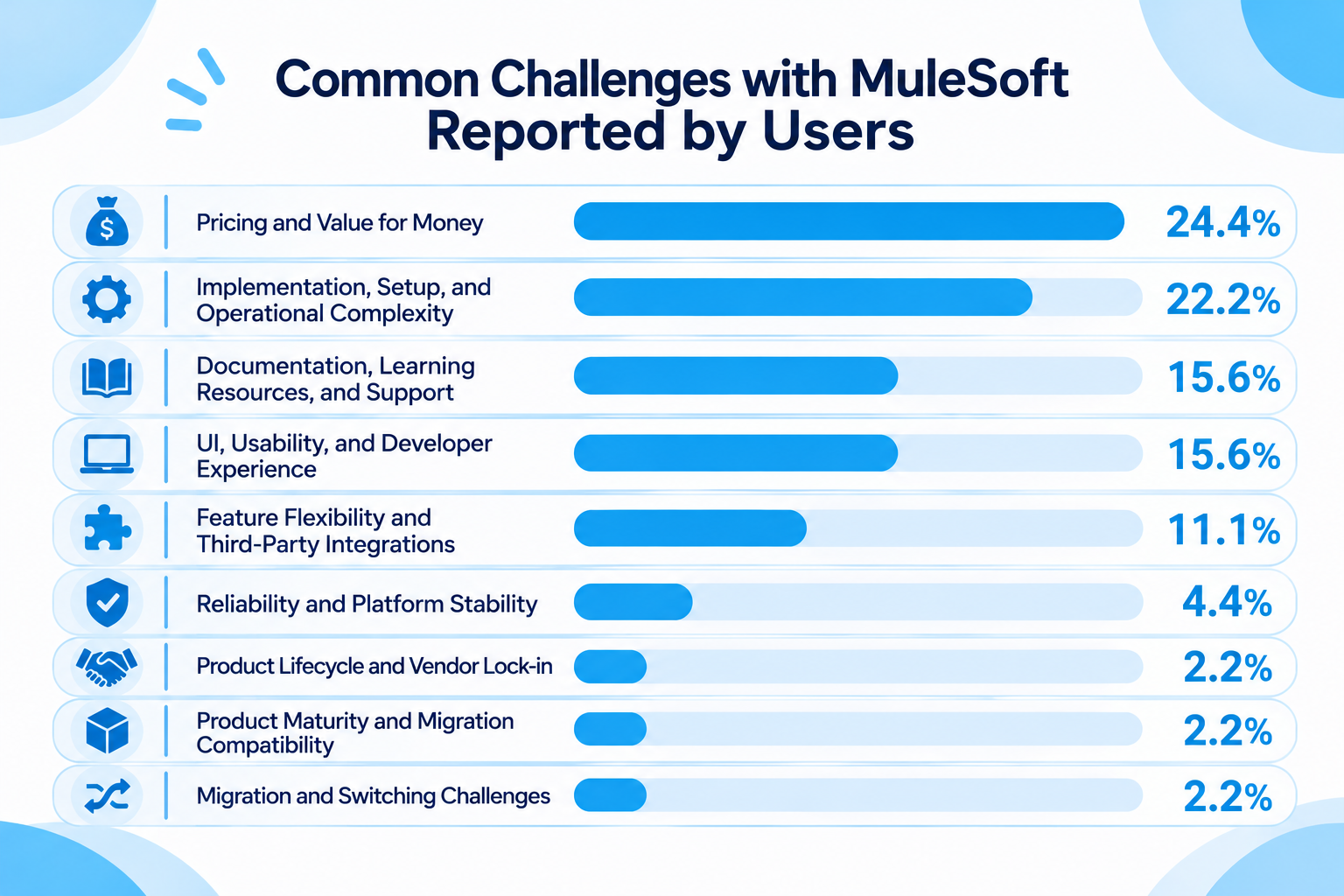
- Pricing and Value for Money: 24.4%
- Implementation, Setup, and Operational Complexity: 22.2%
- Documentation, Learning Resources, and Support: 15.6%
- UI, Usability, and Developer Experience: 15.6%
- Feature Flexibility and Third-Party Integrations: 11.1%
- Reliability and Platform Stability: 4.4%
- Product Lifecycle and Vendor Lock-in: 2.2%
- Product Maturity and Migration Compatibility: 2.2%
- Migration and Switching Challenges: 2.2%
Note: Percentages may not add up to exactly 100% due to rounding.
1. Pricing and Value for Money: 24.4%
Pricing and value for money were the most frequently mentioned concerns, accounting for 24.4% of the negative reviews we analyzed.
Some users described MuleSoft as expensive, while others questioned whether its pricing model offered sufficient value for their needs. For organizations that need to connect only a limited number of applications or automate a smaller set of processes, the cost of an enterprise integration platform may be difficult to justify.
This makes pricing transparency and the ability to scale costs with actual usage important factors when comparing alternatives.
2. Implementation, Setup, and Operational Complexity: 22.2%
Implementation, configuration, and operational complexity accounted for 22.2% of the negative reviews.
Some reviewers mentioned that initial setup and troubleshooting could be difficult, particularly for users without a technical background. Others noted that making changes required specialized personnel.
This is an important consideration for teams that want business users to build and maintain automations themselves, rather than relying on a dedicated integration team for every change.
3. Documentation, Learning Resources, and Support: 15.6%
Documentation and support issues were another recurring concern, representing 15.6% of the reviews.
Some users mentioned difficulties finding practical learning resources or understanding how to resolve technical issues.
For teams adopting an enterprise integration platform, the availability of clear documentation, training materials, and responsive support can make a significant difference during implementation and ongoing maintenance.
4. UI, Usability, and Developer Experience: 15.6%
UI and usability concerns also represented 15.6% of the reviews.
Individual reviewers mentioned interfaces that could feel unintuitive or buggy, as well as challenges navigating the development environment.
These findings suggest that technical capabilities alone are not enough. Teams should also consider how comfortably developers and other users can work with the platform on a daily basis.
Boomi vs. MuleSoft: A Quick Guide to Choosing the Right Tool
Still deciding between Boomi and MuleSoft? The best choice depends on your organization's integration requirements, technical resources, budget, and existing systems.
Use the following guide to help narrow down your options: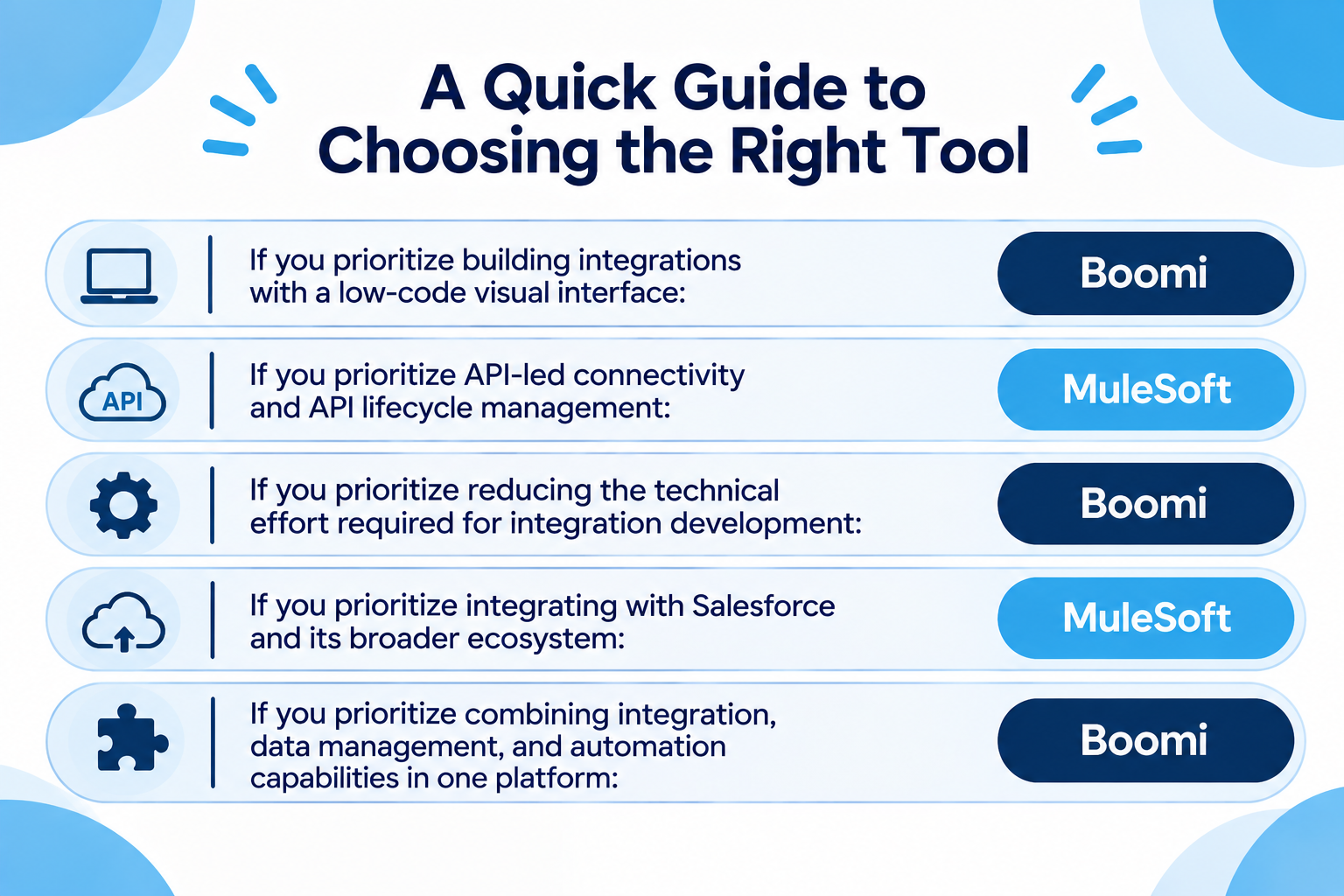
- If you prioritize building integrations with a low-code visual interface: Boomi
- If you prioritize API-led connectivity and API lifecycle management: MuleSoft
- If you prioritize reducing the technical effort required for integration development: Boomi
- If you prioritize integrating with Salesforce and its broader ecosystem: MuleSoft
- If you prioritize combining integration, data management, and automation capabilities in one platform: Boomi
These recommendations are intended to help you choose between Boomi and MuleSoft. They are not absolute rules.
For example, Boomi offers a low-code development environment that can make integration development more accessible. However, complex transformations and specialized requirements may still require technical expertise.
MuleSoft provides extensive API development and management capabilities, but its implementation and ongoing maintenance may require specialized resources.
Still Can't Decide? Consider Other Integration Tools
If you are still unsure after comparing Boomi and MuleSoft, it may be worth exploring other integration platforms.
You do not necessarily have to choose between these two. Other tools may offer a different balance of advantages and disadvantages, such as a simpler interface, more accessible pricing, or features that better match your team's technical capabilities.
Rather than forcing yourself to choose between Boomi and MuleSoft, look for the integration platform that best fits how your team actually works.
Boomi vs. MuleSoft: Key Differences in Detail
Now that we have reviewed the concerns raised by users, let's compare the two platforms across the factors that matter most when choosing an integration tool.
1. Pricing: Is Boomi Cheaper Than MuleSoft?
Pricing is one of the biggest considerations when comparing Boomi vs. MuleSoft.
Both platforms offer enterprise integration capabilities, but their pricing structures and purchasing options differ.
Boomi offers several subscription plans based on the platform capabilities organizations need. Its published Pay-As-You-Go option starts at $99 per month, plus usage charges. Existing subscription plans are priced based on the selected edition, additional features, and other requirements.
MuleSoft, on the other hand, offers Anypoint Platform through customized pricing. Organizations need to contact its sales team to obtain a quote based on their requirements.
MuleSoft also provides usage-based pricing packages, with usage metrics that can include runtime resources, flows, messages, and throughput, depending on the selected package.
Pricing overview:
- Boomi: Pay-As-You-Go starts at $99/month plus usage. Annual subscription pricing varies by edition and selected capabilities.
- MuleSoft: Paid plans start from $2,000/month. A free 30-day trial is available.
For organizations that want to understand their initial costs before speaking with sales, Boomi's published Pay-As-You-Go option offers a more visible starting point.
However, this does not automatically mean Boomi will be cheaper for every organization. The actual cost depends on integration volume, required features, deployment environments, and ongoing maintenance.
Also, if price is the primary consideration, there are other automation platforms available at lower price points than Boomi. Therefore, it is worth comparing Boomi not only with MuleSoft but also with more affordable alternatives, depending on your integration needs and budget.
2. Ease of Use: Which Is Better for Beginners?
Boomi and MuleSoft take different approaches to integration development.
Boomi provides a low-code development environment with a visual interface. Users can build integrations by connecting applications, configuring processes, and mapping data through a graphical interface.
This approach can reduce the amount of manual coding required for many integration tasks.
For example, a team could create an integration that transfers customer information between a CRM and an ERP system, using prebuilt connectors and data mapping features.
MuleSoft, on the other hand, provides developer-focused tools for designing, building, and managing APIs and integrations.
Its Anypoint Platform includes tools such as Anypoint Studio and Anypoint Code Builder, which support visual and code-based development.
MuleSoft also uses DataWeave for data transformation, giving developers control over how information is processed and exchanged between systems.
However, advanced implementations may require familiarity with APIs, programming concepts, and MuleSoft-specific development tools.
Neither platform requires users to write code for every integration. However, the learning curve can differ depending on the complexity of the processes and the technical background of the team.
If you are unsure, start with a relatively simple integration that your team needs to build. The platform that lets your team develop, understand, and maintain that integration most comfortably may be the better choice.
3. App Integrations: Boomi vs. MuleSoft
Both platforms connect business applications, APIs, and data sources so that information can move between systems automatically.
However, they provide different approaches to discovering and implementing integrations.
Boomi offers a large library of prebuilt application connectors. Its platform supports connections to cloud applications, on-premises systems, databases, and other data sources.
Boomi also provides a Connector SDK, allowing organizations to build custom connectors when an existing connector does not meet their requirements.
MuleSoft provides connectors through Anypoint Exchange, where users can discover and reuse connectors, templates, and examples.
Its ecosystem also supports custom integration development and API-based connections.
For example, a developer can use Anypoint Exchange to find a connector for a particular application and add it to an Anypoint Studio project.
Both platforms therefore offer ways to connect applications beyond their standard integration libraries.
However, the availability of a connector does not necessarily mean that it supports every operation your organization needs.
Before choosing a platform, check whether the available connector supports the exact triggers, actions, authentication methods, and data operations required for your use case.
4. Flexibility: Which Is Better for Complex Integrations?
Both Boomi and MuleSoft support complex enterprise integration scenarios, but they approach customization differently.
Boomi offers a low-code environment for building integration processes, mapping data, and managing workflows.
Its platform also supports custom connectors and additional development capabilities, allowing technical teams to extend integrations beyond standard configurations.
In addition to application integration, Boomi provides capabilities such as API Management, Data Hub, and workflow automation within its broader platform.
For example, an organization could use Boomi to synchronize customer data between multiple applications, transform records into the required format, and expose integration processes through APIs.
MuleSoft, on the other hand, is particularly focused on API-led connectivity.
Its Anypoint Platform provides tools for designing, developing, managing, and governing APIs and integrations.
Developers can use DataWeave to transform data and build integration logic tailored to specific business requirements.
MuleSoft also provides API management capabilities that help organizations manage API access, security, governance, and monitoring across different environments.
This approach can be useful for organizations building complex API architectures across multiple business systems.
The difference becomes more relevant when considering the technical resources available within your organization.
Remember that greater flexibility can also mean more configuration and troubleshooting. Consider the complexity your team actually needs rather than choosing a tool solely because it offers more advanced features.
5. Reliability and Troubleshooting
An integration platform is only useful if your processes run as expected and your team can identify problems when something goes wrong.
Both Boomi and MuleSoft provide capabilities for managing and monitoring integrations. However, the user experience can depend on the integration design, connected applications, deployment environment, and types of errors involved.
In the Boomi discussions and reviews we analyzed, operational stability and change management accounted for 22.6% of the reported concerns.
Users mentioned Atom crashes, frequent restarts, and instability following platform updates. Other concerns involved connector configuration and maintaining integrations when the platform changed.
For MuleSoft, reliability and platform stability represented 4.4% of the negative reviews we analyzed.
However, implementation complexity, documentation, and usability were more frequently mentioned concerns.
These findings do not establish that one platform is more reliable than the other. They highlight different challenges that users may need to consider.
For example, an integration that transfers customer records between a CRM and an ERP system may behave differently depending on API availability, authentication settings, data formats, and runtime configurations.
A platform that your team can troubleshoot and maintain comfortably may be a better choice than one with more advanced capabilities that nobody on your team feels comfortable managing.
No Integration Platform Is Perfect: Consider Other Options, Too
Boomi and MuleSoft are both capable enterprise integration platforms. However, being established solutions does not necessarily mean they are the best choice for every team.
For example, Boomi offers a low-code development environment and a broad range of integration capabilities. But what if your team encounters limitations when handling specialized data transformations or connector configurations? You may still need additional development work to meet your requirements.
Similarly, MuleSoft offers extensive API development and management capabilities. But what if your organization does not have enough technical resources to implement and maintain complex integrations? The additional development and operational effort may outweigh the benefits.
As we've seen in user discussions and reviews, both tools have their pros and cons. And that's true of any integration platform.
So, if you're still undecided between Boomi and MuleSoft, it may be worth stepping back and exploring other options rather than forcing yourself to choose between the two.
For example, Yoom is an all-in-one automation platform that combines app integrations, AI Workers, databases, and other business automation features in one environment.
Rather than focusing only on connecting one application to another, Yoom can help teams automate broader business processes that combine AI-powered tasks with rule-based automation.
This may be worth exploring if you want to bring different automation needs together on one platform.