









・
Best Custom Database Software in 2026 | Based on 1,300+ Real Workspaces

Modern companies often rely on dozens of specialized SaaS applications—such as Salesforce for CRM, BambooHR for human resources, and QuickBooks for accounting.
Yet, despite having dedicated software for each department, many teams find that critical operational data still gets trapped between systems—forcing employees to constantly switch between spreadsheets, CRMs, and disparate dashboards just to keep information in sync.
A custom database software solution addresses this issue by providing a tailored structure to store, organize, and automate operational data according to a company's specific workflow requirements.
This guide evaluates the top custom database platforms available today. Rather than relying purely on feature lists, we analyze operational data from over 1,300 active business workspaces to examine how organizations actually design, connect, and automate custom databases in daily practice.
What Are Custom Databases Actually Used For?
To understand how businesses put custom database software to work in practice, we analyzed usage patterns across active Yoom workspaces.
Below is the breakdown of the primary operational categories where custom databases deliver the most value:
- Customer, Contract & Invoicing (32%) :Managing client records, tracking contract renewals, generating invoices, and syncing payment data.
- Sales, Leads & Inquiries (26%) :Capturing form submissions, tracking deal pipelines, managing lead distribution, and syncing CRM records.
- HR, Onboarding & Internal Requests (18%) :Maintaining employee directories, managing onboarding/offboarding workflows, and handling internal approvals.
- Project & Task Management (12%) :Tracking project status, coordinating cross-departmental tasks, and triggering automated status reminders.
- Product, Inventory & Master Data (12%) :Centralizing product catalogs, managing stock adjustments, and maintaining master reference data across channels.
The data reveals that custom databases are most frequently created to solve data fragmentation between CRMs and other specialized SaaS tools. In particular, pairing customer records with invoicing and contract data, as well as combining CRM lead profiles with customer inquiry statuses.
As shown above, 76% of custom database usage centers on cross-departmental operations (invoicing, sales handoffs, and HR workflows). Rather than replacing dedicated SaaS tools, custom databases are primarily built to serve as the structured operational bridge between them.
Custom Databases Are Built for Simplicity and Accuracy
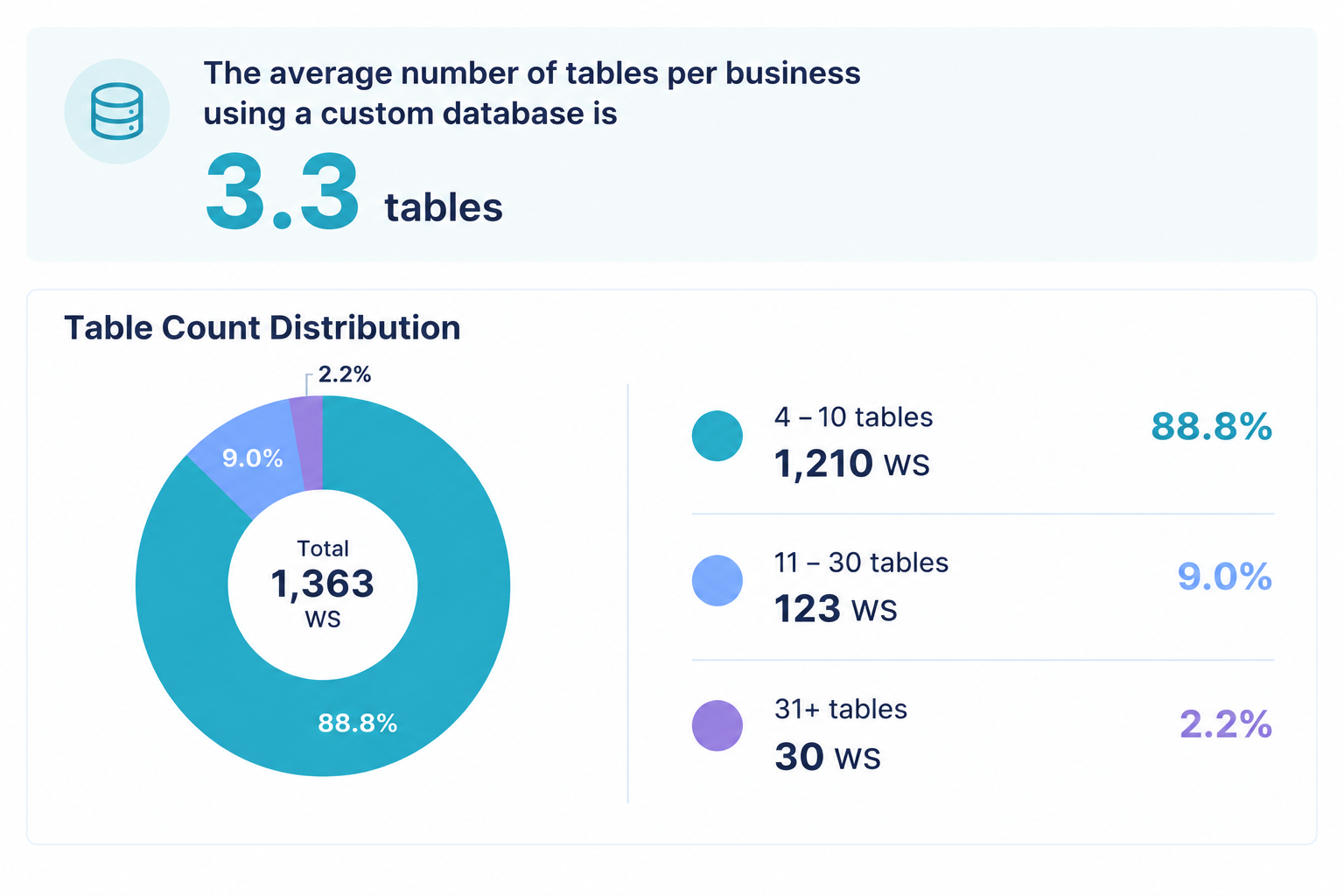
Do businesses use custom database software to build massive systems with dozens of complex tables?
In reality, the evidence points to the exact opposite.
Companies use custom databases not to proliferate data tables, but to minimize them—ideally consolidating all essential information into a single, at-a-glance view.
Data from over 1,300 active workspaces reinforces this pattern:
- Table Structure Distribution: 88.8% of active business databases operate with 1 to 10 tables (averaging 3.3 tables per workspace). Only 2.2% of workspaces require 31 or more tables.
- Relational Depth: Over 99% of workspaces utilize straightforward 1- to 2-tier relationships (e.g., "Parent Client Record" linked to "Child Invoices"). Multi-tiered relational structures (3 or more levels deep) account for less than 1% of active setups.
Where standalone CRMs or specialized SaaS applications force users to navigate between fragmented sub-screens, a custom database brings disparate data points together into a clear, single-page reference.
Reflecting Small Daily Updates Instantly in a Single View
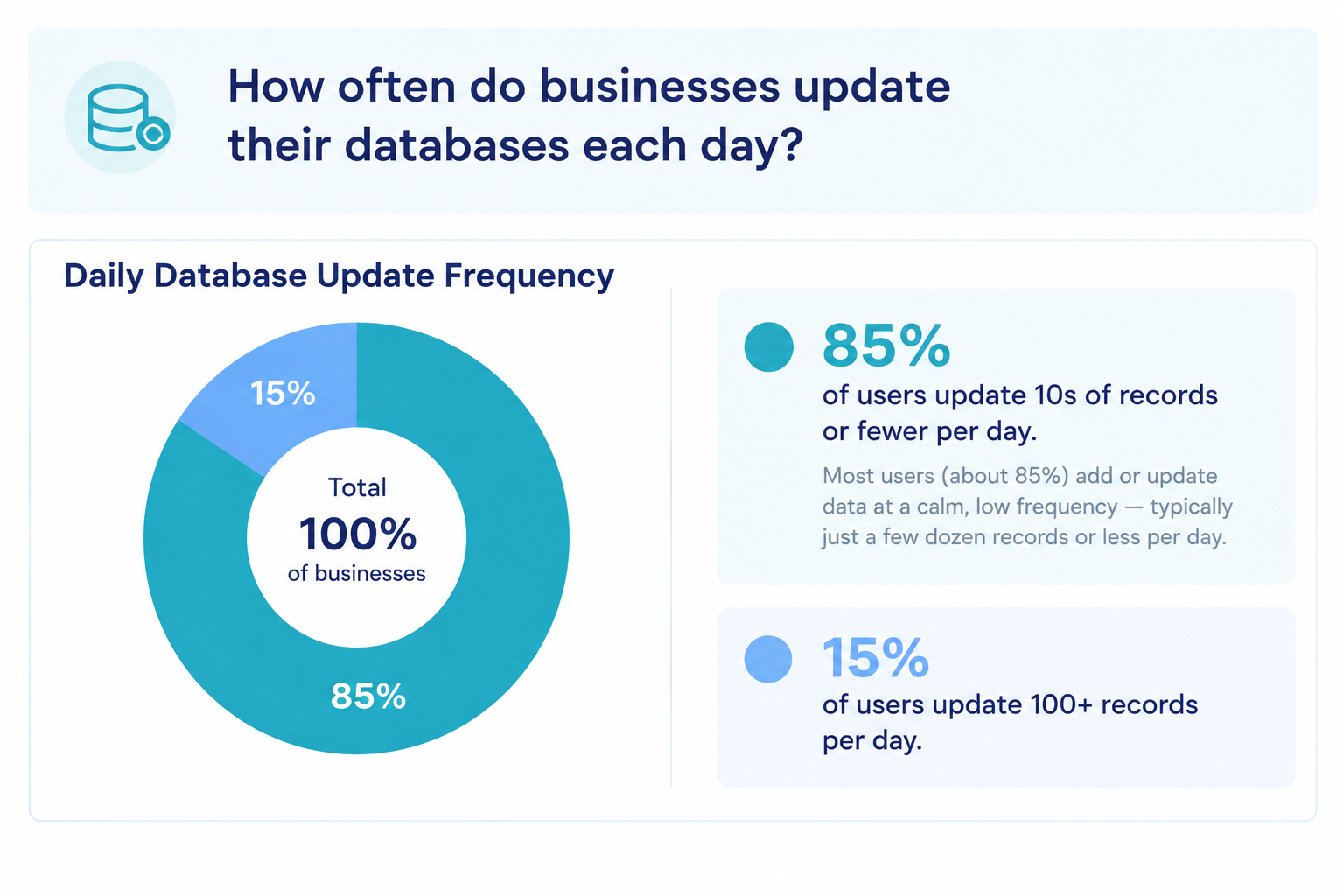
Another key insight lies in how data is actually updated. Processing massive volumes of records—such as executing over 100 automated data tasks per day—is surprisingly rare, occurring in less than 15% of workspaces. Instead, more than 85% of active databases handle smaller, routine updates on an ongoing basis.
Because these small daily updates are often performed manually across different tools, they frequently become a primary cause of data lag and information gaps between departments. By centralizing records within a custom database, teams eliminate these manual friction points and ensure that accurate, up-to-date information is always available in one single location.
Custom Database Software Comparison|Which is Best for You?
There is no single "best" custom database software for every business. The right platform depends entirely on what data you need to manage, the level of detail your operations require, and how you plan to automate work across your existing tools.
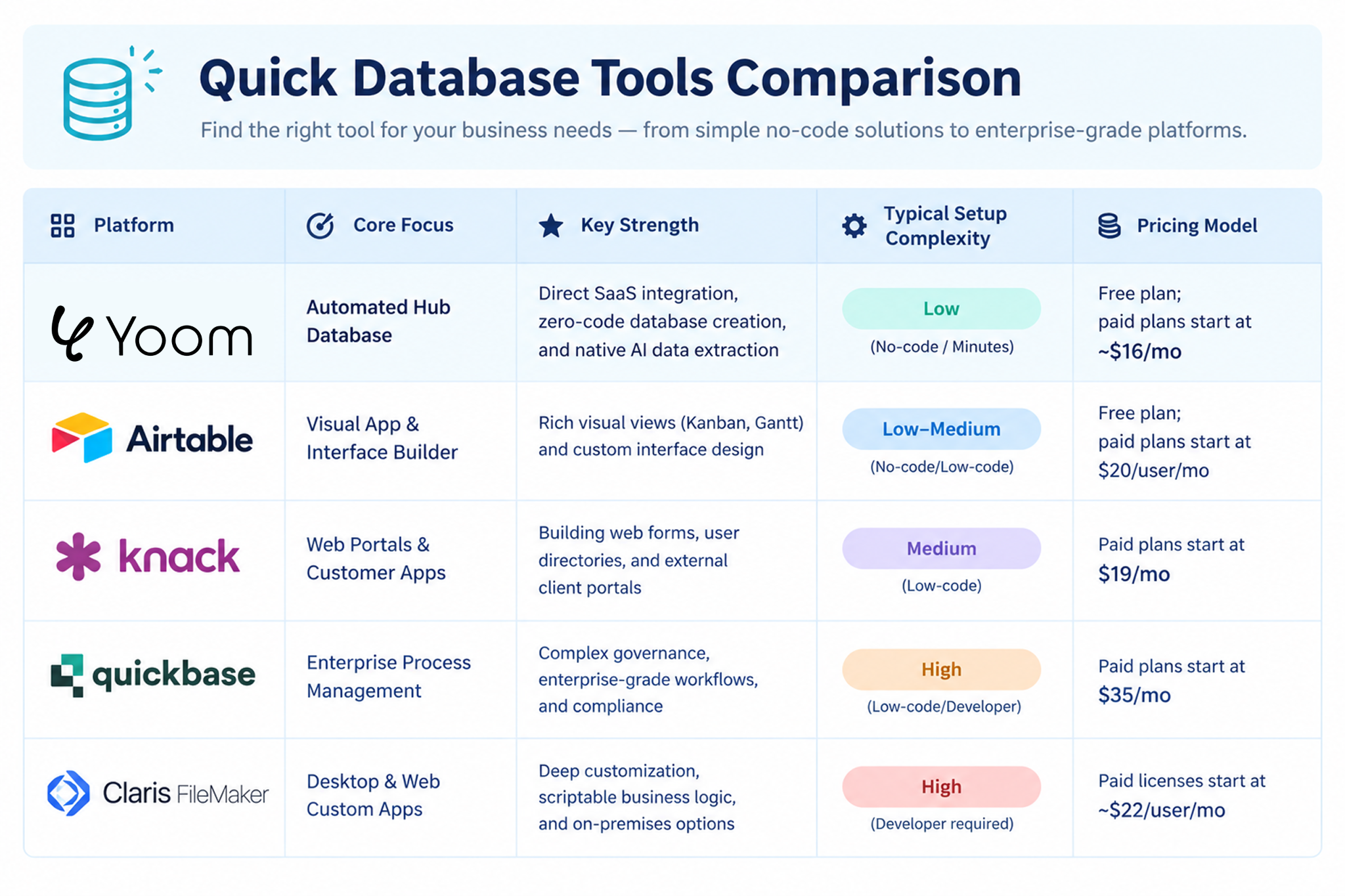
Below is an overview of the leading platforms in 2026, categorizing them by their primary strengths, technical complexity, and operational focus.
Yoom
Yoom functions as an automated hub database, combining relational tables directly with an API integration engine and AI capabilities.
- SaaS Integration: Designed to act as the operational layer between disconnected software tools. When data is updated in YoomDB, it can automatically update records across connected CRMs, accounting systems, and communication channels.
- AI Extraction: Includes native functions to parse unstructured data from documents (such as PDF receipts or email threads) into structured database columns.
- Data Migration: Standard CSV imports do not consume monthly task quotas during initial table setup.
- Best For: Businesses looking to eliminate manual data re-entry between existing SaaS applications without writing code.
Airtable
Airtable is a widely used relational database tool that emphasizes visual customization and interface design.
- Interface Builder: Enables teams to design custom dashboards and front-end layouts tailored to specific user roles based on underlying tables.
- Extensive Ecosystem: Offers a large selection of pre-built templates and third-party extensions.
- Best For: Teams needing custom internal interfaces, project tracking dashboards, and flexible visual views.
Knack
Knack focuses on transforming database tables into web-based applications and public-facing or gated portals.
- Portal Creation: Allows users to set up custom web forms, searchable directories, and member-only portals directly on top of database records.
- Custom Rules: Supports granular display rules and multi-step forms without custom coding.
- Best For: Organizations that need to collect data from or display records to external users and clients.
Quickbase
Quickbase is an enterprise-oriented low-code platform built for complex, high-volume business operations.
- Governance and Security: Provides enterprise-level access controls, audit logs, and compliance management.
- Complex Workflows: Handles large-scale business process management across complex organizational hierarchies.
- Best For: Large enterprises requiring strict governance, custom compliance controls, and dedicated support.
Claris FileMaker
FileMaker is a long-standing custom app development platform that offers deep control over data structures and offline/on-premises deployment.
- Full Customization: Supports custom scripting, layout design, and offline data sync for desktop and mobile applications.
- Flexible Hosting: Can be hosted on-premises or in cloud environments.
- Best For: Organizations with dedicated in-house developers requiring fully tailored, legacy-compatible software.
See Yoom's Database Templates
https://lp.yoom.fun/en/db-templates
Fast, Simple, and Accurate Databases with Yoom
With Yoom, teams can instantly establish a central database that stays simple, accurate, and automatically updated across all connected applications.
Here is how to set up an automated custom database in three straightforward steps:
Step 1: Import Existing Data Instantly
Instead of configuring table schemas from scratch, start by migrating existing operational records directly from spreadsheets.
- Organize your data in Excel or Google Sheets with clear column headers.
- Export the file as a .csv file.
- Import the file into YoomDB to automatically generate a structured database table.
- Set explicit column types (such as Email, Currency, Date, or Single Select) to enforce data consistency.
Note: Standard CSV imports into YoomDB do not consume monthly task quotas during setup.
Step 2: Automate SaaS Data Syncing (Eliminating Manual Updates)
To ensure the database remains an accurate single source of truth, connect Yoom to the specialized software tools your team uses every day.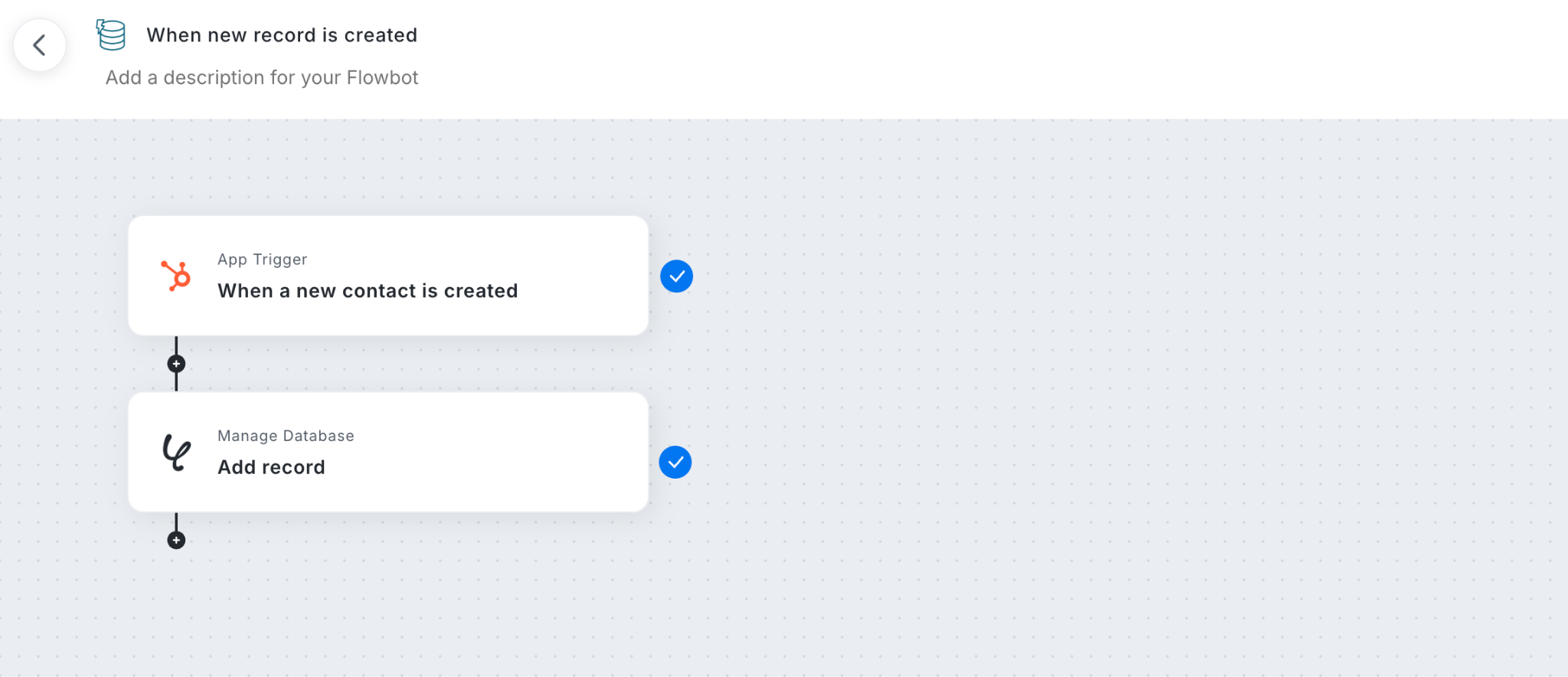
- CRM Syncing: Connect platforms like Salesforce or HubSpot to update customer records and deal statuses in real time.
- Financial Syncing: Link accounting tools like QuickBooks or Xero to pull invoice statuses and payment details directly into corresponding rows.
- HR Syncing: Sync HR systems like Gusto, Rippling, or BambooHR to reflect new hires and organizational changes automatically.
Because external updates trigger background syncing automatically, team members never have to re-key data or cross-check separate tools. Anyone opening the database sees identical, up-to-date records.
Step 3: Configure Event-Driven Workflows
With accurate data centralized in one place, status changes within your table can trigger automated background tasks across your software stack.
- Instant Team Alerts: Trigger real-time notifications in Slack or Microsoft Teams when critical fields change (e.g., when a record moves to "Needs Review").
- Automated Document Creation: Generate PDF contracts, quotes, or receipts using row data as soon as a deal reaches a specific stage.
- Task Dispatches: Assign follow-up actions to relevant team members automatically based on conditional logic set within the table.
By combining direct SaaS integrations with background workflows, Yoom eliminates the need for manual data maintenance. Once connected, team members can refer to a single, unified database table with complete confidence that they are viewing accurate, real-time information.