


・
15 FAQs About Automation Tools

- Q1. What Are Automation Tools?
- Q2. Should I Choose a Department-Specific Automation Tool or a Company-Wide Automation Platform?
- Q3. Can Automation Tools Process Paper Documents?
- Q4. What Is the Difference Between Automation Tools and AI Tools?
- Q5. What Is the Difference Between Automation Tools and RPA?
- Q6. What Are the Benefits of Automation Tools?
- Q7. Are Automation Tools Secure?
- Q8. What Are the Most Popular Automation Use Cases?
- Q9. Do I need programming skills or an engineering background to use automation tools?
- Q10. Can Beginners Struggle with No-Code Automation Tools?
- Q11. How Should I Get Started with Automation Tools?
- Q12. Do I Need a Dedicated Computer or Server to Run Automation Tools?
- Q13. How Do I Choose the Right Automation Tool for My Business?
- Q14. Are Free Automation Tools Enough for Business Use?
- Q15. Are Automation Tools Only for Businesses, or Can Individuals Use Them Tools?
Q1. What Are Automation Tools?
Automation tools are software that automatically handle tasks people would otherwise perform manually, such as entering data, transferring information between apps, sending notifications, and creating documents. They use predefined rules, AI, or a combination of both to reduce repetitive work, improve efficiency, and prevent data entry errors.
Automation tools range from solutions designed for specific departments to platforms that support automation across an entire company.
For example, sales and HR teams may use specialized tools for their own processes, while an all-in-one business automation platform like Yoom connects apps across departments and automates tasks throughout the organization.
Q2. Should I Choose a Department-Specific Automation Tool or a Company-Wide Automation Platform?
The right choice depends on what you want to automate.
If your work requires highly specialized knowledge, such as legal expertise, a dedicated tool designed for that field may be a better fit.
However, if you want to automate tasks using the apps your company already relies on while keeping costs under control, a company-wide automation platform may be a better choice. These platforms allow different departments to connect their apps and automate processes without having to introduce a separate tool for every team.
Q3. Can Automation Tools Process Paper Documents?
It depends on the tool. Automation tools with optical character recognition (OCR) can convert information from paper documents into digital data.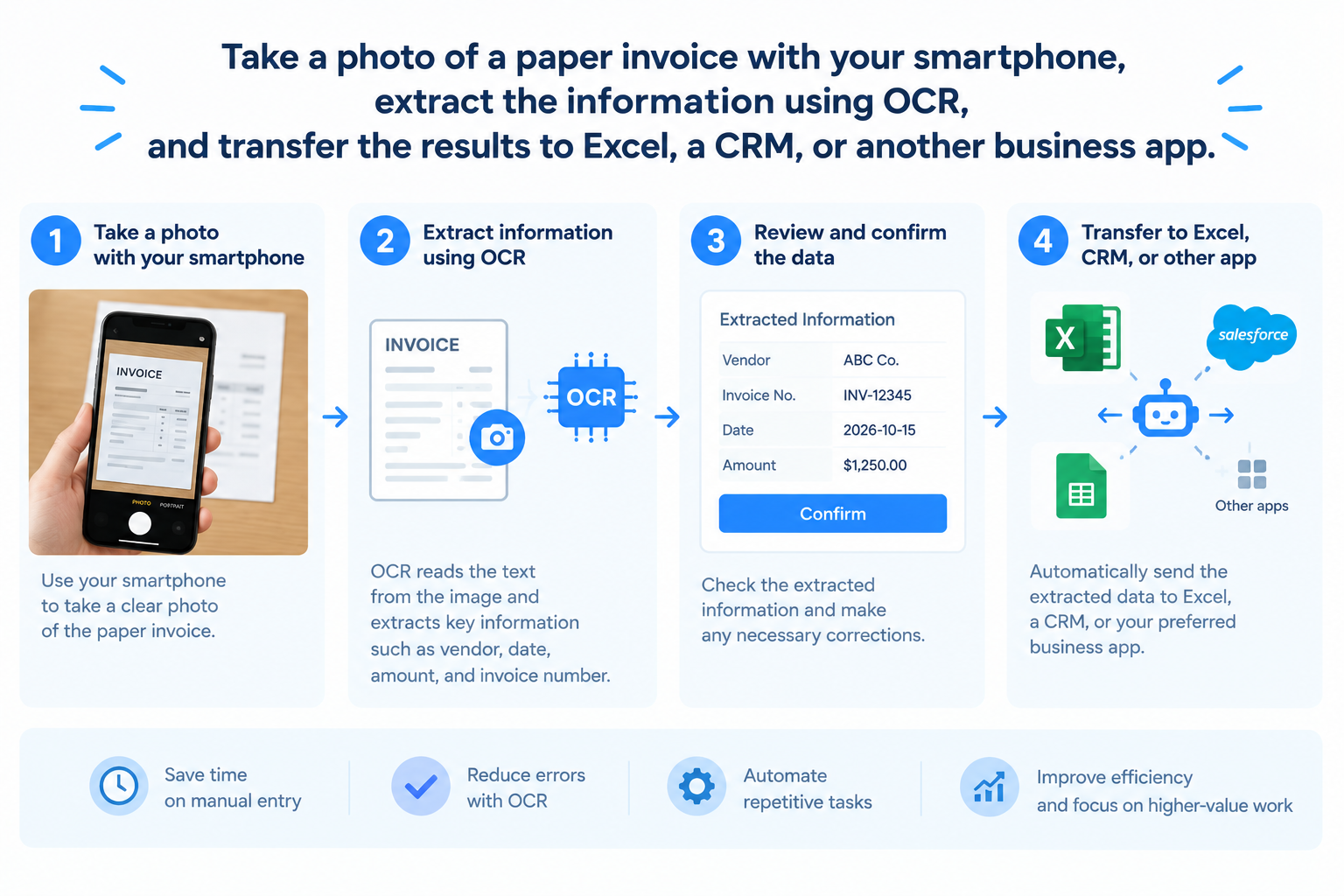
For example, you can take a photo of a paper invoice with your smartphone, extract the information using OCR, and transfer the results to Excel, a CRM, or another business app.
This reduces the need to enter document information manually.
Learn more about OCR and how it works.
Q4. What Is the Difference Between Automation Tools and AI Tools?
AI tools such as ChatGPT and Gemini can generate content, summarize information, and answer questions. However, users often need to provide prompts (instructions) each time they want to perform a new task.
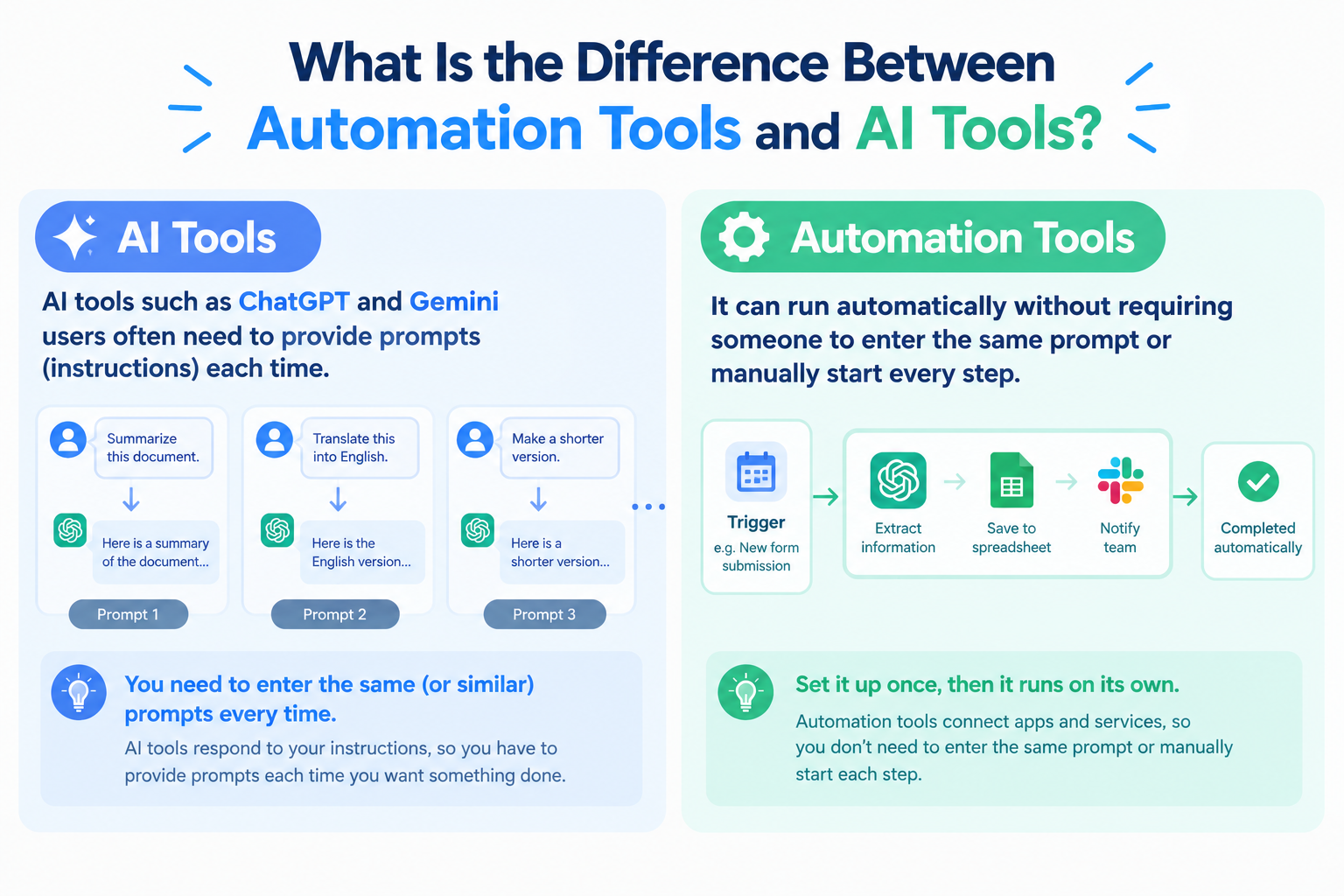
Automation tools work differently. Once an automation is set up, it can run automatically without requiring someone to enter the same prompt or manually start every step. You can also incorporate AI into the process when a task requires it.
Using AI alone also carries risks, such as hallucinations (incorrect information presented as fact) and inconsistent outputs. Automation tools let you use AI for specific steps while keeping other steps governed by predefined rules. You can also add human approval steps before important actions are completed.
This combination helps businesses balance flexibility with reliability: AI handles tasks that require interpretation, while rules and human review help keep the overall process under control.
Q5. What Is the Difference Between Automation Tools and RPA?
Robotic process automation (RPA) automates computer tasks by reproducing actions that a person would normally perform. Depending on the tool, this can require detailed configuration, such as specifying which buttons to click and how to navigate between screens.
.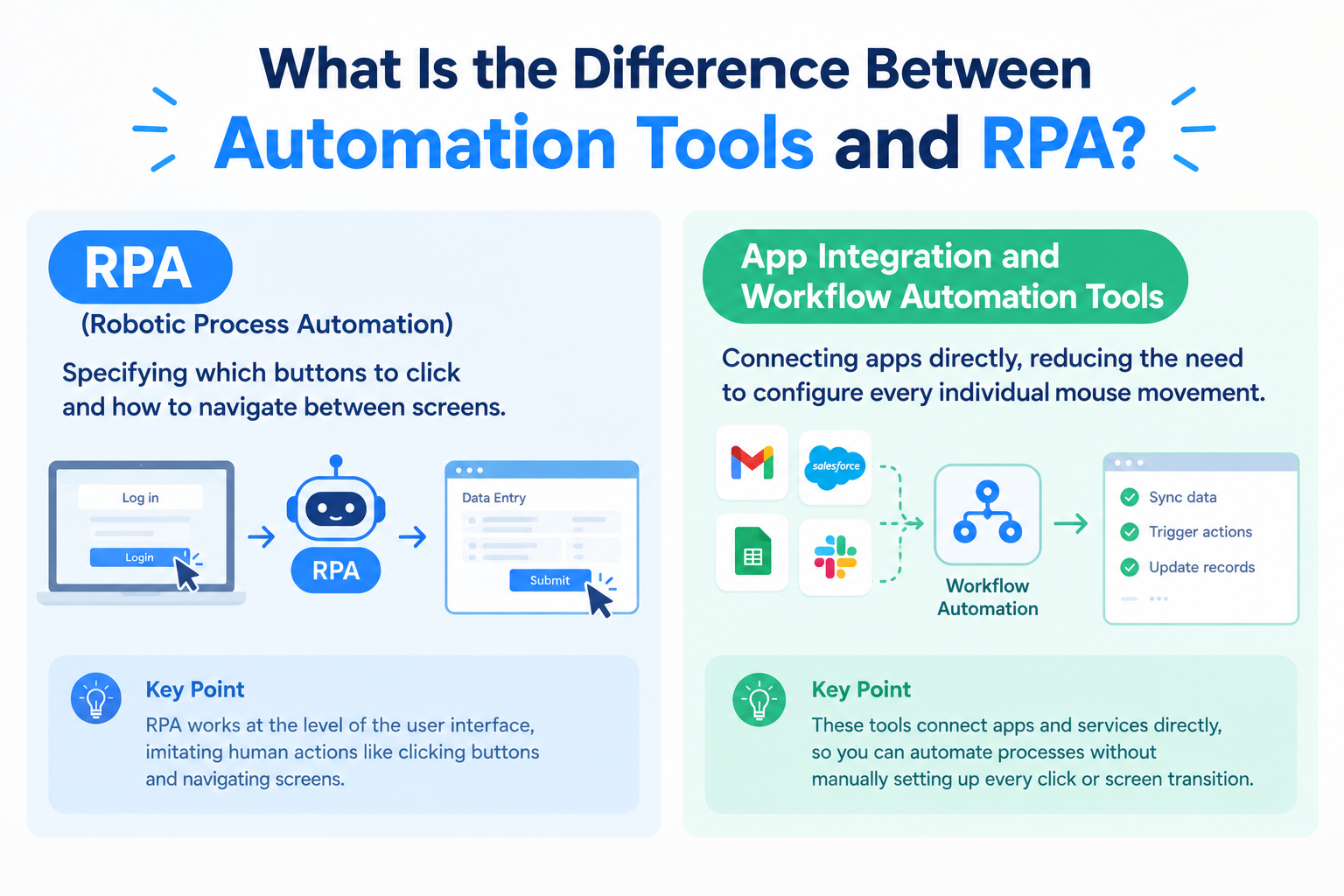
As a result, setup can be much faster for processes that are supported by direct app integrations.
For example, one Yoom customer was able to implement an automation in just two hours, compared with one month using RPA.
The actual setup time depends on the process, the systems involved, and the approach used, but choosing the right automation method can make a significant difference.
Q6. What Are the Benefits of Automation Tools?
Two major benefits are saving time and reducing dependence on individual employees.
1. Save time by reducing manual work
Automation tools connect apps and coordinate a series of tasks automatically. Instead of manually copying data, switching between systems, and sending notifications, employees can let the process run automatically.
Some tasks that previously required repeated manual work can be completed in seconds once the automation is configured.
In one Yoom customer case, automation helped the company save 2,000 hours per year.
2. Reduce dependence on individual employees
Automation can also help teams make better use of internal knowledge and reduce the need to rely on specific employees for routine tasks and questions.
For example, if your company stores procedures and operational information in tools such as Jira or Excel, you can connect relevant information to an automated process. Employees may then be able to find the information they need or trigger the appropriate next step without repeatedly asking a particular colleague where to find information or how to handle a task.
By combining internal knowledge with automation, businesses can make routine processes easier to follow and reduce the burden on employees who would otherwise need to answer the same questions repeatedly.
Q7. Are Automation Tools Secure?
Security depends on the tool and how it is configured. Some automation platforms offer features such as two-factor authentication, SAML-based authentication, and IP address restrictions to help organizations control access.
Before adopting a tool, check whether its security features meet your company's requirements, especially if you handle confidential or sensitive information.
There are also situations where standard cloud services may not be permitted. For example, organizations operating in restricted government environments, such as AWS GovCloud-based environments, may face specific requirements that limit which third-party cloud services they can use.
If your organization has strict security or compliance requirements, confirm compatibility with your IT and security teams before implementation.
Q8. What Are the Most Popular Automation Use Cases?
In our data, common use cases include transferring data to spreadsheets such as Excel and Google Sheets, as well as automatically sending internal notifications through chat apps such as Slack.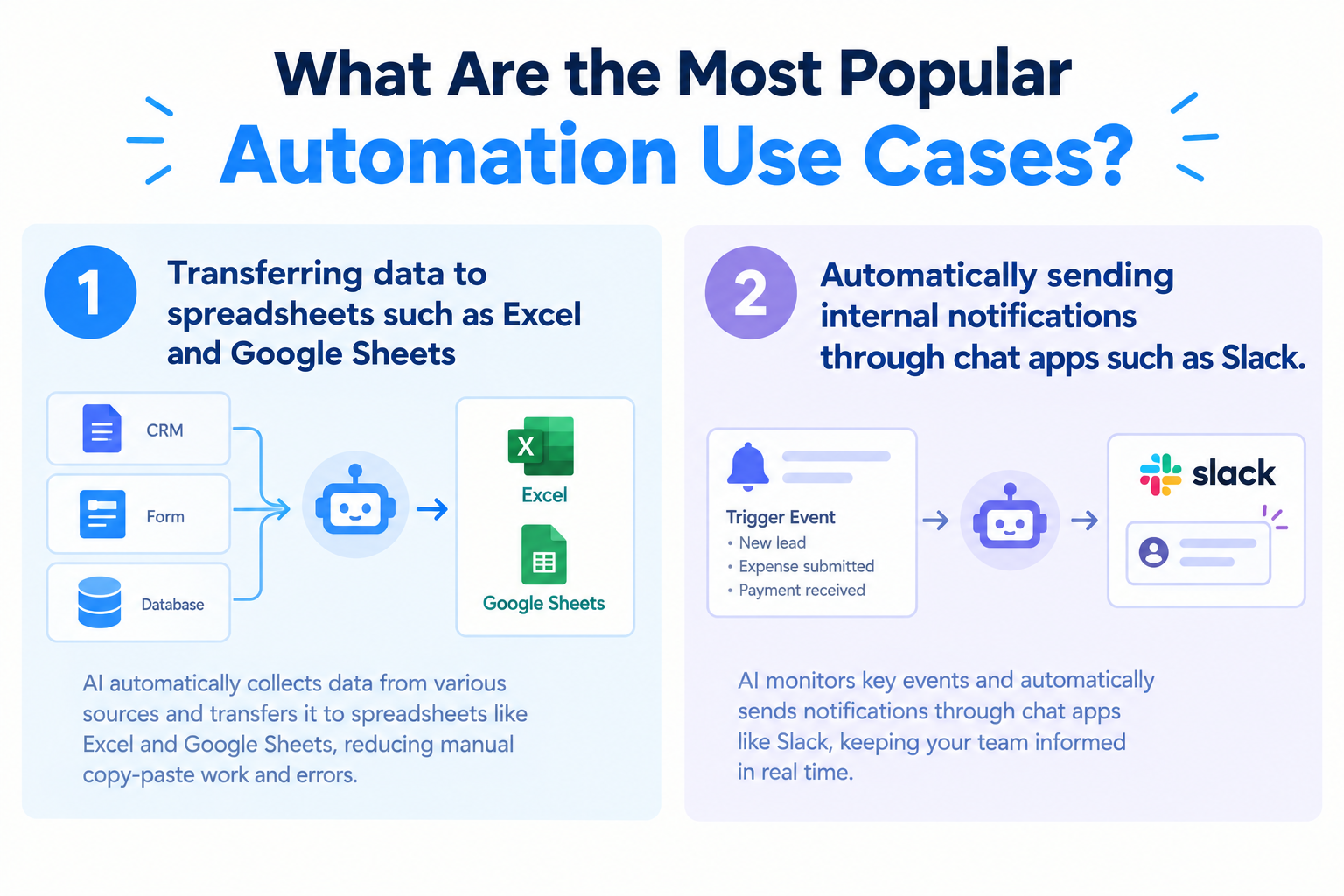
For example, when a new form is submitted, an automation can register the information in a spreadsheet or CRM and notify the relevant team in Slack. This eliminates repetitive copying and pasting and helps employees respond more quickly.
Also AI-powered automation is also being used for a wider range of tasks. In 2026, examples include: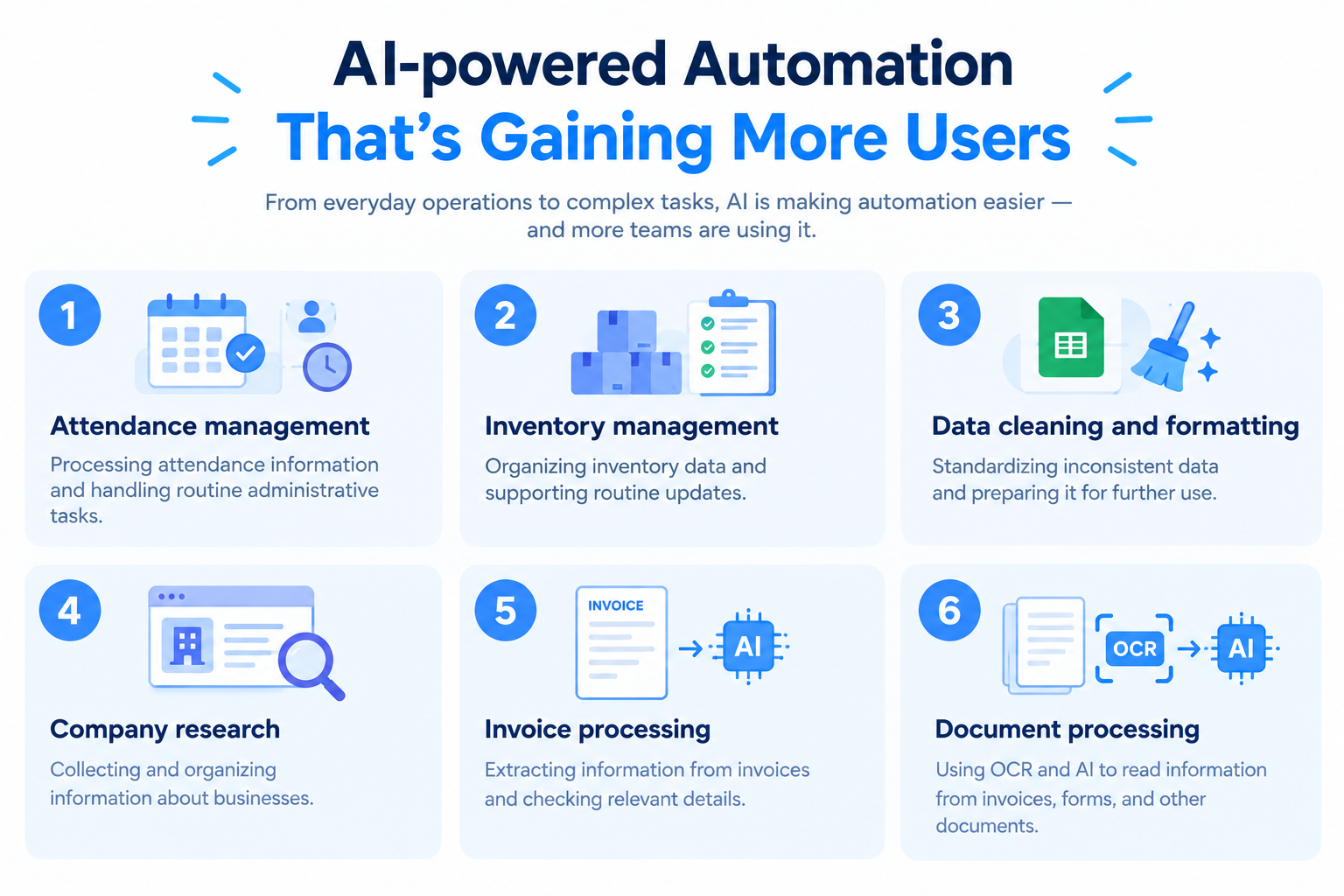
- Attendance management: Processing attendance information and handling routine administrative tasks.
- Inventory management: Organizing inventory data and supporting routine updates.
- Data cleaning and formatting: Standardizing inconsistent data and preparing it for further use.
- Company research: Collecting and organizing information about businesses.
- Invoice processing: Extracting information from invoices and checking relevant details.
- Document processing: Using OCR and AI to read information from invoices, forms, and other documents.
These use cases combine app connections with AI-based information processing, allowing businesses to automate not only data transfers but also tasks that previously required employees to read and interpret information.
Q9. Do I need programming skills or an engineering background to use automation tools?
It depends on the tool.
Some automation solutions may require technical knowledge, such as understanding JSON, APIs, or data formats, particularly when RPA processes.
However, no-code automation platforms allow users to build processes by selecting apps, triggers, and actions through a visual interface. With these tools, you can start automating tasks without writing code.
Yoom is designed to let users configure app connections and automated processes through its interface, making it accessible to people without programming experience.
In Yoom's case, more than 80% of users are non-engineers.
This makes automation particularly useful for companies that want employees on the front lines of their operations to improve processes themselves, rather than relying on engineers for every change.
Q10. Can Beginners Struggle with No-Code Automation Tools?
Honestly,yes. Even when no programming knowledge is required, setting up an automation can be challenging at first.
The main difficulty is often breaking down your everyday work into individual steps. Many tasks are performed almost unconsciously, so it can be difficult to identify every action, decision, and exception that needs to be included in the automation.
For example, before automating an approval process, you may need to determine which information is required, who should approve the request, and what should happen if information is missing.
There are two ways to make the initial setup easier:
Option 1. Use an automation template
Templates provide a starting point for common business processes, so you do not have to build everything from scratch. You can select a relevant template and adjust it to fit your needs.
Explore Yoom's automation templates.
Option 2. Let AI help build the automation
If you know what you want to automate but are unsure how to configure it, AI-assisted tools can help turn your instructions into an initial automation.
Yoom's AI Worker helps users build and execute processes using natural-language instructions, reducing the effort required to get started.
Learn more about Yoom AI Worker.
Q11. How Should I Get Started with Automation Tools?
The best approach is to start small.
If you are new to automation, the initial setup may take more effort than you expect. Trying to automate a large, complicated process right away can make it harder to understand the tool and identify problems.
Instead, start with a simple process that has only a few steps. For example, you could automatically send a Slack notification whenever an email arrives that meets specific conditions.
Once you understand how the automation works and can see the results, you can gradually expand to more complex processes.
The initial goal should not be to build the most sophisticated automation possible. Instead, focus on seeing the benefits of automation while keeping setup effort and time to a minimum. Starting with a manageable task can help you build confidence and avoid giving up before you see results.
Q12. Do I Need a Dedicated Computer or Server to Run Automation Tools?
It depends on the tool.
Some RPA tools run directly on a dedicated computer and may stop working if the computer shuts down or the automation loses access to the required browser or application.
Cloud-based automation platforms work differently. With a cloud-based tool such as Yoom, supported automations can run in the cloud, so you do not need to keep your browser open or leave your computer performing the task.
For example, once an automation is enabled, it can process a new form submission, transfer information between apps, or send a notification while you are working in another application.
This allows you to run supported automations in the background without dedicating your computer to every process.Q13. How Do I Choose the Right Automation Tool for My Business?
Price matters, but it should not be the only factor.
First, check whether the tool supports the apps you want to connect. If your existing systems are not supported, you may not be able to automate the process as planned.
Next, consider ease of use. Even an inexpensive tool will not provide much value if employees find it too difficult to configure or maintain. A tool that feels intuitive to the people who will actually use it is more likely to become part of their everyday work.
When comparing tools, consider:
- App compatibility: Does the tool support your existing business apps?
- Ease of use: Can your team configure and manage automations comfortably?
- Automation capabilities: Does it support the processes you want to automate?
- Pricing and limits: Will the plan accommodate your expected usage?
- Trial options: Can you test the tool before making a commitment?
If possible, use a free plan or free trial to test a real business process. This allows you to evaluate the setup experience and confirm that the tool fits your team's needs before committing to a paid plan.
Q14. Are Free Automation Tools Enough for Business Use?
Free automation tools can be enough to test simple processes and automate a small number of tasks. However, if you want to build more complex automations or process large volumes of data, you may run into limits on the number of tasks or credits available.
For example, Yoom's free plan has included the following limits in the plan information provided for this article:
What you can do
- Run up to 100 tasks (credits) per month.
- Create up to 5 Flowbots.
- Configure up to 5 operations per Flowbot.
- Create up to 5 databases.
Features that may not be available on the free plan
- Certain app integrations.
- Custom apps and custom API connection settings.
- Operations between steps in a Flowbot.
- AI features such as OCR, transcription, summarization, translation, calculations, and text extraction.
- RPA functionality.
- Form customization.
- Individual setup support, including meetings.
- Certain security settings.
Plan limits and available features may change, so check Yoom's current pricing and plan details before making a decision.
If you are just getting started, a free plan can be a useful way to test whether automation will help your business. If you later need more tasks, advanced processing, or additional security features, you can evaluate whether a paid plan is worthwhile.
Q15. Are Automation Tools Only for Businesses, or Can Individuals Use Them Tools?
Automation tools can also be useful for freelancers and individual business owners.
They are particularly helpful if your work involves using a computer to repeatedly copy and paste information, organize spreadsheets, clean up data, or perform other routine administrative tasks.
For example, if you frequently use Excel formulas to format or reorganize data, you may be able to automate part of the process. You can also connect forms, spreadsheets, and communication apps to reduce the need to switch between tools and update information manually.
You do not need to run a large company to benefit from automation. Even automating one repetitive task can save time and make your daily work easier.