


・
Best Finance Automation Platform: 87.5% of Finance Automations Don’t Use Dedicated Finance Software

- 87.5% of Finance Automations Don’t Use Dedicated Finance Software
- How Teams Build Their Own Finance Automation Systems
- Best Finance Automation Platforms and Tools
- Dedicated FP&A Software vs. a Finance Automation Platform
- Which Option Is Right for Your Team?
- Common Finance Automation Use Cases
- How AI Makes Finance Automation More Useful
- How Much Time Can Finance Automation Save?
- The Challenge of Getting Started with Finance Automation
When choosing a finance automation platform, businesses generally have two options: specialized finance platforms designed specifically for financial tasks, or general automation platforms that can be used across the entire company.
You might think that automating finance tasks requires a platform built specifically for finance. After all, managing budgets, forecasting cash flow, and handling financial data can involve complex processes.
However, our data reveals a different picture. 87.5% of the finance automations in our study ran without dedicated finance software. Instead, these automations used general business apps connected through an automation platform.
How are these businesses automating their finance tasks without specialized software?
Let's explore what the data reveals and how companies use finance automation in practice.
87.5% of Finance Automations Don’t Use Dedicated Finance Software
We analyzed execution data from active financial automations on Yoom to understand how companies automate finance tasks.
Our data reveals that 87.5% of the financial automations studied run without dedicated finance software. Instead, they connect general business apps through an automation platform.
- Without Dedicated Finance Software (87.5%): These automations use existing business apps, such as Google Sheets, Airtable, Word, Salesforce, and Slack, without relying on specialized finance software.
- With Dedicated Finance Software (12.5%): These automations connect to specialized financial planning, budgeting, or enterprise performance management software.
This suggests that teams can automate many finance tasks using the business apps they already have, without introducing a dedicated finance system.
Traditional Finance Software vs. Connected Finance Automation
Traditional approach
- Financial data → Dedicated FP&A software → Export to Excel for further work
Teams may still need to move data between systems manually.
Connected approach
- Existing apps (CRM and spreadsheets) → Finance automation platform → Updated budget records and Slack notifications
A finance automation platform connects existing tools and automatically transfers information between them. This makes it easier to keep financial data up to date and respond to changes.
How Teams Build Their Own Finance Automation Systems
Among the general business app automations in our data, we identified three main approaches.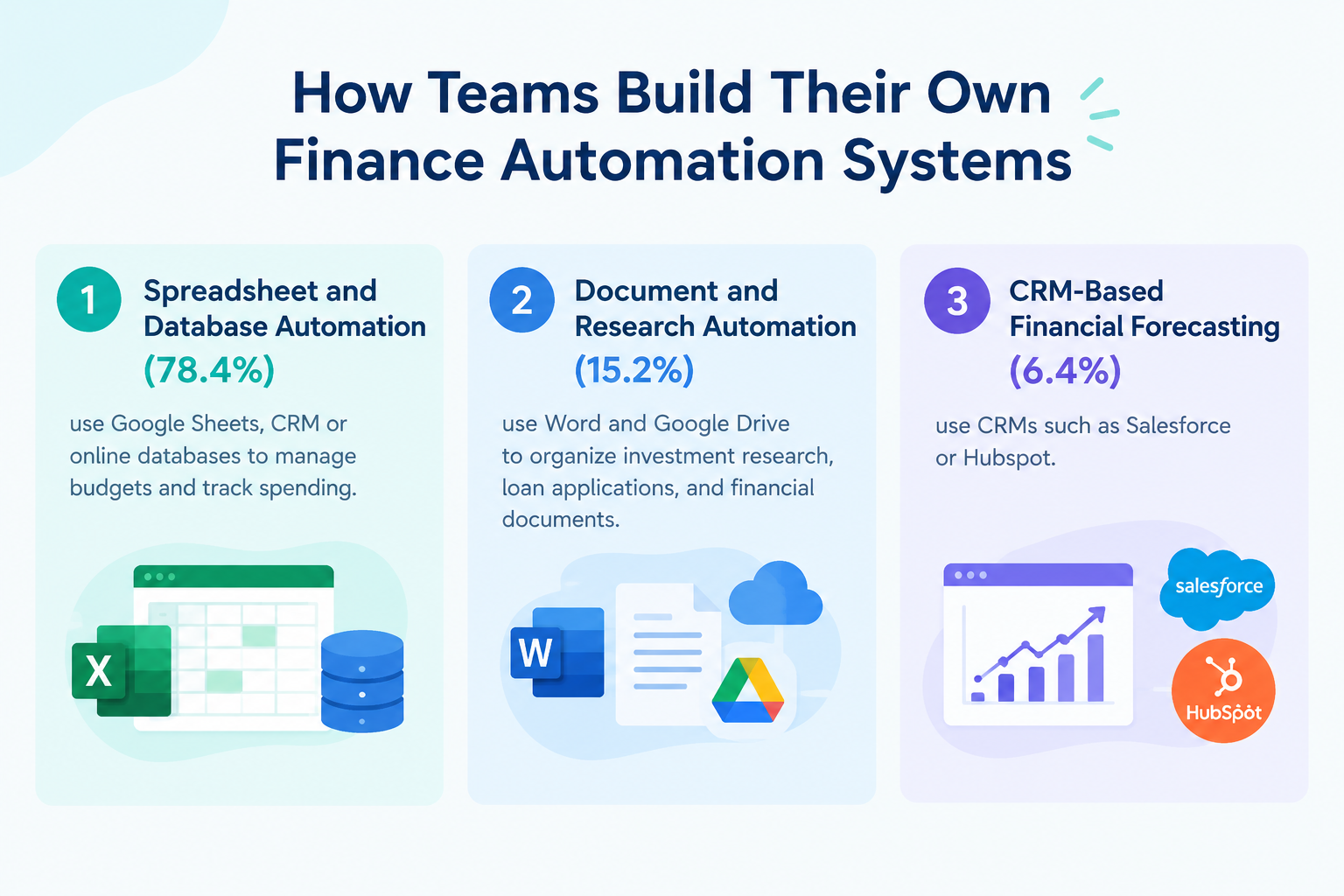
1. Spreadsheet and Database Automation (78.4%)
Many teams use Google Sheets or online databases to manage budgets and track spending.
For example, when a manager submits a budget request through a form, an automation can:
- Add the request to a budget spreadsheet.
- Calculate how much of the budget has been used.
- Send an approval request to the relevant manager through Slack.
- Update the budget records after approval.
This reduces manual data entry and makes it easier to track spending.
2. Document and Research Automation (15.2%)
Some teams use Word and Google Drive to organize investment research, loan applications, and financial documents.
AI can summarize long reports and extract important information, helping finance teams review documents more efficiently.
3. CRM-Based Financial Forecasting (6.4%)
Sales data can also help finance teams estimate future revenue.
For example, an automation can collect expected deal values and closing dates from Salesforce or HubSpot. The team can then use this information to update its revenue forecast and estimate future cash flow.
Best Finance Automation Platforms and Tools
The best finance automation software depends on what you want to automate. Some tools focus on connecting different apps, while others specialize in payments or financial close management.
Here are four options to consider.
1.
Yoom
: Best for Custom Finance Automation and AI
Yoom is a no-code automation platform that connects business apps, databases, and AI to help teams automate repetitive work.
How it helps with finance automation
Yoom can connect budget spreadsheets, CRM systems, databases, and communication tools. For example, it can collect purchase requests, use AI to categorize expenses, send approval requests through Slack, and update budget records automatically.
Teams can create automations that fit their existing processes instead of moving all their data into a dedicated financial planning system.
Key features
- Visual automation builder that does not require coding.
- Built-in database for storing and managing information.
- AI Workers that can interpret text and organize financial information.
- Connections with business apps such as Salesforce, Excel, and Slack.
Best for: Finance managers, CFOs, and operations teams that want to automate budget tracking, approvals, and financial data management using their existing tools.
Pricing: Free plan is available. Paid plans start at ~$16/month.
2.
Zapier
: Best for Connecting Apps and Sending Alerts
Zapier connects different apps and lets users automate tasks by setting a trigger and an action.
How it helps with finance automation
For example, when a payment is completed in Stripe, Zapier can automatically add a record to a spreadsheet or send a notification to the finance team.
Key features
- Connections with thousands of third-party apps.
- Simple trigger-and-action automations.
- Useful for transferring data and sending notifications between apps.
Best for: Small teams that need straightforward automations, such as recording transactions or sending payment alerts.
Pricing: Free plan is available. Paid plans start at $19.99/month.
3.
Tipalti
: Best for Global Payments
Tipalti specializes in accounts payable and global payment management.
How it helps with finance automation
Businesses can use Tipalti to automate parts of supplier onboarding, tax information collection, payment processing, and international payouts.
Key features
- Supplier payment management.
- Support for international payment processes.
- Tools for managing payment and tax compliance requirements.
Best for: Growing and enterprise businesses that manage large numbers of suppliers or international payments.
Pricing: No free plan or trial is available. Paid plans start at $99/month.
4.
Numeric
: Best for Financial Close Automation
Numericl offers tools for finance teams that want to improve accounting and financial reporting processes.
How they help with finance automation
These tools focus on tasks such as tracking month-end close activities, reviewing account balances, and identifying differences in financial records.
Key features
- Support for financial close processes.
- Tools for reviewing and reconciling account balances.
- Better visibility into outstanding accounting tasks.
Best for: Finance and accounting teams that want specialized tools for month-end close and financial record management.
Pricing: No free plan or trial is available. Contact the sales team for paid plan pricing.
Dedicated FP&A Software vs. a Finance Automation Platform
Which is the better choice for your team? It depends on the type of work you need to automate.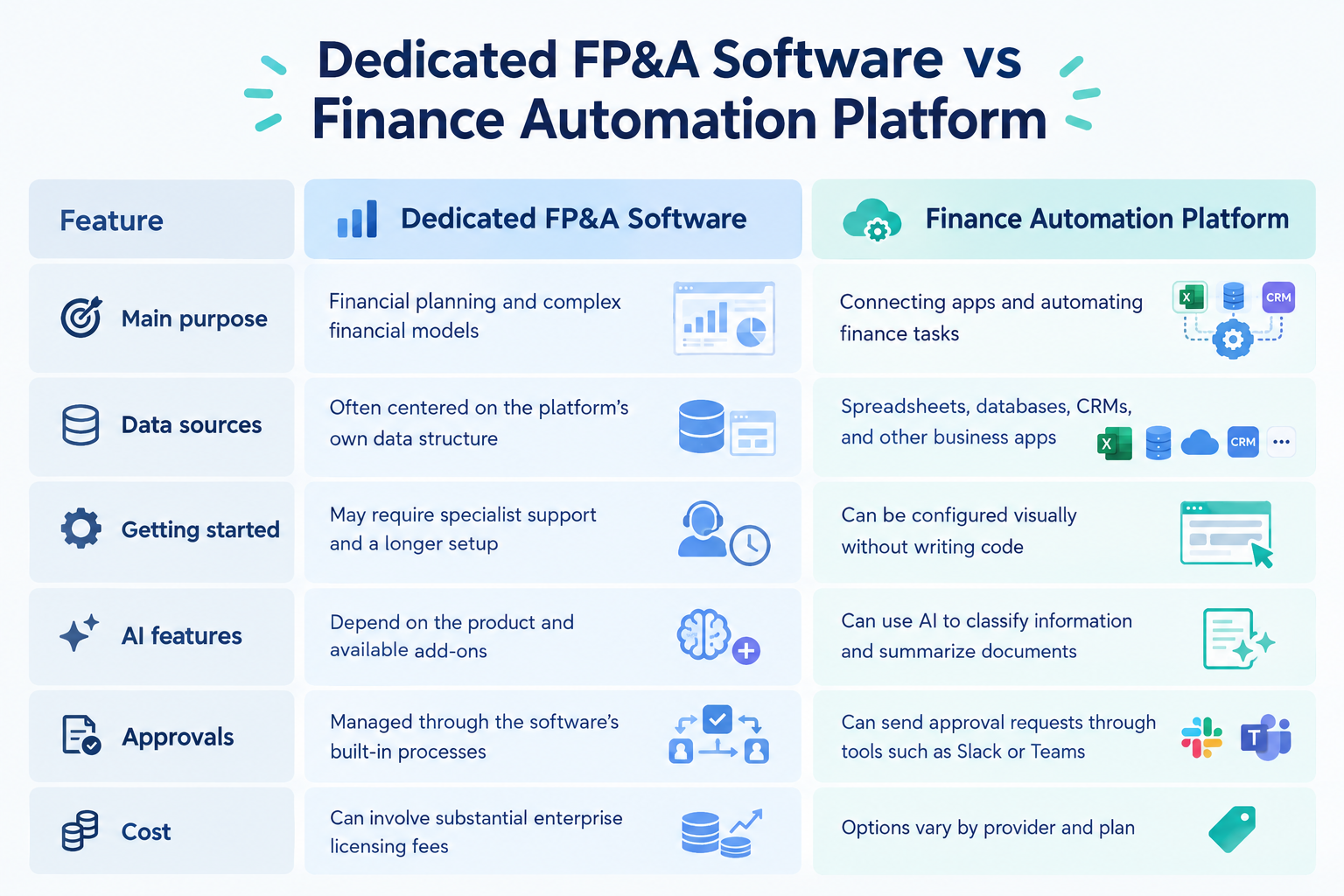
1. Main Purpose
- Dedicated FP&A Software: Focuses on financial planning, budgeting, and complex financial models.
- Finance Automation Platform: Connects different apps and automates repetitive finance tasks, such as data entry, reporting, and approvals.
2. Data Sources
- Dedicated FP&A Software: Often uses its own data structure to manage financial information.
- Finance Automation Platform: Connects existing tools, such as spreadsheets, databases, CRM systems, and other business apps.
3. Getting Started
- Dedicated FP&A Software: May require specialist support and a longer setup process.
- Finance Automation Platform: Lets users build automations with a visual editor, without writing code.
4. AI Features
- Dedicated FP&A Software: AI features depend on the product and may require additional tools or paid add-ons.
- Finance Automation Platform: Can use AI to categorize financial information, summarize documents, and organize data.
5. Approval Processes
- Dedicated FP&A Software: Approvals are typically managed within the software's built-in processes.
- Finance Automation Platform: Can send approval requests through tools your team already uses, such as Slack or Microsoft Teams.
6. Cost
- Dedicated FP&A Software: May involve substantial licensing fees, especially for enterprise plans.
- Finance Automation Platform: Pricing varies by provider and plan, with options for different business needs.
Which Option Is Right for Your Team?
The right solution depends on your team's expertise and how much of the financial process you want to automate.
Choose Specialized Finance Software If You Need Help With Financial Decisions
If your company doesn't have in-house finance experts, specialized finance software may be a better choice. This is especially true if you want a tool that can handle not only routine tasks but also advanced financial analysis, planning, and forecasting.
For example, tools like Numeric are designed for specific finance and accounting tasks, helping teams manage specialized financial processes.
Choose a General Automation Platform If You Have Finance Experts on Your Team
If your company has dedicated finance professionals who can make the final decisions and evaluate forecasts, a general automation platform like Yoom may be a better fit.
Instead of relying on software to handle every financial decision, you can automate the work that comes before it, such as collecting financial data, updating spreadsheets, organizing information, and preparing reports. Your finance team can then focus on reviewing the results and making informed decisions.
A general automation platform can also be more cost-effective and flexible because it can automate tasks across the entire company, not just in finance. For example, the same platform can connect apps and automate tasks in sales, HR, and customer support, reducing the need to introduce separate automation tools for each department.
Common Finance Automation Use Cases
What tasks can finance automation tools handle? Our data highlights four main use cases.
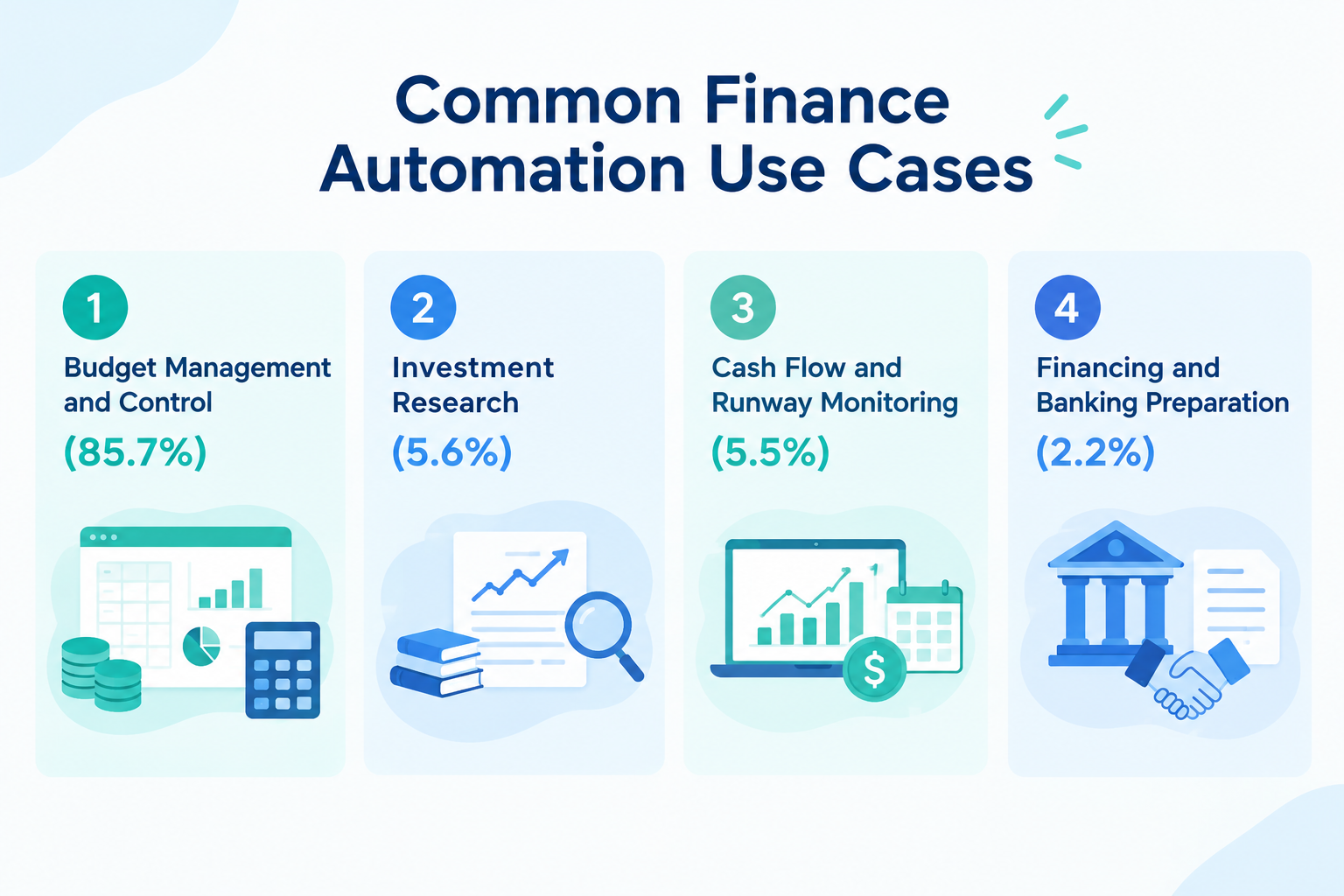
1. Budget Management and Control (85.7%)
Budget management was the largest use case in our dataset.
Finance teams can automate tasks such as:
- Collecting budget information from different departments.
- Comparing actual spending with planned budgets.
- Sending alerts when spending reaches a certain percentage of the budget.
- Updating budget records automatically.
For example, a finance manager can receive a Slack notification when a department uses 85% of its budget. This gives the team time to review spending before reaching the limit.
These automations can also reduce the work required to prepare financial reports.
2. Investment Research (5.6%)
Finance teams can automate parts of their investment research process.
For example, AI can gather information about companies, summarize market reports, and organize findings about potential investments.
This helps teams collect information more efficiently before making investment decisions.
3. Cash Flow and Runway Monitoring (5.5%)
Cash flow monitoring helps businesses understand how much money they have and how long their funds may last.
Automations can collect cash balance data, calculate how quickly a company is spending money, and update a rolling 13-week cash flow forecast.
This gives finance teams a clearer view of their financial position and helps them prepare for future cash needs.
4. Financing and Banking Preparation (2.2%)
Finance teams can also automate parts of the process of preparing for financing or working with banks.
For example, an automation can collect documents for a loan application, schedule meetings with a bank, and send financial information to the appropriate team members for review.
This reduces the time spent collecting documents and coordinating tasks.
While budget management automation accounts for most finance automations in our data, forecasting and simulation automations account for just 0.6%. This may suggest that many companies use automation to collect and organize financial data, while manually updating forecasts and making final decisions about future revenue and expenses.
Related Finance Automation Templates:


■Who This Template Is For
- Corporate planning and accounting teams struggling to compile past performance data when preparing budget proposals for each department
- Teams managing budgets in Google Sheets that want to automate subsequent tasks whenever the status changes
- Team leaders who want to use an AI worker to seamlessly handle everything from creating accurate budget drafts to requesting reviews from department heads
■Benefits of This Template
- When the status in Google Sheets is updated, the AI worker automatically generates a budget proposal, reducing the time spent preparing drafts.
- Once the budget proposal is created, a notification is immediately sent to Slack, making it easy to request a review from the department head and preventing delays throughout the budgeting process.
■Workflow Steps
- First, connect Google Sheets and Slack with Yoom.
- Next, set the trigger to the Google Sheets action “When a record is updated.”
- Finally, create an AI worker skill to automatically generate budget drafts for the company and each department.
■Customization Options
- In the Google Sheets trigger settings, specify the column and status value used to determine when the budgeting process should begin.
- Adjust the AI worker instructions (prompt) to generate budget proposals that more precisely reflect your company’s unique calculation rules and policies.
- Customize the Slack notification channel and message content to create the optimal review request for each department head.
■Notes
- Connect Google Sheets and Slack with Yoom. You must also connect any tools (apps) used within the AI worker through My Apps.
- For details on using Google Sheets as an app trigger, see [App Trigger] Important Notes on Google Sheets Triggers.
- You can choose a trigger interval of 5, 10, 15, 30, or 60 minutes.
- Note that the shortest available trigger interval varies by plan.
- For basic AI worker settings, see [AI Worker] How to Configure Basic Settings.
- The number of concurrent AI worker executions, the number of AI workers you can create, and the AI models available to you vary by plan.
- Apps and operations available within AI workers are subject to the same usage limits as Workflows.
- AI workers consume tasks during test runs just as they do during production runs. For details, see [AI Worker] How Task Execution Counts Are Calculated.
- AI workers are more likely to process tasks appropriately when their skills are configured in detail. For details, see [AI Worker] How to Create a Manual.

- Corporate planning and finance professionals who want to build an efficient budgeting process using AI workers
- Business unit leaders and managers who want to quickly create realistic budgets based on profit targets
- Anyone who wants to automate budget management tasks using tools such as Google Sheets and reduce manual work
- Automate the process from entering profit targets to creating a budget with an AI worker, reducing the time required for information gathering and calculations
- Because the AI creates budget proposals based on consistent logic, you can prevent budgeting tasks from becoming dependent on individual experience and standardize the process
- First, connect Google Sheets and Google Forms to Yoom
- Next, select Google Forms as the trigger and set the action to “When a response is submitted to the form”
- Finally, set up an AI worker in the operation and create a manual (instructions) for creating a budget based on the form responses
■Customization options
- For the Google Forms trigger, set the ID of the form where information such as the profit target will be entered
- For the AI worker, select the AI model you want to use and set instructions for creating a budget based on your business details and goals
- Connect both Google Forms and Google Sheets to Yoom.
- You can select a trigger interval of 5, 10, 15, 30, or 60 minutes.
- Please note that the shortest available trigger interval varies by plan.
- For information on how to retrieve response data when using Google Forms as a trigger, see “How to retrieve response data with the Google Forms trigger”.
- You must also connect the tools (apps) used within the AI worker to My Apps.
- For basic AI worker setup instructions, see “【AI Worker】How to set up the basics”.
- The number of simultaneous AI worker executions, the number of AI workers you can create, and the AI models available to you vary by plan.
- The apps and operations available within AI workers are subject to the same usage limits as Workflows.
- Please note that AI workers consume tasks during test runs in the same way as during production runs. For details, see “【AI Worker】How task executions are counted”.
- AI workers are more likely to process tasks appropriately when their manuals are configured in detail. For details, see “【AI Worker】How to create a manual”.


■Overview
This flow retrieves the budget from Microsoft Excel at a specified date and time and notifies Slack.
With Yoom, you can easily achieve this flow without the need for programming, as it allows for seamless integration between apps.
■Recommended for
- Leaders who want to streamline issue creation and reduce work hours
- Those who manage department budgets using Microsoft Excel
- Those who want to identify signs of budget overruns in advance
■Benefits of using this template
When managing department budgets with Microsoft Excel, the regular checking process can be cumbersome and may lead to oversight.
Additionally, if there are any oversights, there is a risk of exceeding the allocated budget, making it difficult to manage the budget strategically.
With this flow, you can automate the retrieval of budget information from Microsoft Excel and notifications to Slack at the specified date and time.
This eliminates the need for budget checking tasks in Microsoft Excel, thereby helping to prevent oversight and eliminating the need for regular checks.
You can also customize the schedule to any date and time to suit your needs.
How AI Makes Finance Automation More Useful
Financial information is not always easy to organize.
A budget request may use an unclear expense description. An investment report may contain dozens of pages. Data from different countries may also use different currencies and formats.
Traditional automation follows rules that people set in advance. AI can help when information requires more interpretation.
Here are three examples of how AI can help with finance automation.
1. Categorizing Expenses
An employee might submit a purchase request with a description such as "annual software license for Figma."
AI can review the description and suggest the appropriate expense category or department budget code. The automation can then add the information to the budget tracker.
This reduces the need to categorize every request manually.
2. Summarizing Investment Documents
Investment research often involves reviewing company reports, market information, and financial statements.
AI can summarize these documents and organize important findings, such as potential financial risks, into a structured table.
Finance teams can then review the key information without reading every document from beginning to end.
3. Checking Financial Data for Differences
AI can help compare information from different systems.
For example, it can compare payment records with expected revenue and flag differences that need attention.
Instead of stopping whenever information does not match, the automation can notify a team member to review the issue.
AI does not replace financial judgment. It helps teams organize information and identify issues that require human review. Simply provide a company name, and this AI worker uses Perplexity to research its funding status and business strengths online, then summarizes the findings in your specified format. Streamline information gathering to focus on strategy and key decisions—ideal for reducing prep work before sales meetings or competitive research. This AI worker automatically creates well-supported budget drafts based on prior-year performance data and company policies stored in spreadsheet tools such as Microsoft Excel and Google Sheets. From revenue forecasting to expense calculations, it handles the entire process and outputs results to your spreadsheet with clear calculation rationale. By delivering precise budget proposals that account for department-specific conditions, profit margins, and other constraints, it shortens budget planning lead times and reduces the workload for finance and accounting teams.
Related AI Templates:
This AI worker researches the latest funding status and business strengths online using Perplexity when it receives a message containing a company name, then compiles the findings in your specified format. It understands context even from ambiguous wording to conduct accurate research, helping you collect information more efficiently and focus on higher-value decisions and strategic planning.
■Recommended for
■AI Worker Setup Flow
■Customization Points for This AI Worker
■Notes

How Much Time Can Finance Automation Save?
Finance teams often spend time checking individual budget requests, comparing spending with budget limits, updating spreadsheets, and notifying department managers.
Manually completing these steps can take anywhere from five minutes to several hours, depending on the request.
A finance automation platform can handle many of these steps automatically.
Based on execution data from Yoom:
- App and database actions: 7 seconds on average. These include retrieving information, performing calculations, and updating records.
- AI process operations: 25 seconds on average. These include extracting information, checking requests against rules, and creating summaries.
The actual time saved depends on the complexity of the task and the systems involved. However, automating repetitive steps can help finance teams spend less time updating records and more time reviewing financial information.
The Challenge of Getting Started with Finance Automation
Finance automation software can help reduce repetitive tasks, such as collecting budget data, updating spreadsheets, preparing financial reports, and requesting budget approvals.
However, setting up finance automation can take time, regardless of which type of software you choose.
Even with dedicated finance software, you may need to connect your existing apps, configure approval rules, and decide how financial data should move between systems.
The same is true for general automation platforms. To automate a finance process, you need to connect the right apps and define what should happen at each step. For example, a budget automation may need to collect purchase requests from a form, check the available budget in a spreadsheet, send an approval request to a manager, and update the records after approval.
For teams that are new to automation, figuring out how to connect apps and configure each step can feel overwhelming.
That's why choosing finance automation software isn't just about comparing features and prices. It's also important to find a tool that makes it easy to build automations and can support processes across your business as your needs grow.
If you want to automate more than finance tasks, a general automation platform can be a practical choice. You can use the same platform to connect finance processes with tasks in sales, HR, and other departments, rather than introducing a separate tool for every task.
Start with a Free Plan
Before committing to a paid plan, try the software yourself.
A free plan lets you explore the available features and build a simple automation before deciding whether the tool fits your needs.
Start with one repetitive finance task, such as collecting budget requests from a form, updating a spreadsheet with financial data, or notifying your team when a budget approval is needed.
You don't necessarily have to build an automation from scratch. Many automation tools offer ready-made templates that help you get started without planning every step yourself.
With a template, much of the automation is already built for you. You may only need to connect your apps and adjust a few settings to match your process.
As you explore different tools, start with a template and see how easily you can customize it. If your needs become more specific, look for software that lets you build more advanced automations.
The goal isn't to find the tool with the most features. It's to find a finance automation platform that makes it easy to turn your ideas into working automations—and gives you room to automate other business processes when you're ready.
Three Ways to Get Started with Finance Automation Using Yoom
Yoom is a general automation platform that connects business apps and helps teams automate repetitive tasks. Instead of using it only for finance, you can also automate tasks across sales, HR, and other departments.
Yoom offers three ways to get started, depending on how quickly you want to build an automation and how much customization you need.
Option 1. Start with a Template
If you want to automate a common finance task quickly, start with a ready-made automation template. Choose one that matches your needs, then adjust it to fit your company's processes.
For example, you could use a template to collect information from business apps, send notifications when new financial data is submitted, or update a database automatically.
This is a good option if you want to start automating routine finance tasks without planning every step yourself.
Explore Yoom's automation templates
Option 2. Let AI Worker Help Build Your Automation
If you know what you want to automate but aren't sure how to build the automation, describe your goal in natural language. Yoom's AI Worker helps you turn your idea into an automated process.
For example, you could describe an automation that collects budget request details, organizes the information, checks it against predefined budget rules, and notifies the finance team through Slack when a request needs review.
AI Worker can help you get started without having to configure every step manually.
This is a useful option when you have a specific finance task in mind but want help turning your idea into a working automation.
Explore Yoom's AI Worker templates
Option 3. Build a Custom Automation
If you want to automate a more specific finance process, you can build a custom automation using Yoom's customization features.
Connect the apps you already use and configure each step to match your requirements. For example, you can decide what financial information to collect, how AI should organize the data, which team should receive approval requests, and when budget records should be updated.
You can also combine app integrations with AI, OCR, and RPA features to handle different types of work within an automation.
This option is ideal when a ready-made template or AI-assisted setup doesn't fully cover your requirements.
Learn how to set up custom app and API connections
Whether you want to automate a single finance task or connect processes across multiple departments, Yoom gives you different ways to get started. Begin with a template, use AI Worker to help build your automation, or create a custom automation that fits your needs.