


・
10 Best IFTTT Alternatives in 2027: Why Users Switch

IFTTT is an automation platform that allows users to connect different apps, online services, and smart devices without writing code. Its simple trigger-and-action approach makes it particularly useful for personal automations, smart home routines, and everyday tasks.
However, as automation needs become more advanced, some users start looking for alternatives that offer greater flexibility, more reliable integrations, and better support for business processes.
But what exactly makes users consider switching from IFTTT? And which alternatives are worth considering?
To explore these questions, we analyzed reviews and discussions from Reddit, G2, and Capterra to identify the recurring frustrations users have reported about IFTTT.
Based on our findings, this guide introduces 10 IFTTT alternatives for 2027, including all-in-one AI automation platforms, visual workflow builders, and enterprise automation solutions.
Why Do Users Consider IFTTT Alternatives?
To understand why users explore alternatives to IFTTT, we reviewed feedback from three platforms: Reddit, G2, and Capterra.
Common Concerns About IFTTT Reported by Users
Our analysis identified six recurring areas of dissatisfaction:
- Pricing Changes and the Shift to a Credit-Based Model: 32.8%
- Reliability Issues and Failed Integrations: 22.4%
- Lack of Customer Support: 17.9%
- Limited Capabilities for Business Automation: 13.4%
- Confusing UI/UX and Setup Complexity: 9.0%
- Excessive and Unwanted Notifications: 4.5%
1. Pricing Changes and the Shift to a Credit-Based Model: 32.8%
Pricing-related complaints accounted for the largest share of negative mentions.
Some users expressed frustration with changes to IFTTT's pricing structure, including restrictions on the free plan and the introduction of paid subscriptions for features they had previously used for free.
For long-time users who had relied on IFTTT's earlier free or low-cost plans, these changes made the service feel significantly more expensive, even if the current subscription price remained relatively affordable.
This suggests that users' perceptions of pricing are influenced not only by the current cost but also by how much the pricing model has changed over time.
2. Reliability Issues and Failed Integrations: 22.4%
Reliability was another major concern among users.
Reported issues included integrations that suddenly stopped working, failed automation executions, and connectivity problems with certain services and devices.
When an automation fails without a clear explanation, users may have to spend additional time checking the integration and completing tasks manually.
For users who depend on automation for recurring business operations, dependable execution and clear error notifications are particularly important.
3. Lack of Customer Support: 17.9%
The lack of responsive customer support was also a recurring complaint.
Some users reported receiving no response after contacting support or not receiving advance notice of service disruptions.
When an integration breaks or an automation stops working, limited support can make it difficult to identify and resolve the problem.
This can be especially frustrating for users who rely on automated processes in their daily operations.
4. Limited Capabilities for Business Automation: 13.4%
IFTTT's straightforward automation model works well for simple personal tasks and smart home integrations. However, users with more advanced requirements may find its capabilities limiting.
Common concerns include limited conditional logic, fewer options for building multi-step workflows, and insufficient flexibility for complex business processes.
As businesses grow, they may need tools that can connect multiple business applications, handle conditional workflows, and automate processes across different departments.
5. Confusing UI/UX and Setup Complexity: 9.0%
Although IFTTT is designed to make automation accessible without coding, some users still find certain configuration steps confusing.
Complaints include difficulties setting up automations and limited visibility into execution logs, making it harder to identify what went wrong when an automation fails.
An intuitive interface and accessible troubleshooting tools can make a significant difference, particularly for non-technical users.
6. Excessive and Unwanted Notifications: 4.5%
Some users also reported receiving unwanted or excessive notifications.
For example, usage restrictions or delayed automation executions could result in notifications arriving in batches rather than at the expected time.
Unnecessary alerts can make it harder to identify important updates and reduce the overall user experience.
10 Best IFTTT Alternatives and Competitors
1.
Yoom
— All-in-One AI Automation for Every Team
Best for: Businesses that want an accessible automation platform for both non-technical and technical teams, combining AI, app integrations, and flexible customization.
Yoom is an all-in-one AI automation platform that combines app integrations, AI-powered automation, databases, forms, AI-OCR, and browser automation in one platform.
Designed to be accessible to users without programming experience, Yoom enables teams to automate a wide range of everyday business operations. In fact, more than 80% of Yoom users are non-engineers.
At the same time, its flexible customization features also make it useful for IT professionals who need more control over their automations.
Its key capabilities include:
- AI Worker: Build and execute AI-powered tasks using natural-language instructions.
- Workflow: Automate repetitive tasks, approvals, and processes based on predefined rules.
- Database: Store and manage business data without building a separate database system.
- Forms: Collect information and connect submissions to automated processes.
- AI-OCR: Extract information from documents and use it in subsequent automations.
- RPA: Automate browser-based tasks that do not have direct API integrations.
Yoom also offers custom API connections, allowing users to connect with services that are not available as standard integrations.
It provides additional flexibility without requiring users to write an entire code script from scratch. Instead, users can configure functions by entering the necessary values, making customization more accessible even for users who are not full-time developers.
Another advantage is the combination of AI and predefined automation. AI Worker can handle tasks that require AI-based processing, while workflow automation executes repetitive operations based on defined rules.
This makes Yoom suitable for businesses that want to move beyond simple trigger-and-action automations and streamline broader business processes.
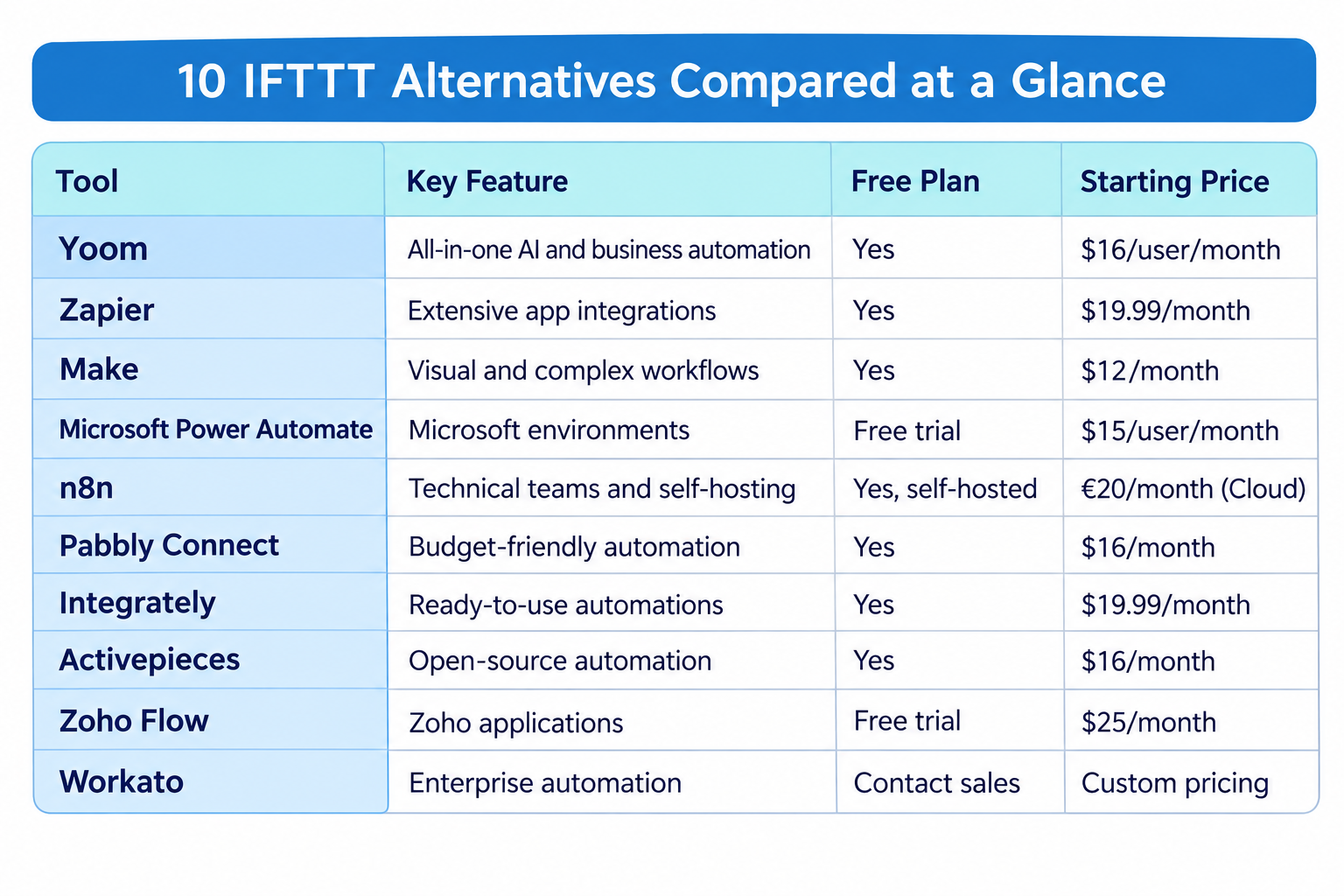
Pricing: A free plan is available. Paid plans start from $16/user/month.
2.
Zapier
— Extensive App Integrations and Easy Automation
Best for: Individuals and businesses that want to connect a wide range of SaaS applications and automate everyday tasks without coding.
Zapier is one of the most widely used automation platforms, allowing users to connect thousands of applications through automated workflows called Zaps.
With support for more than 9,000 app integrations, Zapier is particularly useful for users who want to connect different cloud services without building custom integrations.
Its key capabilities include:
- App-to-app automation
- Multi-step workflows
- Conditional logic and branching
- Webhooks
- AI-powered automation features
- Extensive app integration ecosystem
Zapier is generally easy to get started with, making it a practical alternative for users who want to automate everyday tasks between cloud applications.
Compared with IFTTT's relatively simple trigger-and-action approach, Zapier offers more options for building multi-step workflows and handling business processes.
For example, users can automatically collect new leads from a form, add them to a CRM, and send a notification to their sales team.
However, Zapier's task-based pricing can become an important consideration as automation volume increases. Users should also check which plan includes the specific features they need, especially multi-step workflows and premium app integrations.
Pricing: A free plan is available. Paid plans start from $19.99/month.
3.
Make
— Visual Automation for Complex Workflows
Best for: Users who want more control over automation logic through a visual workflow builder.
Make is a visual automation platform that allows users to connect applications and build multi-step scenarios through a drag-and-drop interface.
Unlike simple trigger-and-action tools, Make provides a visual canvas where users can design workflows with multiple paths, filters, and data transformations.
Its key capabilities include:
- Visual scenario builder
- Multi-step automation
- Routers and filters
- Conditional branching
- Data transformation
- Webhooks and app integrations
One of Make's main strengths is its ability to handle more complex automation scenarios without requiring users to write extensive code.
For example, a workflow can receive information from a form, check whether certain conditions are met, and send the data to different applications depending on the result.
This makes Make a good option for users who find IFTTT too limited for their automation requirements.
However, the visual interface can take time to learn, especially when building scenarios with many branches and operations. Users should also understand how credits are consumed, since each module action generally counts toward monthly usage.
Pricing: A free plan is available. Paid plans start from $9/month, billed annually.
4.
Microsoft Power Automate
— Automation Across Microsoft Environments
Best for: Organizations that rely on Microsoft 365, Dynamics 365, and other Microsoft services.
Microsoft Power Automate is a low-code automation platform that helps businesses connect applications and automate repetitive processes.
It supports both cloud-based workflows and desktop automation through robotic process automation (RPA).
Its key capabilities include:
- Cloud flow automation
- Desktop RPA
- Microsoft 365 and Dynamics 365 integrations
- Approval workflows
- Process mining
- AI-powered automation features
For organizations already using Microsoft's ecosystem, Power Automate can be a convenient option for automating processes across existing business applications.
For example, users can create approval workflows in which documents submitted through Microsoft Forms are automatically routed to the appropriate team members.
Its desktop automation capabilities also make it useful for automating tasks in applications that do not provide direct API integrations.
However, Power Automate may require some time to learn, particularly when configuring advanced flows or managing licensing across multiple users.
Businesses should also check which Microsoft licenses they already have, since certain Power Automate capabilities may be included in existing subscriptions while others require additional licenses.
Pricing: A free trial is available. Power Automate Premium starts from $15/user/month, billed annually.
5.
n8n
— Flexible Workflow Automation for Technical Teams
Best for: Technical teams and developers who want flexible automation with code-based customization and self-hosting options.
n8n is a workflow automation platform that combines visual workflow building with code-based customization.
Users can connect applications and services through nodes, create conditional logic, and add JavaScript or Python code when more flexibility is needed.
Its key capabilities include:
- Visual workflow builder
- Code-based customization
- AI and agent-related integrations
- Self-hosting options
- Workflow execution monitoring
- Custom API integrations
Compared with simpler automation platforms, n8n offers greater control over how workflows are built and deployed.
Its self-hosted option is particularly relevant for teams that want more control over their infrastructure and data environment.
n8n is also worth considering for users who want to build AI-powered workflows by connecting language models, APIs, and other services.
However, self-hosting and advanced customization may require technical resources. It may not be the most accessible choice for users who simply want to automate everyday tasks without managing infrastructure.
Pricing: A self-hosted Community Edition is available for free. Cloud plans start from €20/month, billed annually.
6.
Pabbly Connect
— Budget-Friendly Business Automation
Best for: Small businesses and individuals looking for affordable multi-step automation with a wide range of app integrations.
Pabbly Connect is an automation platform that allows users to connect different applications and automate repetitive tasks.
It provides a visual workflow builder with support for multi-step automation, conditional logic, and webhooks.
Its key capabilities include:
- Multi-step workflows
- 2,000+ app integrations
- Conditional logic and filters
- Webhooks
- Data formatting and transformation
- Workflow scheduling and automation
Pabbly Connect may be worth considering for users who want more flexibility than basic IFTTT automations while keeping subscription costs relatively low.
For example, businesses can use it to connect lead generation forms with CRM systems, email marketing platforms, and other business applications.
It also offers unlimited workflows and team members in its advertised Standard plan, which may be attractive for businesses managing multiple automations.
However, users should compare the available integrations and task limits carefully to ensure the plan can support their expected automation volume.
Pricing: Paid plans start from $16/month.
7.
Integrately
— Ready-to-Use One-Click Automations
Best for: Non-technical users who want to set up app integrations quickly using prebuilt automation templates.
Integrately is an automation platform focused on making app connections simple through ready-to-use automation workflows.
Instead of building every automation from scratch, users can select preconfigured workflows and connect their accounts to get started.
Its key capabilities include:
- One-click automation setup
- Prebuilt automation templates
- Multi-step workflows
- Conditional logic
- Webhooks
- Automatic retries for failed actions
Integrately can be a useful option for users who want to reduce the time spent configuring integrations.
For example, users can select a prebuilt automation to connect a form application with a CRM or email marketing service.
This template-first approach can make the initial setup process more approachable, especially for people who are new to automation.
However, users with highly customized requirements may need to build or modify workflows beyond the available templates. It is also important to check which features are included in each plan.
Pricing: A free plan is available. Paid plans start from $19.99/month, billed annually.
8.
Activepieces
— Open-Source Workflow Automation
Best for: Users who want an open-source automation platform with flexible deployment options.
Activepieces is an automation platform that allows users to connect applications, create workflows, and automate repetitive tasks.
It combines a visual workflow builder with an open-source approach, making it relevant for both business users and technical teams.
Its key capabilities include:
- Visual workflow builder
- Open-source platform
- Cloud and self-hosted deployment
- AI agents and automation
- App integrations
- API and MCP support
One of Activepieces' advantages is its deployment flexibility. Users can choose a cloud-based setup or host the platform on their own infrastructure.
It also provides AI-related capabilities, allowing users to build workflows that combine application integrations with AI-powered processing.
For teams that want more control over their automation environment, Activepieces may be a good alternative to consider.
However, self-hosting requires infrastructure management and technical knowledge. Teams should also evaluate the support and governance features available in each plan.
Pricing: A free plan is available. Paid plans start from $16/month, billed annually.
9.
Zoho Flow
— Automation for Zoho Ecosystems
Best for: Businesses that already use Zoho applications and want to automate processes across their business software.
Zoho Flow is an integration and automation platform that connects different applications and allows users to build automated workflows.
It is particularly relevant for organizations that use Zoho products such as Zoho CRM, Zoho Books, and Zoho Desk.
Its key capabilities include:
- App-to-app integrations
- Multi-step workflows
- Conditional logic
- Custom functions
- Data transformation
- Workflow monitoring
Zoho Flow allows users to automate processes across different business applications without manually transferring information between systems.
For example, a business can automatically create CRM records when new information is submitted through a connected application.
Its integration with the broader Zoho ecosystem makes it a practical option for companies that already rely on Zoho for their daily operations.
However, businesses using applications outside the Zoho ecosystem should check connector availability and compatibility before switching.
Pricing: Paid plans start from $25/month, billed annually.
10.
Workato
— Enterprise Automation and Orchestration
Best for: Large organizations that want to automate complex business processes across multiple departments and enterprise applications.
Workato is an enterprise automation and integration platform that combines application connectivity with business process orchestration.
Its low-code platform allows teams to build automated processes using prebuilt connectors and recipes.
Its key capabilities include:
- Prebuilt connectors for business applications
- Multi-step process automation
- Real-time data and event orchestration
- API management
- Enterprise governance and security features
- AI-powered automation
Workato may be suitable for organizations that want to automate processes across different business applications while maintaining centralized control.
For example, enterprises can use it to synchronize information between CRM, ERP, HR, and other business systems.
Compared with tools designed primarily for personal automation, Workato is more focused on complex business processes and enterprise-scale requirements.
However, its enterprise-oriented capabilities may be more than smaller teams need. Organizations should also consider implementation requirements, pricing, and the technical resources required to manage the platform.
Pricing: Custom pricing is available. Contact Workato's sales team for a quote based on your platform edition and usage requirements.
Prices are starting prices and may vary depending on billing frequency, usage limits, user count, and plan features. Self-hosted and cloud plans may have different pricing structures.
4 Things to Consider Before Switching from IFTTT
Choosing an alternative is not simply about finding a platform with more features or a lower subscription fee.
Before switching, consider the following factors to make sure the new platform fits your actual requirements.
1. Consider the Total Cost, Beyond Just Money
Pricing was the most frequently mentioned concern in our review analysis.
However, the subscription fee alone does not reflect the full cost of an automation platform.
Consider the following:
- Monthly or annual subscription fees
- Usage-based charges and task or credit limits
- Costs for additional users or premium integrations
- Additional charges for advanced features
- Implementation and migration expenses
- Ongoing maintenance and troubleshooting
A platform with a lower starting price may still become expensive as automation usage increases.
But cost isn't just about money. The time and effort required to set up, manage, and maintain automations are also important factors to consider.
For example, one Reddit user shared their experience replacing paid software with a lower-cost setup. Although the new setup reduced software costs, the user reported spending around 12 hours building and testing it.
This illustrates why it's important to look beyond subscription fees. A cheaper platform may require more time and technical effort, potentially offsetting the savings. Consider how easy it is to build workflows, troubleshoot issues, and maintain your automations over time.
Before choosing a plan, estimate how many times your workflows will run each month and how many actions each execution will involve. Also consider the time employees will spend working with the platform.
A platform that is easier to use and manage may reduce overall operational costs, even if its subscription fee is higher.
2. Evaluate Integration Capabilities and Compatibility
Not all automation platforms support the same applications, services, and integration methods.
Before switching, identify the services you currently connect through IFTTT and check whether the alternative supports them.
Consider:
- Availability of native app integrations
- API and webhook support
- Data transformation capabilities
- Conditional logic and multi-step workflows
- Compatibility with your existing business applications
- Support for cloud and on-premises systems, if required
If your automations rely on specific smart home devices or IoT services, make sure those integrations are available in the alternative platform.
For business users, it is also important to check whether the platform can connect essential systems such as CRM, ERP, communication tools, and databases.
If you depend on specialized integrations, test your most important use cases before committing to a new platform.
3. Consider Ease of Use and Maintenance Requirements
A platform may look easy to use during a demo but require more effort when building and maintaining real-world workflows.
Evaluate how much technical knowledge is needed to configure automations, troubleshoot errors, and make changes.
Consider whether:
- Non-technical users can build workflows independently
- The interface makes complex automation logic easy to understand
- Execution logs provide enough information to identify problems
- Failed workflows can be retried or recovered
- Changes to integrations can be managed easily
- Documentation and onboarding resources are available
If your goal is to reduce manual work across departments, choosing a platform that only technical specialists can manage may create another operational bottleneck.
Look for a solution that allows the people closest to each business process to participate in automation whenever possible.
4. Check Customer Support and Scalability
Your automation requirements may change as your personal or business needs grow.
A platform that works well for a few simple automations may not be suitable when you need more integrations, higher execution volumes, or workflows shared across multiple teams.
Check whether the platform can support:
- Increasing automation volume
- More applications and integration flows
- Additional users and departments
- Advanced workflow logic
- Security and governance requirements
- Future changes to your business processes
Also, evaluate the vendor's support options, documentation, onboarding assistance, and response times.
A platform's long-term value depends not only on its technical capabilities but also on how effectively the vendor supports you when something goes wrong.
Which IFTTT Alternative Should You Choose?
IFTTT remains a convenient option for connecting personal apps, online services, and smart devices through simple automations.
However, as automation needs become more advanced, you may start looking for a platform that offers more flexibility, predictable pricing, reliable integrations, or broader business automation capabilities.
It's important to remember that every automation platform has its own pros and cons. A tool with extensive integrations may have a steeper learning curve, while a simple platform may not offer all the features you need as your workflows become more complex.
Rather than choosing based on feature lists or pricing alone, try the platforms that interest you and see how they work in practice. Consider whether the interface feels intuitive, whether you can build the automations you need without unnecessary effort, and whether the platform is something you can comfortably continue using as your needs evolve.
As a starting point, here are some general guidelines for choosing an alternative:
- For all-in-one business automation with AI: Yoom combines app integrations, AI Worker, databases, forms, AI-OCR, and RPA in one platform.
- For extensive app integrations: Zapier is worth considering if you want to connect a wide range of SaaS applications.
- For visual and complex workflows: Make offers a flexible visual builder with branching and data transformation.
- For Microsoft-based organizations: Power Automate is a practical choice for automating processes across Microsoft environments.
- For technical teams: n8n and Activepieces offer flexible automation with code customization and self-hosting options.
- For enterprise automation: Workato provides capabilities for orchestrating complex business processes across organizations.
Ultimately, the best alternative is not necessarily the platform with the most integrations or the lowest subscription fee. It is the one that fits your team's actual needs, feels comfortable to use, and can support your automation requirements as they grow.
If you're looking to go beyond simple app connections and automate broader business operations with AI, workflows, and data management in one place, Yoom is a good starting point to explore.