


・
IFTTT vs Zapier: Common Drawbacks Reported by Users

Choosing an automation platform involves more than comparing integrations, features, and pricing. It is also important to understand the challenges users may encounter when building, running, and maintaining automations.
IFTTT and Zapier are two popular automation platforms, but they serve somewhat different needs. IFTTT is commonly used for simple personal automations and smart home integrations, while Zapier offers a broader range of capabilities for connecting business applications and automating work processes.
But what do actual users say about their drawbacks?
We analyzed public discussions on Reddit and user reviews on G2 and Capterra to identify recurring concerns about IFTTT and Zapier. The findings highlight differences in pricing, reliability, customer support, and the flexibility required for business automation.
In this guide, we compare IFTTT vs. Zapier across pricing, ease of use, app integrations, flexibility, and reliability. We also examine common problems reported by users to help you decide which platform is the better fit for your needs.
What Do Actual Users Complain About IFTTT and Zapier?
To understand why users consider alternatives to IFTTT and Zapier, we reviewed public discussions and user feedback across multiple platforms.
The findings reveal different areas of dissatisfaction. While IFTTT users frequently mention pricing changes and integration reliability, Zapier users more often raise concerns about task limits and the cost of running automations at scale.
Common Concerns About IFTTT
To understand why users explore alternatives to IFTTT, we reviewed feedback from three platforms: Reddit, G2, and Capterra.
The following figures summarize the recurring concerns identified in the discussions and reviews we analyzed. They do not represent the percentage of all IFTTT users who experience these problems.
*A single post or review may mention more than one concern, so the percentages may not add up to 100%.
Common Challenges with IFTTT Reported by Users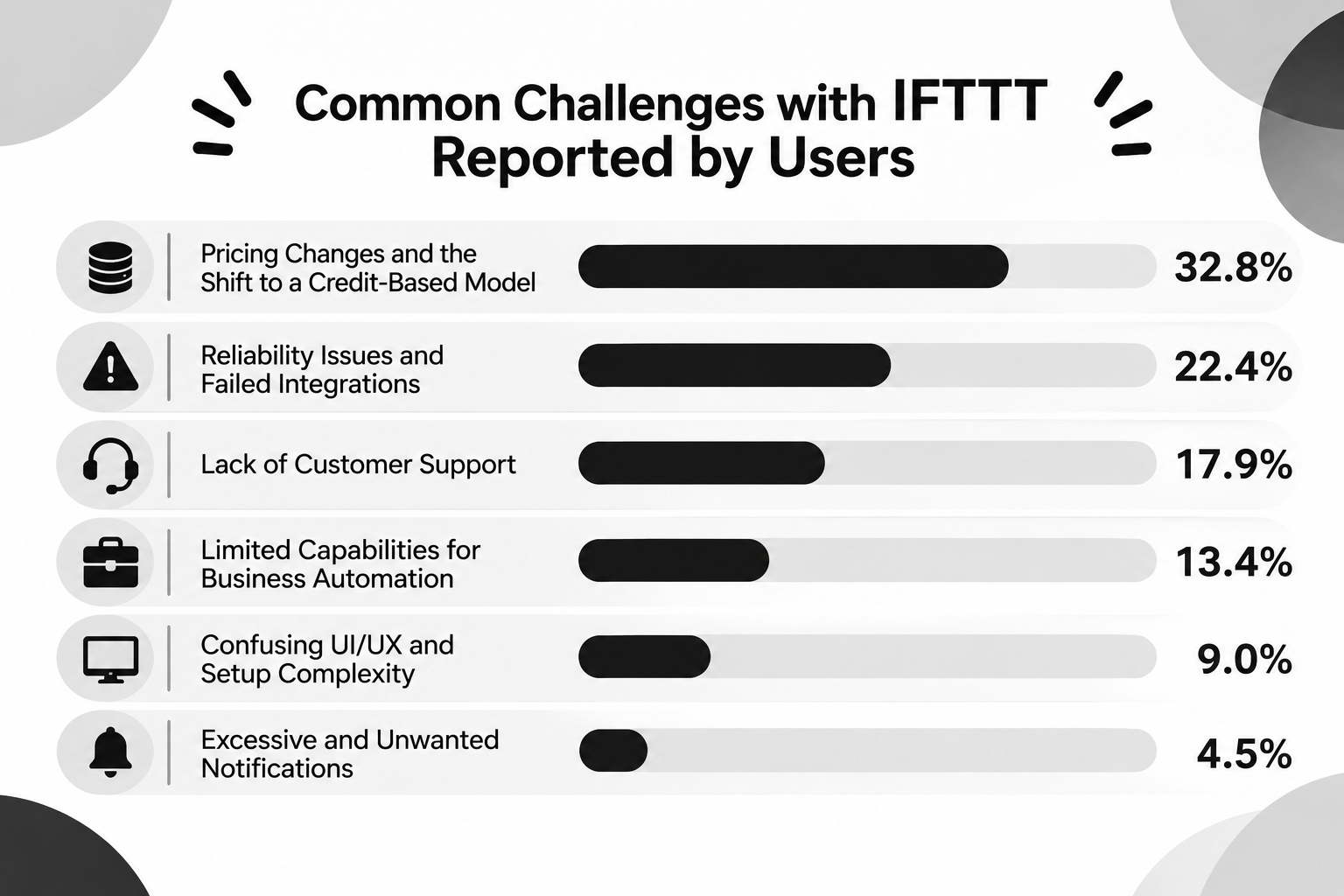
- Pricing Changes and the Shift to a Credit-Based Model: 32.8%
- Reliability Issues and Failed Integrations: 22.4%
- Lack of Customer Support: 17.9%
- Limited Capabilities for Business Automation: 13.4%
- Confusing UI/UX and Setup Complexity: 9.0%
- Excessive and Unwanted Notifications: 4.5%
1. Pricing Changes and the Shift to a Credit-Based Model: 32.8%
Pricing-related complaints accounted for the largest share of negative mentions.
Some users expressed frustration with changes to IFTTT's pricing structure, including restrictions on the free plan and the introduction of paid subscriptions for features they had previously used for free.
For long-time users who had relied on IFTTT's earlier free or low-cost plans, these changes made the service feel significantly more expensive, even if the current subscription price remained relatively affordable.
This suggests that users' perceptions of pricing are influenced not only by the current cost but also by how much the pricing model has changed over time.
2. Reliability Issues and Failed Integrations: 22.4%
Reliability was another major concern among users.
Reported issues included integrations that suddenly stopped working, failed automation executions, and connectivity problems with certain services and devices.
When an automation fails without a clear explanation, users may have to spend additional time checking the integration and completing tasks manually.
For users who depend on automation for recurring business operations, dependable execution and clear error notifications are particularly important.
3. Lack of Customer Support: 17.9%
The lack of responsive customer support was also a recurring complaint.
Some users reported receiving no response after contacting support or not receiving advance notice of service disruptions.
When an integration breaks or an automation stops working, limited support can make it difficult to identify and resolve the problem.
This can be especially frustrating for users who rely on automated processes in their daily operations.
4. Limited Capabilities for Business Automation: 13.4%
IFTTT's straightforward automation model works well for simple personal tasks and smart home integrations. However, users with more advanced requirements may find its capabilities limiting.
Common concerns include limited conditional logic, fewer options for building multi-step workflows, and insufficient flexibility for complex business processes.
As businesses grow, they may need tools that can connect multiple business applications, handle conditional workflows, and automate processes across different departments.
5. Confusing UI/UX and Setup Complexity: 9.0%
Although IFTTT is designed to make automation accessible without coding, some users still find certain configuration steps confusing.
Complaints include difficulties setting up automations and limited visibility into execution logs, making it harder to identify what went wrong when an automation fails.
An intuitive interface and accessible troubleshooting tools can make a significant difference, particularly for non-technical users.
6. Excessive and Unwanted Notifications: 4.5%
Some users also reported receiving unwanted or excessive notifications.
For example, usage restrictions or delayed automation executions could result in notifications arriving in batches rather than at the expected time.
Unnecessary alerts can make it harder to identify important updates and reduce the overall user experience.
Common Concerns About Zapier
We also reviewed public discussions on Reddit and user reviews on G2 to identify recurring reasons why users consider alternatives to Zapier.
The following figures summarize the concerns identified across the materials reviewed. They do not represent the percentage of all Zapier users who experience these problems.
*A single post or review may mention multiple concerns, so the percentages do not add up to 100%.
Common Challenges with Zapier Reported by Users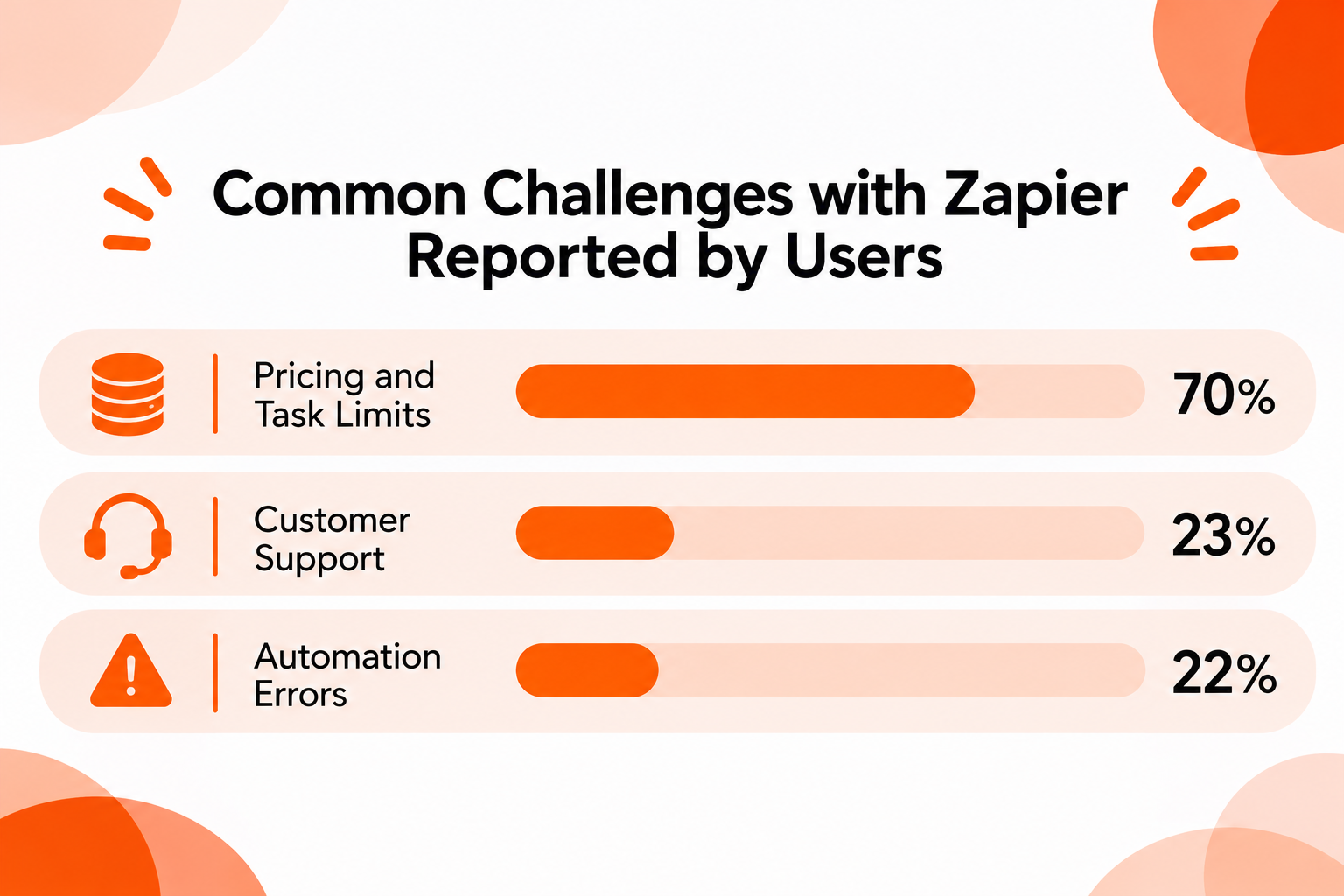
- Pricing and Task Limits: Approximately 70%
- Customer Support: Approximately 23%
- Automation Errors: Approximately 22%
Pricing and task limits stand out as the most frequently mentioned concerns in the Zapier discussions and reviews we analyzed.
Users raise concerns about costs increasing as automations run more frequently, limited task allowances, and unexpected charges. Some also report difficulties accessing timely customer support and dealing with automation errors.
These findings suggest that usage volume, pricing transparency, and ongoing support are important considerations when evaluating Zapier.
Common Causes of Unexpected Zapier Task Usage
Pricing and task limits were the most frequently mentioned concerns in our analysis of Zapier discussions and reviews.
Beyond general pricing concerns, users also describe specific situations in which Zapier consumes more tasks than expected.
Our analysis identified five recurring scenarios:
Common Causes of Unexpected Zapier Task Usage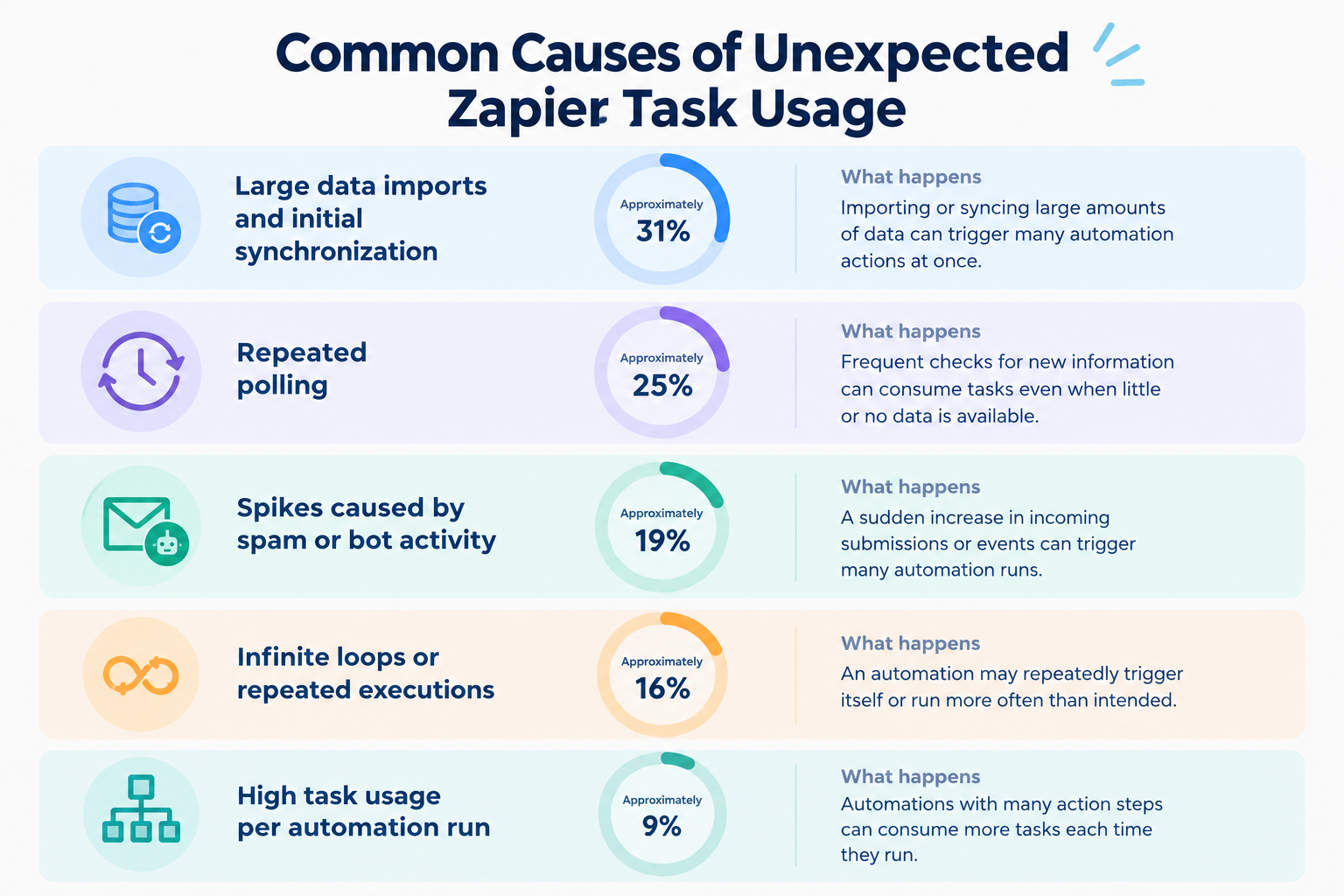
- Large Data Imports and Initial Synchronization: Approximately 31%
- Repeated Polling: Approximately 25%
- Spikes Caused by Spam or Bot Activity: Approximately 19%
- Infinite Loops or Repeated Executions: Approximately 16%
- High Task Usage per Automation Run: Approximately 9%
1. Large Data Imports and Initial Synchronization: Approximately 31%
Importing or syncing large amounts of data can trigger many automation actions at once.
For example, connecting a CRM to another application and importing existing customer records may trigger automations for each record, resulting in a sudden increase in task usage.
This can be particularly challenging when users do not account for initial synchronization before setting up their automations.
2. Repeated Polling: Approximately 25%
Some integrations periodically check external applications for new information.
These repeated checks can contribute to task consumption, depending on how the trigger is configured and whether the integration uses polling.
Even when little or no new information is available, frequent checks may contribute to ongoing resource usage.
Users should consider how frequently their automations need to check for updates when configuring polling-based triggers.
3. Spikes Caused by Spam or Bot Activity: Approximately 19%
A sudden increase in incoming submissions or events can trigger many automation runs.
For example, if a form receives a large number of spam submissions, each submission may activate a connected Zap and trigger additional action steps.
This can lead to unexpected task consumption, even when the additional activity does not represent genuine business opportunities.
Filtering unnecessary submissions before they trigger downstream actions can help reduce this risk.
4. Infinite Loops or Repeated Executions: Approximately 16%
An automation may repeatedly trigger itself or run more often than intended.
For example, a Zap that updates a record in an application may trigger another Zap that monitors changes to the same record. If the workflows are not configured carefully, this can create repeated executions.
Such loops can consume tasks unnecessarily and make it difficult to identify the source of increased usage.
Users should review trigger conditions and add appropriate filters to prevent unintended repeated executions.
5. High Task Usage per Automation Run: Approximately 9%
Zaps with multiple action steps can consume several tasks each time they run.
For example, a workflow that receives a new customer inquiry, adds the information to a CRM, sends a Slack notification, creates a project task, and sends a confirmation email may consume multiple tasks from a single run.
As workflows become more complex, the total task usage can increase even if the number of incoming triggers remains relatively low.
This makes it important to consider not only how frequently a Zap runs but also how many successful action steps it performs each time.
These scenarios highlight why estimating expected task usage is important before choosing a Zapier plan.
Understanding how data imports, polling frequency, incoming events, and workflow structure affect task consumption can help users avoid unexpected costs as their automation needs grow.
What Do These Findings Tell Us?
The concerns reported by IFTTT and Zapier users highlight different challenges when choosing an automation platform.
For IFTTT, pricing changes and the shift to a credit-based model were the most frequently mentioned concerns. Users also reported reliability issues, limited customer support, and difficulties using the platform for more advanced business automation.
However, it is worth noting that IFTTT remains a relatively affordable automation tool, with paid plans starting at $2.09 per month. Some of the pricing dissatisfaction may stem from how much cheaper the service used to be, rather than from its current price alone. In the past, promotional offers and discounts—such as significantly reduced prices for the first year—may have made the platform especially affordable for long-time users. As a result, users who remember those earlier prices may feel that IFTTT has become considerably more expensive, even though its current paid plans remain relatively inexpensive compared with many other automation tools.
For Zapier, pricing and task limits stood out as the biggest concerns. In particular, large data imports, frequent polling, unexpected incoming events, and multi-step workflows can all contribute to higher task consumption.
These findings suggest that understanding how an automation platform calculates usage is just as important as comparing its advertised subscription prices.
They also highlight an important difference in user expectations. IFTTT users may prioritize affordable and reliable automations for everyday tasks, while Zapier users may need to pay closer attention to usage costs as their business workflows become more extensive.
However, neither platform is necessarily the better choice for everyone. The right option depends on the types of tasks you want to automate, the complexity of your workflows, and how frequently they run.
IFTTT vs. Zapier: A Quick Guide to Choosing the Right Tool
Still deciding between IFTTT and Zapier? The best choice depends on your automation requirements, technical capabilities, and expected usage.
Use the following guide to identify which platform may be more suitable for your needs.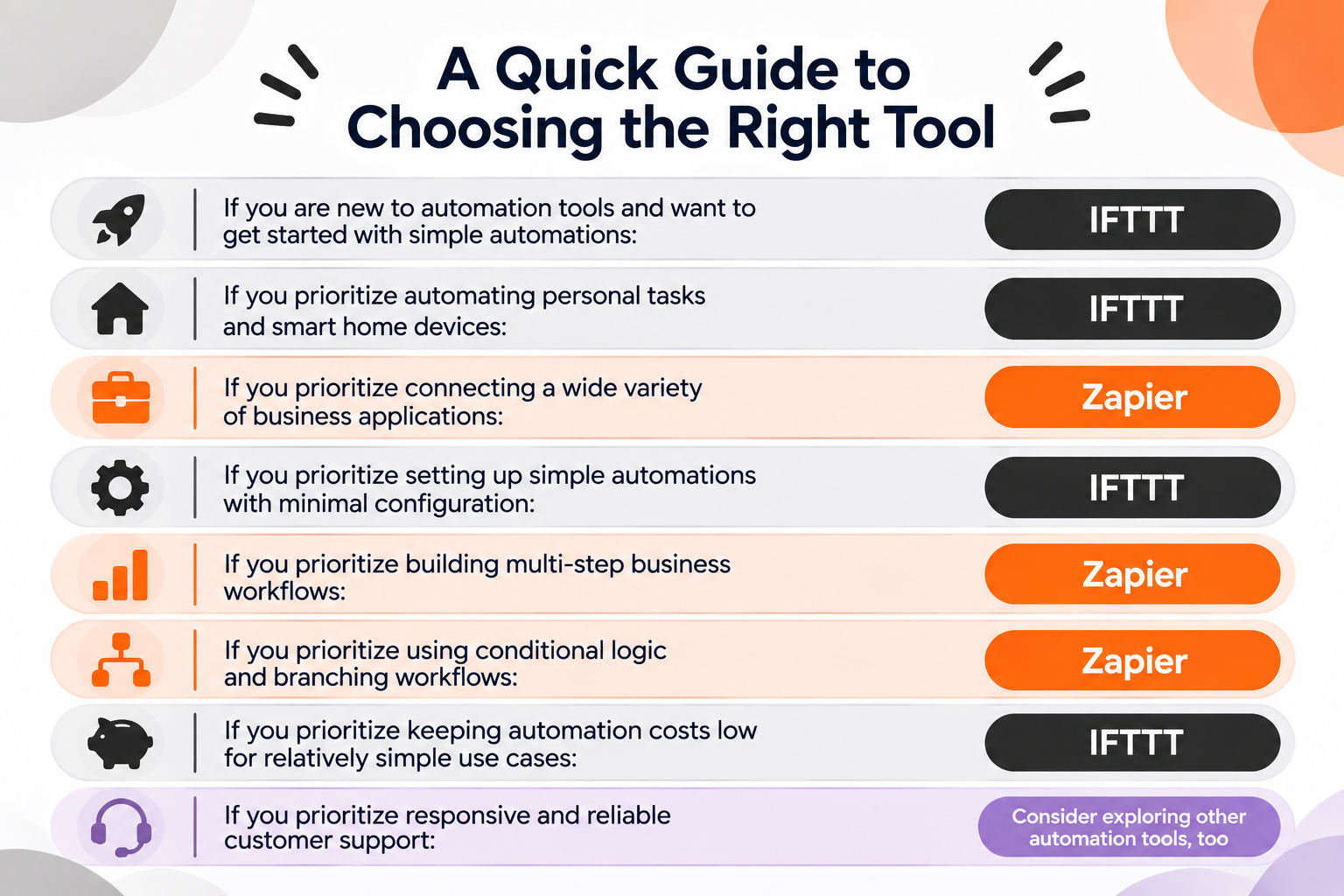
- If you are new to automation tools and want to get started with simple automations: IFTTT
- If you prioritize automating personal tasks and smart home devices: IFTTT
- If you prioritize connecting a wide variety of business applications: Zapier
- If you prioritize setting up simple automations with minimal configuration: IFTTT
- If you prioritize building multi-step business workflows: Zapier
- If you prioritize using conditional logic and branching workflows: Zapier
- If you prioritize keeping automation costs low for relatively simple use cases: IFTTT
- If you prioritize responsive and reliable customer support: Consider exploring other automation tools, too
These recommendations are intended to help you choose between IFTTT and Zapier. They are not absolute rules.
For example, IFTTT supports more than basic one-trigger, one-action automations through features such as multi-action Applets and filters. However, Zapier offers more advanced workflow capabilities, including conditional paths, loops, and broader options for business process automation.
Similarly, Zapier provides a much larger app integration library, but that does not necessarily mean it is the better choice for every user. If you only need to automate a few personal tasks or connect smart home devices, IFTTT may be sufficient.
IFTTT vs. Zapier: Key Differences in Detail
Now that we have reviewed the concerns raised by users, let's compare the two platforms across the factors that matter most when choosing an automation tool.
1. Pricing: Which Is More Affordable?
If keeping automation costs low is your priority, IFTTT is generally the more affordable option.
Its paid plans start at just $2.09 per month, making it an accessible choice for individuals and users who want to automate relatively simple tasks without spending much.
Zapier, on the other hand, is generally more expensive, especially as your automation needs grow and you require more tasks or advanced features.
However, price should not be the only factor in your decision. If you only need to connect a few applications and automate simple tasks, IFTTT may offer better value for money.
But if you need to build more complex business workflows involving multiple applications, actions, and conditions, Zapier's broader capabilities may justify the additional cost.
Ultimately, IFTTT is a better choice if affordability is your main concern, while Zapier may be worth the higher investment if you need more advanced automation capabilities.
IFTTT uses a credit-based pricing model. Each plan includes a monthly credit allowance, and individual steps within an Applet can consume credits.
For example, a trigger firing, an action completing, or a filter running successfully may consume credits. The total credit usage depends on the steps executed within an Applet.
The number of credits included varies by subscription tier. Credits renew monthly and do not roll over. If your balance reaches zero, your Applets pause until your credits renew or you upgrade your plan. (IFTTT pricing plans)
Zapier, on the other hand, uses task-based pricing.
A task is generally counted when an action step in a Zap runs successfully. Triggers, filters, and certain built-in tools do not count toward task usage.
For example, if a Zap contains three successful action steps, one run may consume three tasks. (Zapier pricing and plan details)
2. Ease of Use: Which Is Better for Beginners?
If you are new to automation tools, IFTTT may be the better choice to start with.
IFTTT is built around a straightforward concept: "If This, Then That."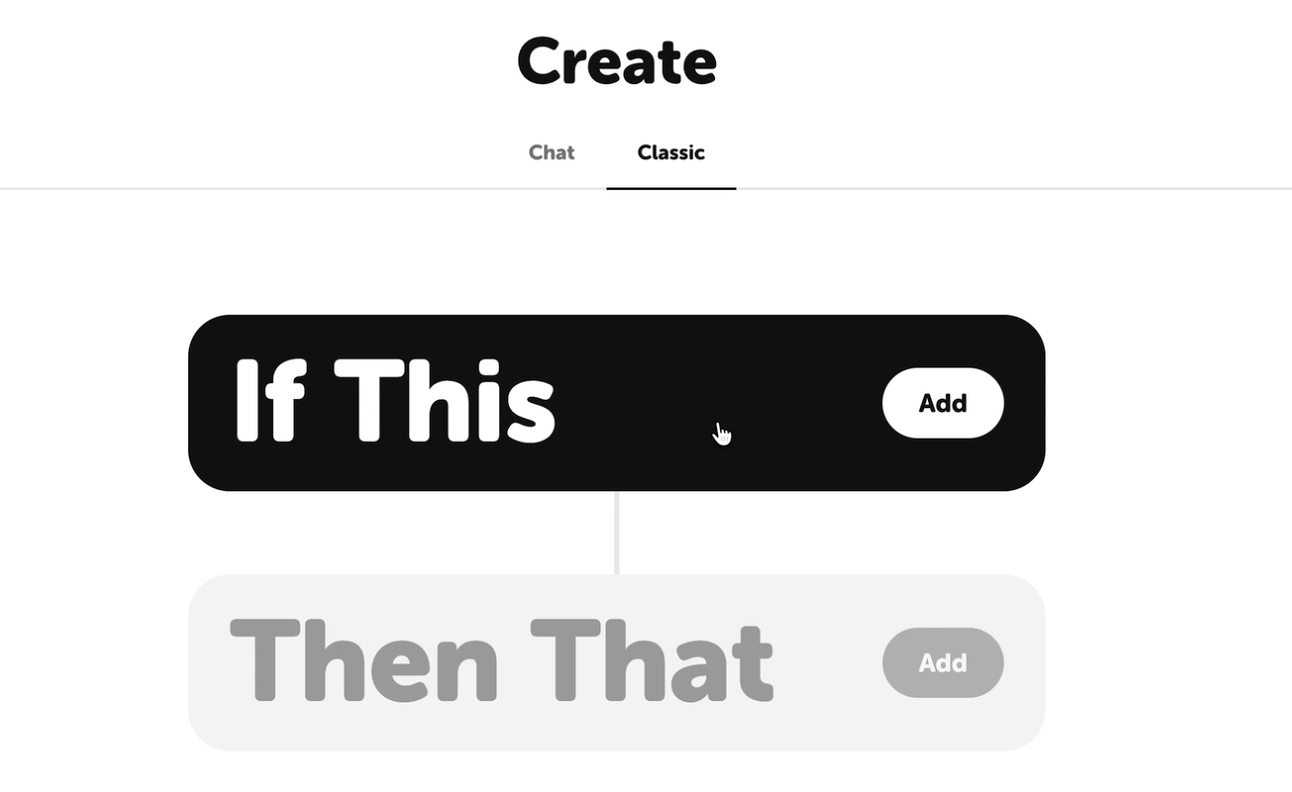
You simply choose a trigger (the "If This" part) and define what should happen next (the "Then That" part). The process is intuitive, so you do not have to spend much time figuring out what to do next or how to structure your automation.
You can start with a simple Applet, see how automation works, and gradually explore more use cases as you become familiar with the platform.
This makes IFTTT a good starting point for beginners who want to automate everyday tasks without feeling overwhelmed by complex settings.
3. App Integrations: IFTTT vs. Zapier
When it comes to app integrations and the variety of automation possibilities, Zapier has a clear advantage.
Its library covers significantly more applications, and it offers a wider range of ways to connect them and automate tasks across different business processes.
IFTTT, on the other hand, makes it easier for beginners to build simple automations without dealing with too many configuration options.
However, as your automation needs grow, you may start to feel limited by IFTTT's capabilities. For example, if you want to connect multiple business applications, handle more complex processes, or build automations involving several steps and conditions, Zapier offers more flexibility.
In other words, IFTTT is a good starting point for simple automations, while Zapier is better suited to users who want to build more extensive and sophisticated automations.
However, while Zapier offers more than 9,000 app integrations and IFTTT supports more than 1,000, you should not choose an automation tool based on the number of integrations alone.
Most people and businesses do not use thousands of different applications in their daily operations. What matters more is whether the tool supports the specific applications you already use and whether it allows you to automate the tasks you actually want to streamline.
Before choosing a platform, consider the following questions:
- Does it integrate with the applications you currently use?
- Does it support the specific triggers and actions you need?
- Can it handle the automation processes you want to build?
Ultimately, the best automation tool is not necessarily the one with the most integrations, but the one that can connect your existing applications and automate the tasks that matter to you.
4. Flexibility: Which Is Better for Complex Automations?
The difference becomes particularly important when your automation requirements grow beyond simple tasks.
Zapier offers greater flexibility than IFTTT when building complex automations, especially when your workflows involve multiple applications, conditional branching, and data processing.
However, Zapier also has its limitations. If you need highly customized automation that involves detailed, step-by-step operations, such as automating actions within a desktop application or reproducing complex manual processes, you may eventually find that Zapier alone cannot meet all your requirements. In such cases, dedicated RPA tools or other automation solutions may be more suitable.
Remember that greater flexibility does not necessarily mean unlimited customization. Consider the complexity of the processes you actually need to automate, rather than choosing a tool solely because it offers more advanced features.
5. Reliability and Troubleshooting
These reports do not establish that one platform is more reliable than the other. They highlight different challenges users may encounter when depending on automated processes.
Customer support is another factor worth considering. In the reviews and discussions we analyzed, users of both IFTTT and Zapier expressed dissatisfaction with support, including concerns about response times and the quality of assistance. Therefore, it is difficult to say that either platform consistently offers better customer support.
If you need faster or more hands-on assistance, working with an agency or implementation partner may be an option. These partners can sometimes provide more responsive support and help resolve technical issues. However, this usually comes with additional costs.
Before committing to a paid plan, it is worth checking how much you can accomplish through self-learning. For example, try building your intended automations using the platform's free plan, watch tutorials on YouTube, and consult the official documentation and guides. This will help you understand whether you can configure and troubleshoot most workflows independently.
You can also contact each provider before subscribing and evaluate the response time, helpfulness, and level of detail in their replies. The quality of this initial interaction can give you a useful indication of what to expect when you need assistance later.
Before relying on an automation for an important process, check:
- Whether the trigger runs when expected.
- Whether the correct data reaches each action.
- Whether errors are clearly reported.
- Whether you can inspect previous executions.
- Whether failed processes can be retried or recovered.
- How the automation behaves when an application is temporarily unavailable.
- Whether you can troubleshoot common issues independently or need external support.
Ultimately, a platform that your team can confidently configure, maintain, and troubleshoot may be a better choice than one with more advanced features but insufficient support for your needs.
No Automation Tool Is Perfect: Consider Other Options, Too
IFTTT and Zapier are both capable automation platforms. However, being popular does not necessarily mean they are the best choice for every team.
For example, one of IFTTT's biggest strengths is its straightforward automation model and support for smart home integrations. But what if your organization needs to automate processes involving multiple business applications, conditional logic, and data management? Its relatively simple structure may become limiting as your requirements grow.
Similarly, Zapier offers an extensive library of more than 9,000 app integrations and advanced workflow capabilities. However, what if your team runs a large number of automations and task-based pricing becomes a significant expense? The cost may increase as your automation usage grows.
As we've seen in user discussions on Reddit and reviews on G2 and Capterra, both tools have their pros and cons. And that's true of any automation platform.
So, if you're still undecided between IFTTT and Zapier, it may be worth exploring other options rather than forcing yourself to choose between the two.
For example, Yoom is an all-in-one automation platform that combines app integrations, AI Workers, databases, and other business automation features in one environment.
Rather than focusing only on connecting one app to another, Yoom helps teams automate broader business processes by combining AI-powered tasks with rule-based automation.
This may be worth exploring if you want to bring different automation needs together on one platform rather than managing multiple separate tools.