


・
12 Best MuleSoft Alternatives for 2027: Why Users Switch

MuleSoft is a powerful integration platform that helps businesses connect applications, manage APIs, and automate data flows across complex IT environments. Its Anypoint Platform provides a wide range of tools for enterprise integration, API management, and application development.
With such a broad range of capabilities, MuleSoft is used to support a variety of integration needs across organizations. But how do users actually feel about using the platform in practice? And what leads some of them to consider switching to an alternative?
To explore these questions, we analyzed reviews and discussions from Reddit, G2, and Capterra to identify the challenges users have experienced with MuleSoft. Based on these findings, this guide introduces 12 MuleSoft alternatives for 2027, covering everything from all-in-one automation platforms to enterprise integration and API management tools.
Whether you're looking for a more accessible way to automate business processes or a platform for complex enterprise integrations, this list can help you find an option that fits your requirements.
Top 9 Concerns About MuleSoft Reported by Users
We analyzed reviews and posts about MuleSoft across Reddit, G2, and Capterra. Each review or post was assigned one primary complaint category to identify the issues users mentioned most often.
Here are the 9 main concerns.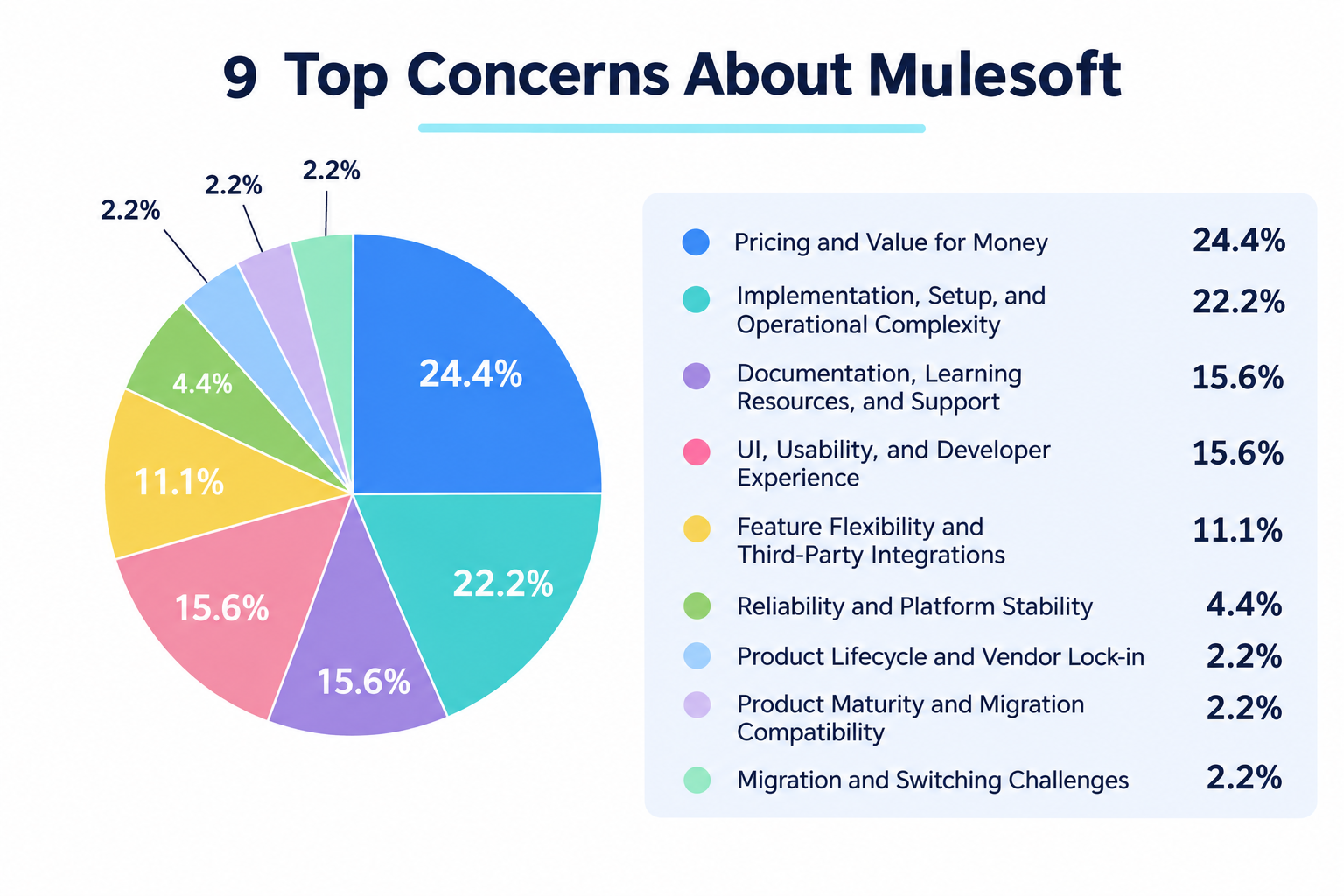
- Pricing and Value for Money: 24.4%
- Implementation, Setup, and Operational Complexity: 22.2%
- Documentation, Learning Resources, and Support: 15.6%
- UI, Usability, and Developer Experience: 15.6%
- Feature Flexibility and Third-Party Integrations: 11.1%
- Reliability and Platform Stability: 4.4%
- Product Lifecycle and Vendor Lock-in: 2.2%
- Product Maturity and Migration Compatibility: 2.2%
- Migration and Switching Challenges: 2.2%
*Note: Percentages may not add up to exactly 100% due to rounding.
1. Pricing Is a Major Consideration
Pricing and value for money were the most frequently mentioned concerns, accounting for 24.4% of the negative reviews we analyzed.
Some users described MuleSoft as expensive, while others questioned whether its pricing model offered sufficient value for their needs. For organizations that need to connect only a limited number of applications or automate a smaller set of processes, the cost of an enterprise integration platform may be difficult to justify.
This makes pricing transparency and the ability to scale costs with actual usage important factors when comparing alternatives.
2. Implementation and Ongoing Management Can Be Complex
Implementation, configuration, and operational complexity accounted for 22.2% of the negative reviews.
Some reviewers mentioned that initial setup and troubleshooting could be difficult, particularly for users without a technical background. Others noted that making changes required specialized personnel.
This is an important consideration for teams that want business users to build and maintain automations themselves, rather than relying on a dedicated integration team for every change.
3. Usability, Documentation, and Support Also Matter
Documentation and support issues accounted for 15.6% of the reviews, while UI and user experience concerns represented another 15.6%.
Individual reviewers mentioned difficulties understanding errors, limited learning resources, and interfaces that could feel unintuitive or buggy.
These findings suggest that choosing an alternative is not just about finding a platform with similar integration capabilities. Teams should also consider how easily they can learn the tool, troubleshoot problems, and maintain automations over time.
12 Best MuleSoft Alternatives for 2027
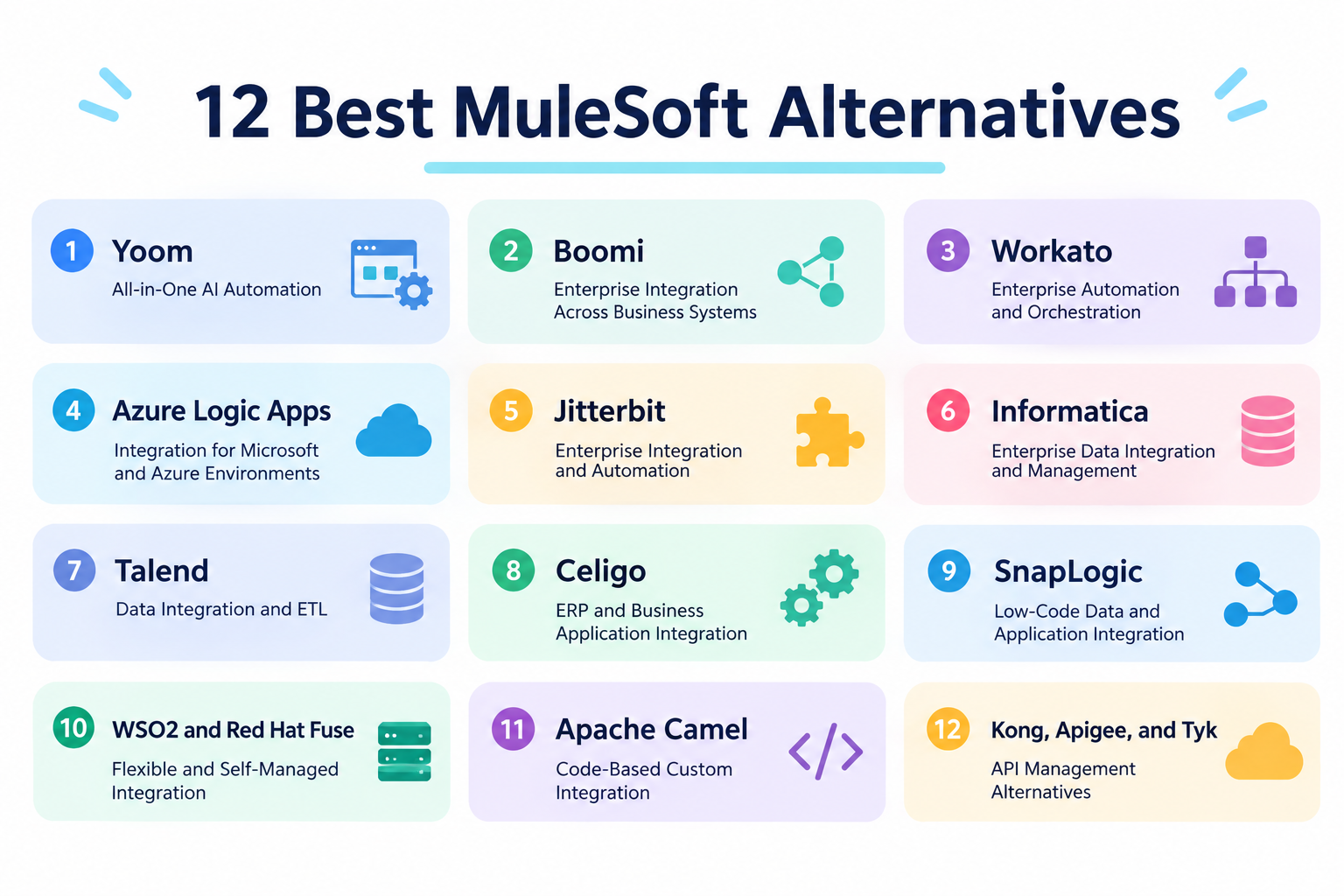
1.
Yoom
— All-in-One AI Automation
Best for: Teams that want to automate business processes across multiple applications without relying entirely on specialized integration developers.
Yoom is an all-in-one AI automation platform that helps businesses connect applications, automate repetitive tasks, and manage business data in one place.
Unlike traditional integration platforms that primarily focus on connecting enterprise systems, Yoom combines app integrations with AI-powered automation, databases, forms, AI-OCR, and RPA capabilities.
Its AI Worker feature allows users to create and execute AI-powered tasks using natural-language instructions. For more structured processes, Flowbot enables teams to build automations based on predefined rules, triggers, and actions.
Yoom also supports custom functions, giving teams additional flexibility when standard automation steps are not enough. This makes it possible to start with relatively simple automations and extend them as business requirements become more specific.
For example, teams can automate data entry, synchronize information between business applications, process incoming forms, and incorporate AI into existing operations.
Yoom may be worth considering if your main goal is to make automation accessible across departments, rather than maintaining a highly specialized integration environment.
Pricing: Free plan available; paid plans start at $16/month with annual billing.
2.
Boomi
— Enterprise Integration Across Business Systems
Best for: Organizations that need to connect multiple SaaS applications, CRM systems, and ERP platforms.
Boomi is an integration platform designed to connect applications, data sources, and business processes across cloud and on-premises environments.
Its platform includes application integration, API management, data management, and workflow capabilities. This makes it a relevant option for organizations looking to replace or complement an enterprise integration platform such as MuleSoft.
Boomi provides a visual development environment that helps users design integration processes. It also supports enterprise use cases such as application integration, data synchronization, and connecting systems across different environments.
Boomi is frequently mentioned in discussions comparing enterprise integration platforms. Its broad integration capabilities make it a natural candidate for organizations evaluating alternatives based on pricing, implementation requirements, and available connectors.
One consideration is that the platform still requires an understanding of integration concepts, particularly when designing complex processes or managing large-scale deployments.
Boomi may be a good fit for organizations that want broad enterprise integration capabilities across multiple business systems.
Pricing: Pay-as-you-go plans start at $99/month, plus usage-based charges.
3. Workato
— Enterprise Automation and Orchestration
Best for: Businesses that want to connect SaaS applications and automate processes across departments.
Workato is an enterprise automation platform that connects business applications and automates processes across departments.
Its visual recipe builder allows users to create automations using triggers, actions, and conditional logic. Workato also supports more advanced orchestration scenarios, making it suitable for organizations that need to coordinate processes across multiple systems.
Common use cases include synchronizing CRM data, automating employee onboarding, managing sales operations, and connecting finance and HR applications.
Compared with platforms focused primarily on APIs and system integration, Workato places greater emphasis on automating business processes. This makes it a relevant option for teams that want to connect SaaS applications while enabling business users to automate their daily operations.
Workato may be worth considering if you want to move beyond IT-led integration and automate processes across business departments.
Pricing: A free plan is available, and the self-service Pro plan starts at $100/month. Enterprise pricing may differ and is available through a sales quote.
4.
Azure Logic Apps
— Integration for Microsoft and Azure Environments
Best for: Organizations already using Microsoft Azure that want to connect cloud services, enterprise applications, and on-premises systems.
Azure Logic Apps is a cloud-based integration service that helps businesses automate workflows and connect applications and services.
It provides a visual workflow designer and a large collection of connectors for integrating with Microsoft services and third-party applications. Users can create processes triggered by events, scheduled activities, or incoming data.
Logic Apps supports enterprise integration scenarios such as processing messages, connecting business systems, and automating data flows. It can also work alongside other Azure services to support more complex architectures.
For organizations that have standardized their IT infrastructure around Microsoft Azure, Logic Apps can be a natural alternative to evaluate. Some users in Reddit discussions also mentioned moving from MuleSoft to Azure Logic Apps.
However, pricing is usage-based, and costs can vary depending on the number and type of triggers, actions, and connectors used. Teams should also consider the learning curve associated with Azure and its broader cloud environment.
Pricing: Usage-based pricing.
5.
Jitterbit
— Enterprise Integration and Automation
Best for: Organizations looking for an integration platform to connect enterprise applications, automate business processes, and manage data across systems.
Jitterbit provides integration and automation solutions that help businesses connect applications, data, and systems.
Its Harmony platform includes capabilities for application integration, API management, and workflow automation. Organizations can use it to synchronize data, connect cloud and on-premises applications, and automate processes across departments.
Jitterbit is also mentioned as an alternative in discussions where MuleSoft's pricing is a concern. For organizations that find MuleSoft difficult to justify within their budget, comparing Jitterbit's capabilities and pricing may be worthwhile.
As with other enterprise integration tools, the complexity of implementation can depend on the number of systems involved and the requirements of each integration.
Jitterbit may be worth evaluating if you need enterprise application integration and want to compare alternatives to MuleSoft's pricing model.
Pricing: Contact Jitterbit for pricing.
6. Informatica
— Enterprise Data Integration and Management
Best for: Large organizations that need data integration, ETL, data quality, and master data management.
Informatica provides enterprise data management and integration solutions, including data integration, data quality, data governance, and master data management.
Its Intelligent Data Management Cloud (IDMC) helps organizations manage data across cloud and on-premises environments. This makes Informatica particularly relevant for businesses whose integration requirements are closely tied to large-scale data management.
The platform supports complex data pipelines and transformation processes, which can be useful when moving and preparing data across different systems.
Compared with platforms focused primarily on application connectivity, Informatica is more closely associated with managing and governing enterprise data.
It may be a strong option if your organization wants to review its data integration infrastructure alongside its broader data management strategy.
Pricing: Consumption-based pricing; contact Informatica for a quote.
7.
Talend
— Data Integration and ETL
Best for: Teams that need to integrate and transform data across cloud and on-premises environments.
Talend, now part of Qlik, is known for its data integration and data management capabilities.
Its tools help organizations collect, transform, and move data between different sources. This can be useful for building data pipelines, preparing information for analytics, and maintaining data quality across business systems.
Talend is particularly relevant when the primary requirement is data integration rather than automating everyday business processes.
It has also appeared in discussions about replacing MuleSoft, including cases where users wanted to move to a different integration solution.
Organizations comparing Talend with MuleSoft should consider whether they need a broad application integration platform or a solution focused more specifically on data integration and transformation.
Talend may be a good fit for data engineering teams that need to manage complex data flows, including those involving on-premises systems.
Pricing: Paid plans start from $300/month.
8.
Celigo
— ERP and Business Application Integration
Best for: Businesses that need to connect ERP systems such as NetSuite with CRM, e-commerce, and other SaaS applications.
Celigo is an integration platform designed to connect business applications and automate data flows between them.
It is particularly well known for integrations involving ERP and e-commerce systems. For example, businesses can synchronize orders, inventory, customer information, and financial data across different applications.
Celigo provides prebuilt integration flows and tools for customizing integrations. These capabilities can reduce the amount of manual work required to connect common business systems.
Compared with a broad enterprise integration platform, Celigo has a stronger focus on business application integration and packaged integration use cases.
It may be a good fit for organizations that want to connect key business applications without building every integration from scratch.
Pricing: 30-day free trial available; paid pricing depends on endpoints and flows. Contact Celigo for a quote.
9.
SnapLogic
— Low-Code Data and Application Integration
Best for: Organizations that want to connect applications and build data integration pipelines using a visual development environment.
SnapLogic is an integration platform that helps businesses connect applications, data sources, and systems.
Its visual interface allows users to build integration pipelines using reusable components called Snaps. The platform supports both application integration and data integration, making it relevant for organizations that need to connect business systems and move data between them.
SnapLogic is often considered alongside other enterprise integration platforms, including MuleSoft, Boomi, Workato, and Celigo.
It may be worth evaluating if your organization wants a low-code approach to integrating applications and managing data flows.
Pricing: Contact SnapLogic for pricing.
10.
WSO2
and
Red Hat Fuse
— Flexible and Self-Managed Integration
Best for: Organizations that want greater control over their integration infrastructure and have the technical resources to manage it.
WSO2 and Red Hat Fuse are integration solutions that can appeal to organizations looking for flexible deployment options and more control over their integration environments.
WSO2 provides integration capabilities for connecting applications, services, and data across different environments. Red Hat Fuse is an integration platform based on open-source technologies and designed for connecting enterprise applications and services.
These options may be relevant for organizations that want to reduce dependence on proprietary platforms, manage their own infrastructure, or customize integration logic to meet specific requirements.
However, self-managed and highly customizable environments can require significant development and operational resources. Teams should consider the costs of implementation, maintenance, and ongoing support alongside potential savings in licensing fees.
WSO2 and Red Hat Fuse may be worth considering if your organization has the technical expertise to manage a more flexible integration environment.
Pricing: WSO2 offers a free trial, with paid plans available through a sales quote. Contact Red Hat for Red Hat Fuse pricing.
11. Apache Camel
— Code-Based Custom Integration
Best for: Development teams that want maximum flexibility when building custom integrations, particularly in Java-based environments.
Apache Camel is an open-source integration framework that allows developers to connect different systems and applications using predefined integration patterns.
Unlike commercial iPaaS products, Apache Camel is a code-first framework. Developers can define integration logic, transform data, and connect services directly through code.
This approach offers considerable flexibility for teams that want to build and manage custom integration solutions. It can also be useful when existing systems require specific integration behavior that is difficult to achieve with prebuilt connectors.
However, Apache Camel is not a plug-and-play replacement for MuleSoft. Organizations need developers who can build, deploy, monitor, and maintain the integration environment.
Apache Camel may be a good fit for technically experienced teams that prioritize implementation flexibility and control over a ready-made integration platform.
Pricing: Free and open source. Infrastructure and maintenance costs still apply.
12.
Kong
Apigee
and
Tyk
:API Management Alternatives
Best for: Organizations that primarily use MuleSoft for API gateway, security, traffic management, and API governance.Some organizations use MuleSoft mainly to expose, secure, and manage APIs rather than to handle broader application integration.
If that describes your use case, dedicated API management platforms may be worth considering.
- Kong provides API gateway and API management capabilities, including traffic control, security, and observability.
- Apigee is Google's API management platform, with tools for securing, monitoring, and managing APIs.
- Tyk offers API management and gateway capabilities for organizations that need to control and monitor API traffic.
These platforms can be relevant alternatives when API management is the main requirement. However, they should not be treated as direct replacements for MuleSoft's broader application integration, data transformation, and orchestration capabilities.
Before choosing one, identify whether you need to replace MuleSoft's API management functionality or its entire integration environment.
4 Things to Consider Before Switching from MuleSoft
Choosing an alternative is not simply a matter of comparing feature lists. The right platform should fit your technical requirements, budget, and team's ability to manage integrations over time.
Here are four points to evaluate before making a decision.
1. Compare the Total Cost, Not Just the Starting Price
Pricing was the most frequently mentioned concern in our review analysis. However, the subscription fee alone often does not reflect the full cost of an integration platform.
Consider the following:
- Subscription or platform fees
- Usage-based charges and transaction limits
- Costs for additional connectors or environments
- Implementation and migration expenses
- Ongoing maintenance and troubleshooting
- The time required for employees to build and update integrations
A tool with a lower starting price may still require significant technical resources. On the other hand, a platform with a higher subscription fee may reduce manual work or maintenance costs.
For a more accurate estimate, it is best to contact the vendor directly. Ask for a quote based on your expected usage, integration requirements, and plans for future growth. This can help you understand costs that may not be clear from publicly available pricing information.
The vendor's responsiveness and the quality of its support during this process are also worth considering. How clearly and promptly the vendor answers your questions can provide useful insight into the level of support you may receive after implementation.
Estimate the total cost based on your actual usage and expected growth, rather than comparing monthly prices alone.
2. Evaluate Usability and Customization Together
Ease of use and flexibility are often treated as competing priorities.
A simple no-code platform may help business users build automations quickly, but it may not support every advanced requirement. A highly customizable integration platform may offer greater flexibility, but require specialized technical knowledge.
Before switching, consider who will actually build and maintain integrations.
If business teams need to make changes regularly, look for a platform that allows non-developers to handle common tasks while still providing options for more advanced customization.
The goal is not necessarily to find a tool that requires no technical knowledge at all. It is to avoid making every small change dependent on a limited number of specialists.
3. Check Integration Coverage and Error Handling
The number of available integrations is important, but it is not the only factor.
Check whether the platform supports the applications and systems your organization actually uses. Pay particular attention to:
- Native connectors for essential business applications
- API connectivity for systems without prebuilt connectors
- Data transformation and mapping capabilities
- Error notifications and execution logs
- Retry options for failed processes
- Monitoring and troubleshooting tools
For complex enterprise environments, also consider support for on-premises systems, data formats, authentication methods, and deployment requirements.
A platform may list hundreds or thousands of connectors, but the quality and flexibility of the integrations you need matter much more than the total count.
4. Consider Documentation and Support
An integration platform is not a one-time setup. Applications change, APIs are updated, and business processes evolve.
Before choosing an alternative, review the resources available when something goes wrong.
Look for:
- Searchable documentation and setup guides
- Troubleshooting articles and error explanations
- Tutorials and practical examples
- Community forums and user discussions
- Access to technical support
- Monitoring and maintenance features
Also consider whether your team can understand and update existing integrations without relying on the original developer.
A platform that is easy to maintain can help reduce operational bottlenecks as your organization grows.
Final Thoughts: Every Tool Comes with Trade-Offs
MuleSoft offers broad integration and API management capabilities, particularly for organizations with complex enterprise requirements. However, its pricing, implementation effort, and learning curve may lead some teams to consider alternatives.
As our review analysis suggests, cost and implementation complexity are two major considerations. Usability, documentation, and ongoing support also influence whether a platform is practical for everyday use.
There is no single best MuleSoft alternative for every organization.
Before making a decision, identify which MuleSoft capabilities you actually use, estimate the total cost of switching, and consider who will be responsible for building and maintaining integrations.
The best alternative is the one that meets your technical requirements while remaining practical for your team to use and manage over time.