


・
10 Best n8n Alternatives for 2027: Why Users Switch

n8n is a workflow automation platform that lets users connect apps, process data, and build complex automations using a visual editor, with the option to write code or host the platform themselves.
However, its flexibility can also come with challenges. Some users report unexpected workflow failures, difficulties with debugging, and the work involved in maintaining a self-hosted environment.
If you are considering switching from n8n, it is important to understand what alternative tools offer and which trade-offs to consider before making a decision.
To explore these questions, we examined public discussions about n8n, including reports of technical issues, operational challenges, and alternative tools users consider.
This guide compares ten n8n alternatives, explains what each one is best suited for, and covers four key things to consider before switching.
Why Look for n8n Alternatives? What User Discussions Reveal
To understand why users consider alternatives to n8n, we reviewed public discussions describing problems, G2 user reviews, and Reddit threads about n8n.
The following figures summarize the discussions included in our analysis. They reflect the posts reviewed, not all n8n users.
Common Concerns in n8n Discussions
*A single post may mention more than one concern, so the total percentages do not add up to 100%.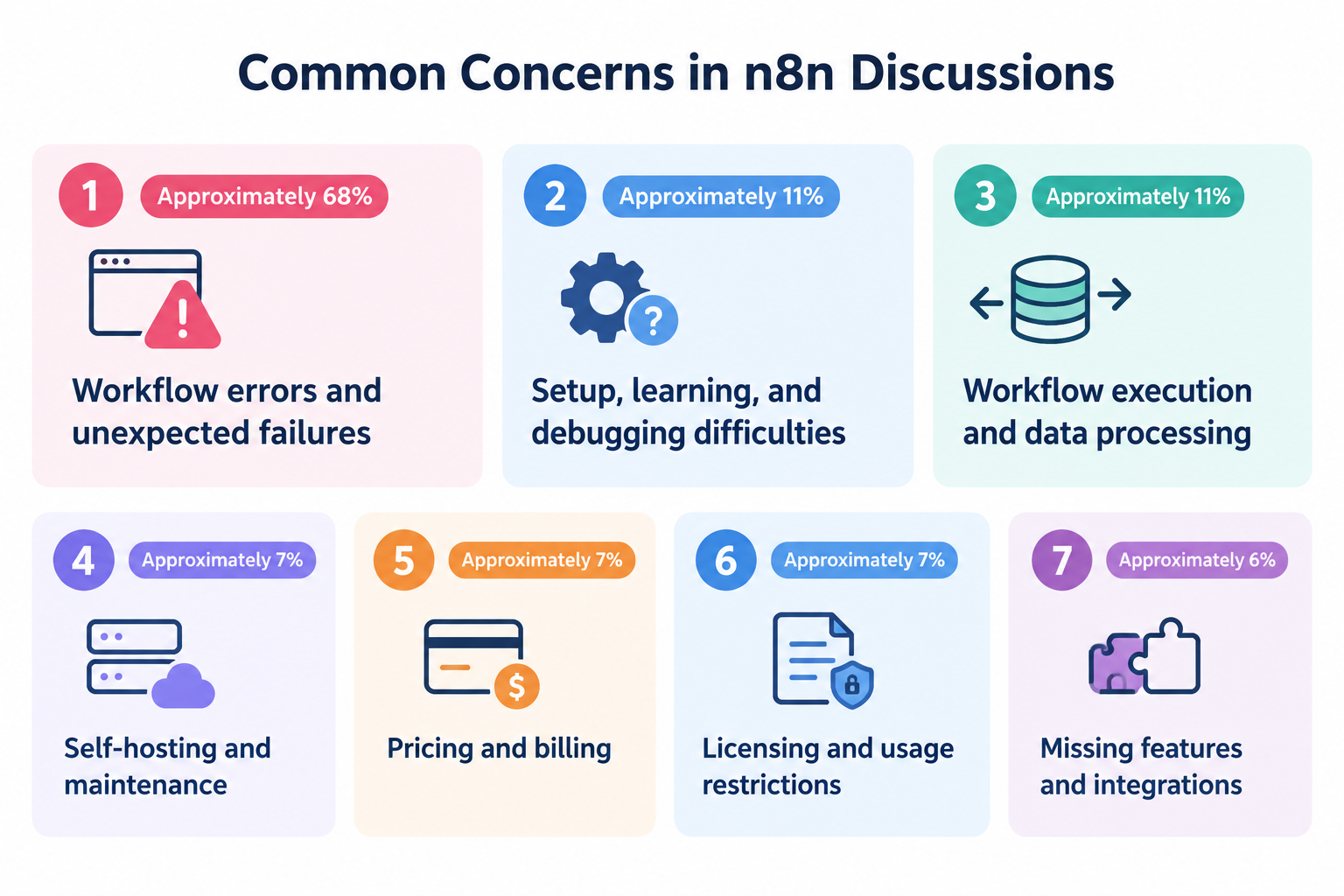
- Workflow errors and unexpected failures (Approximately 68%)Users describe workflows that stop unexpectedly, triggers that fail to fire, and integrations that stop working when external services change.
- Setup, learning, and debugging difficulties (Approximately 11%)
Some users report difficulties configuring workflows, understanding errors, or identifying where a problem occurred. - Workflow execution and data processing (Approximately 11%)
Issues include unexpected execution behavior, problems processing input data, and workflows that fail when data formats change. - Self-hosting and maintenance (Approximately 7%)
Self-hosted users may need to troubleshoot server configuration, networking, updates, and the infrastructure that runs their automations. - Pricing and billing (Approximately 7%)
Some discussions raise concerns about subscription costs and the relationship between usage and pricing. - Licensing and usage restrictions (Approximately 7%)
Some users discuss restrictions that affect how they can use or deploy the platform. - Missing features and integrations (Approximately 6%)
Users sometimes look for functionality, nodes, or integrations that are not available or do not support their specific requirements.
Other concerns include authentication, performance, memory usage, compatibility after updates, and support documentation.
These figures show which topics appeared in the discussions we reviewed. They should not be interpreted as the percentage of all n8n users who experience each problem.
Top 5 Causes of n8n Workflow Failures
One notable finding from our analysis is that reported failures often involve the connections between n8n and external services, rather than only the workflow logic itself.
Based on the discussions we reviewed, the following are the five most frequently mentioned causes of workflow failures.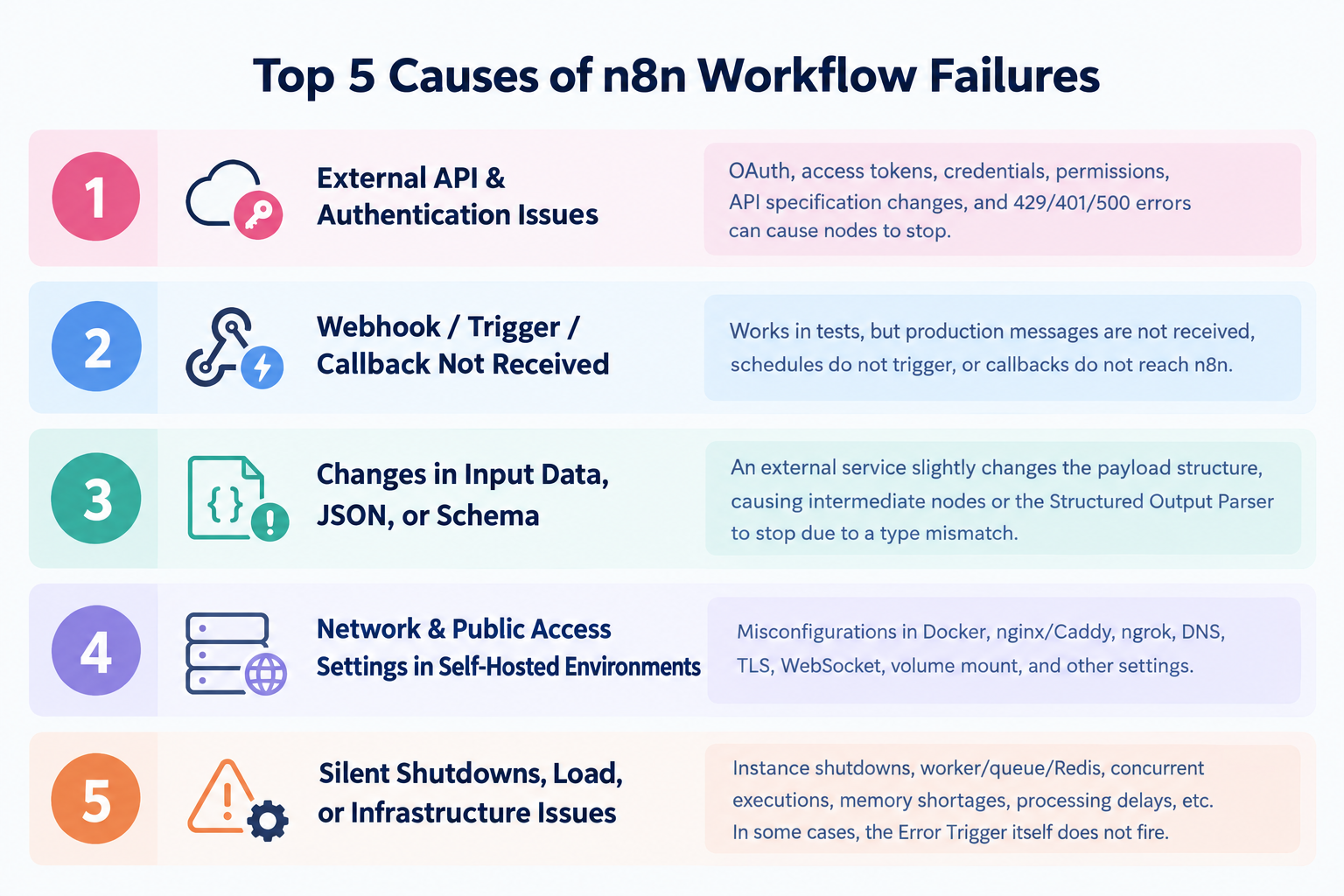
1. External API and Authentication Problems
An integration may stop working when an access token expires, permissions change, credentials become invalid, or an external API returns an error.
For example, an API request may fail with an authentication error or a rate-limit response. The workflow then stops at the affected step unless the error is handled appropriately.
2. Webhooks and Triggers That Do Not Fire
A workflow can be configured correctly but still fail to start if its trigger does not receive the expected event.
Users describe cases where a trigger works during testing but does not receive real messages, or where a scheduled workflow does not run as expected.
These problems can be difficult to diagnose if the missing event never creates an execution record.
3. Changes in Input Data and JSON Structure
External services may change the structure or format of the data they send.
For example, a field that previously contained a number may become a string, or a required field may disappear. A downstream node that expects the original format can then fail.
This can be especially challenging in workflows that process structured data or use AI output parsers.
4. Network and Public Access Configuration in Self-Hosted Environments
Self-hosted installations may depend on several components working together, including Docker, reverse proxies, DNS, TLS certificates, and webhook URLs.
If these components are not configured correctly, external services may be unable to reach n8n, even when the instance itself appears to be running.
The precise cause depends on the deployment and configuration.
5. Instance Downtime, Resource Limits, and Execution Infrastructure
Workflows may also be affected by an unavailable instance, memory shortages, overloaded workers, or problems with queue and Redis configurations.
In some cases, the automation may stop before an error-handling workflow can run.
Why Silent Failures Deserve Attention
A particularly important distinction in the discussions is between a workflow that produces an error and a workflow that never starts or stops without an obvious alert.
Examples described by users include:
- A scheduled trigger that does not run.
- A webhook that never reaches the n8n instance.
- An instance that becomes unavailable.
- A workflow that breaks after an external service changes its data format.
- An error-handling workflow that does not detect a failure occurring outside its intended scope.
These situations can delay detection. A user may discover the problem only after noticing that an expected report, message, or other output was never produced.
The appropriate monitoring setup depends on the type of failure. Error-handling workflows can help with certain execution errors, but they should not be assumed to detect every possible failure. Monitoring the availability of the instance and verifying that expected outputs are produced may also be necessary.
10 n8n Alternatives and Competitors
1.
- Best for: All-in-one automation with a simple, intuitive interface
- Technical requirements: no coding required for standard use, though custom features may require basic knowledge of code and data values.
- Key features: Built-in database, document generation, approvals, AI Workers
- Pricing: Free plan; paid plans from ~$16/month
2.
Make
- Best for: Visual automation with multiple paths
- Technical requirements: Low to moderate; visual automation builder
- Key features: Visual scenario builder, branching logic, data transformation
- Pricing: Free plan is available; paid plans start at $9/month.
3.
Zapier
- Best for: Connecting a wide range of business apps with minimal setup
- Technical requirements: Low; no-code for standard use
- Key features: App integrations, trigger-and-action automations, AI-powered automation tools
- Pricing: Free plan is available; paid plans start at $19.99/month.
- Best for: Open-source automation with a visual builder
- Technical requirements: Low to moderate, depending on the deployment and workflow
- Key features: Visual automation, app integrations, AI-related steps, self-hosting options
- Pricing: Free plan is available; paid plans start at $/20/month.
- Best for: Developer-focused API automation
- Technical requirements: Moderate to high; coding skills can be helpful
- Key features: API integrations, code execution, event-driven workflows
- Pricing: Free plan is available; paid plans start at $99/month.
6.
Windmill
- Best for: Code-based workflows and internal tools
- Technical requirements: Moderate to high; programming knowledge is useful
- Key features: Script-based automation, internal tools, self-hosting options
- Pricing: Free plan is available. paid plans start at $10/month.
7.
Temporal
- Best for: Complex, long-running processes that require reliable execution
- Technical requirements: High; designed for software development teams
- Key features: Durable execution, state management, retries, code-based workflow orchestration
- Pricing: 90-day Free credits are available. Paid plans start at $50
per million actions
- Best for: Data pipelines and scheduled data processing
- Technical requirements: High; technical expertise is generally required
- Key features: Scheduled pipelines, task dependencies, Python-based workflow orchestration
- Pricing: Free open-source software; managed hosting costs vary by provider
- Best for: Automating tasks across Microsoft applications
- Technical requirements: Low to moderate for common automations; advanced scenarios may require additional technical knowledge
- Key features: Microsoft 365 integrations, desktop automation, business process automation
- Pricing: Free trial is available; paid plans start at $15/month.
10.
Dify
- Best for: Building LLM-powered applications and AI workflows
- Technical requirements: Low to moderate for visual building; advanced use cases may require technical knowledge
- Key features: Visual AI workflow builder, model integrations, LLM-powered applications
- Pricing: Free plan is available; paid plans start at $59/month.
Pricing, licensing, and available features may change. Check each provider's official pricing page for the latest details. Some tools are designed for specialized use cases and may not be direct replacements for n8n.
Which n8n Alternative Is Right for You?
The right alternative depends on the problem you are trying to solve.
- Choose Yoom if you want to automate complete business processes using app integrations, databases, document generation, and approval steps in one platform.
- Choose Make if you want a visual automation builder and prefer not to manage your own server.
- Choose Zapier if ease of setup and a broad app ecosystem are your main priorities.
- Choose Activepieces if you want to explore an open-source automation platform with self-hosting options.
- Choose Pipedream if your automations rely heavily on APIs and custom code.
- Choose Windmill if your team prefers building workflows with scripts.
- Choose Temporal if you need to orchestrate complex, long-running software processes.
- Choose Apache Airflow if your main focus is scheduled data pipelines.
- Choose Microsoft Power Automate if your organization relies heavily on Microsoft applications.
- Choose Dify if your main goal is developing AI-powered applications.
What About Self-Hosting?
Self-hosting can offer flexibility and control, but it also means that someone must take responsibility for the environment in which the automation runs.
Depending on the setup, that may include managing updates, network access, credentials, monitoring, backups, and troubleshooting.
Our review of public discussions about n8n found that users explicitly describing their deployment environment were heavily concentrated among self-hosted users.
This means the discussions do not establish that self-hosted n8n is inherently less reliable than n8n Cloud. They also do not provide enough evidence to conclude that managed hosting eliminates operational difficulties.
Still, if your team lacks the technical resources to maintain an automation environment, it is worth evaluating a managed platform and clarifying what the provider handles for you.
4 Things to Know Before Choosing an n8n Alternative
Choosing an n8n alternative is not just about comparing features and subscription prices. Here are four things to consider before switching.1. Test Your Existing Automations Before Switching
Before committing to an alternative, try rebuilding an automation that currently causes problems in n8n using the new tool. Use its free plan or trial to check whether you can achieve the same result with the same amount of setup time or less.
Testing an existing automation before migrating the rest of your workflows can help you determine whether the alternative is a practical fit for your needs.
2. Check Customization Options Beyond Standard Features
If you use n8n, you may value the ability to build automations that closely match your specific requirements. When looking for an alternative, consider whether the tool can offer a similar or greater level of flexibility, even if you have other reasons for switching.
Many no-code automation tools highlight their standard features on their product pages. However, these pages may not explain every customization option available, such as connecting to APIs that are not supported by built-in integrations.
Before deciding that a tool cannot meet your needs, check its help documentation or contact the vendor to ask about its customization options. Find out whether you can connect to services beyond the standard integrations and whether custom logic or API requests are supported.
For example, Yoom offers a custom app & action feature that lets you set up custom API connections when you need to connect to services or endpoints beyond the standard integrations.
Learn more about setting up custom API connections with Yoom's custom apps.
3. Consider the Total Cost, Not Just the Subscription Price
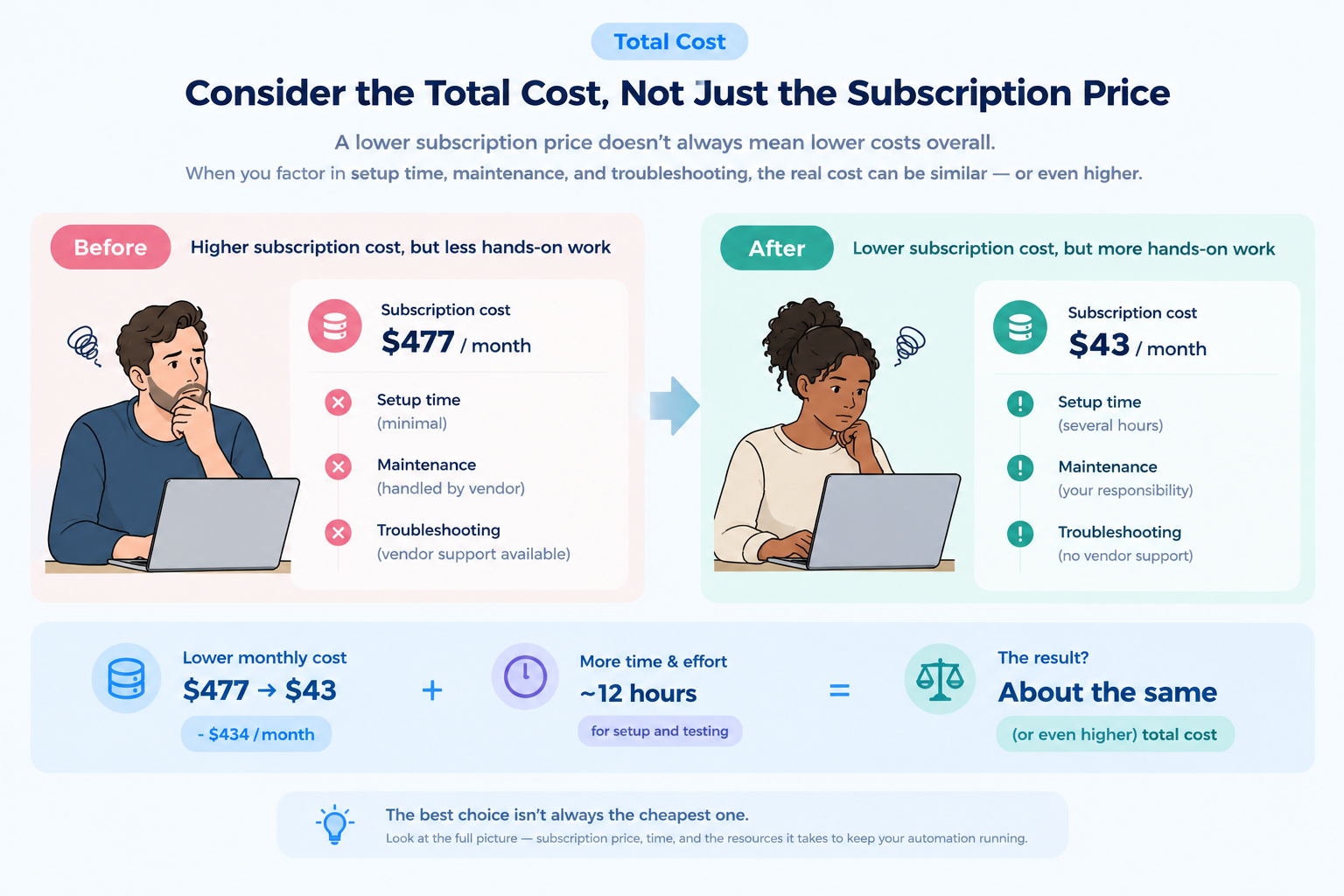
When comparing alternatives, consider the time required to rebuild workflows, test integrations, maintain the environment, and troubleshoot problems. If you are moving away from self-hosting, also consider the cost of managed hosting and any additional usage or licensing fees.
For example, in a Reddit discussion about replacing several business software subscriptions with a self-hosted n8n setup, one business owner reported reducing monthly software costs from approximately $477 to $43. However, building and testing the replacement system took about 12 hours, and the owner noted that troubleshooting would become their responsibility without the same level of vendor support.
This example highlights an important trade-off: lower software costs can come with higher time and maintenance costs. Time is a limited resource, and the hours spent building, maintaining, and fixing automations have a cost, too. If those additional demands outweigh the money saved, the overall benefit may be smaller than the subscription price suggests.
Before committing, estimate the total cost of running your actual automations, including both direct expenses and the time required to keep them working, rather than comparing entry-level prices alone.
4. Expect a Learning Curve With Any Automation Tool
Switching platforms does not automatically make automation easier.
Each tool has its own interface, concepts, and approach to handling data. A visual builder may be easier for some users to understand, while a code-based system may be more suitable for developers.
Even when a tool looks simpler, you may need to rethink how existing automations are structured and tested.
Give the alternative a reasonable trial period. Rebuild one representative automation, test its behavior, and assess how easy it is to understand and maintain before migrating more processes.
Final Thoughts: No Tool Is Perfect
n8n offers flexibility for building automations, especially when technical customization and self-hosting are important. However, some users may find that debugging, infrastructure maintenance, or complex workflows require more effort than expected.
If you are considering switching from n8n, you do not necessarily need to identify the exact cause of every problem first. Instead, try rebuilding an automation that has caused problems in n8n using an alternative tool. This can help you determine whether the alternative can meet your needs with less setup time and maintenance.
Keep in mind that every automation tool has its own pros and cons. The best alternative is not necessarily the one with the most features or the lowest price, but the one that fits your requirements, technical resources, and budget.
You also do not have to rely on a single tool for every task. Some businesses use multiple automation platforms to meet different needs. For example, you could use a paid tool for complex, business-critical automations while using a free plan from another platform for smaller, less demanding tasks. This approach may help you balance costs, reduce maintenance work, and avoid forcing one tool to handle every situation.
Flexibility matters not only in the tools you choose, but also in how you approach automation. Rather than looking for one platform that does everything perfectly, consider which combination of tools works best for your needs. Being open to different approaches may help you reduce frustration and get more value from automation.
Start with Yoom for free