


・
n8n vs Make: Common Drawbacks Reported by Users

Choosing an automation platform involves more than comparing integrations, features, and pricing. It is also important to understand the challenges users may encounter when building, running, and maintaining automations.
Make and n8n are two popular automation platforms, each offering a different approach to connecting applications and automating business processes. But what do real users say about their drawbacks?
To find out, we analyzed user feedback from Reddit and software review platforms, including G2. This article explores the most common concerns reported by Make and n8n users, from workflow errors and data processing difficulties to learning curves, pricing, and technical limitations.
By looking at these recurring issues, you can better understand what to consider before choosing an automation platform.
Common Drawbacks of Make: What Real Users Say
We analyzed negative user feedback about Make from Reddit and G2 to identify its most frequently reported drawbacks.
The findings suggest that execution reliability is the most prominent concern, followed by data processing, authentication, and synchronization issues.What the Data Reveals
The following ranking combines the categorized negative feedback collected from Reddit and G2.
*A single post may mention more than one concern, so the total percentages do not add up to 100%.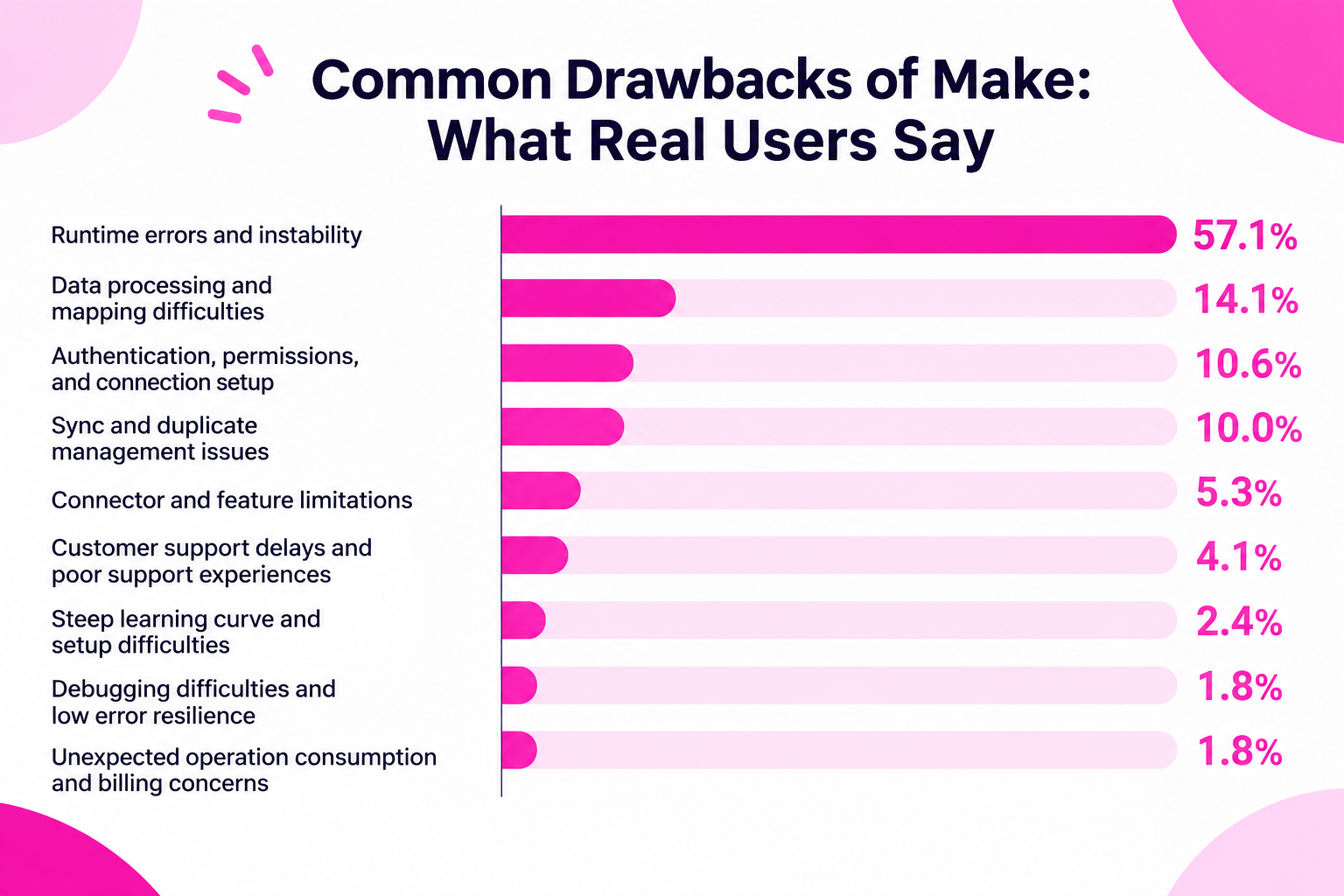
- Runtime errors and instability: 57.1%
- Data processing and mapping difficulties: 14.1%
- Authentication, permissions, and connection setup: 10.6%
- Sync and duplicate management issues: 10.0%
- Connector and feature limitations: 5.3%
- Customer support delays and poor support experiences: 4.1%
- Steep learning curve and setup difficulties: 2.4%
- Debugging difficulties and low error resilience: 1.8%
- Unexpected operation consumption and billing concerns: 1.8%)
1. Runtime Errors and Workflow Instability
Runtime errors and instability were by far the most frequently reported concern, appearing in 57.1% of the negative feedback.
Users described situations where scenarios stopped unexpectedly, webhooks failed to respond, or workflows produced inconsistent results even when their configurations remained unchanged.
The specific issues mentioned included:
- Timeouts
- 500 and 503 server errors
- Delayed or unresponsive webhooks
- Workflows that succeeded once but failed on subsequent runs
- Scenarios stopping unexpectedly
- Inconsistent execution results despite using the same configuration
These reports suggest that execution reliability can be a significant concern for users running automations with Make.
For business-critical processes, unexpected failures can interrupt operations and require users to monitor scenarios or intervene manually.
2. Data Processing and Mapping Difficulties
Data processing and mapping issues accounted for 14.1% of the negative feedback.
Make allows users to transfer and transform data between different applications. However, differences in how applications structure and handle information can create unexpected problems.
Users reported difficulties involving:
- Mismatched data types, such as strings and numbers, causing calculation errors
- Problems expanding or processing arrays and JSON data
- Differences in date formats and time zones
- Missing mapped values or unexpected empty fields
These issues can become particularly challenging in multi-step scenarios where data passes through several applications.
Even when the connections themselves work, users may need additional configuration or data transformation steps to ensure that information is transferred correctly.
3. Authentication, Permissions, and Connection Setup
Authentication, permissions, and connection setup accounted for 10.6% of the negative feedback.
Although connecting applications is a core part of Make, users may encounter problems when external services change their authentication requirements or restrict access.
Common examples included:
- OAuth 2.0 authentication loops
- API key authentication failures
- 401 and 403 authorization errors
- Access tokens expiring without clear notification
- Problems linking accounts to Make
These issues are not necessarily unique to Make. They can occur whenever an automation platform relies on external applications and APIs.
However, they can make troubleshooting difficult, particularly when the cause of the problem lies outside the automation platform itself.
4. Sync and Duplicate Management Issues
Synchronization and duplicate management issues represented 10.0% of the negative feedback.
Users described difficulties keeping records consistent across applications, particularly when automations needed to identify existing records before updating them.
Examples included:
- Failed record matching because applications did not share a common identifier
- Records being missed due to differences in formatting
- Duplicate data generated by repeated executions or synchronization loops
These problems can become more complicated as the number of connected applications and synchronization rules increases.
For workflows involving CRM data, customer records, or inventory, incorrect matching can lead to duplicate entries or inconsistent information across systems.
5. Connector and Feature Limitations
Connector and feature limitations accounted for 5.3% of the negative feedback.
Some users mentioned missing integrations, unavailable functionality, and technical restrictions that made it difficult to build the automations they wanted.
Examples included:
- Discontinued native integrations
- Payload limitations between modules
- Limitations in AI prompt functionality
- Restrictions on writing custom JavaScript or Python code directly
Make supports a wide range of integrations, but the availability of a connector does not necessarily mean every feature or operation of the connected application is supported.
Users with specialized requirements may need to rely on APIs, HTTP requests, or additional workarounds.
6. Customer Support Delays and Poor Support Experiences
Customer support concerns accounted for 4.1% of the negative feedback.
Some users expressed frustration with slow response times, unhelpful answers, and difficulties getting assistance with urgent technical problems.
Reported experiences included:
- Waiting one to three weeks for a response
- Receiving AI chatbot responses that did not resolve the issue
- Getting answers that did not directly address the problem
- Difficulties receiving effective assistance during urgent security-related incidents
For teams relying on automation for important business processes, access to timely and relevant support can be an important consideration.
7. Steep Learning Curve and Setup Difficulties
Learning curve and setup difficulties represented 2.4% of the negative feedback.
Make provides a visual scenario builder, but users may still need to understand how modules, functions, filters, and data structures interact.
For beginners, configuring complex scenarios can require more technical knowledge than expected.
Some users also expressed concerns about the availability of official learning materials and training resources.
This suggests that a visual interface alone does not necessarily make an automation platform easy to learn.
8. Debugging Difficulties and Low Error Resilience
Debugging difficulties and low error resilience accounted for 1.8% of the negative feedback.
Users mentioned situations where a single error could stop an entire scenario, as well as difficulties recovering from failed executions.
Other concerns included unclear error messages and limitations in reusing data from previous runs.
For complex automations, these limitations can make it harder to identify the root cause of a problem and restore normal execution.
9. Unexpected Operation Consumption and Billing Concerns
Unexpected operation consumption and billing concerns represented 1.8% of the negative feedback.
Some users expressed frustration with how operations are consumed, particularly when each module execution contributes to the total usage.
For scenarios involving multiple steps or frequent executions, operation consumption may increase faster than users initially expect.
When evaluating Make's pricing, it is therefore important to understand how operations are calculated and estimate usage based on the actual structure and frequency of your automations.
Common Drawbacks of n8n: What Real Users Say
n8n is another popular automation platform, particularly among users who want greater control over workflow logic and technical configurations.
We reviewed public discussions, G2 user reviews, and Reddit threads.
What the Data Reveals
The following table summarizes the most common drawbacks identified in the collected n8n feedback.
*A single post or review could mention multiple concerns, so the percentages do not add up to 100%.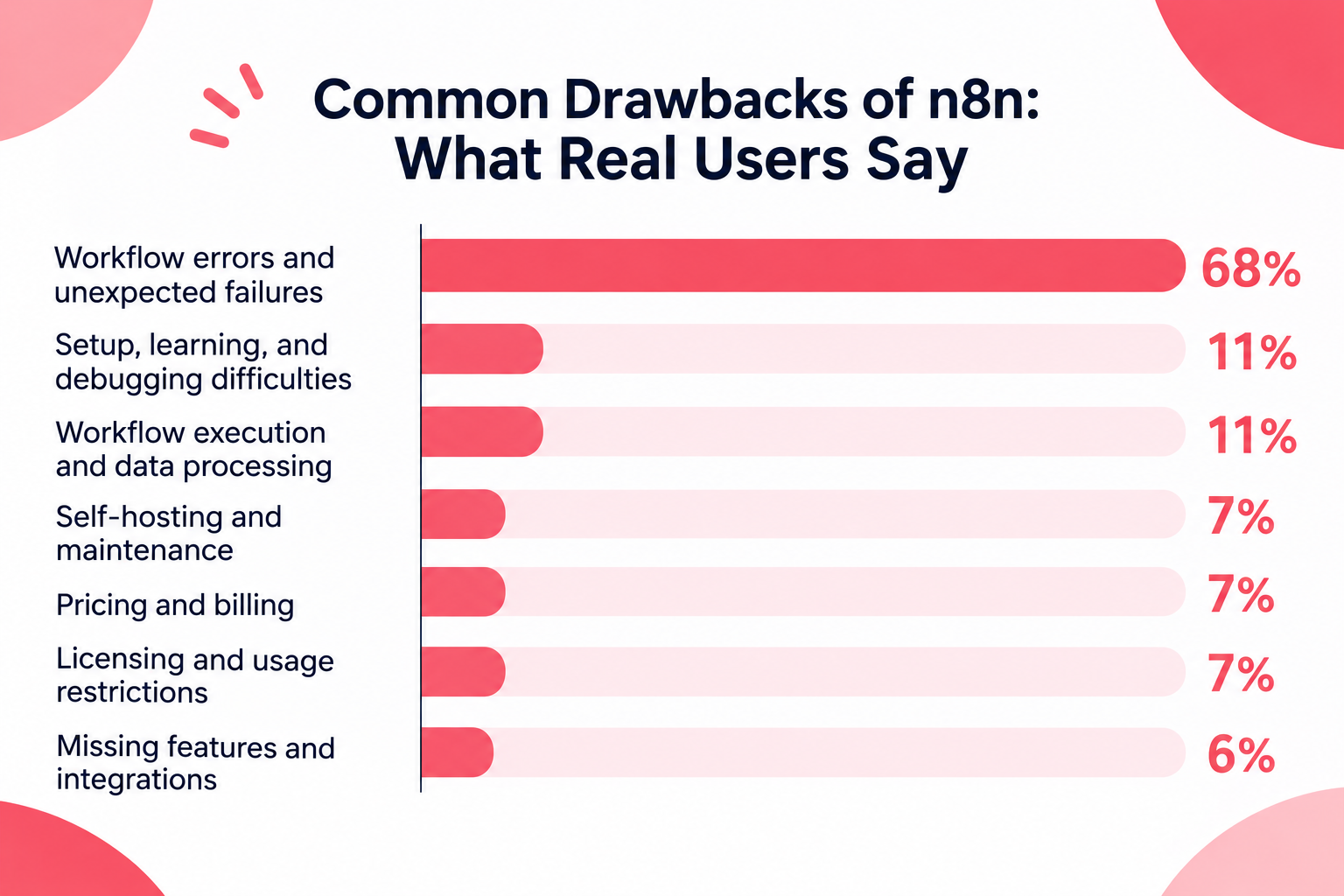
- Workflow errors and unexpected failures: 68%
- Setup, learning, and debugging difficulties: 11%
- Workflow execution and data processing: 11%
- Self-hosting and maintenance: 7%
- Pricing and billing: 7%
- Licensing and usage restrictions: 7%
- Missing features and integrations: 6%
1. Workflow Errors and Unexpected Failures
Workflow errors and unexpected failures were the most frequently reported concern, accounting for approximately 68% of the analyzed feedback.
Users described workflows that stopped unexpectedly, failed to execute, or produced inconsistent results.
Some of the recurring causes included:
- External API and authentication problems
- Webhooks or triggers that failed to fire
- Changes in input data or JSON structures
- Network and public-access configuration issues in self-hosted environments
- Instance downtime and execution resource limitations
These problems highlight the importance of understanding not only how to build a workflow but also how to monitor and maintain it.
2. Setup, Learning, and Debugging Difficulties
Approximately 11% of the analyzed feedback mentioned difficulties with setup, learning, or debugging.
n8n provides considerable flexibility, but that flexibility can also introduce complexity.
Users may need to understand how nodes exchange data, how expressions work, and how to troubleshoot failures across multiple steps.
This can create a learning curve for people who are new to automation or do not have a technical background.
3. Workflow Execution and Data Processing
Around 11% of the feedback mentioned workflow execution or data-processing difficulties.
These issues can involve handling complex data, configuring nodes correctly, and ensuring that information is passed between steps as expected.
As with other automation platforms, workflows that depend on external APIs or changing data structures may require ongoing adjustments.
4. Self-Hosting and Maintenance
Self-hosting and maintenance accounted for approximately 7% of the analyzed feedback.
One of n8n's distinguishing characteristics is that users can choose to host the platform themselves.
However, this also means that users who select a self-hosted setup may need to manage infrastructure-related tasks, such as:
- Server availability and performance
- Network and access configuration
- Updates and maintenance
- Resource usage and execution capacity
For teams without dedicated technical resources, these responsibilities can become an additional operational burden.
5. Pricing, Licensing, and Usage Restrictions
Pricing and billing, as well as licensing and usage restrictions, were each mentioned in approximately 7% of the analyzed feedback.
Some users raised concerns about costs as their automation usage increased, while others discussed restrictions related to how n8n can be used.
These considerations are particularly relevant for teams deciding between cloud-hosted and self-hosted options.
The most suitable option may depend on the team's expected usage, technical resources, and requirements for infrastructure control.
6. Missing Features and Integrations
Approximately 6% of the feedback mentioned missing features or integrations.
Although n8n offers a broad range of integrations and customization options, users may still find that a particular application, trigger, or action is unavailable.
In these cases, users may need to use HTTP requests, APIs, or custom code to connect the services they need.
n8n vs Make: A Quick Guide to Choosing the Right Tool
There is no single automation platform that is best for every team. The right choice depends on your technical resources, automation requirements, and how much control you want over your environment.
Use the following table as a quick guide:
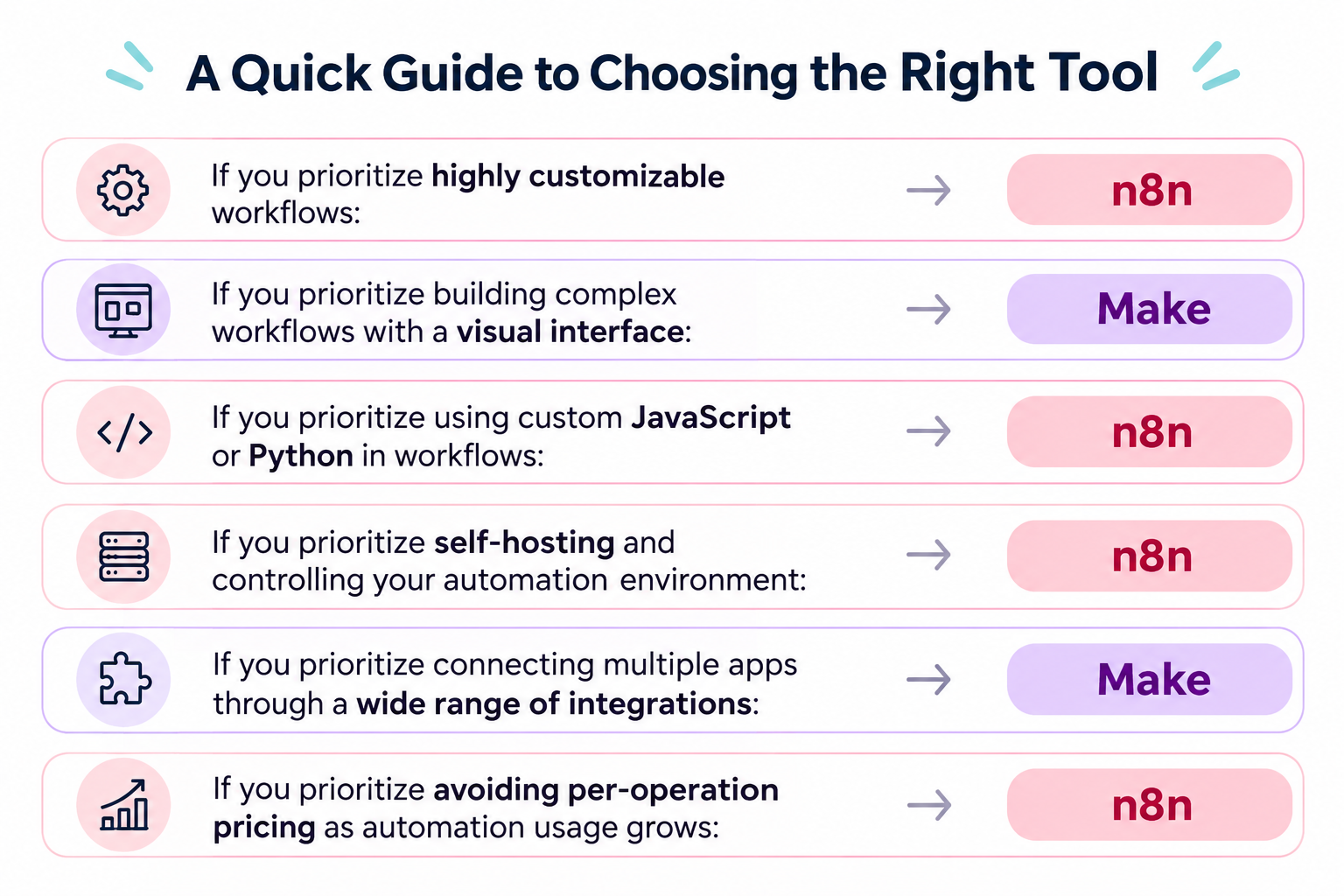
- If you prioritize highly customizable workflows: n8n
- If you prioritize building complex workflows with a visual interface: Make
- If you prioritize using custom JavaScript or Python in workflows: n8n
- If you prioritize self-hosting and controlling your automation environment: n8n
- If you prioritize connecting multiple apps through a wide range of integrations: Make
- If you prioritize avoiding per-operation pricing as automation usage grows: n8n
Still Can't Decide? Consider Other Automation Tools
If you are still unsure after comparing n8n and Make, it may be worth exploring other automation platforms.
You do not necessarily have to choose between these two.
Other tools may offer a different balance of advantages and disadvantages, such as a simpler interface, broader business process automation, more flexible integrations, or features that better match your team's needs.
Rather than forcing yourself to choose between n8n and Make, look for the automation platform that best fits how your team actually works.
What to Consider Before Choosing an Automation Platform
User reviews are useful for identifying potential problems, but they should not be the only factor in your decision.
Before choosing Make or n8n, consider the following points.
1. Evaluate the Complexity of Your Automations
A tool that works well for simple app connections may not be the best fit for workflows involving complex data transformations, branching logic, or multiple external APIs.
Try building a small version of your actual workflow before committing to a platform.
2. Consider Who Will Build and Maintain the Automations
The person who builds an automation may not be the person who maintains it.
If non-technical employees will need to troubleshoot and update workflows, ease of understanding and maintainability should be important selection criteria.
3. Check How Errors Are Handled
No automation platform can guarantee that every workflow will run perfectly.
External applications can experience outages, APIs can change, and data formats can be inconsistent.
Check how each platform helps users identify errors, retry failed operations, and prevent problems from affecting downstream processes.
4. Understand the Total Cost of Usage
Do not compare platforms based only on their entry-level pricing.
Consider how costs may change as the number of workflows, execution frequency, and volume of processed data increase.
It is also worth checking whether the pricing model fits your expected usage patterns.
5. Test the Integrations You Actually Need
A platform may advertise support for an application, but the specific trigger or action you need may not be available.
Before choosing a tool, confirm that it supports the exact operations required by your workflow.
No Automation Tool Is Perfect
Make and n8n are both powerful automation platforms designed to handle complex workflows. Their flexibility allows users to build highly customized automations, but it also comes with trade-offs.
The more complex an automation becomes, the more time and technical knowledge may be required to build, maintain, and troubleshoot it. Errors, unexpected behavior, and debugging can also become more challenging as workflows grow in complexity.
If you are still struggling to choose between Make and n8n, it may be worth exploring other automation tools before making your decision.
There are many emerging automation platforms on the market, each offering a different balance of advantages and disadvantages. While no tool is perfect, you may find one that better matches your technical resources, workflow requirements, and expectations.
Yoom is one such alternative.
Yoom offers a feature called Custom Functions, which allows users to extend standard functionality and handle more advanced automation requirements.
Unlike approaches that require users to write entire scripts from scratch, Yoom's Custom Functions let users work with code without requiring extensive programming knowledge. Users can configure specific values within predefined code, making it easier to customize automation behavior without writing a complete script.
This flexibility is particularly appreciated by users who have some coding knowledge and want more control over their automations, without taking on the complexity of full-scale development.