


・
n8n vs Power Automate: Common Drawbacks Reported by Users

- Common Drawbacks of n8n: What Real Users Say
- Common Drawbacks of Power Automate: What Real Users Say
- n8n vs. Power Automate: A Quick Guide to Choosing the Right Tool
- Still Can't Decide? Consider Other Automation Tools
- What to Consider Before Choosing an Automation Platform
- No Automation Tool Is Perfect
Choosing an automation platform involves more than comparing integrations, features, and pricing. It is also important to understand the challenges users may encounter when building, running, and maintaining automations.
n8n and Microsoft Power Automate are two popular automation platforms, each offering a different approach to connecting applications and automating business processes. But what do real users say about their drawbacks?
To find out, we analyzed negative user feedback from Reddit and software review platforms, including G2. This article explores the most common concerns reported by n8n and Power Automate users, from workflow errors and licensing complexity to debugging difficulties, data processing limitations, and maintenance challenges.
By looking at these recurring issues, you can better understand what to consider before choosing an automation platform.
Common Drawbacks of n8n: What Real Users Say
n8n is a popular automation platform, particularly among users who want greater control over workflow logic, integrations, and technical configurations.
We analyzed user feedback about n8n from G2 user reviews, and Reddit threads.
What the Data Reveals
The following ranking summarizes the most common concerns identified in the collected n8n feedback.
*A single post or review could mention multiple concerns, so the percentages do not add up to 100%.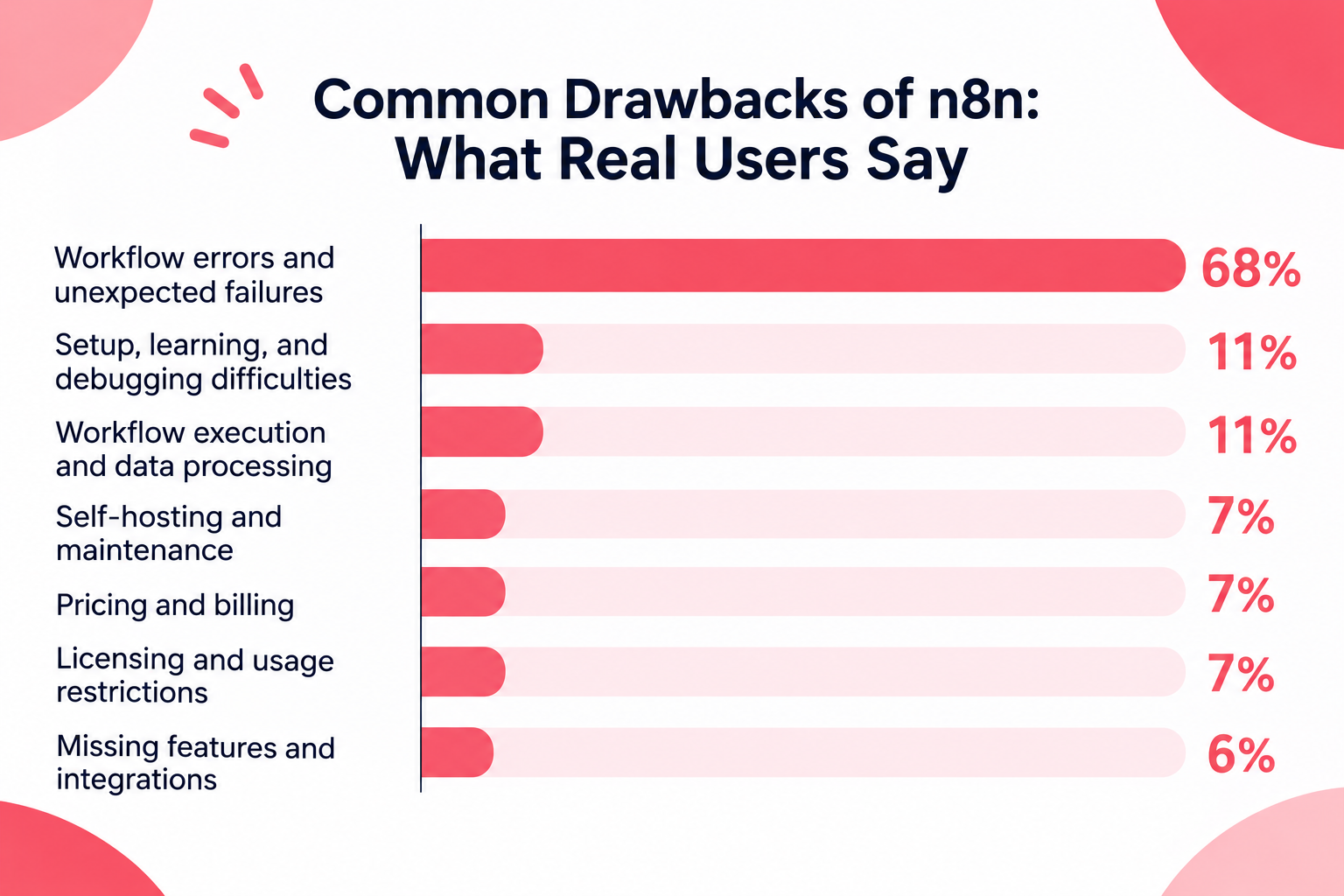
- Workflow errors and unexpected failures: 68%
- Setup, learning, and debugging difficulties: 11%
- Workflow execution and data processing: 11%
- Self-hosting and maintenance: 7%
- Pricing and billing: 7%
- Licensing and usage restrictions: 7%
- Missing features and integrations: 6%
1. Workflow Errors and Unexpected Failures
Workflow errors and unexpected failures were the most frequently reported concern, accounting for approximately 68% of the analyzed feedback.
Users described workflows that stopped unexpectedly, failed to execute, or produced inconsistent results.
Some of the recurring causes included:
- External API and authentication problems
- Webhooks or triggers that failed to fire
- Changes in input data or JSON structures
- Network and public-access configuration issues in self-hosted environments
- Instance downtime and execution resource limitations
These problems highlight the importance of understanding not only how to build a workflow but also how to monitor and maintain it.
For business-critical processes, unexpected failures can interrupt operations and require users to monitor workflows or intervene manually.
2. Setup, Learning, and Debugging Difficulties
Approximately 11% of the analyzed feedback mentioned difficulties with setup, learning, or debugging.
n8n provides considerable flexibility, but that flexibility can also introduce complexity.
Users may need to understand how nodes exchange data, how expressions work, and how to troubleshoot failures across multiple steps.
This can create a learning curve for people who are new to automation or do not have a technical background.
For users building more advanced workflows, identifying the source of an error can require a deeper understanding of the platform's underlying logic.
3. Workflow Execution and Data Processing
Around 11% of the feedback mentioned workflow execution or data-processing difficulties.
These issues can involve handling complex data, configuring nodes correctly, and ensuring that information is passed between steps as expected.
As with other automation platforms, workflows that depend on external APIs or changing data structures may require ongoing adjustments.
For workflows involving multiple applications and data transformations, even small changes in input data can affect downstream operations.
4. Self-Hosting and Maintenance
Self-hosting and maintenance accounted for approximately 7% of the analyzed feedback.
One of n8n's distinguishing characteristics is that users can choose to host the platform themselves.
However, this also means that users who select a self-hosted setup may need to manage infrastructure-related tasks, such as:
- Server availability and performance
- Network and access configuration
- Updates and maintenance
- Resource usage and execution capacity
For teams without dedicated technical resources, these responsibilities can become an additional operational burden.
While self-hosting provides greater control over the environment, it also requires users to take responsibility for keeping the platform running reliably.
5. Pricing, Licensing, and Usage Restrictions
Pricing and billing, as well as licensing and usage restrictions, were each mentioned in approximately 7% of the analyzed feedback.
Some users raised concerns about costs as their automation usage increased, while others discussed restrictions related to how n8n can be used.
These considerations are particularly relevant for teams deciding between cloud-hosted and self-hosted options.
The most suitable option may depend on the team's expected usage, technical resources, and requirements for infrastructure control.
6. Missing Features and Integrations
Approximately 6% of the feedback mentioned missing features or integrations.
Although n8n offers a broad range of integrations and customization options, users may still find that a particular application, trigger, or action is unavailable.
In these cases, users may need to use HTTP requests, APIs, or custom code to connect the services they need.
For teams without development resources, these workarounds can add complexity to the automation-building process.
Common Drawbacks of Power Automate: What Real Users Say
Microsoft Power Automate is an automation platform designed to connect applications and automate business processes, particularly within the Microsoft ecosystem.
We analyzed user feedback about Power Automate from Reddit and G2 to identify its most frequently reported drawbacks.
What the Data Reveals
The following ranking combines the categorized negative feedback collected from Reddit and G2.
*A single post or review may mention more than one concern, so the percentages do not add up to 100%.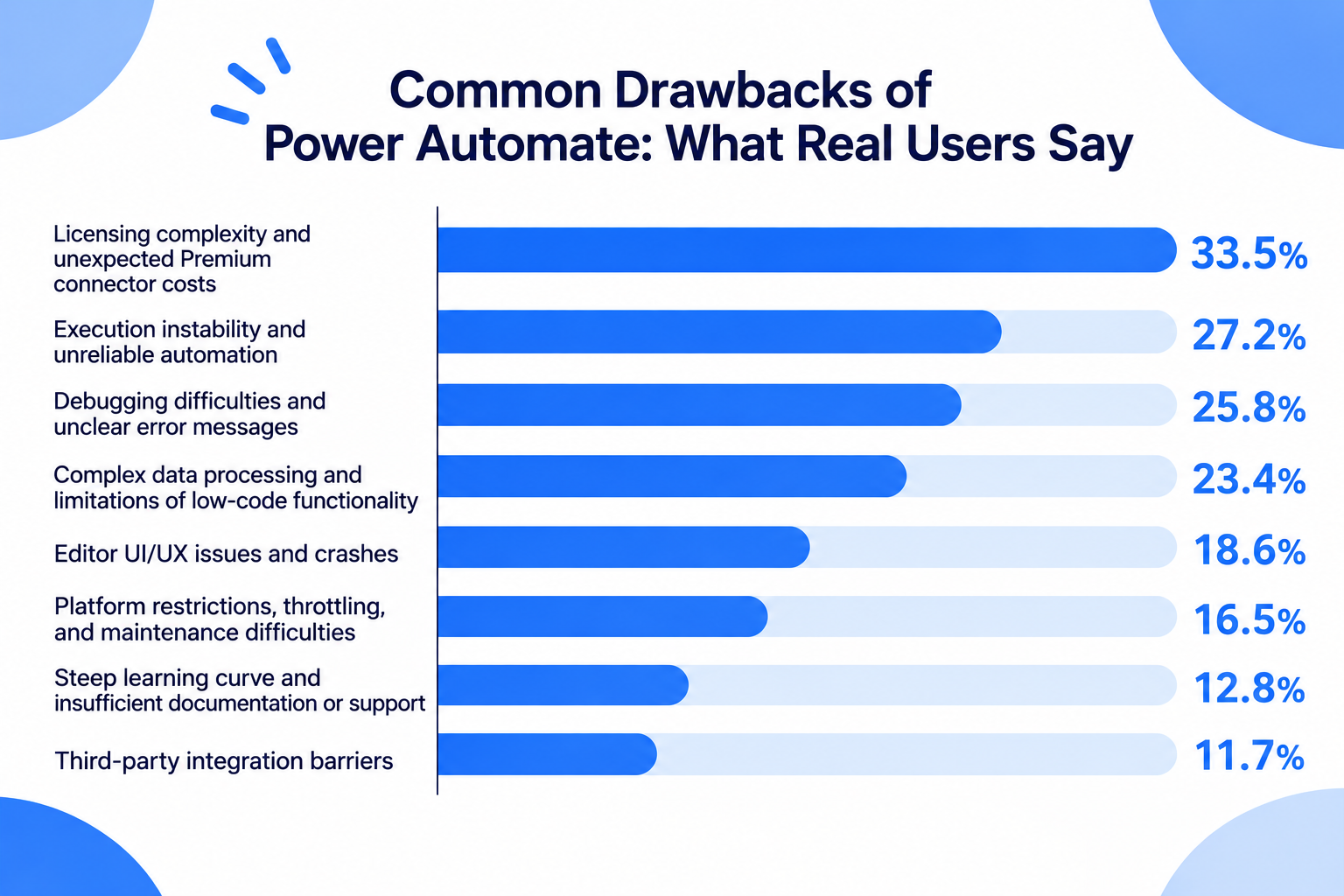
- Licensing complexity and unexpected Premium connector costs: 33.5%
- Execution instability and unreliable automation: 27.2%
- Debugging difficulties and unclear error messages: 25.8%
- Complex data processing and limitations of low-code functionality: 23.4%
- Editor UI/UX issues and crashes: 18.6%
- Platform restrictions, throttling, and maintenance difficulties: 16.5%
- Steep learning curve and insufficient documentation or support: 12.8%
- Third-party integration barriers: 11.7%
1. Licensing Complexity and Unexpected Premium Connector Costs
Licensing complexity and unexpected Premium connector costs were the most frequently reported concern, accounting for 33.5% of the negative feedback.
Although Power Automate is often associated with Microsoft 365, users may discover that certain features and connectors require additional licenses.
Common examples included:
- SQL Server connections requiring Premium licensing
- HTTP requests and Word template generation requiring additional licenses
- On-premises data gateway functionality involving additional licensing requirements
- Confusion about Per User, Per Flow, and Process licensing models
- Uncertainty about multiplexing rules and indirect access to Premium flows
- Unexpected restrictions following licensing or product changes
These issues can make it difficult for businesses to estimate the actual cost of their automation projects.
For example, users who initially expect to automate processes using their existing Microsoft 365 subscriptions may discover that connecting external databases or using specific actions requires a more expensive plan.
Understanding the licensing requirements before building workflows is therefore essential, particularly for organizations planning to scale automation across multiple departments.
2. Execution Instability and Unreliable Automation
Execution instability and unreliable automation accounted for 27.2% of the negative feedback.
Users reported problems with both cloud flows and Power Automate Desktop (PAD), including situations where automations stopped working despite previously successful configurations.
The specific issues mentioned included:
- Desktop flow UI elements becoming unrecognizable after browser updates or interface changes
- Delays of approximately 30–40 seconds between cloud triggers and desktop flow execution
- Intermittent 500 Internal Server Errors
- File-locking problems during simultaneous executions
- Inconsistent results when multiple users or workflows access the same resources
These issues can make it difficult to rely on Power Automate for processes that require consistent and timely execution.
For example, desktop automation may fail when a website's layout or an application's UI elements change, even if the overall workflow remains unchanged.
Similarly, concurrent executions can create conflicts when multiple workflows attempt to access or update the same files.
For businesses relying on automation for daily operations, these problems can increase the need for monitoring and manual intervention.
3. Debugging Difficulties and Unclear Error Messages
Debugging difficulties and unclear error messages accounted for 25.8% of the negative feedback.
Users expressed frustration with error messages that did not clearly explain what went wrong or where a problem originated.
Common examples included:
- Generic error messages such as unknownError
- ActionBranchingConditionNotSatisfied errors that are difficult to interpret
- Errors within nested scopes that do not clearly identify the failed action
- Misleading errors displayed in the editor
- Slow flow saving and execution history loading
- Silent failures that make troubleshooting difficult
For complex workflows, identifying the actual source of an error can require considerable time.
For example, when an action inside a Scope fails, users may find it difficult to identify the specific step responsible for the failure through the available error information.
This can make debugging particularly challenging when workflows contain multiple conditions, nested actions, and dependencies.
As a result, even relatively small changes may require significant time to test and troubleshoot.
4. Complex Data Processing and Limitations of Low-Code Functionality
Complex data processing accounted for 23.4% of the negative feedback.
Although Power Automate offers a visual, low-code interface, users may encounter technical difficulties when working with more complicated data structures.
Reported issues included:
- Unexpected Apply to each loops being generated when handling arrays or JSON data
- Difficulties working with nested arrays and multiple-choice SharePoint columns
- String and integer type mismatches causing condition failures
- Date and time zone conversion problems
- Long and complicated expressions required for data transformation
For example, when users work with data from SharePoint or Excel, values may be interpreted as strings rather than numbers.
This can cause unexpected results in conditions and calculations unless additional type-conversion expressions are configured.
Date and time handling can also require multiple expressions, such as formatDateTime and convertToUtc, to ensure that information is transferred correctly between applications.
These limitations can make advanced automation more complicated than users initially expect from a low-code platform.
5. Editor UI/UX Issues and Unexpected Crashes
Editor UI/UX issues and crashes accounted for 18.6% of the negative feedback.
Users reported problems with the flow editor, including interface changes that made existing workflows more difficult to manage.
Some of the recurring concerns included:
- AND conditions unexpectedly disappearing after saving a flow in the new editor
- Browser crashes caused by memory limitations when editing large workflows
- Difficulty navigating and maintaining complex flows
- Frequently used actions, such as Compose and Initialize variable, not being easily accessible through pinned shortcuts
These problems can interrupt the development process and make routine workflow maintenance more time-consuming.
For teams managing large automations with many steps and conditions, editor performance and usability can become important considerations.
6. Platform Restrictions, Throttling, and Maintenance Difficulties
Platform restrictions and operational limitations accounted for 16.5% of the negative feedback.
Users mentioned several technical restrictions that could affect automation reliability and scalability.
Common examples included:
- SharePoint delegation limits affecting queries involving more than 5,000 records
- Daily action limits and throttling when usage exceeds available capacity
- Workflow failures caused by changes to SharePoint column names
- Connection issues following account password changes
- Difficulties identifying dependencies between multiple workflows
These restrictions can become particularly problematic as businesses expand their automation usage.
For example, a change to a SharePoint column name may affect multiple workflows that depend on that field.
Without clear visibility into these dependencies, identifying all affected automations can become a time-consuming task.
As the number of connected workflows increases, maintaining them can require more coordination and careful management.
7. Steep Learning Curve and Insufficient Documentation or Support
Learning difficulties and documentation or support concerns accounted for 12.8% of the negative feedback.
Although Power Automate provides templates and a visual interface, users may find that building more advanced workflows requires considerably more technical knowledge.
Reported concerns included:
- Difficulty moving beyond standard templates
- Complicated expressions and data transformation requirements
- Conflicting or outdated official documentation
- Uncertainty surrounding changes such as the migration from Exchange Web Services (EWS) to Microsoft Graph
- Slow customer support responses and difficulties resolving technical issues
Some users described waiting several weeks or even months for meaningful responses to support requests.
For businesses that rely on automation for important processes, insufficient documentation and delayed support can make it difficult to resolve problems quickly.
This suggests that access to learning resources and effective technical support should also be considered when evaluating an automation platform.
8. Third-Party Integration Barriers
Third-party integration barriers accounted for 11.7% of the negative feedback.
Power Automate offers extensive integration capabilities, particularly for Microsoft products. However, users may encounter additional difficulties when connecting applications outside the Microsoft ecosystem.
Some of the reported issues included:
- Difficulties integrating with SAP, Salesforce, Snowflake, and other third-party services
- Unsupported or problematic HTTP methods, such as PATCH
- Authentication token expiration without clear notifications
- Conflicts between authorization headers and HTTP trigger authentication
- API connection errors requiring additional middleware or custom solutions
These issues can create additional work for teams that need to connect multiple external applications.
In some cases, users may need to introduce additional services, such as Azure Functions, to work around authentication or API limitations.
Therefore, businesses should verify that the specific connectors, triggers, and actions they need are supported before committing to Power Automate.
n8n vs. Power Automate: A Quick Guide to Choosing the Right Tool
There is no single automation platform that is best for every team. The right choice depends on your technical resources, automation requirements, existing software environment, and how much control you want over your workflows.
Use the following guide to help compare n8n and Power Automate: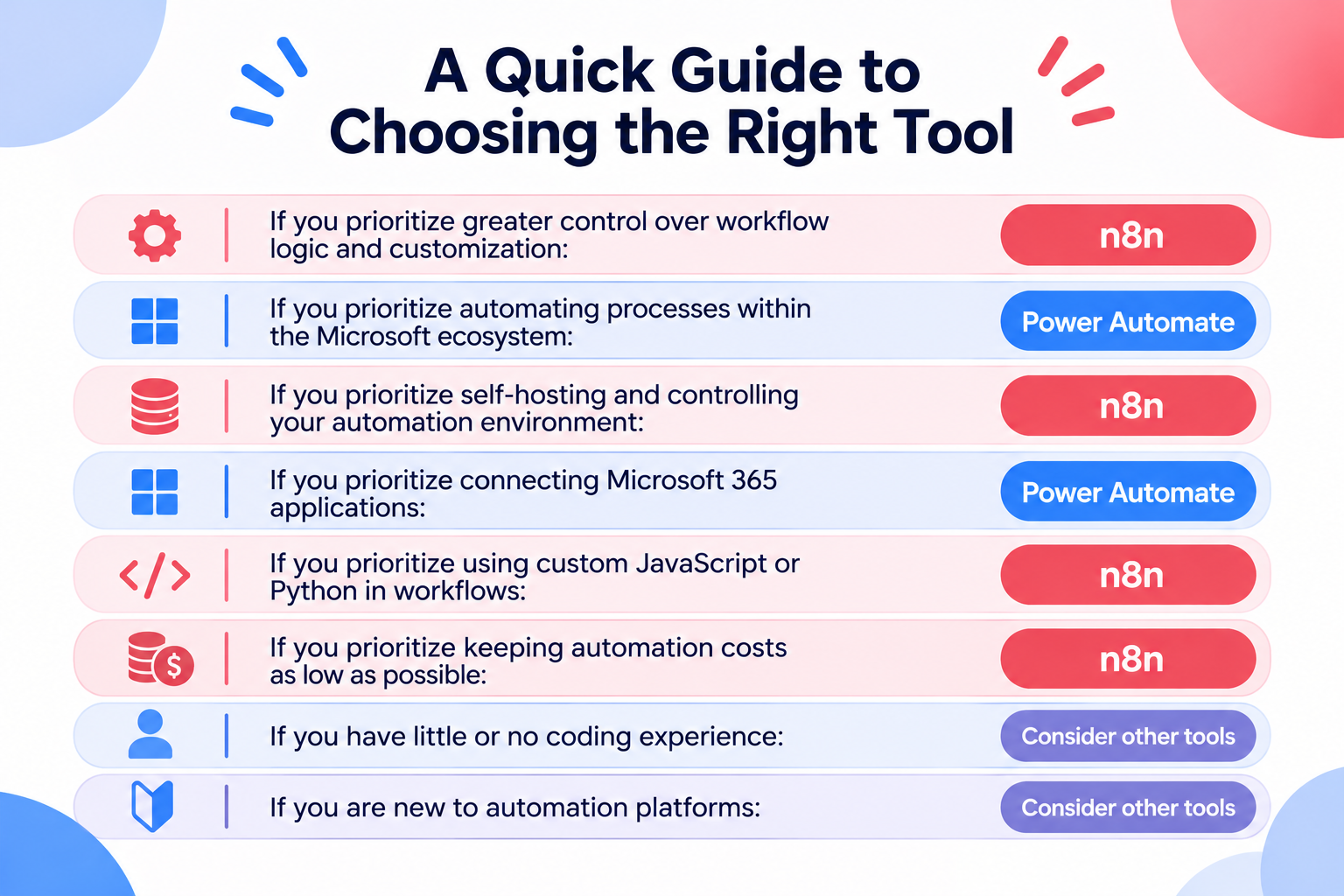
- If you prioritize greater control over workflow logic and customization: n8n
- If you prioritize automating processes within the Microsoft ecosystem: Power Automate
- If you prioritize self-hosting and controlling your automation environment: n8n
- If you prioritize connecting Microsoft 365 applications: Power Automate
- If you prioritize using custom JavaScript or Python in workflows: n8n
- If you prioritize keeping automation costs as low as possible: n8n
- If you have little or no coding experience: Consider other tools
- If you are new to automation platforms: Consider other tools
However, both platforms come with trade-offs.
n8n offers flexibility and infrastructure control, but users may need more technical knowledge to build, debug, and maintain advanced workflows.
Power Automate offers strong integration with Microsoft products and desktop automation capabilities, but licensing complexity, execution reliability, and advanced data processing can create challenges.
Still Can't Decide? Consider Other Automation Tools
If you are still unsure after comparing n8n and Power Automate, it may be worth exploring other automation platforms.
You do not necessarily have to choose between these two.
Other tools may offer a different balance of advantages and disadvantages, such as a simpler interface, broader application integrations, more flexible customization options, or features that better match your team's needs.
Rather than forcing yourself to choose between n8n and Power Automate, look for the automation platform that best fits how your team actually works.
What to Consider Before Choosing an Automation Platform
User reviews are useful for identifying potential problems, but they should not be the only factor in your decision.
Before choosing n8n or Power Automate, consider the following points.
1. Evaluate the Complexity of Your Automations
A tool that works well for simple app connections may not be the best fit for workflows involving complex data transformations, branching logic, or multiple external APIs.
Both n8n and Power Automate offer advanced customization options that allow users to build complex automations. However, this flexibility can also make configuration more complicated.
For example, n8n allows users to customize workflow logic in detail, but building and maintaining a self-hosted environment can require additional technical knowledge and infrastructure setup.
Power Automate also supports detailed automation through cloud flows and robotic process automation (RPA). However, desktop automation may require users to configure specific UI interactions, such as whether an element should be clicked with the left or right mouse button, as well as other interaction settings. As workflows become more complex, users may also need to work with JSON data, expressions, and other technical configurations.
If you have little or no coding experience, these requirements may make it difficult to build and troubleshoot advanced automations.
Consider the types of processes you want to automate and whether the platform can handle the required logic without excessive workarounds.
Try building a small version of your actual workflow before committing to a platform.
2. Consider Who Will Build and Maintain the Automations
The person who builds an automation may not be the person who maintains it.
Both n8n and Power Automate can require technical knowledge beyond basic drag-and-drop configuration, particularly when workflows involve complex logic, data transformations, or custom settings.
If non-technical employees will need to troubleshoot and update workflows, ease of understanding and maintainability should be important selection criteria.
For n8n, consider whether your team has the technical resources to manage infrastructure, particularly if you plan to use a self-hosted setup.
For Power Automate, consider whether your team can handle more detailed configuration requirements, especially when working with desktop flows, complex conditions, and data transformations. Also consider whether your organization has the technical resources to write custom code, work with JSON, or resolve integration problems.
If your team has limited technical experience, a platform with a simpler setup process and more accessible configuration options may be a better fit.
3. Check How Errors Are Handled
No automation platform can guarantee that every workflow will run perfectly.
External applications can experience outages, APIs can change, and data formats can be inconsistent.
Check how each platform helps users identify errors, retry failed operations, and prevent problems from affecting downstream processes.
You should also consider how much monitoring and manual intervention your workflows may require.
4. Understand the Total Cost of Usage
Do not compare platforms based only on their entry-level pricing.
Consider how costs may change as the number of workflows, execution frequency, and volume of processed data increase.
For Power Automate, pay particular attention to Premium connectors and licensing requirements.
For n8n, consider the differences between cloud-hosted and self-hosted options. While self-hosting can significantly reduce software subscription costs, it may also require more time and technical resources to set up and maintain.
For example, in a Reddit discussion about replacing several business software subscriptions with a self-hosted n8n setup, one business owner reported reducing monthly software costs from approximately $477 to $43. However, building and testing the replacement system took about 12 hours, and the owner noted that troubleshooting would become their responsibility without the same level of vendor support.
This example highlights an important trade-off: lower software costs can come with higher time and maintenance costs. Time is a limited resource, and the hours spent building, maintaining, and fixing automations have a cost, too. If those additional demands outweigh the money saved, the overall benefit may be smaller than the subscription price suggests.
Before committing, estimate the total cost of running your actual automations, including both direct expenses and the time required to keep them working, rather than comparing entry-level prices alone.
5. Test the Integrations You Actually Need
A platform may advertise support for an application, but the specific trigger or action you need may not be available.
Before choosing a tool, confirm that it supports the exact operations required by your workflow.
Pay particular attention to authentication requirements, API limitations, and how the platform handles changes to external applications.
No Automation Tool Is Perfect
n8n and Microsoft Power Automate are both powerful automation platforms designed to handle a wide range of business processes.
However, their flexibility and capabilities come with different trade-offs.
n8n offers greater control over workflow customization and hosting environments, but this can introduce additional technical complexity, particularly when building and maintaining advanced automations.
Power Automate provides strong integration with Microsoft products and desktop automation capabilities, but users may encounter licensing complexity, execution instability, and limitations when handling complex data.
The more complex an automation becomes, the more important it is to consider how easily it can be built, maintained, and troubleshooting.
If you are still struggling to choose between n8n and Power Automate, it may be worth exploring other automation tools before making your decision.
There are many automation platforms on the market, each offering a different balance of advantages and disadvantages. While no tool is perfect, you may find one that better matches your technical resources, workflow requirements, and expectations.
Yoom: Another Alternative for Business Automation
Yoom is one such alternative.
Yoom is an all-in-one automation platform that combines AI, application integrations, workflow automation, databases, forms, and other capabilities to help businesses automate their operations.
Yoom also offers a feature called Custom Functions, which allows users to extend standard functionality and handle more advanced automation requirements.
Unlike approaches that require users to write entire scripts from scratch, Yoom's Custom Functions let users work with code without requiring extensive programming knowledge. Users can configure specific values within predefined code, making it easier to customize automation behavior without writing a complete script.
This flexibility is particularly useful for users who want more control over their automations without taking on the complexity of full-scale development.
Yoom also provides AI-powered automation capabilities, allowing users to build and execute automations using natural language.
By combining AI capabilities with application integrations and workflow automation, Yoom offers another approach to improving business processes.