


・
n8n vs Zapier: Common Drawbacks Reported by Users

Choosing an automation platform based on feature lists and pricing pages alone can be difficult. They do not always show what using a platform is like in practice.
If you are deciding between n8n and Zapier, reviewing the concerns of existing users can help you identify potential challenges before committing to a paid plan.
We analyzed public discussions, G2 user reviews, and Reddit threads about both platforms. The findings highlight different concerns, including workflow reliability, setup complexity, self-hosting, pricing, and task limits.
In this guide, we compare n8n vs. Zapier across pricing, ease of use, integrations, flexibility, and reliability. We also examine the problems users have reported to help you make a more informed decision.
What Do Actual Users Complain About n8n and Zapier?
Common Concerns About n8n
To understand why users consider alternatives to n8n, we reviewed public discussions, G2 user reviews, and Reddit threads about n8n.
The following figures summarize the discussions and reviews included in our analysis. They reflect the materials reviewed, not all n8n users.
*A single post or review may mention more than one concern, so the percentages do not add up to 100%.
Common Challenges with n8n Reported by Users
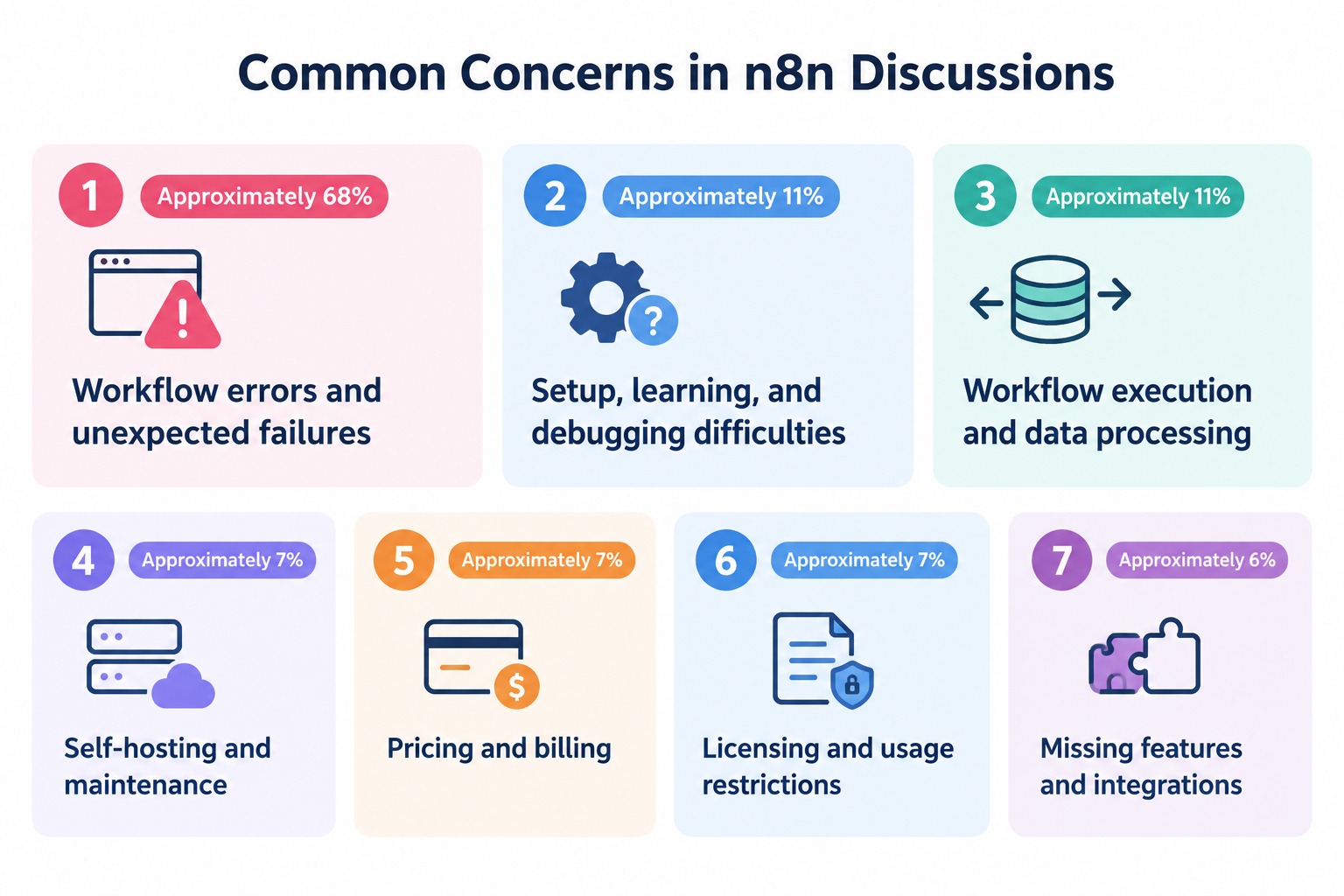
- Workflow errors and unexpected failures: Approximately 68%
Users describe workflows that stop unexpectedly, triggers that fail to fire, and integrations that stop working when external services change. - Setup, learning, and debugging difficulties: Approximately 11%
Some users report difficulties configuring workflows, understanding errors, or identifying where a problem occurred. - Workflow execution and data processing: Approximately 11%
Issues include unexpected execution behavior, problems processing input data, and workflows that fail when data formats change. - Self-hosting and maintenance: Approximately 7%
Self-hosted users may need to troubleshoot server configuration, networking, updates, and the infrastructure that runs their automations. - Pricing and billing: Approximately 7%
Some discussions raise concerns about subscription costs and the relationship between usage and pricing. - Licensing and usage restrictions: Approximately 7%
Some users discuss restrictions that affect how they can use or deploy the platform. - Missing features and integrations: Approximately 6%
Users sometimes look for functionality, nodes, or integrations that are not available or do not support their specific requirements.
Other concerns include authentication, performance, memory usage, compatibility after updates, and support documentation.
These findings suggest that workflow reliability and troubleshooting are particularly important considerations when evaluating n8n. However, they do not mean that every n8n user experiences these problems.
Common Concerns About Zapier
We also reviewed public discussions, G2 user reviews, and Reddit threads about Zapier to identify recurring reasons why users consider alternatives.
The following figures summarize the concerns identified across the materials reviewed. They do not represent the percentage of all Zapier users who experience these problems.
*A single post or review may mention multiple concerns, so the percentages do not add up to 100%.
Common Challenges with Zapier Reported by Users
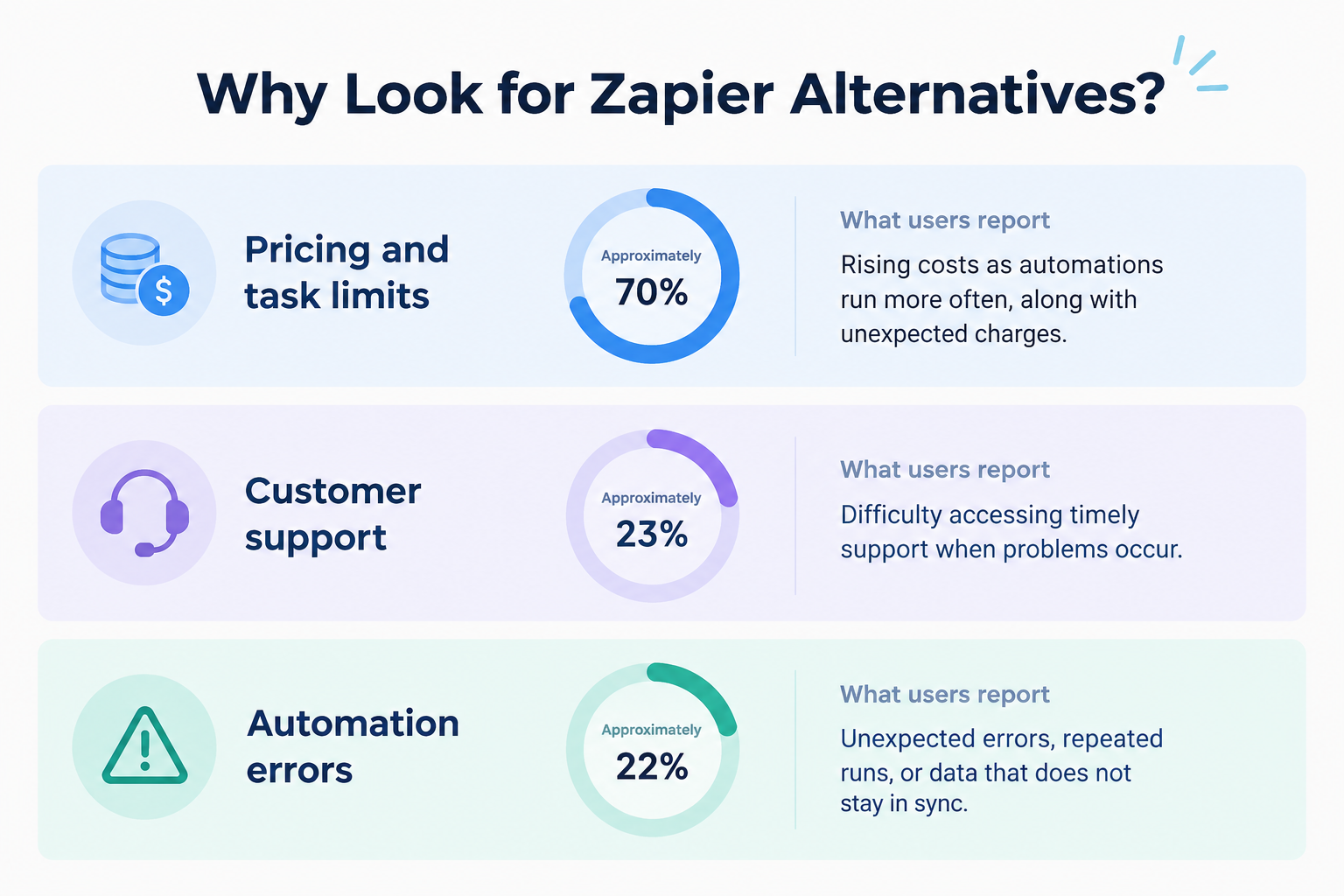
- Pricing and task limits: Approximately 70%
Users raise concerns about costs increasing as automations run more frequently, task allowances, and unexpected charges. - Customer support: Approximately 23%
Some users report difficulties accessing timely support when problems occur. - Automation errors: Approximately 22%
Users describe unexpected errors, repeated runs, and data that does not stay in sync.
Pricing and task limits stand out as the most frequently mentioned concerns in the Zapier discussions and reviews we analyzed.
These findings suggest that usage volume, pricing transparency, and ongoing support are important considerations when evaluating Zapier.
5 Common Causes of Unexpected n8n Workflow Failures
One notable finding from our analysis is that reported n8n failures often involve connections between the platform and external services, rather than only the workflow logic itself.
Based on the discussions we reviewed, the following are the five most frequently mentioned causes of workflow failures.
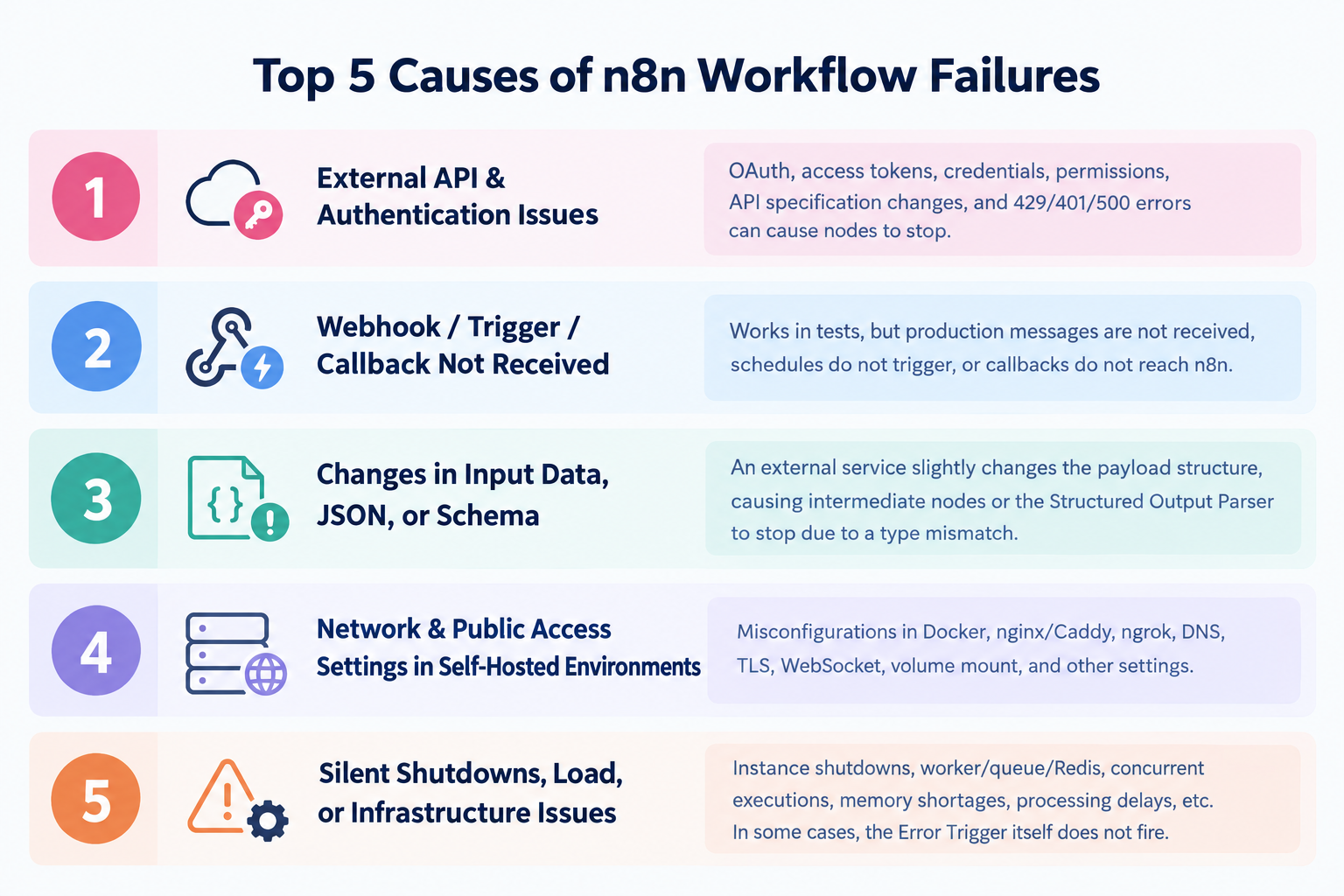
1. External API and Authentication Problems
An integration may stop working when an access token expires, permissions change, credentials become invalid, or an external API returns an error.
For example, an API request may fail with an authentication error or a rate-limit response. The workflow then stops at the affected step unless the error is handled appropriately.
2. Webhooks and Triggers That Do Not Fire
A workflow can be configured correctly but still fail to start if its trigger does not receive the expected event.
Users describe cases where a trigger works during testing but does not receive real messages, or where a scheduled workflow does not run as expected.
These problems can be difficult to diagnose if the missing event never creates an execution record.
3. Changes in Input Data and JSON Structure
External services may change the structure or format of the data they send.
For example, a field that previously contained a number may become a string, or a required field may disappear. A downstream node that expects the original format can then fail.
This can be especially challenging in workflows that process structured data or use AI output parsers.
4. Network and Public Access Configuration in Self-Hosted Environments
Self-hosted installations may depend on several components working together, including Docker, reverse proxies, DNS, TLS certificates, and webhook URLs.
If these components are not configured correctly, external services may be unable to reach n8n, even when the instance itself appears to be running.
The precise cause depends on the deployment and configuration.
5. Instance Downtime, Resource Limits, and Execution Infrastructure
Workflows may also be affected by an unavailable instance, memory shortages, overloaded workers, or problems with queue and Redis configurations.
In some cases, the automation may stop before an error-handling workflow can run.
5 Common Causes of Unexpected Zapier Task Usage
Beyond general pricing concerns, users also describe specific situations in which Zapier consumes more tasks than expected.
Our analysis identified several recurring scenarios:
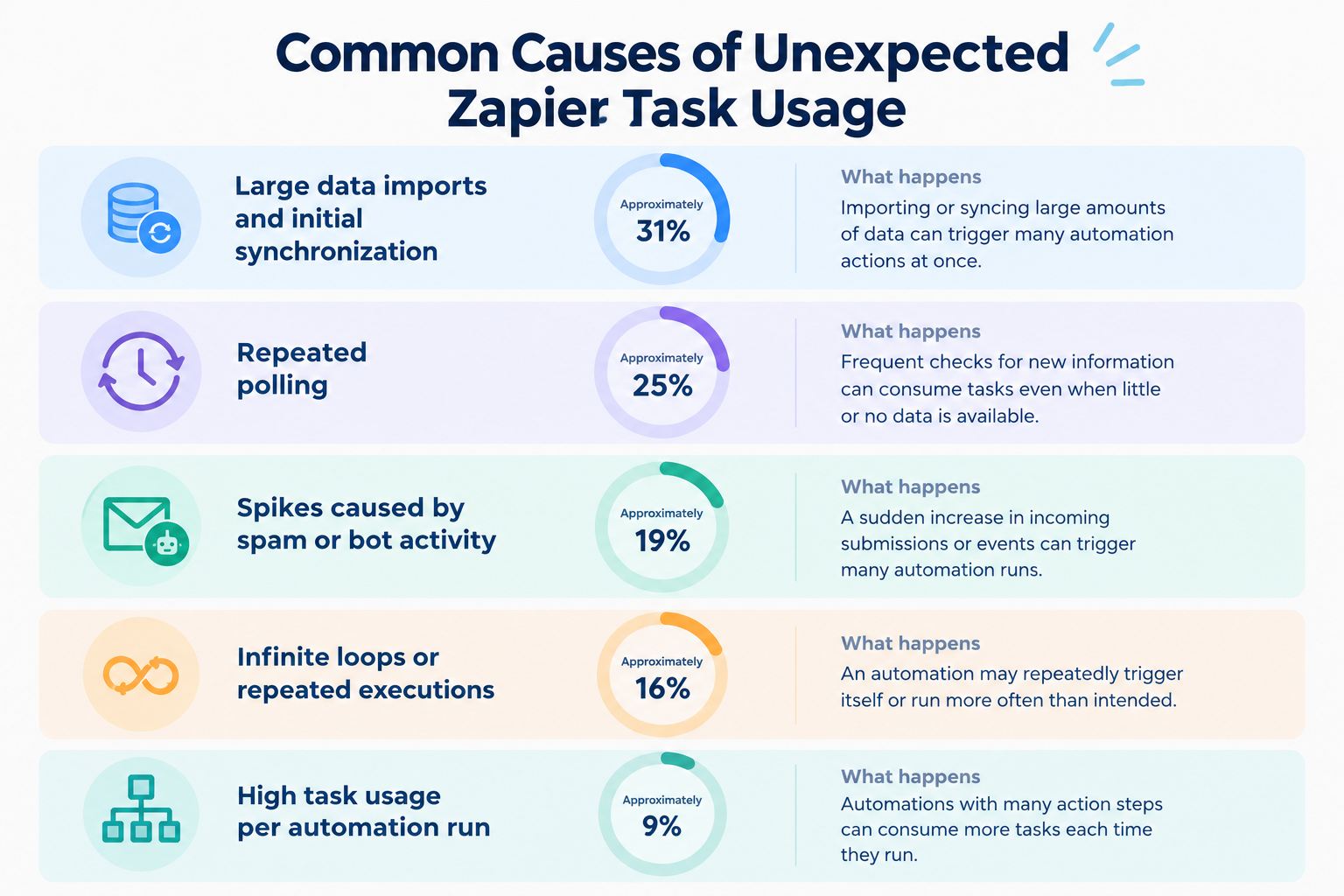
- Large data imports and initial synchronization: Approximately 31%
Importing or syncing large amounts of data can trigger many automation actions at once. - Repeated polling: Approximately 25%
Frequent checks for new information can consume tasks even when little or no new data is available. - Spikes caused by spam or bot activity: Approximately 19%
A sudden increase in incoming submissions or events can trigger many automation runs. - Infinite loops or repeated executions: Approximately 16%
An automation may repeatedly trigger itself or run more often than intended. - High task usage per automation run: Approximately 9%
Automations with many action steps can consume more tasks each time they run.
These scenarios highlight why estimating expected task usage is important before choosing a Zapier plan.
n8n vs. Zapier: A Quick Guide to Choosing the Right Tool
Still deciding between n8n and Zapier? The best choice depends on your team's technical capabilities, automation requirements, and expected usage.
Use the following table as a quick guide: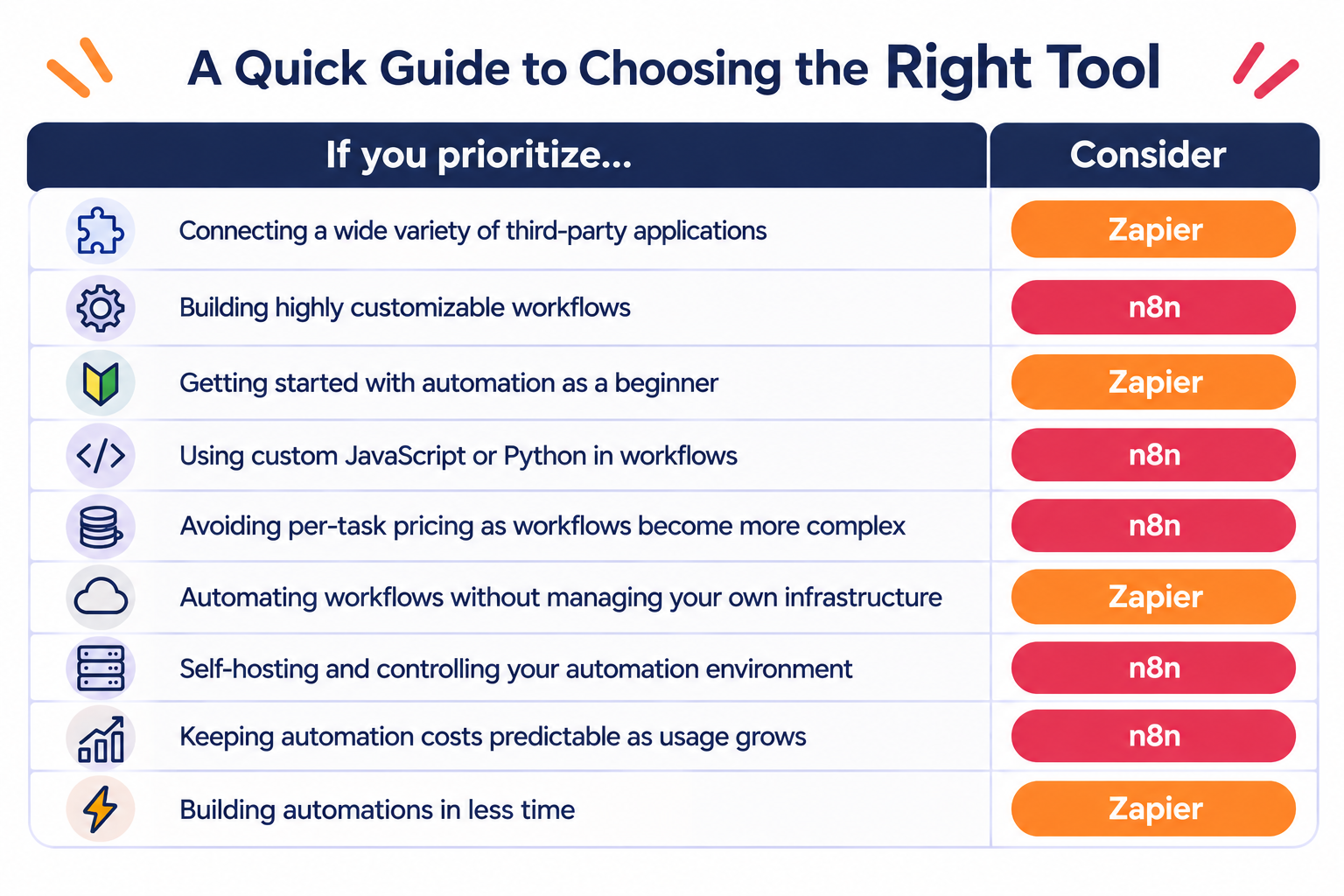
- If you prioritize connecting a wide variety of third-party applications: Zapier
- If you prioritize building highly customizable workflows: n8n
- If you prioritize getting started with automation as a beginner: Zapier
- If you prioritize using custom JavaScript or Python in workflows: n8n
- If you prioritize avoiding per-task pricing as workflows become more complex: n8n
- If you prioritize automating workflows without managing your own infrastructure: Zapier
- If you prioritize self-hosting and controlling your automation environment: n8n
- If you prioritize keeping automation costs predictable as usage grows: n8n
- If you prioritize building automations in less time: Zapier
These recommendations are intended to help you choose between n8n and Zapier. They are not absolute rules.
For example, n8n offers greater control over workflow logic and deployment, but self-hosting requires technical knowledge and ongoing maintenance.Zapier provides a large integration library and a more guided setup experience, but its task-based pricing can become a consideration as automation usage grows.
Still Can't Decide? Consider Other Automation Tools
If you are still unsure after comparing n8n and Zapier, it may be worth exploring other automation platforms.
You do not necessarily have to choose between these two. Other tools may offer a different balance of advantages and disadvantages, such as a simpler interface, broader business process automation, more flexible integrations, or features that better match your team's needs.
Rather than forcing yourself to choose between n8n and Zapier, look for the automation platform that best fits how your team actually works.
n8n vs. Zapier: Key Differences in Detail
Now that we have reviewed the concerns raised by users, let's compare the two platforms across the factors that matter most when choosing an automation tool.
1. Pricing: Is n8n Cheaper Than Zapier?
One of the biggest differences between n8n and Zapier is how they calculate usage.
n8n charges based on workflow executions. A workflow execution counts as one run of the entire workflow, regardless of how many steps it contains.
For example, a workflow with 10 steps and one with 50 steps each count as one execution when they run once.
n8n also offers a free Community Edition for users who choose to self-host the platform. However, you are responsible for the infrastructure and maintenance costs.
Zapier, on the other hand, uses task-based pricing. Each successful action step generally consumes one task, although some built-in tools do not count toward task usage.
For example, if a Zap contains three successful action steps, one run may consume three tasks.
Pricing:
- n8n: Free self-hosted Community Edition. n8n Cloud Starter starts at €20/month when billed annually, including 2,500 workflow executions.
- Zapier: Free plan available with 100 tasks/month. Professional starts at $19.99/month when billed annually, including 750 tasks/month.
These prices do not represent equivalent usage allowances. n8n counts complete workflow executions, while Zapier generally counts successful action steps.
For workflows with many action steps, n8n's execution-based model may offer a cost advantage. However, the actual cost depends on workflow frequency, hosting requirements, and the features you need.
Choose n8n if:
- You run workflows with many steps.
- You want to avoid paying for each individual action.
- You have the technical resources to manage a self-hosted environment.
- You want more control over your hosting and infrastructure.
Choose Zapier if:
- You run relatively simple automations with predictable task usage.
- You prefer a managed cloud service without infrastructure maintenance.
- Your expected monthly task usage fits your budget.
- You want to get started without managing a server.
The best way to compare costs is to estimate your expected monthly workflow executions and successful action steps. For n8n, also account for hosting and maintenance if you choose the self-hosted option.
2. Ease of Use: Which Is Better for Beginners?
Zapier is often a good starting point for people who are new to automation.
Its Zap editor uses a step-by-step structure. You select a trigger, choose an action, and configure the information passed between connected apps.
This approach makes it relatively easy to understand how a straightforward automation works.
For example, you might create a Zap that adds a new form submission to a spreadsheet or sends a notification when a new record appears in a business application.
n8n also provides a visual workflow editor, but it offers more control over how individual nodes connect and process data.
You can build workflows by connecting nodes, configuring their parameters, and defining how information moves between steps.
However, more advanced workflows may require familiarity with APIs, JSON, expressions, or JavaScript and Python.
Self-hosting n8n adds another layer of complexity because you need to configure and maintain the environment in which it runs.
Neither platform requires you to write code for every automation. However, the learning curve can differ depending on how much customization you need.
Choose Zapier if you:
- Are new to automation.
- Want to build straightforward automations quickly.
- Prefer a guided, step-by-step setup process.
- Do not want to manage infrastructure.
Choose n8n if you:
- Are comfortable working with technical concepts.
- Want more control over how workflows are built.
- Need to customize data processing and workflow logic.
- Have the resources to manage a self-hosted environment if needed.
If you are unsure, start with a simple process you already perform manually. The platform that lets you build, understand, and maintain that process most comfortably may be the better choice.
3. App Integrations: n8n vs. Zapier
Both platforms connect business applications so that information can move between systems automatically.
However, their integration libraries differ in size and approach.
Zapier offers more than 9,000 app integrations, making it particularly attractive if your organization uses a wide variety of third-party applications.
n8n offers integrations through built-in nodes and also supports connections to external services through HTTP requests and APIs.
Its approach provides flexibility when working with services that do not have a dedicated integration node.
For example, you can use an HTTP Request node to connect to an external API and configure the requests and data handling yourself.
Zapier, on the other hand, may be more convenient if you want to connect popular third-party applications through ready-made integrations.
However, the number of listed integrations does not tell the whole story. Two platforms may support the same application but offer different triggers, actions, or configuration options.
Before choosing a platform, check whether the integration supports the exact operation you need.
Choose Zapier if:
- You need to connect a wide variety of third-party applications.
- Your business relies on several specialized tools.
- You want to maximize the chance of finding a ready-made integration.
Choose n8n if:
- You need to connect applications through custom API requests.
- You want more control over how data is exchanged between services.
- You are comfortable configuring integrations that require additional technical work.
4. Flexibility: Which Is Better for Complex Automations?
Both platforms support multi-step automations, but they offer different approaches to building and managing complex processes.
n8n is designed to give users considerable control over workflow logic and data processing.
You can connect multiple nodes, use conditions and loops, manipulate data, and write custom JavaScript or Python code within workflows.
It also supports custom nodes and direct API connections, allowing technical users to extend its capabilities.
For example, you could create a workflow that receives customer data, transforms it into a specific JSON structure, sends it to an external API, and processes the response before updating another application.
Zapier also supports multi-step automations and conditional logic.
You can use features such as Paths and Filters to determine which actions run under particular conditions. Its broad app ecosystem makes it useful for connecting different services and building workflows across third-party applications.
For straightforward processes, this may be all you need. You do not necessarily need a more specialized automation environment to automate a simple business task.
The difference becomes more relevant when your process involves custom data processing, code, self-hosting, or highly customized workflow logic.
Choose n8n if:
- You need highly customizable workflows.
- You want to use JavaScript or Python within automations.
- Your processes involve complex data transformations or API requests.
- You want control over your deployment environment.
Choose Zapier if:
- You need to connect multiple third-party applications.
- Your processes follow relatively straightforward sequences.
- You prefer built-in tools for conditions and workflow branching.
- You want to build automations without extensive technical configuration.
Remember that greater flexibility can also mean more configuration and troubleshooting. Consider the complexity your team actually needs rather than choosing a tool solely because it offers more advanced features.
5. Reliability and Troubleshooting
An automation is only useful if it runs as expected and you can identify problems when something goes wrong.
Both n8n and Zapier provide ways to inspect automation activity and investigate execution issues. However, your experience will depend on the workflow, integrations, and types of errors involved.
In the n8n discussions and reviews we analyzed, workflow failures were the most frequently mentioned concern. Users described problems involving external APIs, authentication, triggers, data structures, and self-hosted infrastructure.
In the Zapier materials we reviewed, users more frequently raised concerns about pricing and task limits, while automation errors were another recurring issue.
These reports do not establish that one platform is more reliable than the other. They highlight different challenges that users may need to consider.
For example, an automation that transfers customer information between two applications may behave differently depending on the available triggers, API limits, authentication settings, and data formats.
Before relying on an automation for an important business process, check:
- Whether the trigger runs when expected.
- Whether the correct data reaches each action.
- Whether errors are clearly reported.
- Whether you can inspect previous executions.
- Whether failed processes can be retried or recovered.
- How the automation behaves when an application is temporarily unavailable.
If you use n8n in a self-hosted environment, also consider who will monitor the server, manage updates, and respond to infrastructure problems.
A platform that is easy to troubleshoot for your team may be a better choice than one with more advanced features that nobody on your team feels comfortable maintaining.
No Automation Tool Is Perfect: Consider Other Options, Too
n8n and Zapier are both capable automation tools. However, being popular does not necessarily mean they are the best choice for every team.
For example, one of Zapier's biggest strengths is its extensive library of more than 9,000 app integrations. But does your team really need that many integrations? In most cases, having access to thousands of apps does not automatically make a tool more useful. What matters is whether it supports the apps your team actually uses.
Similarly, n8n offers considerable flexibility, custom coding capabilities, and self-hosting options. But what if your team does not have the technical resources to maintain its workflows and infrastructure? Even a highly customizable platform may not deliver much value if it creates too much operational overhead.
As we've seen in user discussions on Reddit and reviews on G2, both tools have their pros and cons. And that's true of any automation platform.
So, if you're still undecided between n8n and Zapier, it may be worth stepping back and exploring other options rather than forcing yourself to choose between the two.
For example, Yoom is an all-in-one automation platform that combines app integrations, AI Workers, databases, and other business automation features in one environment.
Rather than focusing only on connecting one app to another, Yoom can help teams automate broader business processes that combine AI-powered tasks with rule-based automation.
This may be worth exploring if you want to bring different automation needs together on one platform.