


・
8 Best No-Code Automation Platforms: Real User Experiences

- What Is a No-Code Automation Platform?
- 8 Best No-Code Automation Platforms
- How to Choose the Right No-Code Workflow Automation Platform
- No-Code vs. Low-Code Automation Platforms: What's the Difference?
- What Real Users Say About No-Code Automation Platforms
- Even Developers Can Benefit from No-Code Automation
- Why Can No-Code Automation Feel Difficult at First?
- How to Get Started with No-Code Automation Without Getting Overwhelmed
No-code automation platforms help businesses automate repetitive tasks without writing code. From connecting everyday business apps to automating data entry and notifications, these tools allow teams to reduce manual work and improve efficiency.
But choosing a no-code automation platform involves more than comparing features and pricing.
What can you actually automate without technical knowledge? Can developers benefit from no-code tools, too? And what should you do if building your first automation feels harder than expected?
In this guide, we'll compare popular no-code automation platforms, explain what to look for when choosing one, and share experiences from real-world users who use no-code automation tools in their daily work.
What Is a No-Code Automation Platform?
A no-code automation platform is a tool that allows users to automate business processes without writing code. Users typically build automations by connecting apps, selecting actions, and configuring rules through a visual interface.
For example, you could create an automation that:
- Saves form submissions to a spreadsheet.
- Sends a Slack notification when a new sales opportunity is created.
- Extracts information from a document and records it in a database.
- Creates a document when a specific event occurs in another app.
- Routes an approval request to the appropriate person.
Instead of manually performing each step, the platform executes the configured process automatically when a specified trigger occurs.
Many no-code automation platforms also offer prebuilt templates, integrations with popular business apps, and AI-powered features that help users build or execute automations.
8 Best No-Code Automation Platforms
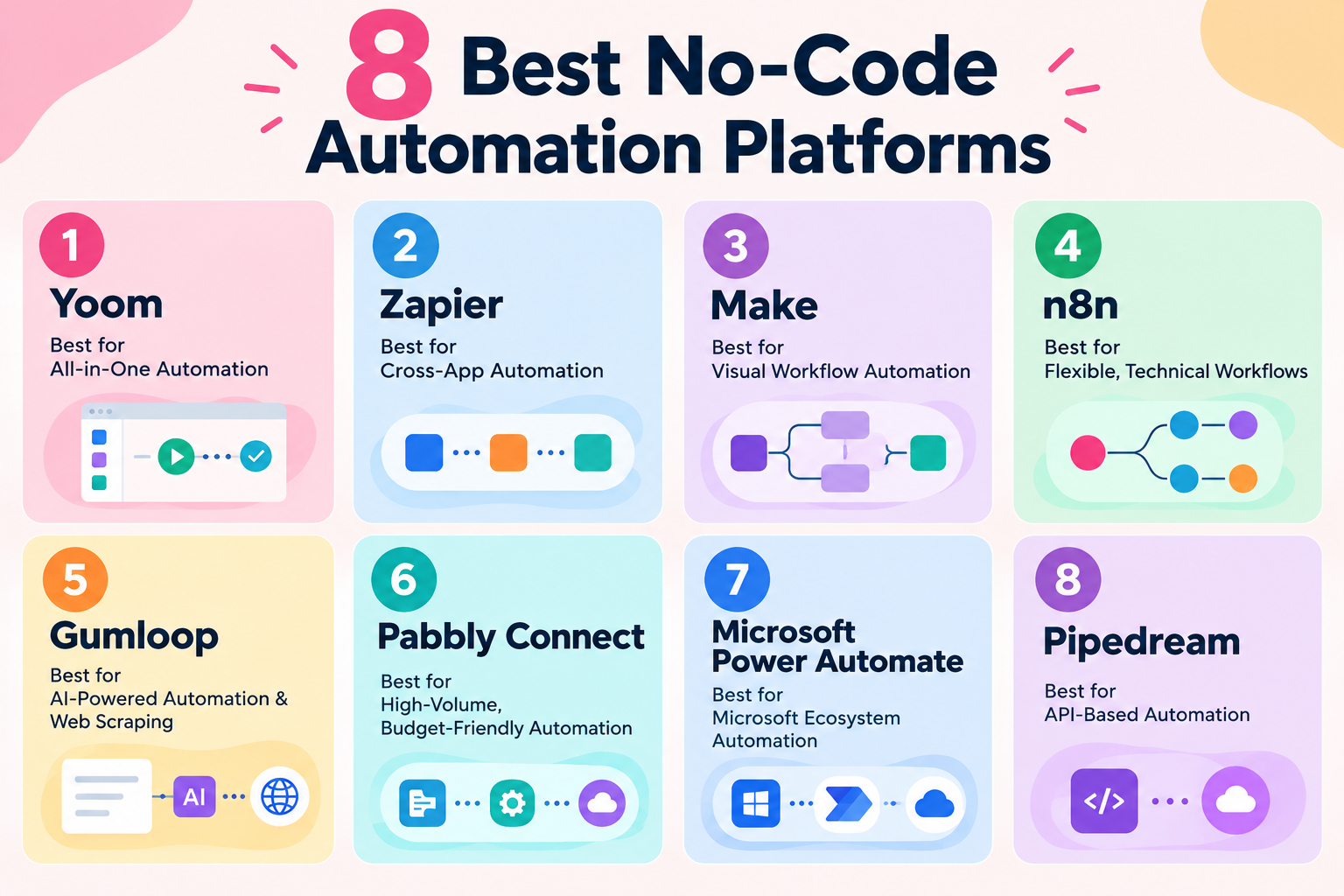
1.
Yoom
(Best for AII-in-One Automation)
- Target Audience: Frontline operations, RevOps, HR, Finance, and non-engineers needing complete end-to-end business workflows.
- How It Works: Connects cloud SaaS apps, intake forms, relational databases, and autonomous AI agents without writing middleware. Unlike tools that only pass linear data, Yoom integrates an internal database (Yoom DB), dynamic PDF document generation, and 1-click Slack/Teams approval cards directly into the execution canvas.
- Strengths: Truly non-technical visual builder used by over 80% non-engineers, built-in OCR and data categorization agents, and visual API configuration for technical extensions.
- Pricing: Free plan includes 100 tasks/month. Paid plans start at ~$16/month.
2.
Zapier
(Best for Cross-App Automation)
- Target Audience: General business users, solo operators, and marketers needing rapid 2-step integrations across popular software.
- How It Works: Operates on a standard "When this happens, do that" architecture, transferring data between over 6,000 supported web applications.
- Strengths: Unmatched third-party ecosystem directory and fast initial setup for basic pipelines.
- Pricing: Free plan includes 100 tasks/month. Starter plan starts at $19.99/month.
3.
Make
(Best for Visual Workflow Automation)
- Target Audience: Growth operators, digital agencies, and power users comfortable with visual logic mapping.
- How It Works: Provides an infinite drag-and-drop canvas to configure multi-branching data pathways, loop through arrays, and transform complex payloads.
- Strengths: Flexible visual routing, powerful data aggregators, and lower execution costs compared to Zapier.
- Pricing: Free plan includes 1,000 operations/month. Core plan starts at $9/month.
4.
n8n
(Best for Flexible, Technical Workflows)
- Target Audience: Software engineers, DevOps teams, and technical organizations prioritizing data privacy and self-hosting.
- How It Works: A fair-code workflow platform combining node-based execution with deep JavaScript customization. It features native LangChain nodes for assembling complex multi-agent architectures.
- Strengths: Can be self-hosted on your own infrastructure for total data control; advanced custom coding and vector database support.
- Pricing: Self-hosted Community Edition is Free. Cloud Starter plan starts at €20/month (~$22)
5.
Gumloop
(Best for AI-Powered Automation & Web Scraping)
- Target Audience: Growth hackers, technical marketers, and AI researchers conducting automated internet research and agentic data extraction.
- How It Works: A node-based AI builder centered on chaining large language models with browser automation, headless scraping, and structured text output.
- Strengths: Robust headless web scraping, custom Python script execution, and support for over 35 commercial LLMs.
- Pricing: 14-day free trial. Pro plan starts at $37/month.
6.
Pabbly Connect
(Best for High-Volume, Budget-Friendly Automation)
- Target Audience: Solopreneurs, e-commerce stores, and digital marketing agencies running high-volume, straightforward data pipelines on a fixed budget.
- How It Works: Uses a linear "Trigger ➔ Action" workflow structure where internal logic steps (filters, routers, formatters, and delays) do not consume task credits—only final external app actions count.
- Strengths: Extremely cost-effective for high volume, non-metered internal steps, unlimited workflows and seats across all plans, and rare lifetime deal (LTD) options.
- Pricing: Free tier includes 100 tasks/month. Standard plan starts at $19/month.
7.
Microsoft Power Automate
(Best for Microsoft Ecosystem Automation)
- Target Audience: Enterprise IT teams, operations managers, and corporations standardized on Microsoft 365, Azure, and Dynamics.
- How It Works: Automates cloud API workflows across Microsoft services (SharePoint, Teams, Excel) and provides desktop Robotic Process Automation (RPA) for legacy on-premise software.
- Strengths: Native active directory governance, enterprise compliance, and AI Builder for document parsing.
- Pricing: 30-day free trial. Power Automate Premium starts at $15/user/month.
8.
Pipedream
(Best for API-Based Automation)
- Target Audience: Developers and engineering teams seeking an alternative to Zapier that doesn't restrict custom code execution.
- How It Works: An integration platform for developers where workflows are built using pre-built API triggers alongside native Node.js or Python code blocks.
- Strengths: Full access to any npm or PyPI package, transparent code-level debugging, and serverless execution.
- Pricing: Free plan is available. Startup plan starts at $99/month.
How to Choose the Right No-Code Workflow Automation Platform
When choosing a no-code workflow automation platform, don't focus only on price or the number of features.
A low-cost plan may seem attractive, but if it limits the number of automations you can run, it may not meet your needs. Similarly, a platform with too many features can feel overwhelming if you're not sure where to start.
The most important thing is whether you find the platform easy to use.
Many platforms offer free plans or trials, so take the opportunity to try them yourself.
See if you can build an automation intuitively, without relying too much on guides or tutorials.A platform that feels easy to navigate and lets you work without unnecessary frustration may be the best fit for you.
No-Code vs. Low-Code Automation Platforms: What's the Difference?
No-code and low-code automation platforms both help businesses automate processes, but they differ in how much technical knowledge may be required.
No-code platforms generally allow users to build automations through visual interfaces, prebuilt templates, and configurable actions without writing code. Low-code platforms also offer visual development tools but may require coding or more advanced technical configuration for certain use cases.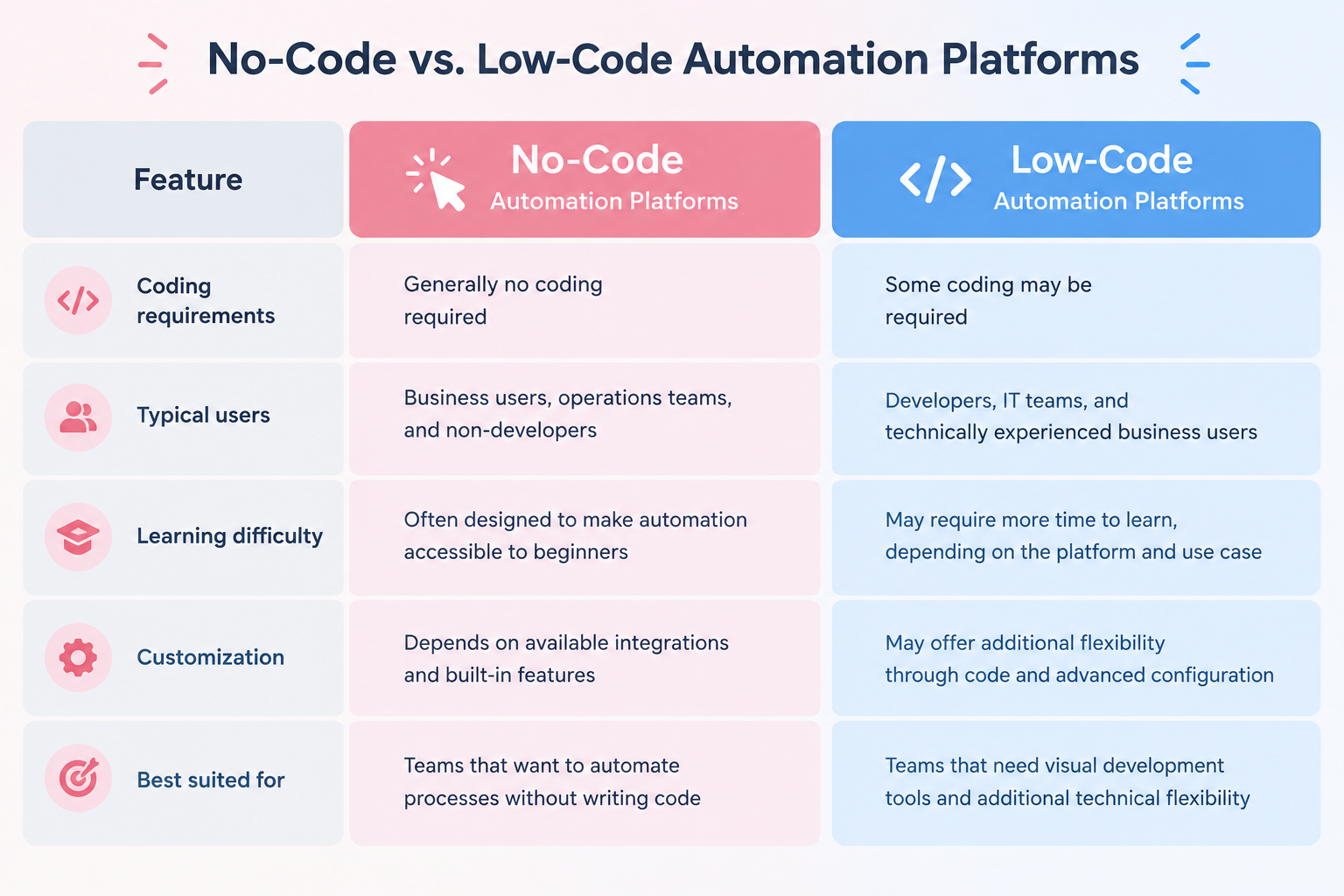
- Coding Requirements: No-code platforms generally don't require coding, while low-code platforms may require some coding for more advanced tasks.
- Typical Users: No-code platforms are often designed for business users, operations teams, and non-developers. Low-code platforms are more commonly used by developers, IT teams, and business users with technical experience.
- Learning Difficulty: No-code platforms are generally designed to make automation accessible to beginners. Low-code platforms may take more time to learn, depending on the tool and what you want to build.
- Customization: No-code platforms offer customization through built-in features and integrations. Low-code platforms may provide more flexibility through code and advanced configuration.
- Best Suited For: No-code platforms are a good fit for teams that want to automate tasks without writing code. Low-code platforms are better suited to teams that need visual development tools with additional technical flexibility.
Low-Code Doesn't Always Mean Easy to Use
Even when a platform is described as low-code, learning to use it effectively can take time.
A fashion manufacturer that had started exploring Microsoft Power Apps and Power Automate found that the learning curve was higher than expected.
The company shared:
"We started exploring Power Apps and Power Automate, but they were harder to learn and use than we expected. We tried to meet every request from our team by building solutions with low-code tools. However, development took time, making it difficult to respond to requests quickly.
When we discovered Yoom, we found its intuitive interface much easier to work with. We also liked how flexible it was. Being able to customize automations to fit our needs was a major reason we chose Yoom."
This experience highlights an important point when choosing an automation platform: writing less code doesn't always make a tool easier to learn.
A platform's interface, setup process, and available customization options can all affect how easily a team can turn its ideas into working automations.
For businesses that want employees outside the development team to build and maintain automations, ease of use can be just as important as technical flexibility.
At the same time, ease of use doesn't have to mean sacrificing customization. The fashion manufacturer also valued Yoom's ability to accommodate additional requirements when it wanted to do more than what was available out of the box.
When comparing no-code and low-code automation platforms, consider both how easy they are to learn and whether they can support your business needs as they evolve.
What Real Users Say About No-Code Automation Platforms
Feature comparisons can help you narrow down your options, but they don't always explain how an automation platform changes the way people work.
To understand the practical benefits, it helps to look at how people in different roles use these tools.
The following examples are based on experiences shared by Yoom users across different industries.
1. Non-Engineers Can Automate Work Without Waiting for Developers
One of the main benefits of no-code automation platforms is that business teams can build and modify automations without relying on developers for every change.
A law firm that adopted Yoom faced a familiar challenge: its development team could build internal systems, but it also had higher-priority responsibilities.
As a result, requests for smaller internal improvements often competed with other development work.
The firm explained:
"We could have asked our development team to build a system for us. However, they had higher-priority responsibilities, such as developing tools essential to our external operations. It was difficult to turn every idea for automating tasks or connecting tools into reality."
This is a common problem for organizations where business teams depend on a limited number of developers.
Even when employees know what they want to improve, their ideas may remain unrealized if every change requires development resources.
With a no-code automation platform, teams can take a more direct approach: identify a repetitive task, build an automation, and adjust it as their needs change.
The same law firm also highlighted the value of being able to make changes without going through a full development and deployment process.
During the early stages of AI adoption, when processes are still evolving, the firm found it useful to make adjustments directly in Yoom.
"Yoom allows our team to change prompts and add branches on our own, without deployment work. We can quickly test ideas and decide what works, which helps reduce the risk of investing in the wrong solution."
This flexibility is particularly valuable when a process is not yet stable enough to justify building and maintaining a custom system.
The takeaway: A no-code automation platform can help business teams turn their ideas into working solutions without having to wait for development resources to become available.
2. You Don't Need an Engineering Background to Build Advanced Automations
No-code automation isn't limited to simple tasks such as sending notifications or copying data between apps.
A construction company using Yoom has two members in its digital transformation team who primarily manage its automations.
According to the company, neither has an engineering background, yet both have been able to build advanced automations.
The company shared:
"They don't have engineering backgrounds, but they can use Yoom to build advanced automations. I believe that as long as you can think logically, you can learn to use Yoom effectively without development knowledge."
This highlights an important distinction: building automations doesn't necessarily require programming skills, but it does require an understanding of how a business process works.
The takeaway: No-code automation platforms can make sophisticated process automation more accessible, provided users understand the business logic behind the process.
3. No-Code Automation Can Change How Employees Approach Their Work
The impact of no-code automation isn't limited to the tasks that get automated. It can also change how employees think about improving their work.
The law firm described a shift in employee attitudes after introducing Yoom.
"By making it possible for employees to turn their own ideas into reality without going through the development team, we've lowered the barrier to thinking about automation. Digital transformation has become something everyone can take ownership of."
This illustrates a broader benefit of no-code automation: it can distribute the ability to improve processes across an organization.
Instead of leaving every automation idea to a central IT or development team, businesses can empower the people closest to the work to identify and test improvements.
The takeaway: No-code automation can help organizations build a culture in which employees actively look for ways to reduce manual work.
Even Developers Can Benefit from No-Code Automation
No-code automation platforms are often associated with non-technical users. However, they can also be valuable for developers, IT teams, and employees with engineering experience.
The key is that no-code doesn't have to mean limited functionality.
For technical users, the appeal may be less about avoiding code entirely and more about reducing the amount of work required to build and maintain an automation.
1. Reduce the Amount of Code You Need to Write
An in-house IT engineer at an energy and utilities company highlighted the customization options available in Yoom.
The engineer explained that the platform could support requirements beyond its standard actions, including API integrations and custom actions.
They also noted:
"You don't have to write all the code yourself. You just enter the values you need, and the rest is assembled for you."
For developers, this can reduce the effort involved in implementing common automation patterns.
Rather than writing an entire integration from scratch, they may be able to use a visual builder for the main process and add custom logic only where necessary.
This can be useful when the goal is to connect existing applications, transform data, or build an internal automation without investing unnecessary time in routine implementation work.
The level of customization available will depend on the platform and the specific technical requirements.
2. Choose Between Building Manually and Letting AI Help
Developers also have different preferences when it comes to building automations.
Some prefer to configure every condition and action themselves. Others would rather define the overall requirements and let AI help generate the initial structure.
A user in the television industry described this flexibility as one of Yoom's strengths.
"Even among developers, people have different preferences. Some want to build every step and condition themselves, while others prefer to let AI handle the overall setup. Yoom works well for both types of users.
One developer tried AI Worker, which lets you set things up using natural language, and said, ‘It was incredibly easy and took almost no time!’"
The takeaway: Developers don't have to choose between writing everything from scratch and giving up technical control. The right no-code automation platform can combine visual building, customization, and AI assistance.
Why Can No-Code Automation Feel Difficult at First?
If no-code automation platforms are designed to make automation easier, why do some beginners still struggle?
The answer is that removing the need to write code doesn't remove the need to understand the work being automated.
A law firm using Yoom described its initial experience:
"At first, honestly, there were so many things, so we didn't even know where to start!
The tool itself wasn't that difficult to use. The real challenge was figuring out how to break down our daily tasks and put them back together as an automated process."
This is an important distinction.
Many employees are familiar with performing repetitive tasks, but they may never have had to describe those tasks as a sequence of explicit steps.
For example, a person might routinely review a contract, identify important information, enter the details into a spreadsheet, and notify a colleague.
When performing a task manually, you may be able to complete these steps without thinking about them.
To automate the process, however, the user needs to consider questions such as:
- What event should start the automation?
- Where does the required information come from?
- Which information needs to be extracted or checked?
- What should happen if information is missing?
- Which app should receive the results?
- Who needs to be notified, and under what conditions?
This is the thinking involved in process mapping and automation design.
A no-code interface can make it easier to configure the steps, but users still need to decide what those steps should be.
The law firm gradually became more comfortable with automation by experimenting with the platform and learning to see its business processes in a more structured way.
The takeaway: Struggling at the beginning doesn't necessarily mean that a no-code platform is too difficult. You may simply be learning a new way to analyze and structure your work.
How to Get Started with No-Code Automation Without Getting Overwhelmed
If you're new to no-code workflow automation platforms, you don't need to automate an entire business process at once.
A more practical approach is to start with a small, clearly defined task and gradually expand your automations as you gain experience.
Here are two ways to get started with Yoom.
Option 1. Start with a Template
If you're new to automation, a ready-made template is an easy way to get started.
Choose a template that matches your needs, then adjust it to fit your existing process.
Templates give you a starting point, so you don't have to build every step from scratch.
You can begin by automating a single task and gradually expand the process as your needs grow.
Explore Yoom's automation templates:
https://lp.yoom.fun/en/fb-template/all-templates
Option 2. Let AI Help Build Your Automation
If you know what you want to automate but aren't sure how to build it, AI can help.
Describe your goal in natural language, and AI can help turn your idea into an automated workflow.
For example, you could describe a process that extracts key information from a contract, records it in a spreadsheet, saves the document to cloud storage, and notifies the relevant team.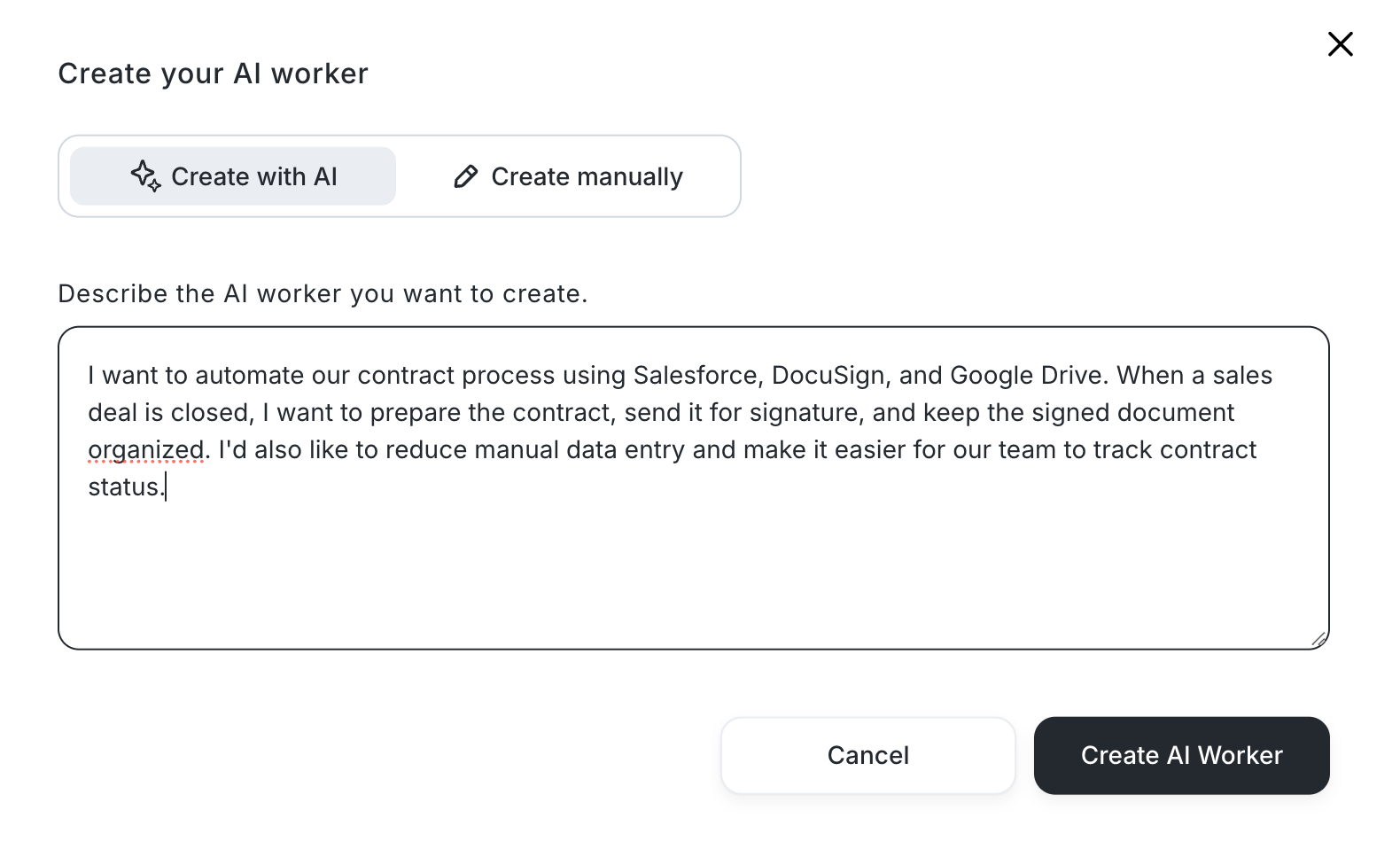
You can then review the suggested automation and adjust it to fit your business needs.
This approach helps you get started without having to figure out every technical detail yourself.
Explore Yoom's AI Worker templates:
https://lp.yoom.fun/en/ai-worker-templates/all-templates
The Most Important Tip: Start Small
Start with a small automation process that is quick to build.
This helps you experience the benefits of automation sooner, without spending too much time on setup. Once you see the results, you can gradually expand your automation.