









・
Best Spreadsheet-Style Databases With Real-World Use Cases

Google Sheets and Excel are standard tools for managing daily business tasks, but they have clear limits when handling large datasets, strict data validation, or automated workflows.
A spreadsheet-style database addresses these limitations. It provides the familiar row-and-column layout of a spreadsheet while offering the structure, data integrity, and automation capabilities of a relational database.
This guide compares the leading spreadsheet-style databases available today and explores how businesses actually put them to work, based on an analysis of over 16,000 active Yoom workspaces.What is a Spreadsheet-Style Database?
A spreadsheet-style database is a hybrid software solution that combines the visual layout of a traditional spreadsheet with the underlying architecture of a relational database.
While spreadsheets treat every cell as an independent text or number container, a spreadsheet-style database enforces structured data rules across entire columns. Key features include:
- Strict Data Types: Columns are defined by specific formats, such as dates, email addresses, attachments, or single-select dropdowns, preventing entry errors.
- Relational Linking: Records in one table can be linked directly to records in another (e.g., matching a "Client" record to multiple "Invoices").
- Event-Driven Workflows: Changes to records (such as a status update) can automatically trigger downstream actions in connected business software.
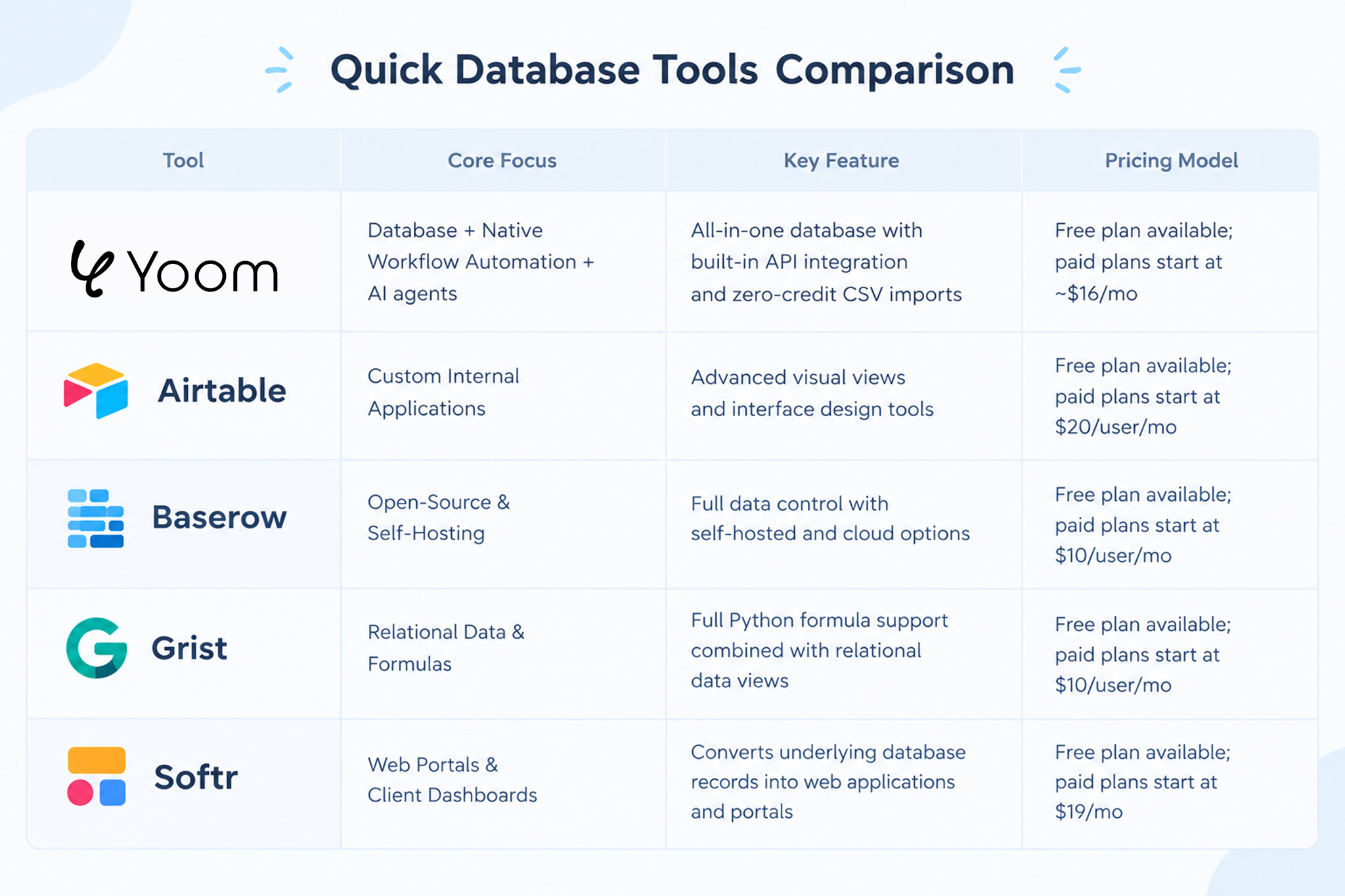
Quick Spreadsheet-Style Databases Comparison
Yoom
Yoom integrates a relational database (YoomDB) directly with a native workflow automation engine and AI capabilities.
Unlike platforms that rely on separate third-party integration tools to pass data between apps, Yoom handles both data storage and automated background operations within a single system.
- Database & Automation Integration: Records stored in YoomDB can trigger automated workflows across external SaaS platforms without requiring external connector software.
- Data Onboarding: Initial CSV file uploads and database setup do not consume monthly automation task quotas.
- AI Extraction: Built-in AI functions allow non-structured inputs (such as PDF invoices or email text) to be parsed and saved into structured database fields.
- Pricing: Free plan includes 100 tasks/month and 500 records per table. Paid plans start at ~$16/month (Personal/Mini) for up to 5,000 tasks and 10,000 records per table.
Airtable
Airtable is one of the most widely adopted spreadsheet-database platforms, offering strong interface design tools and a large ecosystem of pre-built templates.
- Interface Builder: Allows administrators to create custom front-end dashboards for team members based on underlying database tables.
- Multiple Views: Supports Grid, Kanban, Gantt, Calendar, and Timeline views for project tracking.
- Considerations: Cost scales per user, which can increase overall software spend for larger teams requiring editing access.
- Pricing: Free plan available with basic features. Paid plans start at $20/user/month (billed annually).
Baserow
Baserow is an open-source database platform designed for organizations that require self-hosting capabilities or strict data governance.
- Data Ownership: Can be deployed on private servers, on-premises infrastructure, or managed via Baserow Cloud.
- Developer Friendly: Provides a REST API and database structure built for customization.
- Considerations: Native third-party SaaS integrations are more limited compared to commercial cloud platforms.
- Pricing: Free self-hosted community edition. Cloud plans start at $10/user/month.
Grist
Grist combines relational database capabilities with standard spreadsheet formulas, utilizing Python for custom calculations.
- Python Formula Engine: Supports standard spreadsheet functions alongside full Python code for data transformation.
- Linked Card Views: Displays related records side-by-side across dynamic multi-pane layouts.
- Considerations: Formula setup using Python may require a learning curve for non-technical staff.
- Pricing: Free plan available. Pro plans start at $10/user/month.
Softr
Softr functions as an application layer on top of existing databases rather than a standalone database backend.
- Front-End Portal Creation: Connects to database backends like Airtable or Google Sheets to generate client portals, directories, and internal dashboards.
- Access Control: Offers granular permission settings based on user roles and login credentials.
- Considerations: Requires a separate database source to store and manage raw data.
- Pricing: Free plan available for basic sites. Paid business plans start at $19/month.
See Yoom's Database Templates
https://lp.yoom.fun/en/db-templatesHow Fast Is a Spreadsheet-Style Database?
One of the primary concerns when switching from traditional spreadsheets is speed. As datasets grow into thousands of rows, standard spreadsheet files often lag, freeze, or crash during complex operations.
Based on performance metrics measured on cloud-based spreadsheet databases, here is what you can expect under realistic operational conditions:
- Data Import Processing: Uploading a standard 10,000-row CSV file takes approximately 10 to 30 seconds. This allows large datasets to be migrated efficiently without disrupting daily work.
- Search and Query Response: Performing searches, filtering, or view-sorting across 5,000 records responds in under 1 second (sub-second latency), delivering a responsive experience similar to desktop software.
- Automation Trigger Latency: When a record is updated via an external event (such as a customer submitting a web form), background automated actions execute within 1 to 3 seconds.
Which Apps Do Teams Connect to Their Databases?
A spreadsheet-style database rarely operates as an isolated island. Most organizations link their database tables directly to the SaaS apps their teams use daily.
An analysis of integration patterns across over 16,000 active Yoom workspaces shows the app categories that teams connect most frequently:
- Cloud Spreadsheets (e.g., Google Sheets): Used primarily for initial data collection or bidirectional reference syncing.
- Document & Knowledge Workspaces (e.g., Notion): Connected to link structured database records with internal wikis, project documentation, and team notes.
- HR & Payroll Apps: Integrated to update employee records and trigger onboarding checklists.
- Accounting & Invoicing SaaS: Connected to generate billing records automatically when a project status changes.
- Team Communication Apps (e.g., Slack, Microsoft Teams): Used for real-time status alerts and task notifications.
How Do Businesses Actually Automate Database Tasks?
Unlike standard spreadsheets that rely on manual cell updates, spreadsheet-style databases can trigger automated workflows whenever data is added, updated, or flagged.
Aggregated operational data from over 190,000 active database workflows reveals how modern businesses structure their background operations:
- External SaaS & Email Actions (57%): Calling external software APIs, posting Slack or Teams notifications, and sending automated emails as soon as a record status changes.
- Internal Database Operations (38%): Cross-referencing related tables, calculating field values, reformatting text, and updating internal database records.
- Document Generation & Approvals (5%): Generating PDF documents (such as invoices or contracts) directly from row data and routing formal sign-off or human approval requests.
How to Build a Database from Your Spreadsheet Instantly with Yoom
Moving operational data out of a spreadsheet does not require rebuilding your workflow from scratch. With Yoom, you can instantly transform an existing spreadsheet or CSV file into a structured relational database—and immediately connect it to the rest of your software stack.
Here is a practical step-by-step guide to setting up a database and leveraging it to reduce daily manual tasks:
Step 1: Upload Your Spreadsheet Data to Build a Database Instantly
Importing an existing spreadsheet (such as a Google Sheet or Excel CSV) creates a fully structured database in seconds.
- Export your current spreadsheet as a .csv file.
- Select Import CSV inside Yoom to automatically create a new database table.
- Configure field types (e.g., setting Status to Single-Select, Deal_Value to Currency, and Last_Contact_Date to Date).
Note: Manual CSV imports into YoomDB do not deduct from your monthly automation task quota.
Step 2: Enrich Your Data with CRM Integrations
Once your database is active, you do not need to update record details manually. By connecting YoomDB to CRMs like Salesforce or HubSpot, you can automatically enrich and sync your database records.
- Automated Data Enrichment: Pull the latest lead details, deal stages, or contact information directly from Salesforce or HubSpot into your database rows.
Step 3: Trigger Automated Workflows to Eliminate Manual Work
With a structured database as your foundation, changes to any record can serve as triggers for background workflows, eliminating repetitive manual steps.
- Real-Time Team Alerts: Automatically send notifications to Slack or Microsoft Teams when a record status changes (e.g., moving a lead from Under Review to Closed Won).
- Document Generation: Generate custom PDF invoices, quotes, or contracts using row data as soon as a record reaches a specific stage.
- Automated Dispatch: Send personalized follow-up emails or assign internal tasks to team members automatically upon data updates.
By combining instant database creation with CRM data enrichment and automated workflows, teams maintain a reliable central source of truth while removing hours of manual work.