


・
9 Best UiPath Competitors and Alternatives in 2027

UiPath is an enterprise automation platform that helps organizations automate repetitive business processes through robotic process automation (RPA), AI, and application integrations.
Its platform includes tools for building, deploying, and managing software robots, as well as capabilities for document processing, testing, and process orchestration.
However, some users consider switching to alternative tools for a variety of reasons, including technical limitations, maintenance challenges, high licensing costs, and difficulties with development and troubleshooting.
So, why do users look for UiPath alternatives, and what should they consider before making the switch?
To explore these questions, we analyzed Reddit discussions and user reviews on G2 and Capterra.
This guide examines common concerns about UiPath, explains the challenges users may encounter when working with the platform, and compares nine UiPath competitors and alternatives, helping you find an automation solution that fits your organization's needs.
Common Concerns in UiPath Discussions and Reviews
To understand why some users consider UiPath alternatives, we analyzed discussions on Reddit and user reviews on G2 and Capterra.
Common Concerns About UiPath on Reddit
We categorized Reddit posts about UiPath according to the concerns they described.
The following are the key challenges users may encounter with UiPath, based on our analysis.
Common Challenges with UiPath Reported by Reddit Users:
- Product limitations, bugs, and poor UX: 35.1%
- Business stability and market competitiveness concerns: 18.9%
- Customer support, sales, and documentation: 18.9%
- High costs and unclear pricing: 16.2%
- Learning curve and career concerns: 10.8%
Common Concerns About UiPath Among G2 and Capterra Reviewers
We also analyzed user reviews on G2 and Capterra to better understand the practical challenges users encounter when using UiPath.
Common Challenges with UiPath Reported by G2 and Capterra Reviewers:
- Technical limitations and extraction accuracy: 18.8%
- Performance, reliability, and maintenance: 15.2%
- Costs and licensing: 12.5%
- Documentation, learning resources, and customer support: 12.5%
- UI/UX and overall usability: 11.6%
- Learning costs and implementation barriers: 9.8%
- Development and debugging environment: 8.9%
- External integrations: 4.5%
- Other concerns, including security, ROI, and immature features: 6.2%
The two sources highlight several overlapping challenges.
Reddit discussions placed particular emphasis on product limitations, bugs, and concerns about UiPath's business direction. Meanwhile, G2 and Capterra reviews highlighted technical limitations, performance, licensing, and the difficulties involved in developing and maintaining automations.
Together, these findings suggest that users' concerns extend beyond pricing. The technical reliability of automations, development experience, and the resources required to maintain them are also important considerations.
These findings do not mean that every UiPath user experiences these problems. They indicate which concerns appeared in the discussions and reviews included in our analysis.
What These Concerns Look Like in Practice
The concerns identified in Reddit discussions and G2 and Capterra reviews become clearer when we look at the specific situations users described.
1. UI Changes Can Break Automations
One recurring concern is the fragility of UI-based automation.
UiPath relies on selectors and other methods to identify and interact with elements in applications. However, when a target website or application changes its interface, existing automations may stop working as expected.
For example, users described situations where:
- Changes to website layouts caused previously working automations to fail.
- Minor changes to page titles or pop-up windows interrupted robot execution.
- Selectors that had previously been saved disappeared or stopped working.
- Image-based automation and remote desktop environments made element recognition more difficult.
These issues can be particularly challenging when automating processes involving third-party applications, where users have little control over interface changes.
As a result, automations that initially work well may require frequent adjustments and maintenance.
When evaluating alternatives, consider how each platform identifies application elements, handles UI changes, and supports recovery when an automation breaks.
2. Technical Limitations and Data Extraction Accuracy
Another recurring concern involves the limitations of specific automation modules and the accuracy of data extraction.
Some users reported difficulties with Document Understanding (DU), OCR, PDF processing, and extracting information from complex documents.
Examples included:
- Inaccurate extraction from documents with different layouts and formats.
- Difficulties extracting text from virtual environments such as Citrix.
- Problems identifying text within PDFs, tables, and merged spreadsheet cells.
- Limited accuracy when working with image-based or screen-based data.
These challenges can affect processes that rely on extracting information from invoices, forms, contracts, and other business documents.
Even when a platform provides dedicated document-processing features, the actual accuracy may vary depending on the document format, image quality, and complexity of the data.
Before choosing an alternative, test its document-processing and OCR capabilities with the actual files your organization needs to handle.
3. Performance, Reliability, and Maintenance
Performance and reliability were also frequently mentioned in the reviews.
Some users described slow loading times, application freezes, unexpected errors, and problems that occurred after software updates.
Other concerns involved the long-term maintenance of automation processes.
For example:
- UiPath Studio or related components occasionally crashed during development.
- Software updates introduced compatibility issues with existing automations.
- Package dependencies caused errors when sharing or migrating projects.
- Managing multiple robots and large automation processes became increasingly difficult.
These problems can create additional work for development teams, particularly when an organization relies on many automations across different departments.
When comparing alternatives, look beyond whether a tool can execute an automation successfully. Also consider how reliably it runs over time, how updates affect existing processes, and how easily teams can maintain multiple automations.
4. Development, Debugging, and Learning Complexity
Although UiPath provides a visual development environment, some users found that building and troubleshooting complex automations required considerable technical knowledge.
Several reviews highlighted difficulties with debugging, understanding errors, and managing large automation projects.
For example:
- Developers may need to restart an automation from the beginning rather than easily resuming from a failed step.
- Debugging tools may not provide enough flexibility for testing different variable values.
- Large workflows can become difficult to navigate and review.
- Package dependencies and project structures can make collaboration and reuse more complicated.
Some users also noted that the learning curve was steeper than expected, especially for people without programming or IT experience.
UiPath's visual interface can make basic automation development more accessible, but building complex processes still requires an understanding of variables, conditions, selectors, and debugging techniques.
Before switching, consider whether your team needs a low-code environment, more flexible debugging capabilities, or a development framework that provides greater control over automation logic.
5. Licensing Costs and Support Challenges
Pricing and support were other recurring concerns.
Some users expressed frustration with the cost of expanding automation across an organization, particularly when additional robots, modules, or enterprise capabilities were required.
Others mentioned difficulties understanding licensing requirements and predicting the total cost of ownership.
Support-related concerns included:
- Slow responses from customer support or account managers.
- Difficulty obtaining practical solutions to technical problems.
- Documentation that was outdated or inconsistent with the current product version.
- Insufficient step-by-step guidance for complex implementations.
These issues can become particularly important when automations support business-critical operations.
Before choosing an alternative, review the licensing model, available support channels, and documentation. Consider not only the initial subscription price but also the ongoing costs of scaling and maintaining your automations.
Note: The Reddit and G2/Capterra percentages come from different datasets and categorization methods. They should be interpreted separately rather than compared as directly equivalent measurements.
9 UiPath Alternatives and Competitors
If you are considering switching from UiPath, the right alternative depends on the types of processes you want to automate, your team's technical capabilities, and your budget.
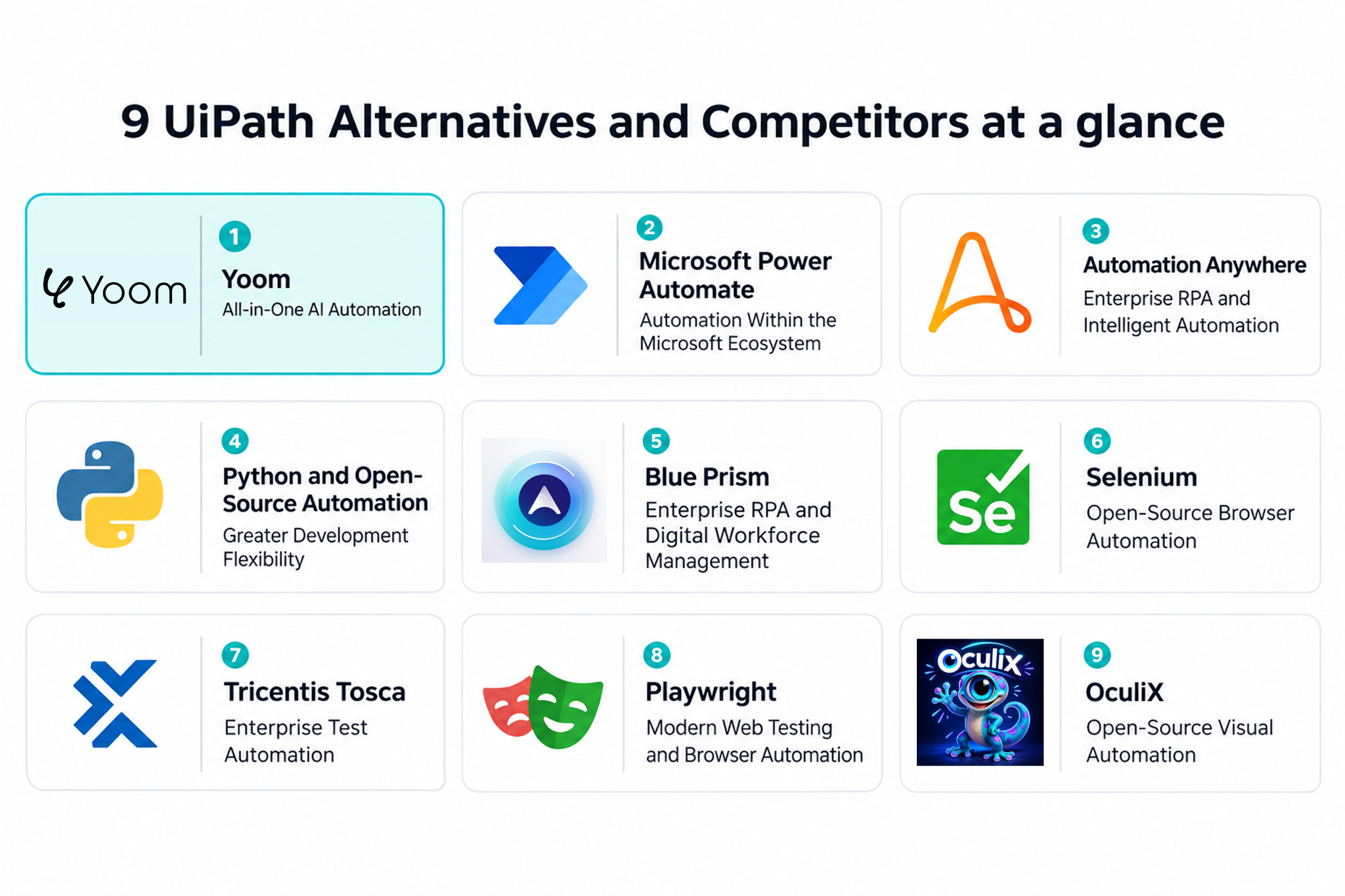
Here are nine tools and technologies worth considering.
1. Yoom — All-in-One AI Automation
Best for: Teams looking to automate business processes across applications using a combination of AI, app integrations, workflow automation, and RPA.
Yoom is an all-in-one AI automation platform that combines app integrations, workflow automation, AI Workers, databases, OCR, and RPA capabilities.
Rather than relying entirely on traditional RPA, Yoom allows teams to choose the most suitable automation method for each task.
For example, tasks that can be automated through simple app integrations and predefined workflows do not require complex RPA configurations. On the other hand, when a process requires more detailed interactions with a screen or application, teams can use RPA to handle those steps.
This flexibility allows organizations to combine different automation approaches within their business processes, rather than relying on RPA for every task.
Yoom offers several capabilities:
- AI Workers: Build and execute AI-powered tasks using natural-language instructions.
- Flowbots: Automate repetitive processes using predefined rules, conditions, and triggers.
- RPA: Automate detailed interactions with applications and screens when more specific control is required.
- Database: Store, organize, and manage business data that can be used across automated processes.
- AI OCR: Extract information from documents and use it in subsequent automation steps.
- App integrations: Connect business applications and coordinate processes across different services.
By combining these capabilities, Yoom can support both straightforward workflow automation and tasks that require more detailed RPA configurations.
Pricing: Free plan available; paid plans start at $16/month.
2. Microsoft Power Automate — Automation Within the Microsoft Ecosystem
Best for: Organizations that rely heavily on Microsoft 365, Windows applications, and other Microsoft services.
Microsoft Power Automate is an automation platform that supports both cloud-based workflows and desktop automation.
It provides cloud flows for connecting applications and services, as well as Power Automate Desktop for automating repetitive tasks on Windows.
Power Automate may be a good fit for organizations that already use Microsoft products such as Excel, Outlook, SharePoint, and Teams.
Its integration with the Microsoft ecosystem can simplify automation across existing business processes.
However, users should consider licensing requirements carefully. Premium connectors, unattended desktop automation, and other advanced capabilities may require additional plans or licenses.
Pricing: Free trial available; paid plans start at $15/user/month.
3. Automation Anywhere — Enterprise RPA and Intelligent Automation
Best for: Large organizations looking for enterprise-grade RPA and centralized automation management.
Automation Anywhere is an enterprise automation platform that combines robotic process automation, AI, and workflow orchestration.
Its platform enables organizations to build software bots that automate repetitive business processes across applications and systems.
Automation Anywhere may be worth considering if your organization wants to maintain an enterprise RPA approach while evaluating a different vendor.
Its capabilities include bot development, centralized management, and AI-powered automation features.
However, organizations should evaluate the implementation requirements, licensing structure, and ongoing maintenance responsibilities before making a decision.
As with UiPath, deploying enterprise RPA at scale can require technical expertise and dedicated resources.
Pricing: Contact Automation Anywhere for pricing.
4. Python and Open-Source Automation — Greater Development Flexibility
Best for: Technical teams that want greater control over automation logic and are comfortable writing and maintaining code.
Python is a programming language that can be used to automate a wide range of tasks, including data processing, file management, web interactions, and application integrations.
Unlike dedicated RPA platforms, Python does not provide a complete enterprise automation environment out of the box.
Instead, developers can combine Python libraries and frameworks to build automation solutions tailored to their requirements.
For example, teams can use:
- Selenium or Playwright for browser automation.
- PyAutoGUI for desktop and mouse/keyboard automation.
- Requests for API-based integrations.
- Pandas for data processing and spreadsheet operations.
Python can offer considerable flexibility, particularly when standard RPA activities do not support a specific requirement.
It may also reduce software licensing costs because Python is open source and can be used for commercial purposes.
However, this flexibility comes with additional responsibilities. Teams need to build and maintain their own automation infrastructure, error handling, monitoring, and deployment processes.
Python is therefore more suitable for organizations with developers or technical teams than for users looking for a ready-to-use, low-code RPA platform.
Pricing: Python is open source and free to use.
5. Blue Prism — Enterprise RPA and Digital Workforce Management
Best for: Enterprises that need centralized control and governance over large-scale automation operations.
SS&C Blue Prism is an enterprise RPA platform designed to automate business processes through digital workers.
It provides capabilities for designing, deploying, and managing automated processes across business systems.
Blue Prism may be worth considering for organizations that prioritize enterprise governance, centralized automation management, and structured process automation.
Its platform also provides options for cloud and on-premises deployment, depending on the product and requirements.
However, organizations should consider implementation complexity and licensing costs. Like other enterprise RPA solutions, Blue Prism may require dedicated technical resources to build and maintain automations.
Pricing: Contact SS&C Blue Prism for pricing.
6. Selenium — Open-Source Browser Automation
Best for: Developers who primarily need to automate browser-based processes or test web applications.
Selenium is an open-source browser automation framework that allows developers to control web browsers through code.
It supports multiple programming languages, including Python, Java, C#, and JavaScript, and works with major browsers such as Chrome, Firefox, Edge, and Safari.
Selenium is particularly useful for automating browser interactions and testing web applications.
For example, developers can use it to automate:
- Logging into web applications.
- Filling out online forms.
- Extracting information from web pages.
- Performing repetitive browser-based tasks.
- Running automated browser tests.
Compared with UiPath, Selenium offers a more developer-oriented approach and does not provide the same complete enterprise RPA environment.
It is therefore better suited to browser automation than to managing complex business processes involving desktop applications, document processing, and multiple systems.
Teams should also account for the development and maintenance required to keep scripts working as websites change.
Pricing: Free and open source.
7. Tricentis Tosca — Enterprise Test Automation
Best for: Organizations that prioritize software testing automation across complex enterprise applications.
Tricentis Tosca is a test automation platform designed to help organizations automate software testing across different applications and technologies.
Unlike general-purpose RPA tools, Tosca focuses primarily on software quality assurance and test automation.
It provides model-based test automation capabilities, allowing teams to design and manage tests with less reliance on traditional scripting.
Tosca may be worth considering if your main reason for evaluating UiPath alternatives is its Test Suite capabilities or difficulties with test development and maintenance.
However, it is important to distinguish between business process automation and software testing.
Tosca is not a direct replacement for every UiPath automation use case. Organizations should first determine whether their requirements are primarily related to testing applications or automating everyday business operations.
Pricing: Contact Tricentis for pricing.
8. Playwright — Modern Web Testing and Browser Automation
Best for: Development teams that need reliable browser automation and end-to-end testing.
Playwright is an open-source framework developed by Microsoft for web testing and browser automation.
It supports Chromium, Firefox, and WebKit through a unified API and provides features such as automatic waiting, browser isolation, and parallel test execution.
Playwright can be useful for automating browser-based tasks and testing web applications across different browsers.
Compared with Selenium, it offers a modern development experience with built-in testing capabilities and tools for handling browser interactions.
However, Playwright is primarily designed for web automation and testing rather than enterprise-wide business process automation.
Organizations that rely on UiPath for desktop automation, document processing, or centralized robot management may need additional tools to cover those requirements.
Pricing: Free and open source.
9. OculiX — Open-Source Visual Automation
Best for: Teams looking for a lightweight, cross-platform approach to automating graphical interfaces.
OculiX is an open-source visual automation tool that allows users to automate interactions with graphical interfaces.
Rather than relying primarily on DOM selectors or application accessibility hooks, OculiX identifies elements based on their visual appearance.
It uses a Python-based scripting environment and supports automation across Windows, macOS, and Linux.
OculiX may be worth considering when you need to automate legacy applications or graphical interfaces that do not provide convenient APIs or accessibility interfaces.
Its open-source approach also means users can run automation scripts locally without relying on a conventional per-bot SaaS subscription.
However, OculiX is not a full enterprise RPA platform. Organizations that need centralized governance, complex workflow orchestration, or extensive enterprise support may need additional infrastructure and tools.
Pricing: Free and open source.
4 Things to Know Before Choosing a UiPath Alternative
Finding a tool with similar features is only part of the decision. Before switching from UiPath, consider whether the alternative can support your existing processes, what it will cost in practice, and how much effort it will take to maintain.
1. Check Whether the Alternative Supports Your Existing Automation Requirements
If you are already considering a UiPath alternative, start by identifying which parts of your current automations need to be replaced.
For example, do you primarily use UiPath for:
- Desktop automation and repetitive UI interactions?
- Browser automation and web scraping?
- Document processing and OCR?
- Application integrations and data transfers?
- Enterprise-wide RPA and robot management?
- Software testing and quality assurance?
Different tools specialize in different areas.
For example, Selenium and Playwright are primarily designed for browser automation, while Power Automate and Automation Anywhere offer broader automation capabilities.
Similarly, Yoom focuses on connecting applications and automating business processes through AI and rule-based workflows.
The best alternative is not necessarily the one with the most similar feature list. It is the one that can reliably handle the specific processes your organization needs to automate.
Before switching, try rebuilding representative automations with the alternative and test them under realistic conditions.
2. Look for Hidden Costs Before You Commit
A tool with a lower starting price is not always less expensive overall.
Automation platforms use different pricing models. Some charge based on users, bots, or automation executions, while others require additional licenses for advanced features or enterprise capabilities.
For example, an organization that expands its unattended automation operations may need additional robot licenses or infrastructure.
Similarly, open-source tools may have no software licensing fees but still require investment in development, hosting, monitoring, and maintenance.
To avoid unexpected costs, estimate the total resources required for your actual use cases.
Consider:
- How many automations will you run?
- How frequently will they execute?
- How many users and robots will need access?
- Are premium features or additional modules required?
- Will you need dedicated infrastructure or external development resources?
Ask vendors to clarify usage limits, additional charges, and features that require higher-tier plans.
3. Consider the Total Cost of Ownership, Not Just the Subscription Price
A lower subscription price does not automatically mean lower overall costs.
Replacing an existing automation platform can require significant time and effort.
For example, your team may need to:
- Rebuild existing automation processes.
- Test and validate the new workflows.
- Migrate data and integrations.
- Train employees on the new platform.
- Establish monitoring and troubleshooting procedures.
If you switch from a commercial RPA platform to an open-source framework, you may also need to take responsibility for infrastructure, security, updates, and ongoing maintenance.
This creates an important trade-off: lower software costs can come with additional development and operational responsibilities.
Before switching, consider not only licensing fees but also the time and resources your team will spend building, monitoring, and maintaining the new automations.
4. Evaluate Customer Support and Documentation
No matter which automation tool you choose, you may eventually encounter technical issues that are difficult to resolve on your own.
When documentation and community resources are not enough, the quality of customer support can make a significant difference.
This is particularly important for business-critical automations that need to operate reliably.
Before switching, consider:
- Whether the vendor provides direct technical support.
- Whether support is included in the subscription or requires an additional fee.
- How comprehensive the documentation and learning resources are.
- Whether practical examples and troubleshooting guides are available.
- Whether the platform has an active developer or user community.
If possible, contact the vendor with a technical question before purchasing.
Pay attention to how quickly they respond, how clearly they explain the solution, and whether their guidance addresses your actual requirements.
A platform's functionality matters, but so does the support you can rely on when something goes wrong.
Consider an Automation Platform That Supports Both RPA and Non-RPA Automation
UiPath is a powerful enterprise RPA platform, but it may not be the right fit for every organization.
As the user discussions and reviews analyzed in this article suggest, some users encounter challenges involving technical limitations, automation reliability, maintenance, licensing, and development complexity.
When evaluating UiPath alternatives, it is worth considering not only which RPA tool to choose, but also whether every process actually needs RPA.
RPA is particularly useful when you need detailed control over interactions with desktop applications, screens, or systems that cannot be easily connected through standard integrations. However, trying to automate every process with RPA can require a significant amount of setup and maintenance time, even when the tool itself is relatively affordable.
RPA platforms also generally require a longer learning period than automation tools that rely on app integrations and predefined workflows.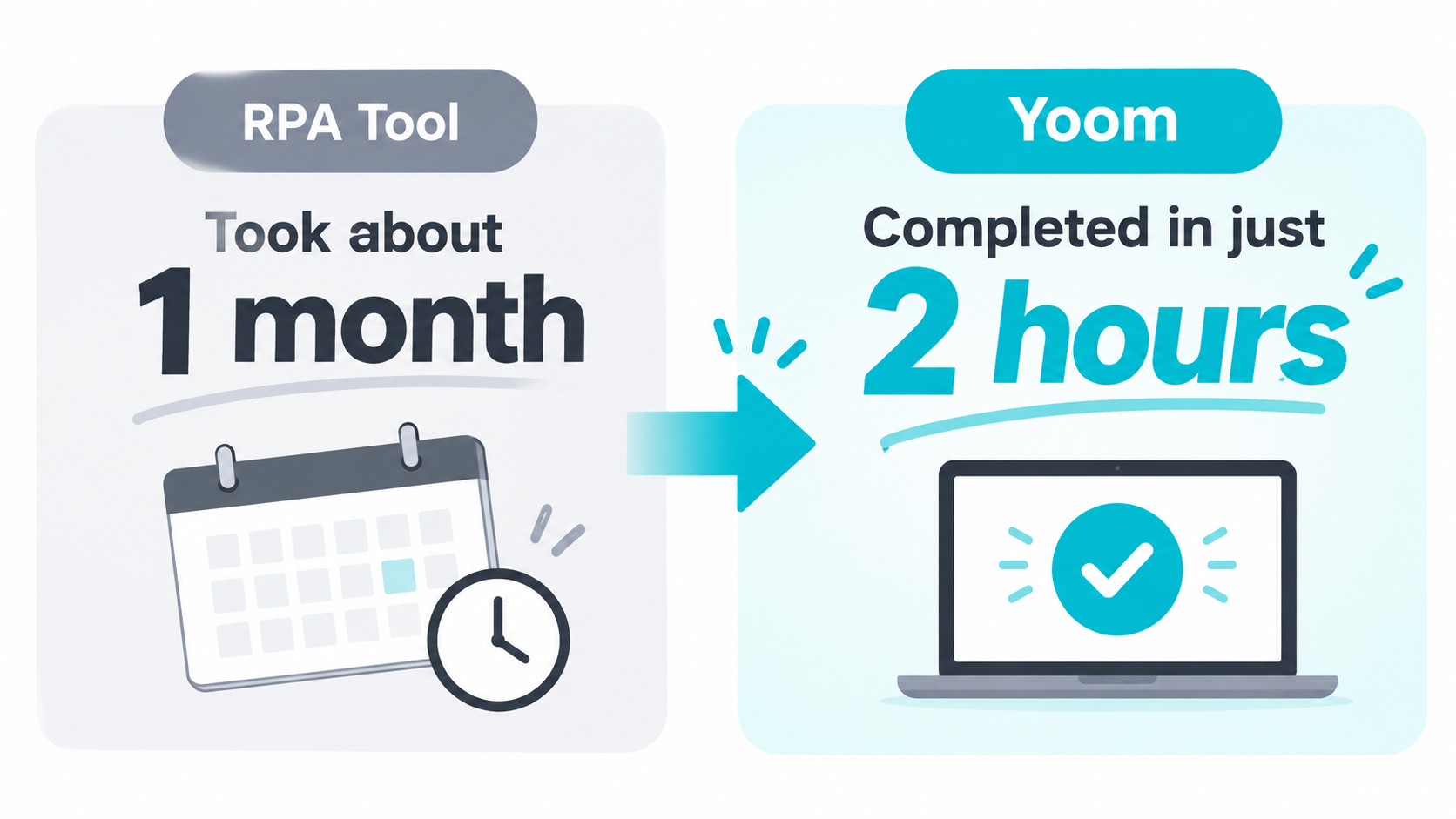
For example, one Yoom user reported that a process that took a month to build with an RPA tool was completed in just two hours using Yoom.
This illustrates why it can be beneficial to choose a platform that supports both RPA and non-RPA automation. You can use RPA when a process requires detailed configuration, while relying on simpler automation methods for tasks that can be handled through app integrations, predefined rules, or AI-powered capabilities.
If you are looking for a UiPath alternative, consider platforms that let you combine these approaches rather than limiting yourself to RPA-only tools.
Ultimately, the goal is not simply to replace UiPath with another RPA tool, but to find an automation platform that lets you choose the right approach for each business process.
Take advantage of free plans and trials where available, test your actual use cases, and evaluate the total cost of ownership before making a final decision.