


・
10 Best Workato Alternatives for 2027: Why User Switch

Workato is an enterprise automation platform that helps organizations connect applications, synchronize data, and automate business processes. Its recipe-based approach and extensive integration capabilities support a wide range of automation needs across business systems.
However, no automation platform is perfect. Even a well-established solution like Workato may not be the right fit for every organization. Differences in pricing, usability, technical requirements, and customization needs can lead teams to explore other options.
So, why do users consider switching from Workato, and what are they looking for in an alternative? To explore these questions, this guide draws on public reviews and discussions from platforms such as G2 and Reddit, examining individual user experiences and the factors that may influence their decisions.
Based on these insights, we'll introduce 10 Workato alternatives, highlighting their key features, strengths, and potential limitations to help you find a platform that better fits your organization's needs.
When Do Users Consider a Workato Alternative?
Workato offers a wide range of automation capabilities, but the right platform for an organization can depend on its budget, technical requirements, team experience, and support needs.
As automation requirements evolve, businesses may start exploring alternatives to find a solution that better fits their current situation. Here are four factors that can help you identify when it may be worth considering other automation platforms.
1. When Automation Costs Become Harder to Predict
Automation platforms use different pricing structures. Depending on the product, costs may be based on tasks, actions, executions, usage tiers, or negotiated enterprise plans.
For organizations processing large volumes of data or running frequent automations, understanding how usage is calculated can be particularly important.
In a Reddit discussion about Workato and NetSuite, one commenter reported reaching their monthly action limit sooner than expected and expressed concerns about additional usage costs. Another participant described their own experience as more cost-effective than an alternative integration platform.
These accounts reflect different individual experiences. They do not establish how Workato's pricing compares for all organizations. However, they illustrate why it is important to understand how usage and costs may change as automation requirements grow.
When comparing platforms, consider:
- What counts as a billable task, action, credit, or execution.
- How usage is calculated when processing multiple records or fields.
- What happens when you exceed the limits included in your plan.
- How costs may change as your automation requirements grow.
If your automation usage is increasing or monthly costs are becoming difficult to forecast, comparing pricing models across platforms may help you identify a more suitable option.
2. When Your Team Needs a Different Balance of Usability and Customization
Automation platforms vary in how they balance visual configuration, low-code development, and more advanced customization. The right approach depends on who will build and maintain the automations and how complex those automations need to be.
Workato users have shared different perspectives on its learning experience. For example, one G2 reviewer described Workato as powerful but said that learning to build recipes required a significant amount of trial and error. Other reviewers have praised the recipe builder and the platform's capabilities.
These differing perspectives illustrate why usability is best evaluated in the context of a team's needs and experience.
If your team wants more employees to build and maintain automations independently, you may want to compare platforms with different levels of visual configuration, reusable templates, and technical requirements. On the other hand, teams with developers or integration specialists may prioritize code-level customization and advanced integration logic.
Consider which approach best matches your team's skills, resources, and long-term automation plans.
3. When Your Integration Requirements or Troubleshooting Needs Change
Automation requirements can range from straightforward app connections to complex integrations involving data transformation, multiple records, conditional logic, and error handling.
As businesses expand their use of automation, they may need to process more data, connect additional systems, or manage increasingly complex processes. The way each platform handles these requirements is an important part of evaluating its suitability.
In one G2 review, a user shared concerns about iteration, output handling, and the debugging experience. In another example, a Workato user on Reddit reported having trouble identifying the cause of an error in a recipe designed to sync data with Salesforce.
These are individual accounts of specific scenarios, rather than evidence that the same challenges apply to all Workato implementations.
When evaluating any automation platform, test the functions that matter most to your business. These may include:
- Connecting your required applications and services.
- Transforming data and processing multiple records.
- Handling errors and retrying failed operations.
- Inspecting execution history and troubleshooting issues.
- Supporting custom API calls or specialized business logic.
A proof of concept using representative workflows can help you assess how well a platform meets your technical requirements. During testing, pay attention to how easily you can identify errors, trace execution history, and adjust configurations when something goes wrong. This can help you determine whether the platform provides the troubleshooting capabilities your team needs.
4. When Your Team Needs More Accessible Documentation or Support
Documentation, training, and technical support can all contribute to a successful automation implementation.
Workato reviewers have shared a range of experiences in this area. One G2 reviewer appreciated the assistance provided by the product team but noted that they wanted more learning resources. Other feedback has highlighted the value of support and training.
These experiences suggest that the availability of learning resources and support can be an important consideration, particularly for teams that are new to automation or have limited in-house technical resources.
When comparing solutions, look at:
- The availability and clarity of official documentation and tutorials.
- Whether users can find answers through community resources.
- What onboarding and training options are available.
- Whether responsive technical support is available directly from the vendor.
- Support hours and service-level commitments, especially for enterprise deployments.
Before choosing a platform, consider whether your team can find answers to common questions independently and how easily you can contact the vendor when additional help is needed. Checking available support channels, response times, and service-level commitments in advance can help you understand what assistance will be available after implementation.
10 Best Workato Alternatives
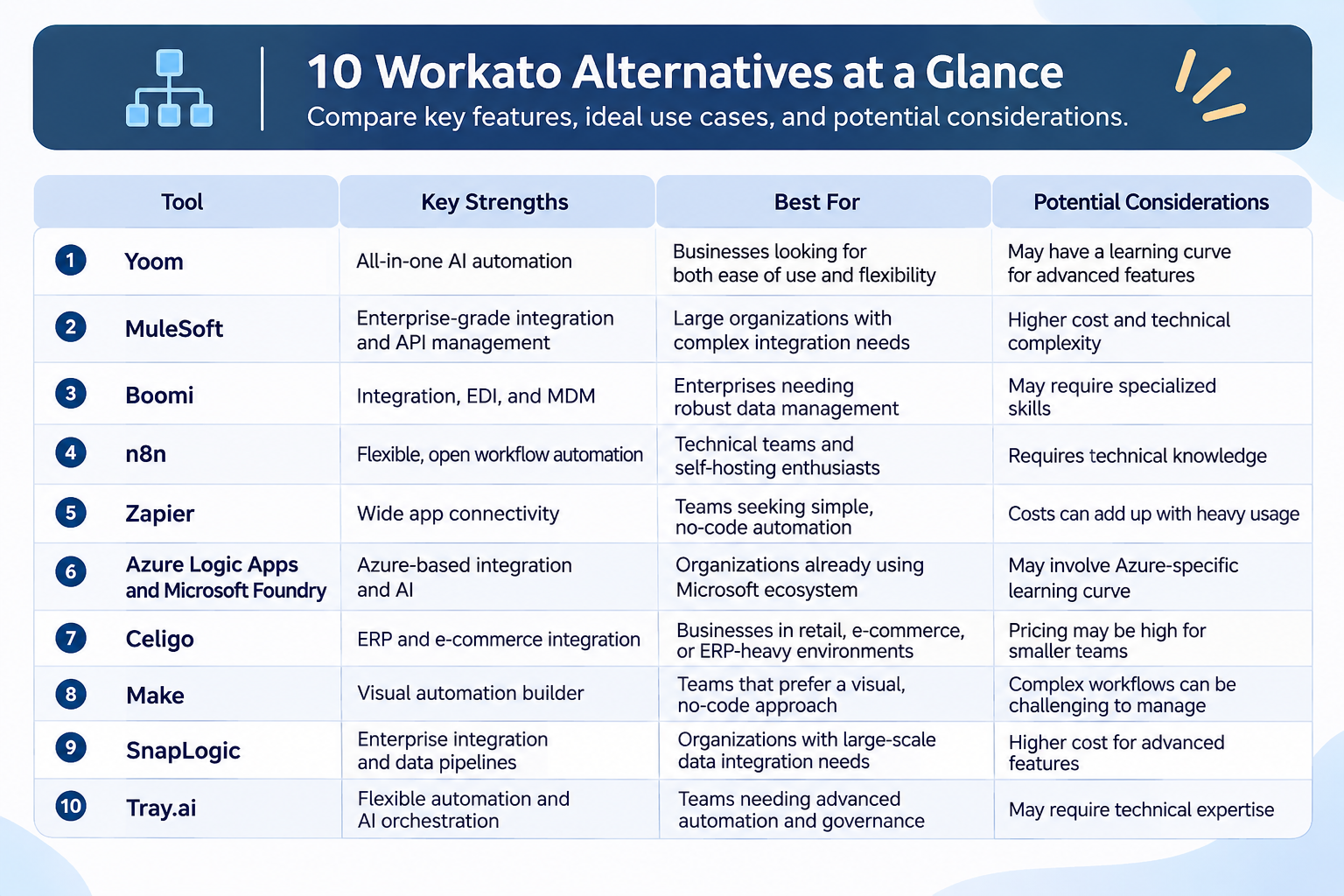
1.
Yoom
— All-in-One AI Automation
Best for: Teams looking to combine AI-powered tasks, app integrations, and business process automation in one platform.
Yoom is an all-in-one AI automation platform that brings together app integrations, workflow automation, AI Workers, and other tools for business operations.
Teams can use rule-based automations for repeatable processes and AI Workers for tasks that benefit from AI. This combination can support automation across different departments without requiring every process to be built as a custom integration project.
Yoom also offers custom functions for automations that go beyond its standard features. If you want to create a process that isn't available out of the box, you can customize its behavior by entering the values you need, without having to write an entire block of code from scratch. This gives teams more flexibility to build automations that match their specific requirements while reducing the need for complex coding.
Pricing: Free plan available; paid plans start at $16/month.
2.
MuleSoft
— Enterprise Integration and API Management
Best for: Organizations with complex integration requirements and a need for enterprise API management.
MuleSoft's Anypoint Platform supports application integration and API management across different systems and environments.
It may be a suitable option for organizations that need to connect enterprise applications while managing APIs, access, and integration architecture centrally. Its capabilities can be particularly relevant when integration strategy extends beyond individual business automations.
When evaluating MuleSoft, consider your organization's API management requirements, implementation resources, and long-term integration architecture.
Pricing: paid plans start at $2,000/month.
3.
Boomi
— Enterprise Integration, EDI, and Master Data Management
Best for: Organizations connecting enterprise applications, data sources, and hybrid environments.
Boomi provides capabilities for application integration, data management, and business process automation.
Organizations can evaluate Boomi when they need to connect multiple enterprise systems or coordinate data across cloud and on-premises environments. Its suitability depends on the applications involved, the required data flows, and the level of integration governance needed.
Before making a decision, review the available connectors, deployment options, administrative features, and implementation requirements.
Pricing: Contact Boomi for pricing.
4.
n8n
— Flexible Automation for Technical Teams
Best for: Technical teams that want control over how automations are built and deployed.
n8n offers a visual automation builder with options for adding code and working with APIs. It can be useful when teams need to customize data processing or build automations around specific technical requirements.
The platform offers both cloud-hosted and self-hosted approaches. The right option depends on your team's infrastructure preferences, operational resources, and deployment requirements.
Organizations considering n8n should evaluate not only its flexibility but also the time and technical expertise required to build, test, secure, and maintain their automations.
Pricing: Free self-hosted option available; paid plans are from $20/month.
5.
Zapier
— Wide App Connectivity
Best for: Teams that use a wide range of business applications and want to connect them through ready-made integrations.
With support for more than 9,000 app integrations, Zapier is worth considering for organizations that use a diverse range of applications or need to connect tools across multiple departments.
However, the total number of available integrations is not the only factor to consider. Rather than focusing on how many apps a platform supports, check whether it integrates with the specific applications your team actually uses and whether the required triggers and actions are available.
Pricing: Free plan available; paid plans star from $19.99.
6.Azure Logic Apps
and
Microsoft Foundry
— Azure-Based Integration and AI
Best for: Organizations using Microsoft Azure that need cloud integration and AI application capabilities.
Azure Logic Apps helps organizations build automated workflows that connect applications, services, and systems. It can be relevant to teams that want to build integrations within the Azure ecosystem.
Microsoft Foundry serves a different but related purpose, providing tools for building and managing AI applications and agents. It is not a direct replacement for Azure Logic Apps, but the services may support different parts of a broader automation architecture.
Organizations considering these services should evaluate which components they need, how those components will work together, and the technical expertise required to manage them.
Pricing:
- Azure Logic Apps: Usage-based pricing
- Microsoft Foundry: Pricing varies by product and usage
7.
Celigo
— ERP and E-Commerce Integration
Best for: Organizations that need to connect ERP systems with e-commerce platforms, CRM tools, and other business applications.
Celigo is an integration and automation platform designed to connect business systems and synchronize data across applications. It is particularly relevant to organizations using NetSuite, with integrations for platforms such as Salesforce, Shopify, Amazon, and HubSpot.
Common use cases include syncing e-commerce orders with ERP systems, keeping inventory information up to date across platforms, connecting CRM and ERP data, and automating order and fulfillment processes.
Celigo may be worth evaluating if your organization relies on multiple business systems and needs to keep operational data synchronized across them. Its capabilities can be especially relevant for businesses with complex ERP, e-commerce, and back-office integration requirements.
Pricing: Contact Celigo for pricing.
8.Make
— Visual Automation Builder
Best for: Teams that want to create visual, multi-step automations with conditions and data transformations.
Make uses a visual scenario builder that allows users to connect applications and define how information moves between steps.
It can be useful for automations that involve branching logic, multiple actions, and data manipulation. The visual structure also gives users a way to inspect and modify the logic of their scenarios.
When comparing Make with Workato, consider the complexity of your scenarios, the integrations you require, your team's familiarity with visual automation tools, and how usage-based credits affect your total cost.
Pricing: Free plan available; paid plans start from $9..
9.
SnapLogic
— Enterprise Integration and Data Pipelines
Best for: Organizations connecting applications and data systems as part of broader integration projects.
SnapLogic provides integration tools for moving and transforming data across applications and systems.
It may be relevant to organizations with enterprise integration requirements that extend beyond everyday task automation. When comparing SnapLogic with Workato, assess how each platform supports your data flows, application connections, monitoring requirements, and governance needs.
A proof of concept using your actual systems can help clarify which platform is the better fit for your environment.
Pricing: Contact SnapLogic for pricing.
10.
Tray.ai
— Flexible Automation and AI Orchestration
Best for: Teams that need flexible integrations, complex workflow automation, and AI-powered processes across business applications.
Tray.ai is an automation and integration platform that helps businesses connect applications, synchronize data, and automate complex processes. Its visual workflow builder allows users to design and customize integrations, while its AI capabilities enable teams to incorporate AI-powered tasks into their workflows.
Tray.ai supports use cases such as lead routing in Salesforce, data synchronization between business applications, and connecting e-commerce platforms with other business systems. Users also highlight its flexibility, visual workflow builder, and ability to monitor execution logs and retry failed processes.
However, some G2 reviewers note that the platform can have a learning curve, particularly for users unfamiliar with APIs or complex workflow logic. Documentation and the ease of reaching customer support are also areas where experiences vary.
Tray.ai may be worth considering if your team needs a flexible platform for complex integrations and wants to incorporate AI into existing business processes.
Pricing: Free trial available; for Paid Plans Contact Tray.ai.
4 Things to Check Before Choosing an Automation Platform
Once you have identified potential alternatives, use the following checklist to compare them against your organization's requirements.
1. Confirm Support for Your Required Integrations
Start by listing the applications, triggers, actions, and data flows involved in your existing processes.
Then confirm that each candidate platform supports the specific functionality you need. General support for an application does not necessarily mean that every trigger, action, or data-processing pattern is available.
Pay particular attention to authentication, custom API requirements, error handling, and the processing of multiple records.
Where possible, build a proof of concept around a representative business process before making a final decision.
2. Compare Total Cost, Not Just Subscription Price
Subscription prices are only one part of the cost of operating an automation platform.
Depending on the product and deployment model, the total cost may include usage charges, additional features, implementation services, training, infrastructure, and ongoing maintenance. The time your team spends building, testing, learning, and maintaining automations is another important cost to consider.
Estimate the usage generated by your actual workflows, and consider how much time and effort your team will need to implement and manage them. Ask vendors how their pricing applies to your scenarios, and assess whether the platform's usability and support resources can help reduce the time required for implementation and ongoing operations.
For example, one Reddit user shared the trade-offs of replacing paid software with a lower-cost setup. The user reported spending around 12 hours building and testing the setup, noted the lack of dedicated support, and explained that an office manager needed two weeks to adjust to the new system. This illustrates why a lower subscription price does not necessarily mean a lower overall cost.
3. Assess Implementation and Maintenance Requirements
Consider who will build, test, and maintain your automations.
Some use cases may be straightforward to configure, while others may require API knowledge, custom logic, or specialist implementation support. The level of effort will depend on both the platform and the complexity of the process.
For company-wide use, it's also important to consider whether employees across different roles can build or adapt automations themselves. If only a small group of technically skilled employees can create and maintain workflows, requests from other teams may become concentrated on those individuals. This can increase their workload and make it harder to address the actual needs of people working on the front lines.
Look for a platform that supports different levels of customization. For example, natural-language interfaces can help employees quickly try out automation ideas without having to configure every step manually. At the same time, custom functions or advanced configuration options can help more experienced users reproduce specific requirements that standard features may not cover.
A platform that accommodates both approaches can make automation more accessible across the organization while giving teams the flexibility to build processes that meet their actual needs.
Finally, evaluate whether your internal team can maintain the solution over time and whether external assistance will be needed for implementation or ongoing changes.
4. Review Support, Documentation, and Governance
Documentation, onboarding, and technical support are important considerations when evaluating automation software.
In addition to access to human support, check whether users can find answers independently through help centers, searchable documentation, or support bots. These self-service resources allow employees to resolve common questions quickly without having to wait for a response from the support team.
Help centers can be particularly useful for finding detailed explanations of features, step-by-step setup instructions, and troubleshooting guides. While support bots can provide quick answers, well-organized documentation may offer more comprehensive information when users need to understand a specific feature or resolve a more complex issue.
For example, Yoom's Help Center provides guides on getting started, app integrations, settings and permissions, troubleshooting, and frequently asked questions.
Final Thoughts: Every Tool Comes with Trade-Offs
Workato is one option for organizations looking to connect applications and automate business processes. The alternatives in this guide offer different approaches to integration and automation, from accessible app connections to enterprise integration and more customizable technical workflows.
No automation platform is perfect, and every tool comes with trade-offs. Pricing is a common consideration across platforms, but choosing the lowest-cost option does not always mean getting the best value.
For example, if minimizing software costs is your only priority, an open-source tool that you configure and host yourself may be worth considering. However, this approach also requires time, technical skills, and ongoing maintenance. Similarly, a platform with thousands of app integrations may sound highly scalable, but that advantage may matter less if your team only needs to connect a handful of applications.
Usability and customization can also involve trade-offs. A no-code platform may make automation accessible to employees without programming experience, but it may not offer the level of control that technically skilled users need for more advanced configurations. On the other hand, a highly customizable platform may require more technical knowledge from the people building and maintaining automations.
Public reviews and online discussions can help you understand these trade-offs through individual user experiences. However, these accounts reflect specific situations and should not be treated as a comprehensive assessment of any platform.
When comparing Workato with alternatives, start with your business requirements. Consider the applications you need to connect, the complexity of your automations, the technical skills available across your organization, and the total cost of ownership.
Ultimately, the right automation platform is not necessarily the one with the most features, the lowest price, or the largest number of integrations. It is the one whose advantages outweigh its limitations for your organization and its specific needs.