


・
9 Best Zapier Alternatives for 2027: Why Users Switch

Zapier is one of the best-known workflow automation platforms, helping businesses connect apps and automate repetitive tasks without writing code. However, some users consider switching to alternative tools for a variety of reasons.
So, why do users look for Zapier alternatives, and what should they consider before making the switch?
To explore these questions, we examined user reviews and discussions on platforms such as G2 and Reddit to understand why people consider leaving Zapier and what challenges they may face after switching.
This guide compares nine Zapier alternatives, explains what each one does best, and helps you decide which platform is right for your team. It also covers four key things to keep in mind before switching, helping you make a more informed decision.
Why Look for Zapier Alternatives? What User Discussions Reveal
To better understand why businesses consider switching from Zapier, we reviewed hundreds of public discussions, G2 user reviews, and Reddit threads about Zapier.
The following figures summarize the discussions and reviews examined for this article. They reflect the reviewed material, not all Zapier users.
*Note: Percentages exceed 100% because a single discussion or review can mention multiple concerns.
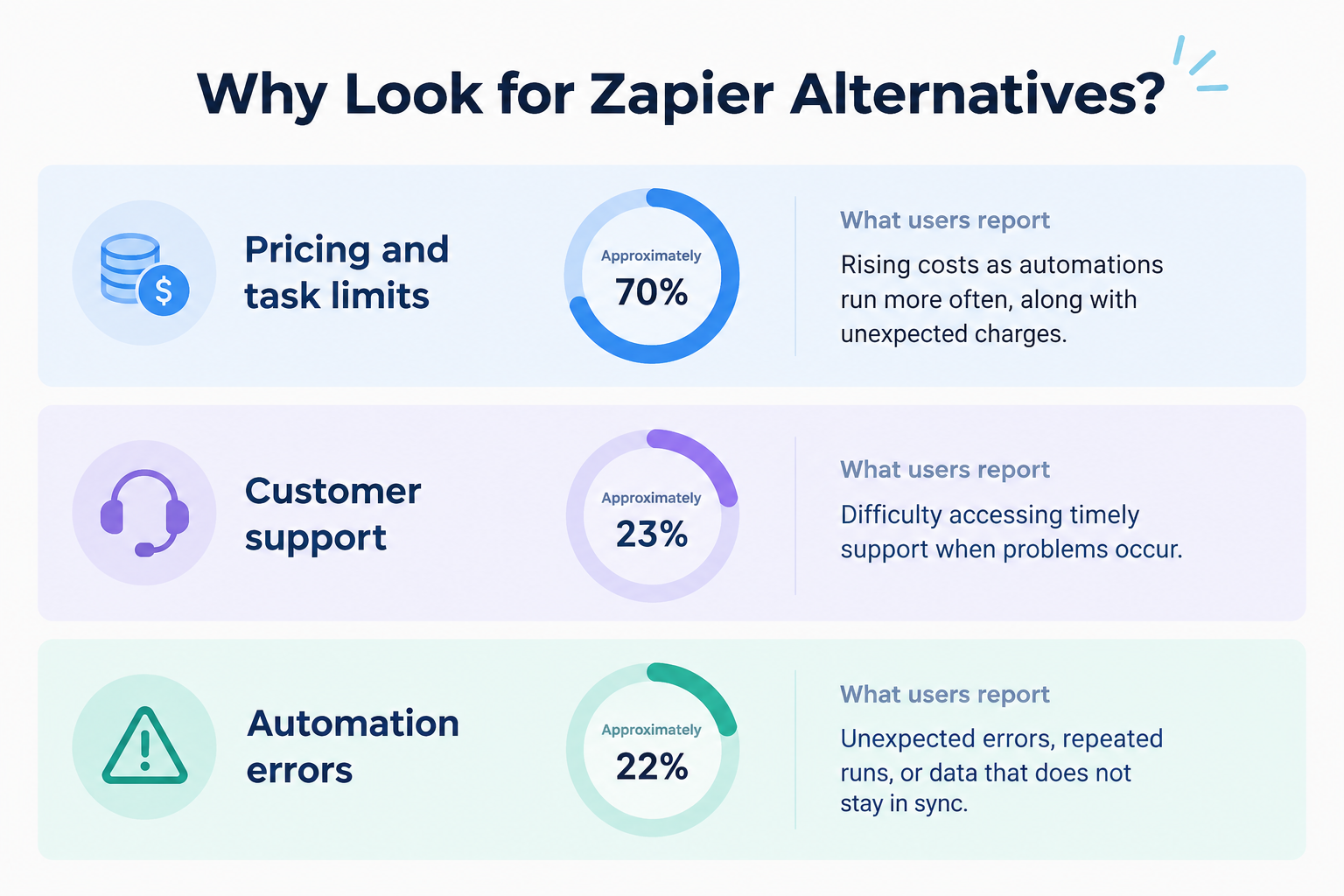
- Common concern: Pricing and task limits(Approximately 70%)
Rising costs as automations run more often, along with unexpected charges. - Common concern: Customer support(Approximately 23%)
Difficulty accessing timely support when problems occur. - Common concern: Automation errors(Approximately 22%)
Unexpected errors, repeated runs, or data that does not stay in sync.
These concerns can help you identify what to look for when comparing Zapier alternatives. However, they do not mean that every user will experience these problems or that another platform will automatically solve them.
Common Causes of Unexpected Zapier Task Usage
Beyond general pricing concerns, users also describe specific situations in which Zapier consumes more tasks than expected.
Our analysis identified several recurring scenarios: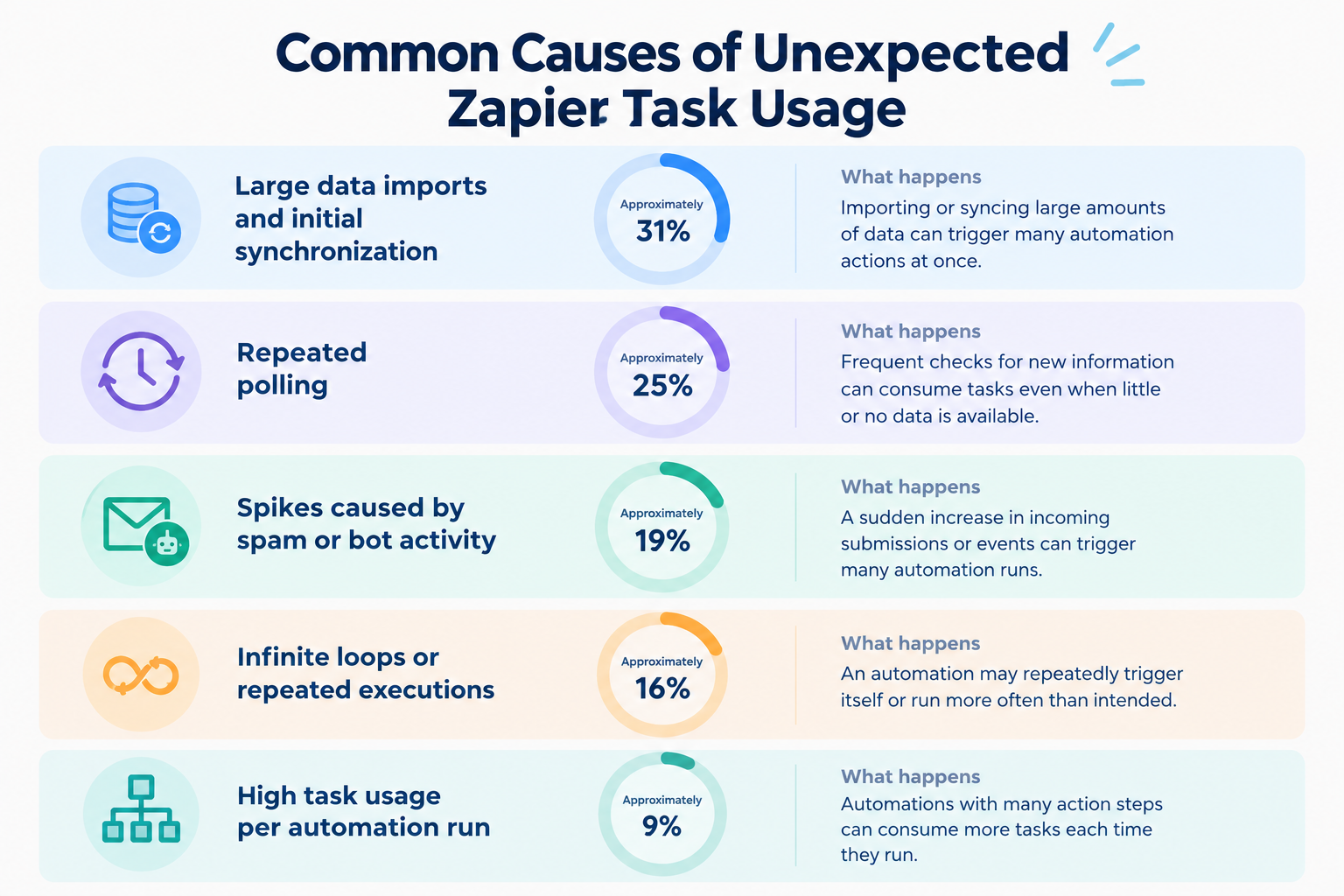
- Large data imports and initial synchronization (Approximately 31%)
Importing or syncing large amounts of data can trigger many automation actions at once. - Repeated polling (Approximately 25%)
Frequent checks for new information can consume tasks even when little or no new data is available. - Spikes caused by spam or bot activity (Approximately 19%)
A sudden increase in incoming submissions or events can trigger many automation runs. - Infinite loops or repeated executions (Approximately 16%)
An automation may repeatedly trigger itself or run more often than intended. - High task usage per automation run (Approximately 9%)
Automations with many action steps can consume more tasks each time they run.
9 Zapier alternatives and competitors
1.
Yoom
- Best for: All-in-one automation with a simple, intuitive interface
- Technical requirements: no coding required for standard use, though custom features may require basic knowledge of code and data values.
- Key features: Built-in database, document generation, approvals, AI Workers
- Pricing: Free plan; paid plans from ~$16/month
2.
Make
- Best for: Visual automations with multiple paths
- Technical requirements: Moderate; visual low-code
- Key features: Visual automation builder, routers, data aggregators
- Pricing: Free plan; paid plans from $9/month
3.
n8n
- Best for: Technical automations and self-hosting
- Technical requirements: Moderate to high
- Key features: Self-hosting, JavaScript and Python, AI integrations
- Pricing: Free self-hosted edition; cloud plans from €20/month
- Best for: Open-source automation and AI workflows
- Technical requirements: Low to moderate
- Key features: Visual builder, AI steps, custom extensions
- Pricing: Free self-hosted edition; cloud plans from $20/month
- Best for: High-volume automations on a budget
- Technical requirements: Low; no-code
- Key features: Trigger-and-action automations, filters, routers
- Pricing: Free plan; paid plans from $19/month
6.
Gumloop
- Best for: AI-powered research and data collection
- Technical requirements: Moderate
- Key features: Web scraping, AI models, Python support
- Pricing: Free trial; paid plans from $37/month
- Best for: Microsoft 365 and desktop automation
- Technical requirements: Moderate
- Key features: Microsoft integrations, desktop automation, AI Builder
- Pricing: Some Microsoft 365 plans include features; Premium from $15/user/month
- Best for: Developer-focused API automation
- Technical requirements: High; coding skills helpful
- Key features: API integrations, Node.js, Python
- Pricing: Free plan; paid plans from $99/month
9.
Lindy.ai
- Best for: AI assistants for business tasks
- Technical requirements: Low; natural-language setup
- Key features: AI assistants, email and calendar integrations
- Pricing: Free plan; paid plans from $49.99/month
Prices and plan details are based on the information available for this comparison and may change. Check each provider's official pricing page before making a decision. Features and usage limits may vary by plan.
Which Zapier Alternative Is Right for You?
Switching from Zapier does not always solve every automation challenge. User reviews suggest that some people encounter new difficulties after switching, including a steep learning curve, server maintenance, missing app integrations, and troubleshooting errors.
To avoid these problems, look beyond pricing and feature lists when choosing a Zapier alternative. Consider how each platform fits your team's technical skills, existing apps, and long-term maintenance needs.
The right Zapier alternative depends on what you want to accomplish.
- Choose Yoom if you want to automate complete business processes using app integrations, databases, document generation, and approval steps in one platform.
- Choose Make if you want a visual builder with detailed control over branching logic.
- Choose n8n if you need technical flexibility and the option to host your automations yourself.
- Choose Activepieces if you want an open-source platform with visual automation and AI features.
- Choose Pabbly Connect if you want to compare task-based costs for high-volume automations.
- Choose Gumloop if your work involves AI-powered research and web data collection.
- Choose Microsoft Power Automate if your organization relies heavily on Microsoft applications.
- Choose Pipedream if you need code-based API integrations.
- Choose Lindy.ai if you want AI assistants to handle selected business tasks.
Before making a long-term commitment, use a free plan or trial to build one small automation based on your actual work. Check how easy it is to set up, how much usage it consumes, and how well it handles errors.
The best automation platform is not necessarily the one with the most features or the lowest starting price. It is the one that helps your team automate the right tasks reliably, at a cost and level of complexity you can manage.4 Things to Know Before Choosing a Zapier Alternative
Choosing a Zapier alternative is not just about comparing features and prices. Based on the challenges discussed above, here are some practical tips to help you find an automation tool that fits your needs.
1. Build Automations “Manually” When Cost Control Matters
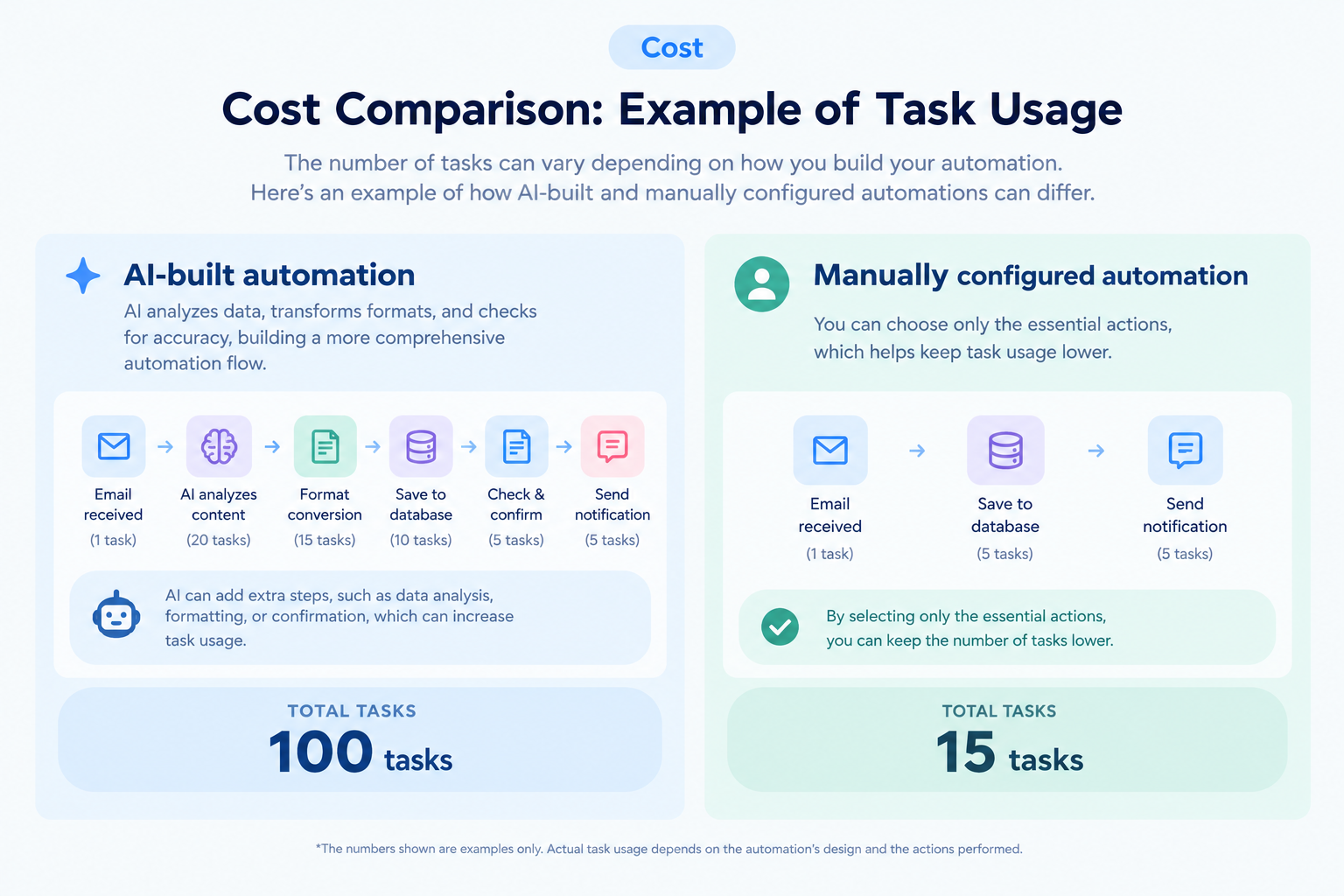
As a result, you may reach your task limit sooner than expected, leading to frustration over usage and costs.
If keeping costs under control is a priority, consider building your automations manually instead of relying entirely on AI. It may take more time upfront, but it can help you understand how your automations work and manage task usage more carefully.
2. Don't Make a Decision Based on Listed Prices Alone
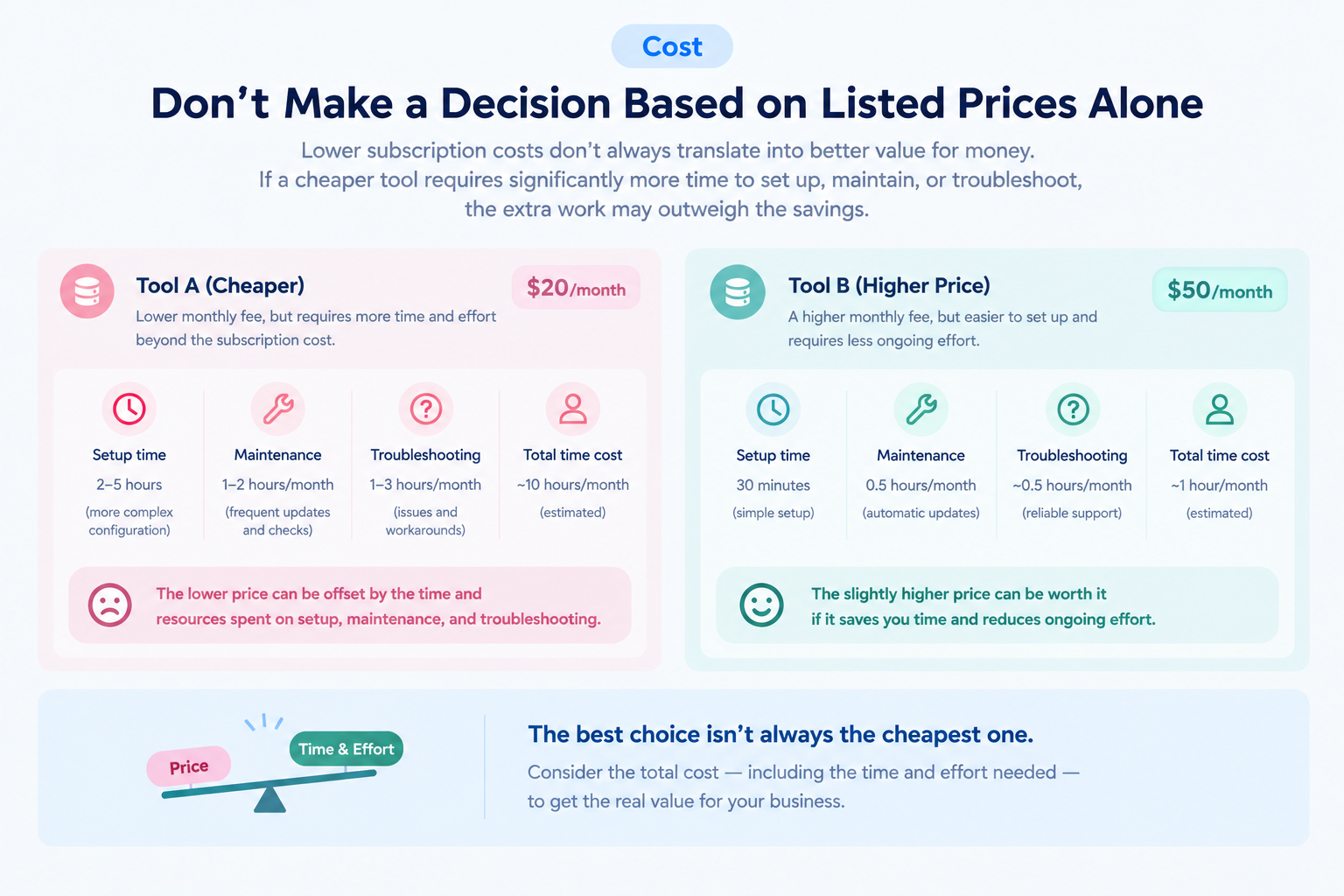
What's more, lower subscription costs don't always translate into better value for money. If a cheaper tool requires significantly more time to set up, maintain, or troubleshoot, the extra work may outweigh the savings.
For example, one Reddit user shared the trade-offs of replacing paid software with a lower-cost setup. The user reported spending around 12 hours building and testing the setup, noted the lack of dedicated support, and explained that an office manager needed two weeks to adjust to the new system.
Before committing, consider contacting the vendor's sales team. Explain how many users you expect to have and what you want to automate, then ask for an estimate based on your intended use.
Also, factor in the time your team will spend building, maintaining, and troubleshooting automations when comparing different tools.
This can help you assess the overall cost and value of a platform, rather than choosing based on its subscription price alone.
3. Expect a Learning Curve With Any Automation Tool
Any beginners may find automation tools difficult to use at first. As discussed earlier, this is not necessarily a problem with the tool itself. Building automations also requires you to think about your work in a different way.
Tasks you normally perform without thinking may need to be broken down into smaller, explicit steps before you can automate them. This process can be more frustrating than expected.
Rather than deciding too quickly that a tool is too difficult, give it a reasonable trial period. If you get stuck, contact the vendor's support team and ask for help. Taking the time to learn the tool can help you determine whether it is genuinely unsuitable or simply unfamiliar.
4. Ask Whether the Tool Can Handle Your Specific Needs
If you want to build more advanced automations, ask the vendor whether your requirements can be met before switching.
For example, if you currently use Zapier but find it difficult to automate a particular process, describe exactly what you want to achieve to the vendors of the alternatives you are considering.
Their responses can tell you more than a feature list alone. You can assess whether they understand your needs, explain possible solutions clearly, and provide the support you may need in the future.
This is also an opportunity to evaluate the quality of their customer support before committing to a tool.
Final Thoughts: No Tool Is Perfect
Zapier is not necessarily the wrong choice for everyone, and switching to another tool does not automatically solve every problem. Ultimately, choosing an automation platform often comes down to how well it fits your needs, technical skills, budget, and working style.
Before making a decision, try the tool yourself and contact the vendor with any questions about your intended use. Confirming that the platform can support your requirements before purchasing can help you choose an alternative that works for you in the long run.
Start with Yoom for free