



・
Make vs Zapier: Can't Decide? See What Real Users Complain About

Choosing between Make and Zapier depends on what you want to automate, how much flexibility you need, and how much time you are willing to spend learning a new tool.
Both platforms help you connect apps and automate repetitive tasks without building an entire system from scratch. However, they take different approaches to automation.
Neither tool is the best choice for everyone. The right option depends on your technical skills, budget, and the complexity of your automation needs.
In this guide, we compare Make vs Zapier across pricing, ease of use, integrations, and flexibility. We also examine concerns raised by actual users on Reddit and G2 to help you make a more informed decision.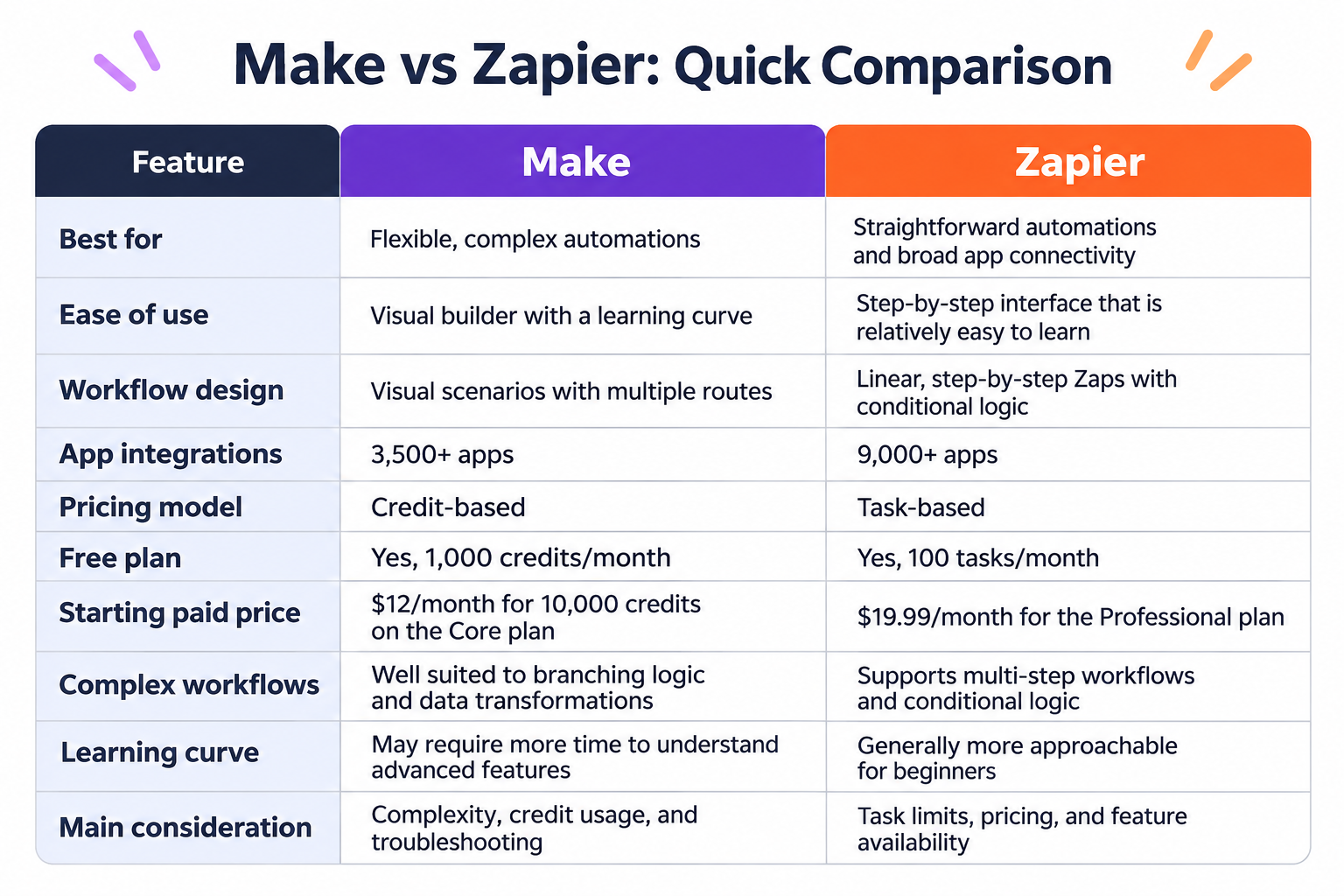
What Do Actual Users Complain About Make and Zapier?
Feature lists and pricing pages can help you compare automation tools, but they do not always show what using a platform is like in practice.
If you are still deciding between Make and Zapier, reviewing the concerns of existing users can help you identify potential challenges before committing to a paid plan.
We previously analyzed Reddit discussions and G2 reviews about both platforms. The findings highlight different concerns, including integration issues, learning difficulties, pricing, and customer support.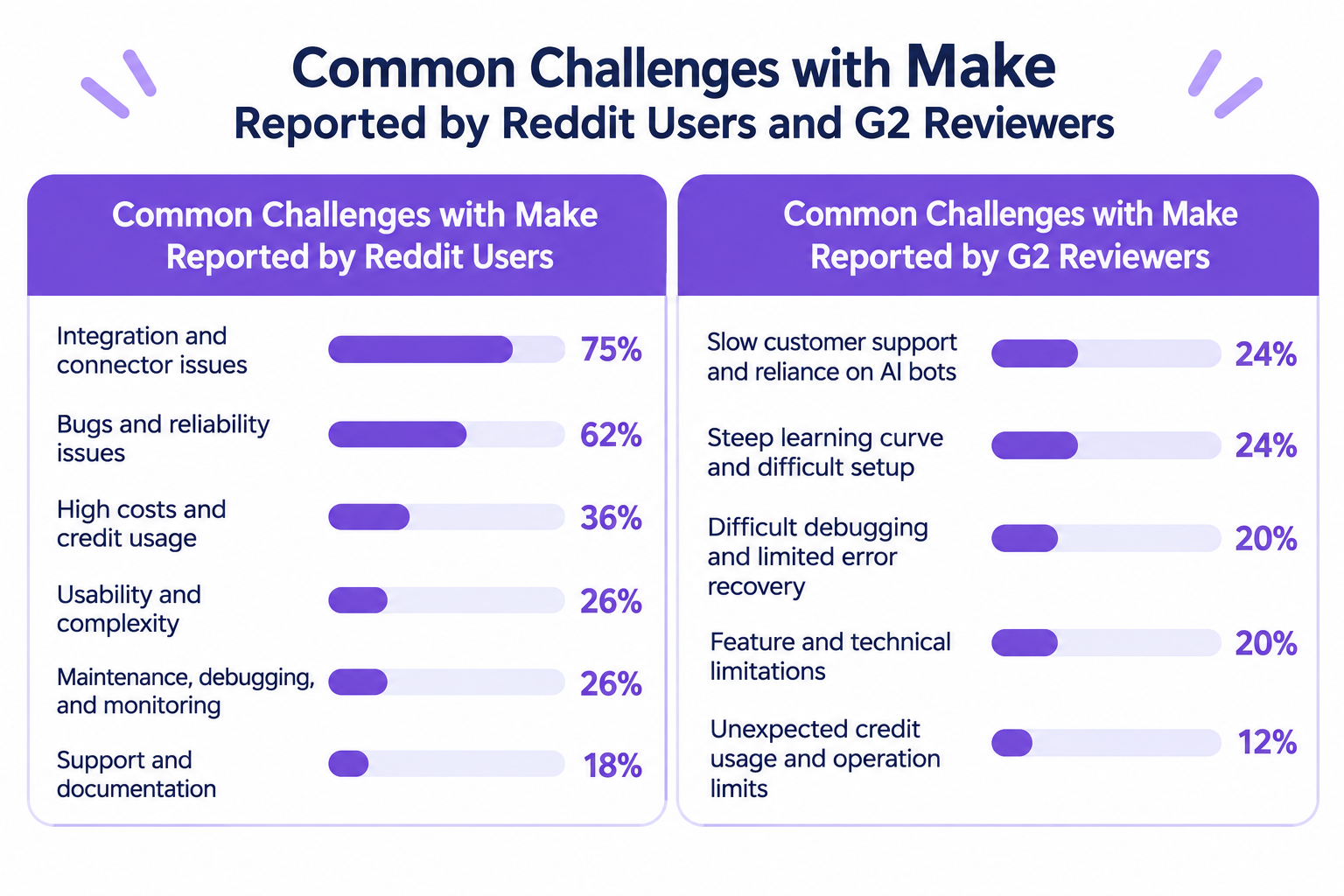
Common Concerns About Make Reported by Reddit Users
Our analysis of Reddit discussions about Make identified several recurring concerns.
The following percentages represent the share of analyzed posts that mentioned each issue.
*A single post could mention multiple concerns, so the percentages do not add up to 100%.
Common Challenges with Make Reported by Reddit Users
- Integration and connector issues: 75%
- Bugs and reliability issues: 62%
- High costs and credit usage: 36%
- Usability and complexity: 26%
- Maintenance, debugging, and monitoring: 26%
- Support and documentation: 18%
Integration-related issues and reliability were particularly common in the Reddit discussions we examined.
For example, users described difficulties involving webhooks, data transfers between modules, authentication, and unexpected scenario behavior.
These concerns do not mean that Make is inherently unreliable or that every user will encounter these problems. They highlight the importance of testing the specific integrations and processes you plan to automate.
If you choose Make, consider how comfortable you are with troubleshooting scenarios and checking data when something does not work as expected.
Common Concerns About Make Reported by G2 Reviewers
We also examined G2 reviews to understand which challenges Make users described in their product reviews.
The following percentages are based on categorized mentions in the reviews analyzed. Categories may overlap.
Common Challenges with Make Reported by G2 Reviewers
- Slow customer support and reliance on AI bots: 24%
- Steep learning curve and difficult setup: 24%
- Difficult debugging and limited error recovery: 20%
- Feature and technical limitations: 20%
- Unexpected credit usage and operation limits:12%
The findings suggest that learning how to configure scenarios and resolve errors can be important considerations when choosing Make.
Its visual builder offers flexibility, but building a complex automation may require more than connecting two apps. You may need to understand how data moves between modules, how conditions affect execution, and how to troubleshoot unexpected results.
If you prefer to spend less time learning an automation platform, consider how much complexity your actual use cases require before choosing Make.
See the original Make alternatives analysis for further context.Common Concerns About Zapier Reported by Reddit Users
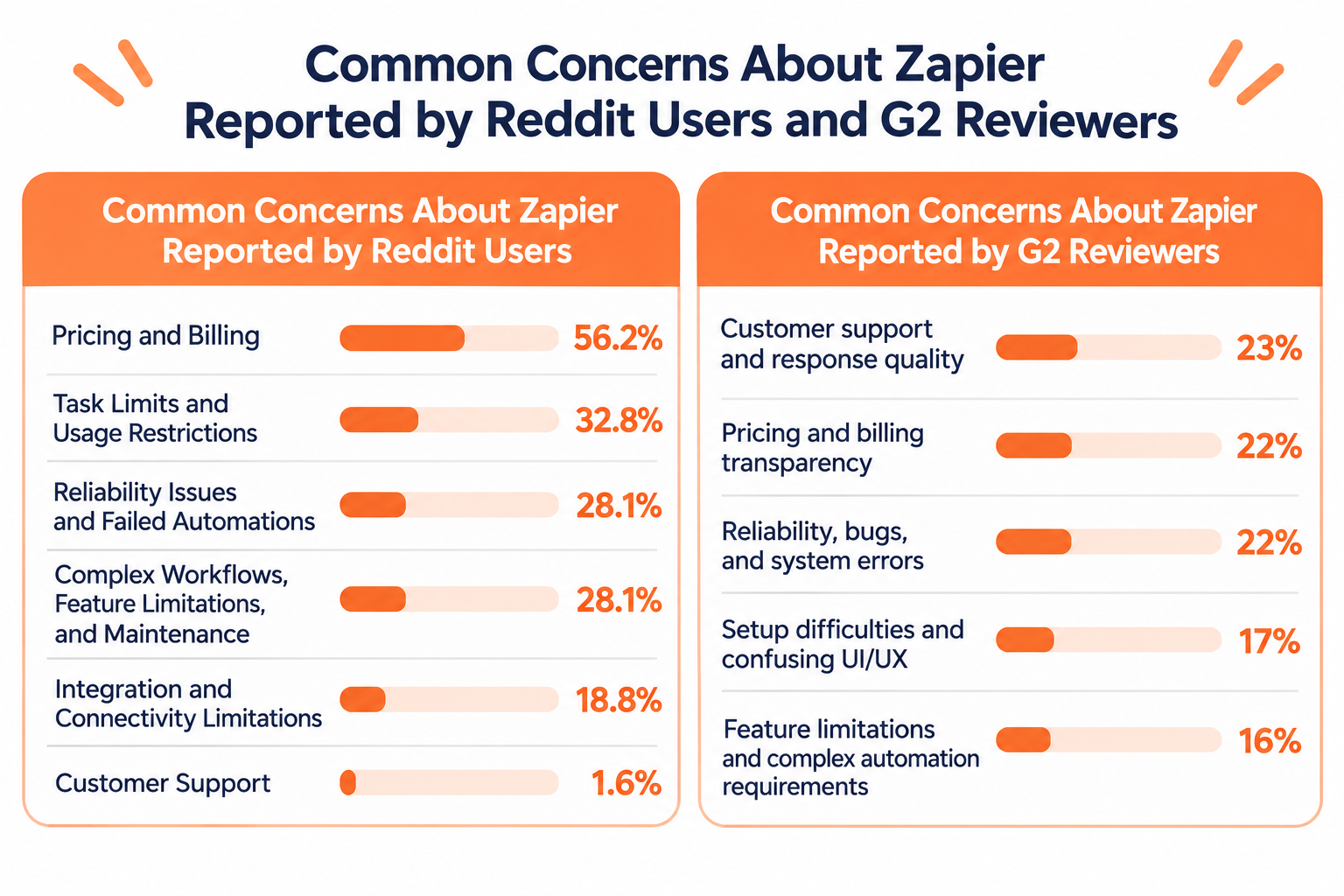
Our analysis of Reddit discussions about Zapier revealed several recurring concerns. The percentages below represent the share of negative posts that mentioned each issue.
*A single post could mention multiple concerns, so the percentages do not add up to 100%.
- Pricing and Billing: 56.2%
- Task Limits and Usage Restrictions: 32.8%
- Reliability Issues and Failed Automations: 28.1%
- Complex Workflows, Feature Limitations, and Maintenance: 28.1%
- Integration and Connectivity Limitations: 18.8%
- Customer Support: 1.6%
Pricing and billing were the most frequently mentioned concerns. Many users expressed frustration with Zapier's task-based pricing, saying that costs increased as their automation usage grew. Task limits were also a recurring issue, particularly for users running high-volume or multi-step automations.
Reliability and complexity were other notable concerns. Some users reported automations stopping unexpectedly, integration errors, or difficulties maintaining workflows as they became more advanced. Others pointed to limitations in customization and handling complex logic.
These discussions suggest that pricing, scalability, and the ability to manage complex automations are important considerations when evaluating Zapier.
Common Concerns About Zapier Reported by G2 Reviewers
We also examined G2 reviews to understand which aspects of Zapier users found frustrating.
The following percentages represent the distribution of categorized negative mentions. A single review could mention multiple concerns.
Common Challenges with Zapier Reported by G2 Reviewers
- Customer support and response quality: 23%
- Pricing and billing transparency: 22%
- Reliability, bugs, and system errors: 22%
- Setup difficulties and confusing UI/UX: 17%
- Feature limitations and complex automation requirements: 16%
Customer support, pricing, and reliability were the most frequently identified areas of dissatisfaction in the G2 reviews we analyzed.
Some reviewers described difficulties getting timely assistance, while others expressed frustration with task-based billing and unexpected automation errors.
These findings suggest that when evaluating Zapier, it is worth considering not only its ease of use and app connectivity but also the level of support and troubleshooting you may need after deployment.
See the original Zapier alternatives analysis for further context.Make vs. Zapier: A Quick Guide to Choosing the Right Tool
Still deciding between Make and Zapier? The best choice depends on what matters most to your team.
Use the following table as a quick guide: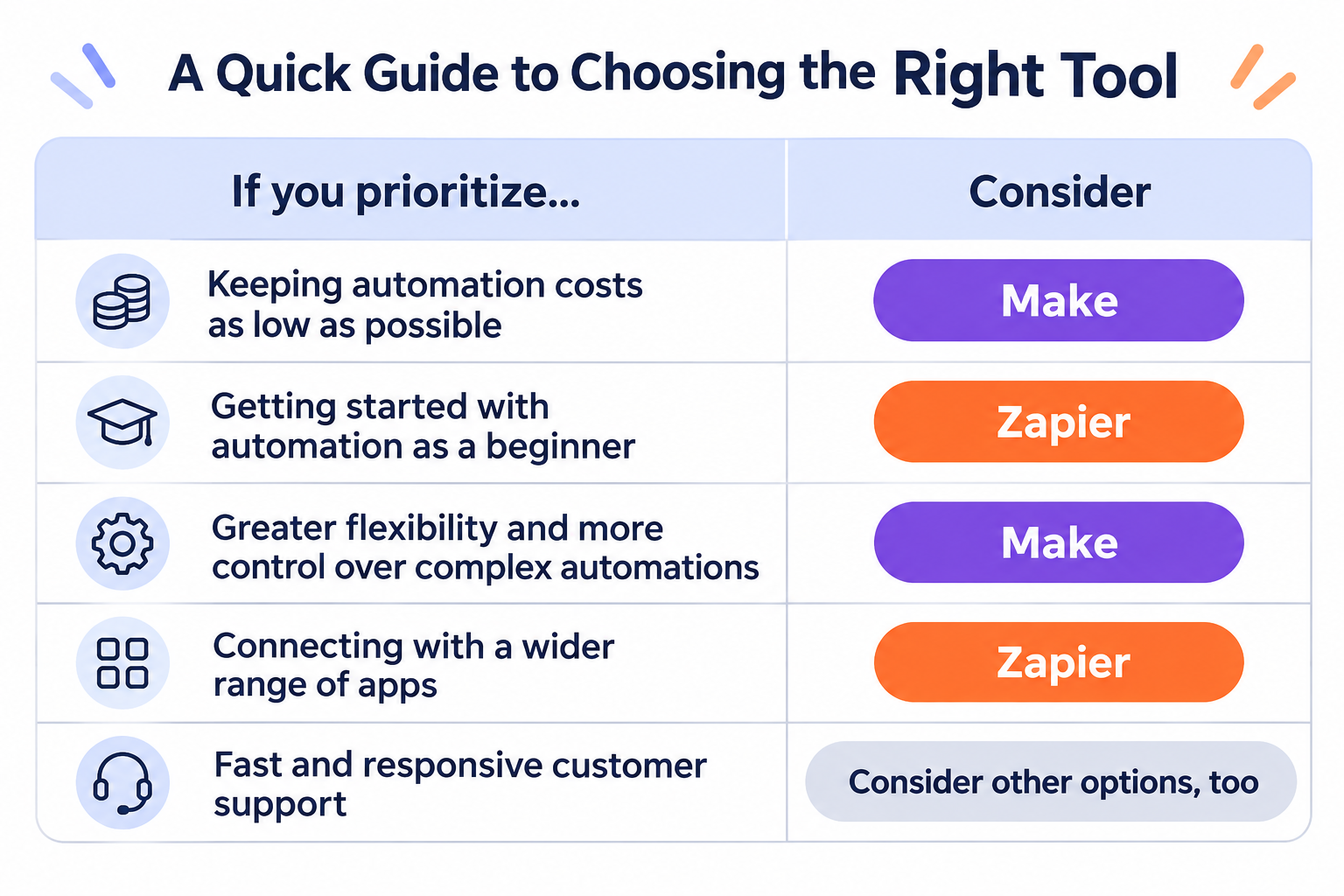
- If you prioritize keeping automation costs as low as possible: Make
- If you are new to automation: Zapier
- If you prioritize flexibility and greater control over complex automations: Make
- If you want to connect with a wider range of apps: Zapier
- If fast and responsive customer support is important to you: Consider other options, too
These recommendations are intended to help you choose between Make and Zapier. They are not absolute rules. For example, Make can be cost-effective, but costs may increase as your automation usage grows. Similarly, Zapier's beginner-friendly interface does not mean every advanced automation will be easy to build.
Still Can't Decide? Consider Other Automation Tools
If you are still unsure after comparing Make and Zapier, it may be worth exploring other automation platforms.
You do not necessarily have to choose between these two. Other tools may offer a different balance of advantages and disadvantages, such as a simpler interface, flexible automation capabilities, more predictable pricing, or features that better match your team's needs.
Rather than forcing yourself to choose between Make and Zapier, look for the automation platform that best fits how your team actually works.
Make vs. Zapier: Key Differences in Detail
Now that we have reviewed the concerns raised by users, let's compare the two platforms across the factors that matter most when choosing an automation tool.
1. Pricing: Is Make Cheaper Than Zapier?
Make is worth considering if keeping automation costs low is a priority, particularly for workflows with multiple steps. However, the actual cost depends on how your scenarios consume credits and how your automations are structured.
Make uses a credit-based pricing model. Its free plan includes 1,000 credits per month, while its Core plan starts at $12 per month for 10,000 credits, according to its current pricing page.
Zapier uses a task-based pricing model. Its free plan includes 100 tasks per month, while the Professional plan starts at $19.99 per month.
Pricing:
- Make: Free plan available; paid plans start at $9/month.
- Zapier: Free plan available; paid plans start at $19.99/month.
These starting prices do not represent equivalent usage allowances. One Make credit and one Zapier task are not necessarily interchangeable, and actual consumption depends on the automation's design and execution.
For example, a Make scenario that processes multiple records through several modules may consume credits differently from a Zap that performs a similar task.
Likewise, a frequently executed Zap with multiple actions may consume more tasks than a simple two-step automation.
Before choosing either platform, map out your intended process and estimate how often it will run.
Choose Make if:
- You want to compare lower starting prices for paid automation plans.
- Your workflows involve multiple steps or complex data processing.
- You are willing to monitor credit usage and optimize your scenarios.
Choose Zapier if:
- You prefer its interface and existing app connections.
- Your expected task usage fits your budget.
- You value ease of implementation more than minimizing the starting subscription price.
The best way to compare costs is to test a representative automation and estimate its monthly usage rather than relying on subscription prices alone.
2. Ease of Use: Which Is Better for Beginners?
Zapier is often a good starting point for people who are new to automation.
Its Zap editor uses a step-by-step structure. You select a trigger, choose an action, and configure the information passed between the connected apps.
This approach makes it relatively easy to understand how a straightforward automation works.
For example, you might create a Zap that adds a new form submission to a spreadsheet or sends a notification when a new record appears in a business application.
Make takes a more visual approach.
Its scenario builder displays modules and connections on a canvas, allowing you to see how data moves through an automation. You can add routes, filters, and data-processing steps to control what happens under different conditions.
This approach can be useful when you need to understand and manage a more complicated process. However, the additional flexibility may take time to learn, particularly when working with complex data structures.
Neither platform requires you to write code for every automation. However, more advanced use cases may require familiarity with APIs, data structures, or technical concepts.
Choose Zapier if you:
- Are new to automation.
- Want to build straightforward automations quickly.
- Prefer a guided, step-by-step setup process.
Choose Make if you:
- Prefer to see the full structure of an automation visually.
- Want more control over how data moves through a process.
- Are comfortable spending time learning a more flexible builder.
If you are unsure, start with a simple process you already perform manually. The platform that lets you build, understand, and maintain that process most comfortably may be the better choice.
3. App Integrations: Make vs Zapier
Both platforms connect business applications so that information can move between systems automatically.
However, their integration libraries differ in size.
Zapier offers more than 9,000 app integrations, while Make lists more than 3,500. These figures are based on the providers' published comparison information and may change over time.
This makes Zapier particularly attractive if your organization uses many different applications or less common business tools.
For example, if you want to connect a CRM, a form builder, a project management tool, and a communication app, Zapier's broad integration library may make it easier to find the connections you need.
Make also supports a wide range of applications, and its visual builder provides flexibility when designing processes that involve multiple apps and data transformations.
However, the number of listed integrations does not tell the whole story. Two platforms may support the same application but offer different triggers, actions, or configuration options.
Before choosing a platform, check whether the integration supports the exact operation you need.
Choose Zapier if:
- You need to connect a wide variety of applications.
- Your business relies on several specialized tools.
- You want to maximize the chance of finding a ready-made integration.
Choose Make if:
- Your required apps are already supported.
- You need more control over how information moves between applications.
- Your workflows involve multiple branches or data-processing steps.
You should also consider whether the integration is maintained by the platform or its community, where applicable, and whether the available actions meet your requirements.
4. Flexibility: Which Is Better for Complex Automations?
Make is particularly well suited to workflows that require branching logic and more detailed control over data processing.
Its visual scenario builder allows you to create multiple routes, apply filters, and use modules to transform or aggregate information.
For example, imagine a process that receives a new sales lead, checks the lead's region, evaluates the available information, and sends the record to a different destination depending on the result.
Make's visual approach can help you see how these different paths connect.
Zapier also supports multi-step automations and conditional logic. You can use features such as Paths and Filters to determine which actions run under particular conditions, depending on your plan.
For straightforward processes, this may be all you need. You do not necessarily need a more complex builder to automate a simple business task.
The difference becomes more relevant when your process contains many branches, repeated operations, or complicated data transformations.
Choose Make if:
- You need several conditional routes.
- Your automations involve detailed data processing.
- You want greater visibility into the structure of complex scenarios.
Choose Zapier if:
- Your processes follow a relatively straightforward sequence.
- You want to build automations without managing a more elaborate visual canvas.
- Your existing workflows already work well with Zapier's available features.
Remember that greater flexibility can also mean more configuration and troubleshooting. Consider the complexity your team actually needs rather than choosing a tool solely because it offers more advanced features.
5. Reliability and Troubleshooting
An automation is only useful if it runs as expected and you can identify problems when something goes wrong.
Both Make and Zapier provide ways to inspect automation activity and investigate execution issues. However, your experience will depend on the workflow, integrations, and types of errors involved.
In the Make discussions and reviews we analyzed, users raised concerns about integration issues, unexpected behavior, and debugging.
In the Zapier materials we reviewed, users also described automation errors and difficulties involving data synchronization.
These reports do not establish that one platform is more reliable than the other. They show why testing your actual use case matters.
For example, an automation that transfers customer information between two applications may behave differently depending on the available triggers, API limits, authentication settings, and data formats.
Before relying on an automation for an important business process, check:
- Whether the trigger runs when expected.
- Whether the correct data reaches each action.
- Whether errors are clearly reported.
- Whether you can inspect previous executions.
- Whether failed processes can be retried or recovered.
- How the automation behaves when an application is temporarily unavailable.
If the automation supports an important business process, also consider who will monitor it and respond to problems.
A platform that is easy to troubleshoot for your team may be a better choice than one with more advanced features that nobody on your team feels comfortable maintaining.
No Automation Tool Is Perfect: Consider Other Options, Too
Make and Zapier are both well-known and capable automation tools. However, being popular does not necessarily mean they are the best choice for every team.
For example, one of Zapier's biggest strengths is its extensive library of over 9,000 app integrations. But does your team really need that many integrations? In most cases, having access to thousands of apps does not automatically make a tool more useful. What matters is whether it supports the apps your team actually uses.
Similarly, Make offers extensive flexibility and customization options. But what if you frequently encounter errors or unreliable workflows? Even a highly flexible tool may not deliver much value if your automations fail to run as expected.
As we've seen in user reviews on Reddit and G2, both tools have their pros and cons. And that's true of any automation platform.
So, if you're still undecided between Make and Zapier, it may be worth stepping back and exploring other options rather than forcing yourself to choose between the two.
For example, Yoom is an all-in-one automation platform that combines app integrations, AI Workers, databases, and other business automation features in one environment.
Rather than focusing only on connecting one app to another, Yoom can help teams automate broader business processes that combine AI-powered tasks with rule-based automation.
This may be worth exploring if you want to bring different automation needs together on one platform.