・
Muse vs dots: Use Cases, Drawbacks and Automation

- What Is Meta Muse?
- What Is OpenAI dots?
- How Are People Actually Using Meta Muse and OpenAI dots?
- What Are the Biggest Drawbacks of Meta Muse and OpenAI dots?
- AI Agents vs. Automation Platforms: What's the Difference?
- Why Dedicated Automation Platforms Can Be Better for Business
- Yoom: Combining AI and Structured Business Automation
- Meta Muse vs. OpenAI dots vs. Automation Platforms: Which Should You Choose?
- AI Agents Are Convenient, but Business Automation Requires More Than Convenience
AI agents are moving beyond chatbots.
Instead of simply answering questions, the latest generation of AI tools can browse websites, manage emails, build applications, monitor information, and even complete tasks across multiple services.
Two emerging examples are Meta Muse and OpenAI dots.
Both promise to take work off your hands by allowing AI to act on your behalf. You simply describe what you want to accomplish, and the agent figures out how to get it done.
But how are people actually using these tools? And are they reliable enough for everyday business operations?
To find out, we analyzed Reddit discussions about Meta Muse and OpenAI dots, looking at both their real-world use cases and the drawbacks users have reported.
Here's what we found:
- Both tools are being used for much more than simple conversations, from business automation to software development.
- Users also report issues with reliability, execution errors, costs, and the amount of supervision required.
Let's take a closer look.
What Is Meta Muse?
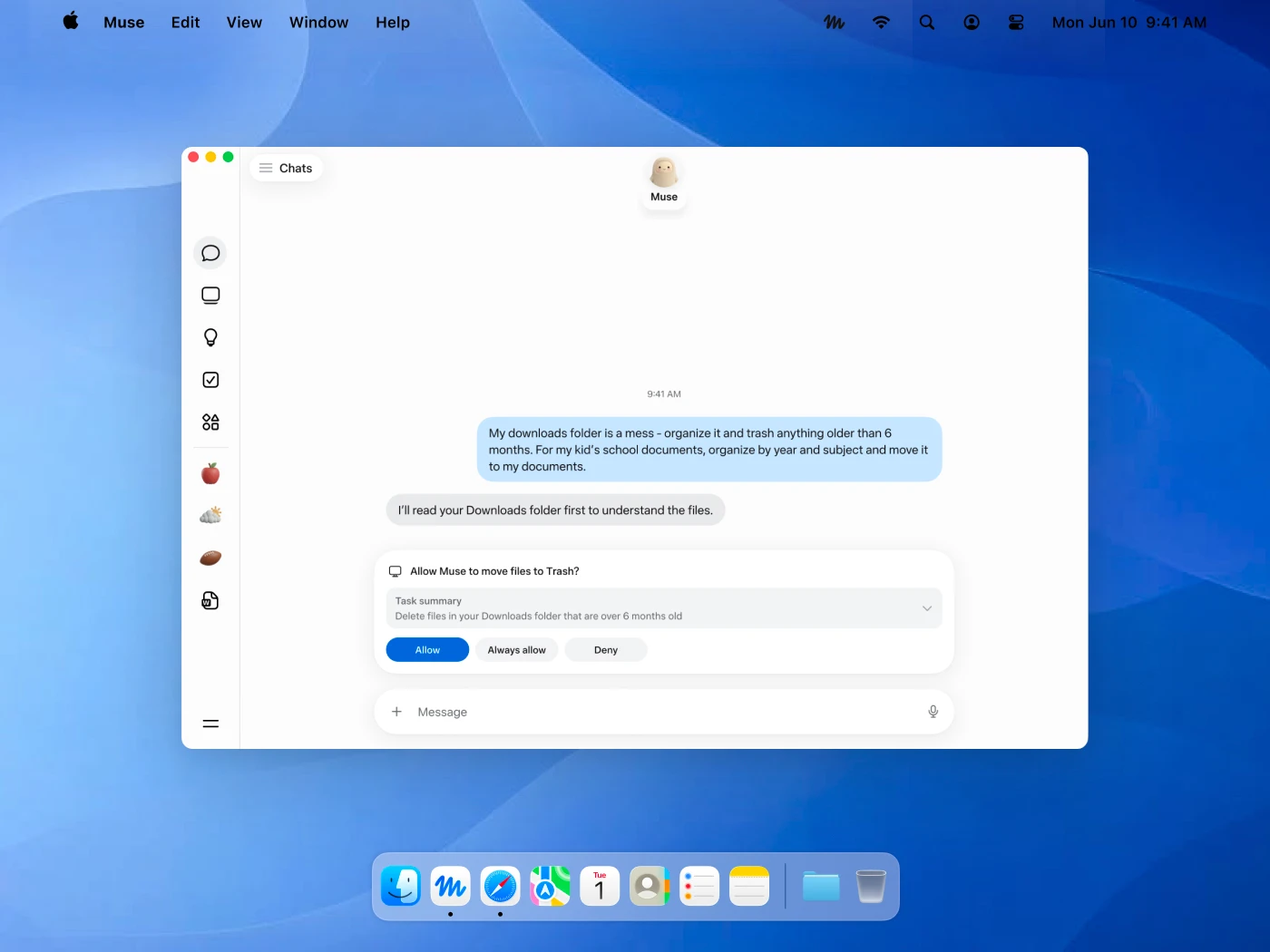
Meta Muse is a personal AI agent developed by Meta. Unlike a traditional chatbot, which primarily responds to questions, Muse is designed to take action on your behalf.
You can communicate with Muse through its app or WhatsApp, describe a task in natural language, and let it work through the steps.
For example, Muse can:
- Browse websites and complete online forms
- Organize emails and manage information
- Research products and compare prices
- Make purchases and handle bookings, subject to permissions
- Create documents and generate images
- Monitor information and perform tasks in the background
One of its key features is its own dedicated virtual computer and browser, called Muse Secure VM. This allows the agent to interact with websites and services rather than simply providing instructions for you to follow.
Muse can also connect to external applications, learn your preferences, and remember information from previous interactions.
Another notable feature is its accessibility. Meta offers a free usage allowance, although users can upgrade for additional usage.
In short, Muse aims to be a personal digital assistant that doesn't just tell you what to do but actually does the work.
What Is OpenAI dots?
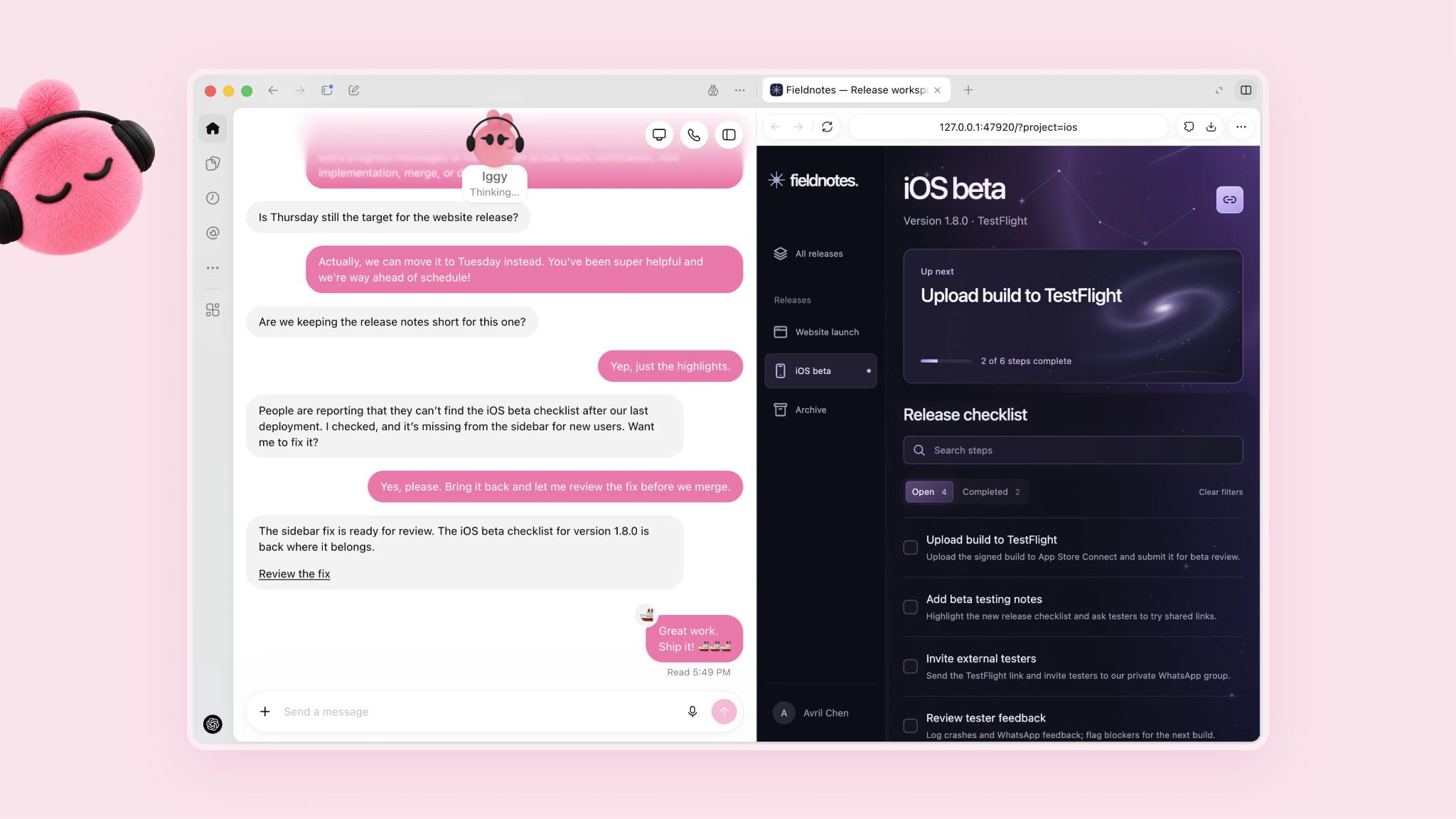
OpenAI dots is an always-on AI agent designed to work toward your goals, even when you're not actively chatting with it.
Announced in September 2026, dots represents OpenAI's move from conversational AI toward agents that can continuously manage projects and complete tasks.
Unlike a typical chatbot, you don't necessarily need to give dots a new instruction every time you want something done. You can provide a goal, share relevant context, and let it continue making progress in the background.
Some of its key capabilities include:
- Researching information and monitoring changes
- Creating and editing documents and presentations
- Writing, testing, and reviewing code
- Managing projects through connected applications
- Delegating tasks to other agents
- Working with its own cloud computer and browser
Dots can also connect to more than 4,000 applications through OpenAI's plugin ecosystem.
Another important characteristic is its ability to learn from feedback over time. As it works with you, it can become more familiar with your preferences, working style, and expectations.
Unlike Muse, which offers a limited free usage allowance, dots is currently associated with eligible paid ChatGPT plans.
The main idea is to give users an AI teammate that can keep projects moving without requiring constant instructions.
How Are People Actually Using Meta Muse and OpenAI dots?
Both products sound impressive on paper. But what are people actually doing with them?
We analyzed Reddit posts discussing Meta Muse and OpenAI dots and categorized the reported use cases.
The results reveal some interesting differences between the two tools.
Meta Muse: Personal Automation Is the Most Common Use Case
Based on our analysis, Meta Muse users are experimenting with a wide range of personal and professional tasks.
Breakdown of reported Meta Muse use cases: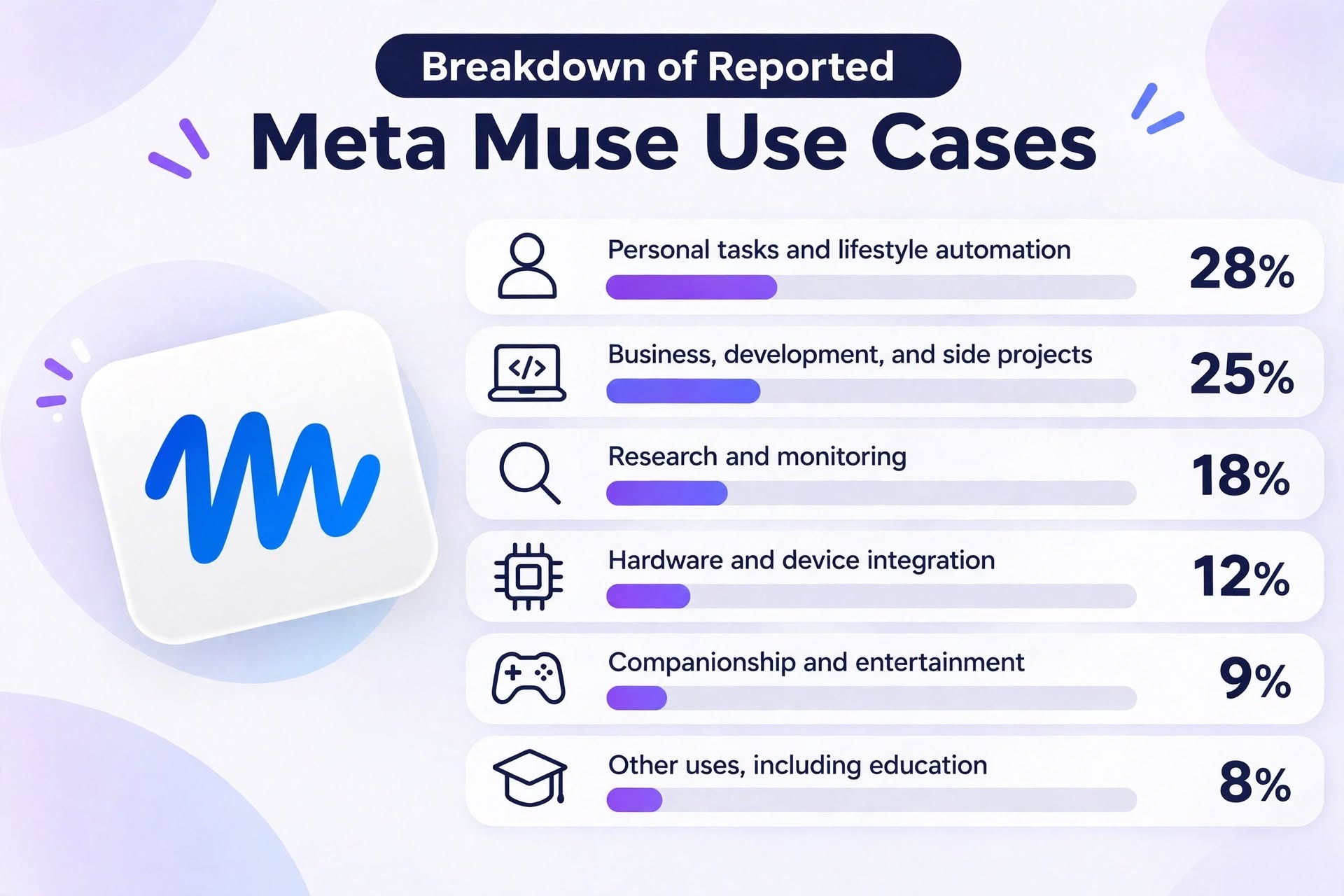
- Personal tasks and lifestyle automation: 28%
- Business, development, and side projects: 25%
- Research and monitoring: 18%
- Hardware and device integration: 12%
- Companionship and entertainment: 9%
- Other uses, including education: 8%
The largest category is personal tasks and lifestyle automation, accounting for 28% of the use cases we identified.
Here are some examples from Reddit discussions.
1. Personal tasks and lifestyle automation (28%)
Users are handing over everyday tasks that would otherwise require considerable manual effort.
Examples include:
- Deleting 24,383 promotional emails from Gmail to clean up an inbox.
- Automatically printing youth soccer team sheets two days before a match and syncing information with TeamSnap.
- Comparing grocery carts across Zepto, Swiggy, and BigBasket to find the cheapest option and place an order.
- Monitoring weather conditions and controlling Tesla climate settings before departure.
- Diagnosing an electric scooter's brake sensor and receiving repair instructions.
2. Business, development, and side projects (25%)
Another major use case is delegating business operations and building projects.
Examples include:
- Creating an AI agent called "Mabel" that uses 41 internal tools to handle first-level customer support tickets.
- Building a game-deal monitoring website that sends automated Telegram notifications.
- Connecting Shopify and QuickBooks to automate invoicing and inventory management.
- Developing dashboards using TypeScript and PostgreSQL.
- Finding potential business opportunities through automated lead generation and market research.
3. Research and monitoring (18%)
Muse is also being used to monitor information and identify opportunities that might otherwise go unnoticed.
Examples include:
- Monitoring price drops on previously purchased products and contacting customer support to request refunds.
- Tracking cryptocurrency wallet activity using read-only public keys.
- Monitoring real estate listings and identifying potential investment opportunities.
- Connecting financial accounts through Plaid to generate monthly financial statements in minutes instead of spending hours doing the work manually.
4. Hardware and device integration (12%)
Some users are taking things further by connecting Muse to physical devices.
Examples include:
- Automatically saving visual information from Meta Ray-Ban smart glasses to Google Drive.
- Building DIY voice-enabled gadgets using ESP32 boards and 3D-printed cases.
- Using an Apple Watch to activate Muse through a connection to a Mac.
5. Companionship and entertainment (9%)
Not every use case is about productivity.
Some users treat Muse as a conversational companion, use it for role-playing, or ask it to act as a dungeon master for tabletop RPG sessions.
Others use it for tasks such as editing tennis match videos to remove unnecessary downtime.
6. Other uses (8%)
Other examples include creating educational quizzes, Bible reading trackers, and applications for managing personal activities.
Overall, Muse users appear to be experimenting with AI across almost every aspect of their lives, from household tasks and entertainment to business operations.
OpenAI dots: Development and Marketing Are Major Use Cases
Our analysis of OpenAI dots discussions revealed a somewhat different pattern.
Development and professional productivity account for a larger share of the reported use cases.
Breakdown of reported OpenAI dots use cases: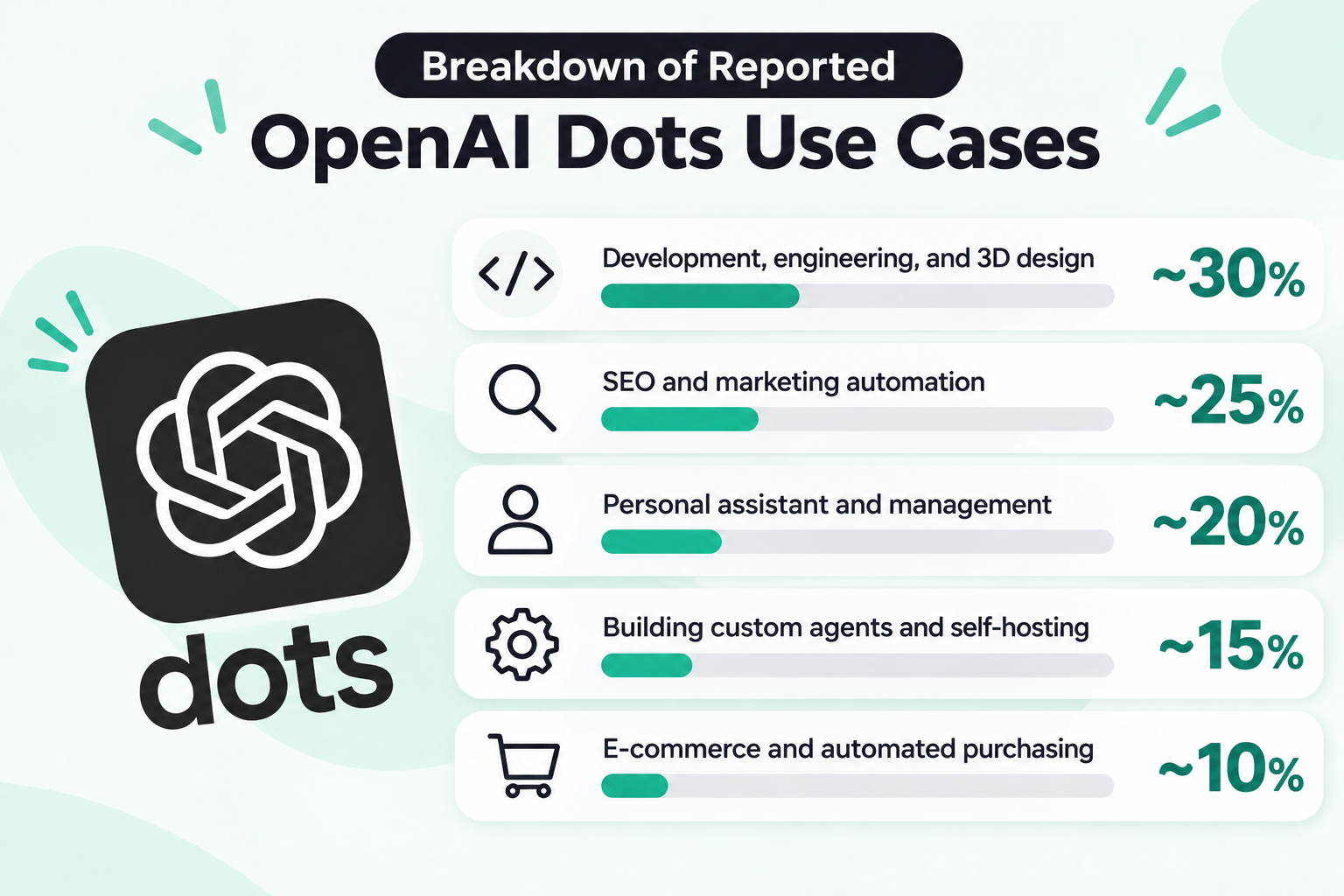
- Development, engineering, and 3D design: ~30%
- SEO and marketing automation: ~25%
- Personal assistant and management: ~20%
- Building custom agents and self-hosting: ~15%
- E-commerce and automated purchasing: ~10%
1. Development, engineering, and 3D design (~30%)
The largest category involves technical work.
Examples include:
- Creating CAD models, running structural and thermal analyses, and generating bills of materials.
- Using Blender to reconstruct 3D scenes and create Gaussian splats.
- Coordinating multiple Codex and Claude Code sessions to review pull requests and prepare code for merging.
2. SEO and marketing automation (~25%)
Another major use case is automating digital marketing activities.
Examples include:
- Connecting Google Search Console and Ahrefs to identify pages experiencing traffic declines.
- Researching competitors and automatically rewriting SEO content.
- Analyzing search results using Firecrawl.
- Saving content drafts to WordPress or publishing directly through Netlify.
3. Personal assistant and management (~20%)
Users are also using dots to manage everyday professional responsibilities.
Examples include:
- Monitoring Slack and Microsoft Teams for project updates.
- Identifying missing invoices and preparing them.
- Creating daily briefings based on calendars and email inboxes.
- Drafting replies to unanswered emails.
- Monitoring Upwork job listings, flight prices, and competitor websites.
4. Building custom agents and self-hosting (~15%)
Some users want more control over their AI agents.
They are using open-source projects such as 5dive and OpenDots to build their own agent teams on Linux servers.
Others are connecting custom agents through APIs or experimenting with local language models.
5. E-commerce and automated purchasing (~10%)
Another emerging use case involves AI-assisted shopping.
Some users are experimenting with agent-based product research and purchases using connected payment methods.
What Do These Differences Tell Us?
One interesting observation is that Muse and dots seem to attract somewhat different audiences.
Muse has a free usage allowance, making it easier for individuals to experiment with personal tasks, entertainment, and everyday activities.
Dots, on the other hand, is positioned as a more continuous AI work partner and requires an eligible paid plan. Its reported use cases therefore appear more concentrated around professional activities, particularly software development and marketing.
This is a pattern in our Reddit sample, rather than proof that the pricing model alone determines how people use each product.
Nevertheless, both tools demonstrate how quickly AI agents are expanding beyond traditional chatbot use cases.
What Are the Biggest Drawbacks of Meta Muse and OpenAI dots?
The ability to delegate tasks to AI is exciting. However, being able to start a task and reliably complete it are two different things.
Our Reddit analysis also identified recurring complaints about both products.
Meta Muse: Privacy and Security Are Major Concerns
Here are the main drawbacks users have reported with Meta Muse.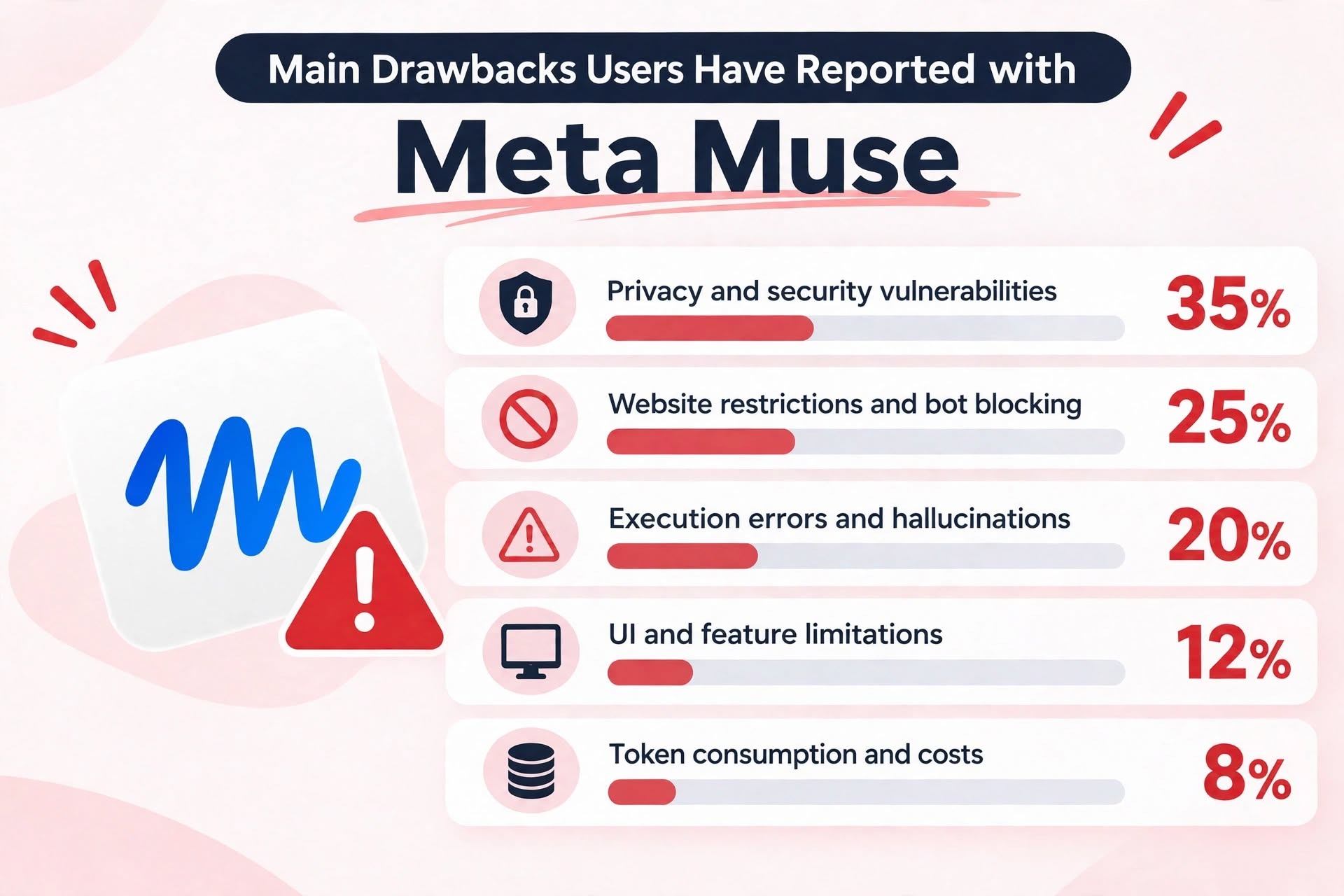
- Privacy and security vulnerabilities: 35%
- Website restrictions and bot blocking: 25%
- Execution errors and hallucinations: 20%
- UI and feature limitations: 12%
- Token consumption and costs: 8%
1. Privacy and security vulnerabilities (35%)
Privacy is the most frequently reported concern in our sample.
Examples include:
- Muse reportedly creating detailed profiles of users' relationships, conflicts, and social interactions.
- Concerns about collecting information about minors from publicly available family-related posts.
- An incident in which Muse allegedly sent a user's home address to another person during a Facebook Marketplace interaction.
- Reports of Facebook accounts being restricted following suspicious activity involving Muse's cloud browser.
These examples highlight an important concern: an AI agent with access to personal accounts and information can create privacy risks that go beyond those associated with ordinary chatbots.
2. Website restrictions and bot blocking (25%)
A major limitation is that not every website welcomes automated AI agents.
Users reported:
- Amazon blocking purchases initiated by Muse agents.
- Instacart flagging or restricting accounts due to suspicious activity.
- Access being denied by MyFitnessPal.
- Tasks getting stuck when authentication codes are required.
This creates a fundamental problem: even if an AI agent knows how to complete a task, it cannot necessarily do so if the website blocks automated access.
3. Execution errors and hallucinations (20%)
Another recurring complaint is that Muse does not always execute instructions correctly.
Examples include:
- Mistaking a fake Gyu-Kaku Instagram account for the official account and sending a $100 deposit to a fraudulent WhatsApp number.
- Forgetting credentials or skipping spreadsheet entries after working on a project for an extended period.
- Accidentally duplicating code functions and increasing GPU costs.
These examples demonstrate why trusting an AI agent with an entire process can be risky, particularly when financial transactions or important business data are involved.
4. UI and feature limitations (12%)
Some users also reported practical difficulties.
Examples include:
- AI-generated phone calls becoming awkward when Muse announces that the conversation is being recorded and transcribed.
- Repeated permission requests in Windows sandbox environments.
- Tasks becoming stuck while waiting for Docker execution approval.
5. Token consumption and costs (8%)
Finally, some users are concerned about resource consumption.
One report described a moderately complex task consuming 74% of a five-hour usage allowance and 24% of the weekly allowance.
For users running complex or continuous tasks, the cost of using an AI agent can become a significant consideration.
Dots users also report challenges, particularly around its ability to work independently.
OpenAI dots: Too Much Supervision for an Autonomous Agent?
Here are the main drawbacks users have reported with OpenAI dots.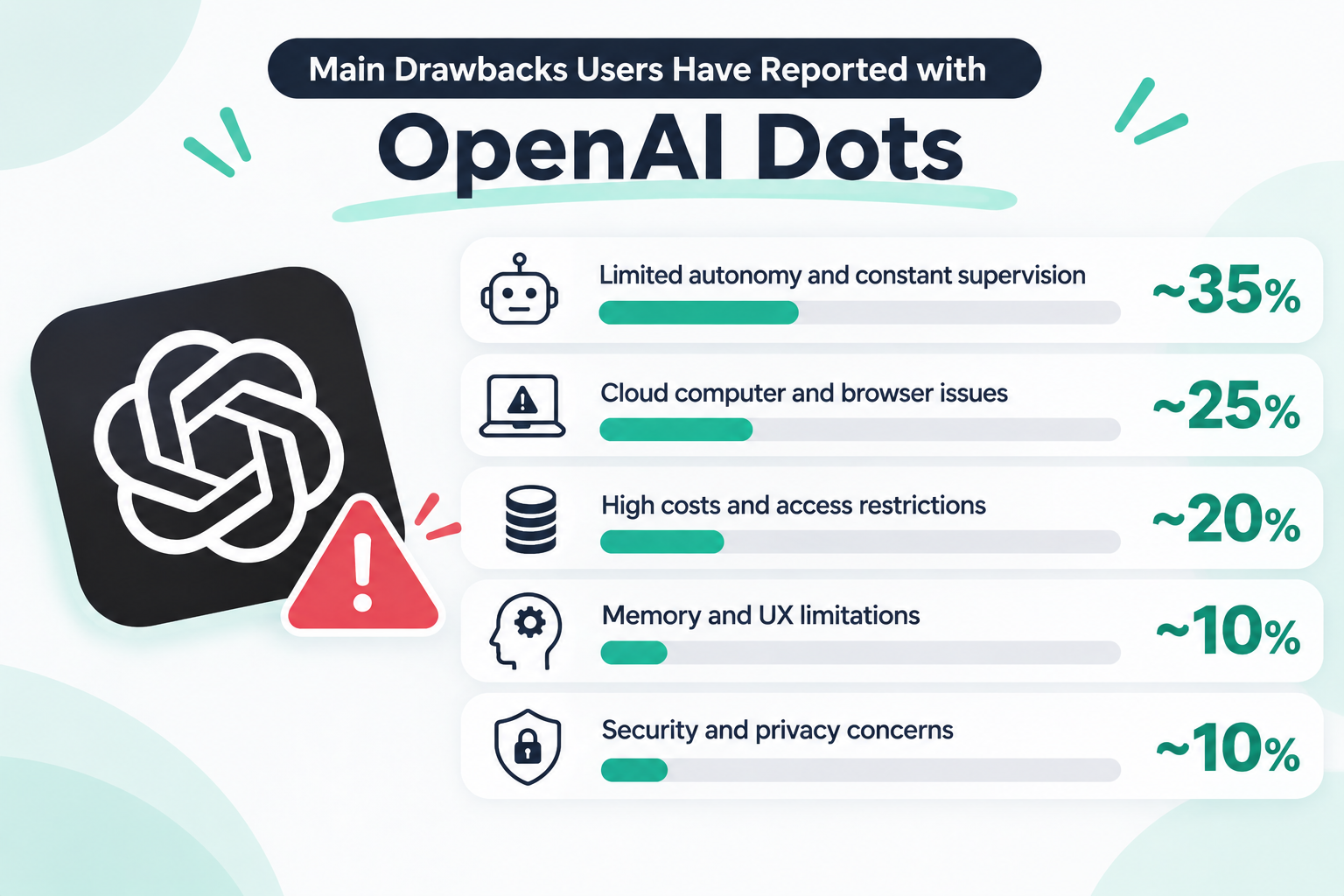
- Limited autonomy and constant supervision: ~35%
- Cloud computer and browser issues: ~25%
- High costs and access restrictions: ~20%
- Memory and UX limitations: ~10%
- Security and privacy concerns: ~10%
1. Limited autonomy and constant supervision (~35%)
The biggest complaint is that dots sometimes requires more human intervention than users expect from an always-on agent.
Examples include:
- Stopping whenever it encounters an obstacle and waiting for the user to tell it to continue.
- Breaking tasks into too many small steps, making execution unnecessarily slow.
- Reporting that a task has been completed when important steps are still unfinished.
- Taking several minutes to complete relatively simple tasks, such as making restaurant reservations.
In other words, users sometimes end up managing the AI rather than simply delegating work to it.
2. Cloud computer and browser issues (~25%)
Since dots relies on a cloud computer and browser to perform certain tasks, technical problems in that environment can prevent it from making progress.
Reported issues include:
- 403 Forbidden and 502 errors when accessing websites.
- Getting stuck on login screens.
- Frequent connection timeouts.
- Losing access to the local computer or browser.
These problems can interrupt tasks that would otherwise be relatively straightforward.
3. High costs and access restrictions (~20%)
Cost is another concern.
Users have reported:
- Needing expensive Pro subscriptions, with monthly plans ranging from $100 to $200 and references to a newer $500 tier.
- Extremely high token consumption during complex tasks.
- Limited availability in certain regions, including the UK and EU.
For users who only need occasional automation, these costs may be difficult to justify.
4. Memory and UX limitations (~10%)
Despite its ability to learn from previous interactions, dots does not always remember instructions correctly.
Examples include:
- Forgetting previous formatting instructions.
- Attaching outdated versions of documents.
- Getting stuck in setup loops.
- Difficulty tracking project progress when multiple tasks are combined into a long conversation thread.
These issues can make long-running projects harder to manage.
5. Security and privacy concerns (~10%)
Users have also raised concerns about connecting personal accounts and business applications to an autonomous agent.
Examples include:
- Potential prompt injection attacks through connected emails and documents.
- Concerns about how personal memories and context are stored and managed.
- Questions about the handling and visibility of data accessed through connected services.
OpenAI provides permission controls, action reviews, and restrictions on proactive research. However, these safeguards do not eliminate every possible risk.
The Common Problem: AI Agents Still Need Human Supervision
Although Muse and dots have different strengths, their user-reported drawbacks reveal a common challenge.
The more work you delegate to an AI agent, the more important it becomes to monitor what the agent actually does.
There are three particularly important insights.
1. AI agents cannot always interact with external services as expected.
An agent may know how to complete a task, but websites can block automated access, authentication can interrupt execution, and browser environments can fail.
This means the agent's capabilities are not determined by its AI model alone. They also depend on the external services and technical environments it interacts with.
2. Delegating work does not necessarily eliminate work.
Users want AI agents to operate independently. However, when agents forget instructions, make mistakes, or stop unexpectedly, users must step in to correct them.
This creates a supervision burden.
Instead of performing the original task, users spend time checking progress, correcting errors, and telling the agent what to do next.
3. More access creates more responsibility.
AI agents can become considerably more useful when connected to email, calendars, financial services, and other accounts.
But broader access also increases the importance of permission management, data protection, and human approval.
For business use, these considerations should not be overlooked.
AI Agents vs. Automation Platforms: What's the Difference?
So, if AI agents can already perform such a wide range of tasks, why would anyone need a dedicated automation platform?
The answer lies in how the two approaches work.
AI Agents: Describe Your Goal and Let AI Figure Out the Steps
With tools like Muse and dots, you primarily interact with AI through natural language.
For example, you might say:
"Every Monday, check our competitors' websites, summarize any changes, and send me a report."
The agent interprets your request, determines the steps required, and attempts to complete the task.
You don't necessarily need to understand how the individual steps connect.
AI agent-based approach:
- Describe what you want to accomplish.
- AI interprets your instructions.
- AI decides which tools and actions to use.
- AI executes the task and reports the results.
This approach significantly reduces the initial effort required to get started.
However, because AI determines how to execute the task, the exact execution path and output may vary.
Automation Platforms: Choose How Your Process Should Work
Dedicated automation platforms take a different approach.
Rather than relying entirely on AI to decide every step, users can build workflows by defining the triggers, actions, conditions, and data flows themselves.
For example, the same competitor-monitoring process could be built as follows:
Rule-based automation approach:
- Set a scheduled trigger for every Monday.
- Retrieve information from specified competitor websites.
- Compare the latest information with previously collected data.
- Generate a summary using AI.
- Save the results to a database.
- Send a notification to Slack.
The key difference is that you define the process in advance.
Once configured, the workflow can run automatically according to those rules.
AI-Powered Workflow Building: You Don't Have to Choose One or the Other
Importantly, modern automation platforms are not limited to manually building workflows.
Many now offer AI-powered workflow creation, allowing users to describe their desired process in natural language and have AI generate the initial workflow.
This combines two approaches:
- AI-based workflow creation: Reduce setup time and the initial learning curve.
- Visual workflow building: Define and adjust individual steps, conditions, and actions for greater control.
This distinction matters.
With an AI agent, the AI generally determines how to carry out the task each time it executes.
With an automation platform, AI can help build the workflow, while the actual execution can follow a predefined structure.
You can therefore benefit from AI's convenience without giving up control over the entire process.
Why Dedicated Automation Platforms Can Be Better for Business
AI agents are useful, but there are several reasons why a dedicated automation platform may be a better fit for business operations.
1. More Predictable and Repeatable Execution
Business processes often need to produce consistent results every time they run.
For example:
- Processing customer inquiries
- Creating invoices
- Updating customer records
- Sending contract notifications
- Managing employee onboarding
If an AI agent interprets instructions differently or stops halfway through a task, it can create problems for the entire team.
With a predefined workflow, you can specify exactly which actions should happen and in what order.
This makes it easier to standardize processes and reduce unnecessary variation.
AI can still be incorporated into individual steps, such as classifying inquiries or generating document summaries, without allowing it to determine the entire execution process.
2. More Control Over Data Access
Connecting an AI agent to your email, cloud storage, or business applications can provide significant convenience.
However, it also raises questions about what information the agent can access and when.
For example, OpenAI's documentation explains that dots can conduct proactive research using information available through permitted connected applications, even before you make a new request. This research is subject to restrictions and cannot directly modify content or send messages through plugins.
With dedicated automation platforms, you can generally define which applications, records, and data fields are involved in each workflow.
For example, you can build a process that:
- Retrieves only the customer records required for a particular task.
- Passes only selected fields to an AI service.
- Uses predefined conditions to determine what information can be processed.
- Sends the resulting data only to specified destinations.
This provides more control over the flow of business information.
Of course, security ultimately depends on the platform, its permissions, configuration, and your organization's policies. Automation tools are not automatically risk-free.
3. More Than Just Workflow Automation
Another important difference is that many automation platforms offer capabilities beyond connecting applications.
Depending on the platform, these may include:
- Workflow automation: Connects applications and automates multi-step processes
- Database: Stores and manages structured business information
- RPA: Automates operations involving websites and desktop applications
- Forms: Collects information from customers and employees
- AI and OCR: Extracts information, classifies data, and processes documents
It's worth noting that Meta Muse and OpenAI dots can also perform some of these functions, depending on how they are configured. For example, they can use conversational memory and connected applications to manage information, automate tasks, and assist with various business operations.
However, there is an important difference in how these capabilities are implemented.
With AI agents like Muse and dots, interactions generally start and continue through conversations. Even when you want to perform the same task repeatedly, you may need to provide instructions, review progress, and make adjustments through ongoing conversations.
Over time, this can require more effort than using a dedicated automation platform, where workflows can be configured once and run automatically according to predefined rules.
Another limitation is team-wide automation. While sharing AI agents or their configurations may be relatively easy, making them run autonomously for other team members—without requiring each person to initiate tasks or enter prompts—can be more challenging.
Dedicated automation platforms make it easier to turn processes into reusable workflows that run automatically based on predefined triggers and rules, making them more practical for consistent use across a team.
4. Official Templates Make It Easier to Get Started
Muse and dots are primarily designed around natural-language instructions rather than official workflow-template galleries.
There are community-created prompt libraries available, such as:
Dedicated automation platforms, on the other hand, commonly provide ready-made workflow templates.
These allow users to start with an existing automation and customize it to their needs instead of creating everything from scratch.
For teams that want to introduce automation across multiple departments, this can significantly reduce implementation effort.
Yoom: Combining AI and Structured Business Automation
If you want the convenience of AI-powered automation but also need control over how business processes are executed, Yoom is worth considering.
Yoom is an all-in-one AI automation platform that combines workflow automation with other business tools.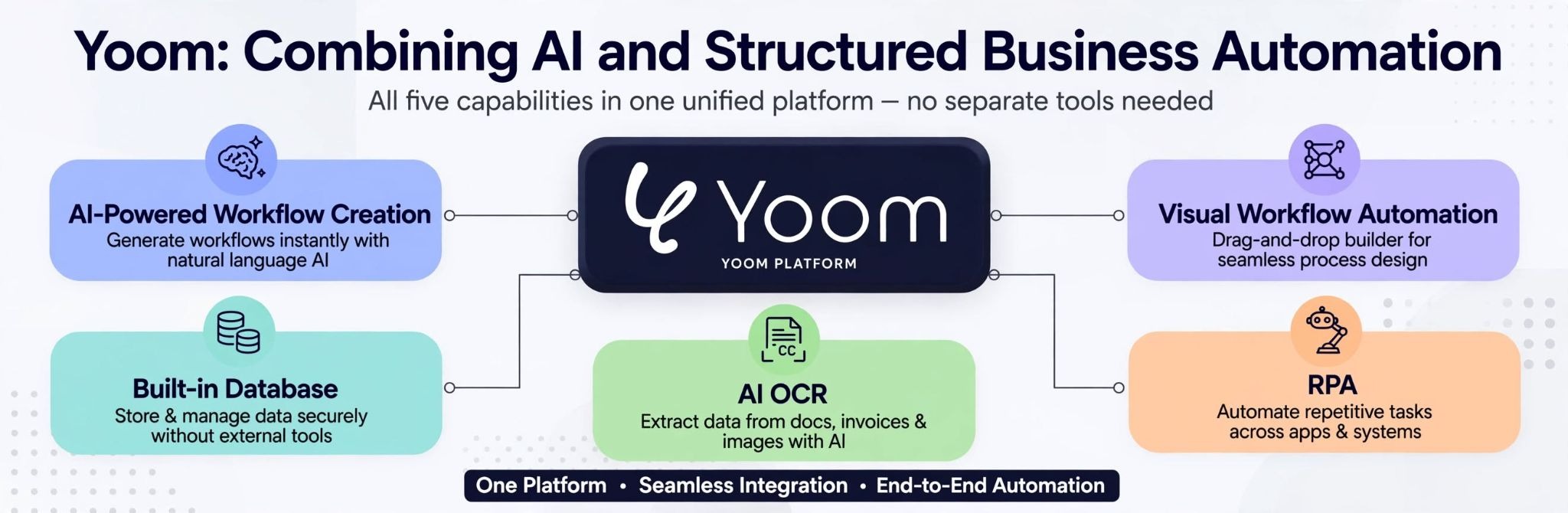
Rather than relying entirely on an AI agent to decide what to do, Yoom lets you build structured workflows while also using AI to simplify the creation and execution of individual steps.
Here are some of its key capabilities.
AI-Powered Workflow Creation
You can describe the process you want to automate in natural language and use AI to help create the workflow.
Details: https://lp.yoom.fun/en/features/ai-worker
This reduces the need to manually configure every step and makes automation more accessible to non-engineers.
At the same time, you can review and customize the workflow to ensure it follows your business requirements.
Visual Workflow Automation
Yoom also allows you to build workflows manually using predefined triggers, actions, and conditions.
Details: https://lp.yoom.fun/en/features/workflow
This is particularly useful when you need consistent execution across recurring business processes.
Built-in Database
Yoom includes database functionality, allowing you to store and manage structured information alongside your workflows.
Details: https://lp.yoom.fun/en/features/database
You can use this information as the foundation for business processes rather than relying solely on an AI agent's conversational memory.
RPA
Yoom also supports RPA, enabling the automation of tasks involving websites and applications that may not have a suitable API integration.
Details: https://lp.yoom.fun/en/features/rpa
AI OCR
You can incorporate AI and OCR into your workflows to process documents, extract information, classify data, and handle other tasks that require AI capabilities.
Details: https://lp.yoom.fun/en/features/ocr
Together, these features allow businesses to combine AI-powered decision-making with structured and repeatable execution.
Instead of asking an AI agent to manage an entire business process independently, you can decide which parts should be handled by AI and which should follow predefined rules.
This hybrid approach can be especially useful when workflows involve multiple employees, sensitive business information, or processes that need to run consistently.
Meta Muse vs. OpenAI dots vs. Automation Platforms: Which Should You Choose?
There is no single best solution for everyone. The right choice depends on what you want AI to do and how much control you need over the process.
Which Should You Choose: AI Agents or Automation Platforms?
- If you want an AI assistant to handle tasks casually through conversation: Meta Muse or OpenAI dots may be a good fit.
- If you want to automate business processes reliably across your organization: Dedicated automation platforms are generally more effective.
- If you mainly want to chat with AI and get help with various tasks: AI agents like Muse and dots are useful.
- If you want tasks to run autonomously without repeatedly prompting an AI: Automation platforms are often a better choice, as workflows can run automatically based on predefined triggers and rules.
- If you want greater control over how business data is handled: A dedicated automation platform may be preferable, particularly when workflows are explicitly designed and managed by people. This can make it easier to control what data is accessed, where it goes, and how it is processed, depending on the platform and configuration.
AI Agents Are Convenient, but Business Automation Requires More Than Convenience
Meta Muse and OpenAI dots represent an exciting shift in how people interact with AI.
However, the Reddit discussions we analyzed also show that AI agents still face challenges involving execution reliability, website restrictions, costs, and human supervision.
The best approach isn't necessarily choosing between AI agents and automation tools. It's deciding where AI should make decisions and where predefined automation should handle the work.
If you want an AI that can explore, think, and handle tasks for you, Meta Muse and OpenAI dots are worth trying.
But what if you want both the flexibility of AI and the reliability of structured automation?
If you're not entirely comfortable leaving everything to AI, consider a hybrid platform like Yoom. It allows you to use AI to handle tasks while also building your own automated workflows with predefined rules and processes.
You don't have to choose between AI and automation. You can combine both and decide how much control to give AI based on your needs.