









・
11 Best SaaS Integration Platforms in 2026: From Simple App Integration to AI Workflow Automation

Businesses use many different apps to manage their daily work. A SaaS integration platform connects these apps so they can share information and work together.
For example, when someone fills out a web form, an integration can automatically add their details to a CRM (customer relationship management system). It can also send a notification to Slack or Microsoft Teams.
But today's businesses need more than simple connections between two apps. They often need to connect several apps, organize information in a central database, use AI to read documents or summarize messages, and complete entire business processes automatically.
This is where modern SaaS integration platforms come in. They help teams connect their apps, reduce manual work, and automate tasks across their business.
In this guide, we compare 11 SaaS integration platforms in 2026, explain how businesses use them, and help you understand what to look for when choosing a platform.
What the Data Reveals: How Businesses Use SaaS Integration
This analysis is based on 14.45 million active workflows in enterprise workspaces on Yoom.
1. More Than 80% of Integrations Are Built by Non-Technical Users
SaaS integration is no longer just for IT teams and software developers.
More than 80% of active integration workflows are created and managed by people without a technical background. These users include sales, marketing, finance, and administrative teams.
With no-code tools, employees can connect apps and automate daily tasks using visual builders and simple settings. They do not need to write code or ask the IT team to build every workflow for them.
*For more advanced needs, Yoom also offers custom features that let users connect to apps and actions not available in its standard options by entering only the required values, without having to write an entire block of code.
This makes app integration more accessible to people across the business.
2. The Average Workflow Includes 8.1 Apps and Steps
Some integration tools focus on connecting 2 apps. For example, they might copy new form submissions into a CRM.
However, many business processes involve several apps and steps.
The data shows the following patterns:
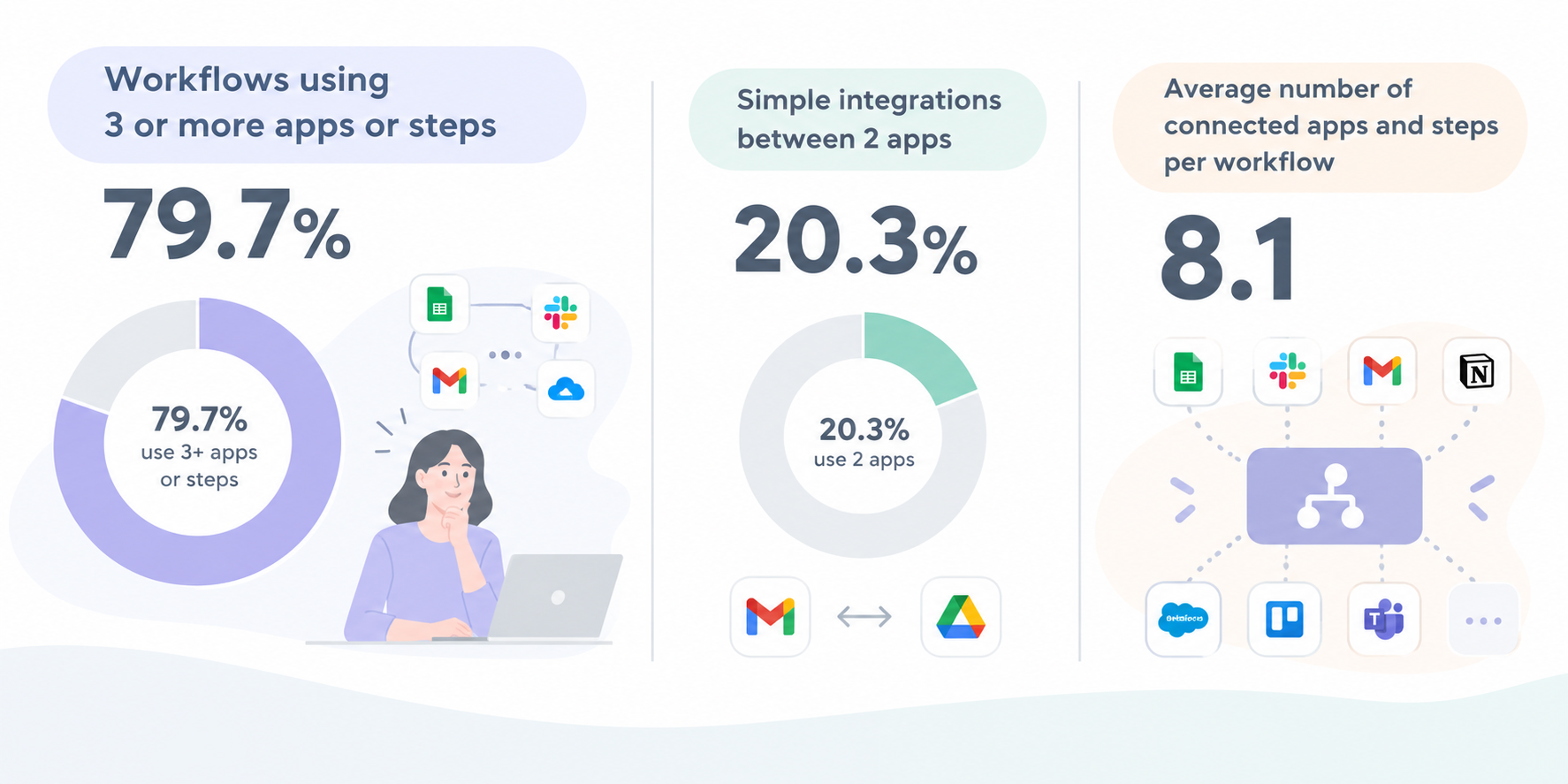
- Workflows using 3 or more apps or steps: 79.7%
- Simple integrations between 2 apps: 20.3%
- Average number of connected apps and steps per workflow: 8.1
These results show that businesses often need more than basic app integration. They need a platform that can move information between apps, check database records, and send notifications to different teams as part of one workflow.
For example, when a new order arrives, a workflow could save the order details in a database, update a spreadsheet, notify the sales team, and send a confirmation email.
3. AI Integration Is Growing Rapidly, with 73,000+ Active Workflows
In 2024, we found almost no workflows using Yoom's AI Worker features. In 2026, however, the number of active workflows using AI had grown to approximately 73,000.This rapid growth shows how quickly businesses are adopting AI as part of their app integration and automation processes.
The Yoom data shows:
- Active workflows using AI: Approximately 73,000
This growth marks a major shift in how businesses connect their apps. Instead of simply moving information from one app to another, more workflows now use AI to process information along the way.
For example, AI can summarize customer emails, extract details from PDF invoices, or organize customer records before sending the results to another app.
By combining AI with app integration and workflow automation, businesses can automate tasks that previously required employees to read, review, or organize information manually. As AI becomes part of more workflows, integration platforms are evolving from simple tools for connecting apps into platforms that can handle more complex business processes.
Top 5 SaaS Integration Patterns Used by Businesses
An analysis of 14.45 million active workflows on Yoom revealed five common ways businesses connect their apps.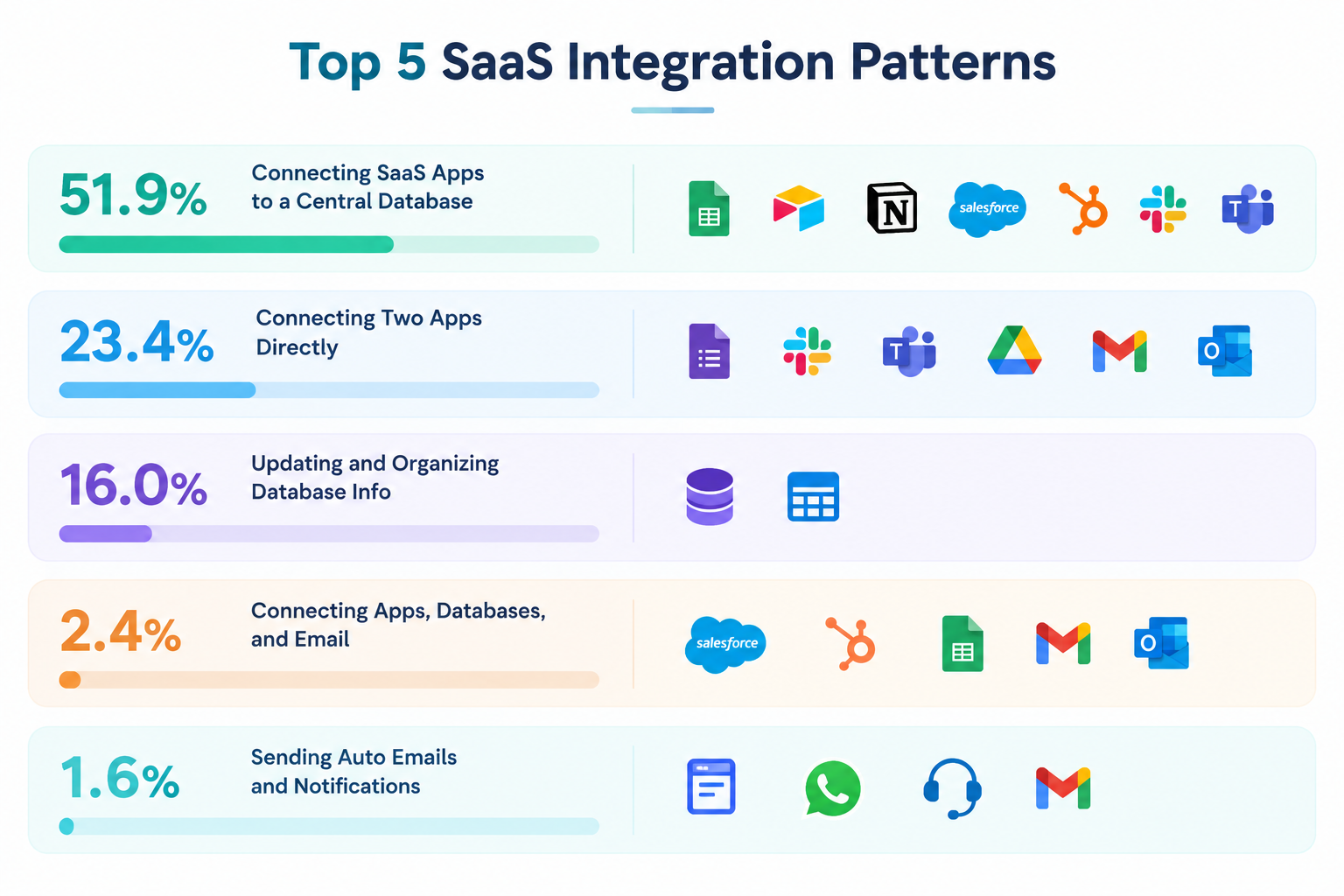
1. Connecting SaaS Apps to a Central Database (51.9% of Workflows)
- Common apps: Google Sheets, Airtable, Notion, Salesforce, HubSpot, Slack, and Microsoft Teams
- Example: Collecting information from different apps, saving it in one database, and sharing the updated information with other apps.
A central database gives teams one place to store and manage business information. Connected apps can send data to the database and use that data when needed.
2. Connecting Two Apps Directly (23.4% of Workflows)
- Common apps: Google Forms, Slack, Microsoft Teams, Google Drive, Gmail, and Outlook
- Example: Sending a Slack notification when someone submits a form, or creating a new Google Drive folder automatically.
This is a simple form of app integration. It works well when a task only requires information to move from one app to another.
Keeping a workflow simple also reduces the time and effort needed to build it.For beginners, starting with a basic integration is a practical way to see how integration and automation work in practice and understand their benefits before moving on to more complex workflows.By trying a simple workflow and seeing it run, they can learn how automation fits into their daily work.
3. Updating and Organizing Database Information (16.0% of Workflows)
- Common tools: Cloud databases and data tables
- Example: Combining records, calculating totals, or updating information before sending it to another app.
These workflows help businesses keep their data organized and ready to use. They can also reduce the need to update records manually.
4. Connecting Apps, Databases, and Email (2.4% of Workflows)
- Common apps: Salesforce, HubSpot, Google Sheets, Gmail, and Microsoft Outlook
- Example: When a sales opportunity changes in Salesforce, the workflow saves the update in a central database and sends a personalized onboarding email through Gmail.
This type of integration connects several steps in a business process. Employees do not have to update each app or send every email themselves.
5. Sending Automatic Emails and Notifications (1.6% of Workflows)
- Common tools: Web forms, WhatsApp Business, customer support portals, and Gmail
- Example: Automatically sending a reply to a customer inquiry or forwarding a support request to the person responsible for it.
These workflows help teams respond to customers more quickly and make sure requests reach the right person.
Related SaaS Integration Templates:


■Overview
The workflow "When a record is added in Airtable, create multiple documents in bulk and send the PDF via Gmail" is a business workflow utilizing Yoom.
When a new record is added to Airtable, the necessary documents are automatically created in PDF format in bulk and sent to the specified recipient via Gmail.
This allows for a smooth automation of the series of tasks from data management to document creation and email sending, improving operational efficiency.
■Recommended for
- Those who use Airtable and find manual document creation time-consuming
- Business people who want to efficiently manage by creating multiple documents in PDF format in bulk
- Those who want to automatically send created documents via email using Gmail
- Team leaders or managers who are considering advancing the automation of business workflows
- Those who want to standardize the process of document creation and email sending to maintain consistency in operations
■Benefits of using this template
- Automation of bulk PDF creation: Create multiple documents in PDF format at once, reducing the effort of the task.
- Efficiency in email sending: Automatically send emails via Gmail, enabling quick responses.
- Reduction of work time: Tasks that were done manually are automated, allowing focus on important tasks.
- Error-free processing: Automation prevents human errors, ensuring accurate business execution.


■Overview
This is a flow to create a payment link from Stripe using HubSpot and send it via Gmail.
By using a trigger with a Chrome extension, you can initiate the trigger directly from HubSpot.
With Yoom, you can easily achieve this flow without any programming, as it allows for integration between apps.
■Recommended for
1. Those who frequently use HubSpot for business
・Those who manage transaction information in HubSpot
2. Those who use Stripe to conduct business
・Those who manually create payment links
■Benefits of using this template
When interacting with customers to sell products or services, using Stripe payment links can make the process smoother.
However, creating payment links requires entering information such as product names and quantities, which can be time-consuming if done manually each time.
In this flow, you can automate the creation of Stripe payment links by triggering a Chrome extension from the HubSpot transaction details page.
The Stripe payment link is sent via Gmail, allowing you to streamline transaction operations.
■Notes
・Please integrate HubSpot, Stripe, and Gmail with Yoom.
・Stripe is an app available only with the Team Plan and Success Plan. If you are on the Free Plan or Mini Plan, operations and data connections set in the flow bot will result in errors, so please be careful.
・Paid plans such as the Team Plan and Success Plan offer a two-week free trial. During the free trial, you can use apps that are subject to restrictions.
Common AI-Embedded Integration Patterns
AI can do more than generate text. When connected to other apps, it can process information automatically as part of a workflow.
Common examples include:
- Gmail / Slack → ChatGPT / Gemini → Notion / Airtable: Summarize messages, identify tasks, and analyze customer feedback before saving the results in a workspace.
- Google Drive → AI-powered OCR → Google Sheets / Airtable / Salesforce: Extract information from invoices, receipts, and business cards, then save the results as structured records in other apps.
By combining AI with app integration, businesses can automate tasks that involve more than simply copying data.
Related AI×SaaS Integration Templates:


■Overview
The flow of "Drafting a contract based on Gmail content using ChatGPT and adding it to Notion" is a business workflow that automatically drafts a contract using ChatGPT and adds it to Notion when an email with a specific label is received in Gmail.
This reduces the effort required for contract creation and enables efficient business operations.
■Recommended for
- Business users who use Gmail regularly
- Administrative staff who want to streamline contract creation tasks
- Those interested in business automation using ChatGPT
- Team leaders who want to centrally manage information in Notion
- Executives looking to improve business processes in small to medium-sized companies
- IT personnel who want to enhance operational efficiency using AI and API integration
■Benefits of using this template
- Improves operational efficiency by reducing the time spent on contract creation through automation.
- Reduces human error and allows for the creation of accurate contracts.
- Enables centralized management of contract-related information in Notion, allowing for team-wide sharing.


■Overview
The workflow "When a file is uploaded to Google Drive, perform OCR and add it to Airtable" is an automated process that reduces the hassle of file management and data entry.
Data integration between apps becomes smoother, enhancing the overall efficiency of business processes.
■Recommended for
- Those who store many files in Google Drive and manage their contents in Airtable
- Business users who want to automate manual data entry tasks and improve operational efficiency
- Those who want to utilize OCR technology to extract text data from images and PDFs and reflect it in a database
- IT personnel who want to integrate multiple SaaS applications to build a seamless business workflow
- Team leaders or project managers who want to improve data accuracy and reduce human error
■Benefits of using this template
When a new file is uploaded to Google Drive, the AI-powered OCR function automatically extracts text and smoothly adds the data to Airtable.
By automating data reading and entry, you can reduce manual work time.
Additionally, the OCR function and automatic transcription prevent errors during manual entry, improving the accuracy of data management.
It is useful for managing various PDF and image data such as invoices, reports, application forms, business cards, and receipts.
The 11 Best SaaS Integration Platforms Compared for 2026
Different SaaS integration platforms support different needs. Some focus on simple connections between apps, while others help businesses automate complex processes or build integrations into their own software.
Here are 11 platforms to consider.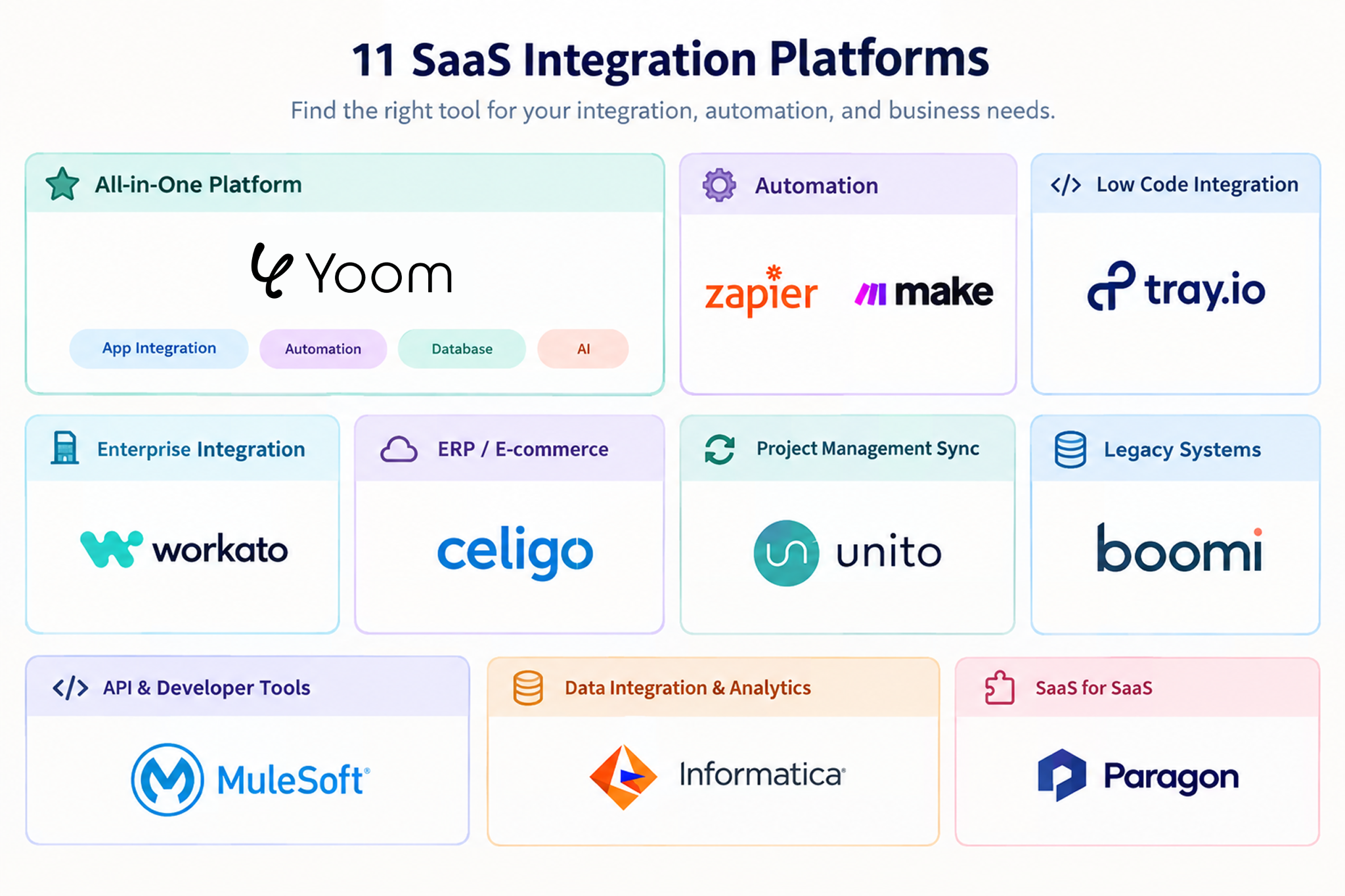
1. Yoom
Yoom is a SaaS integration platform that combines app connections, workflow automation, database features, and AI capabilities.
It helps teams connect their existing apps and automate tasks without needing to write code.
- Main use: Connecting multiple apps, automating business processes, managing data, and using AI to process information.
- Key features: Designed for non-technical users, with more than 750 SaaS connectors, built-in AI features, and database tables. Teams can create workflows that connect multiple apps and perform several actions in sequence.
- Pricing: Free plan available; paid plans start at $16/month.
- Suitable for: Operations, sales, finance, and marketing teams that want to reduce manual work without relying on software developers.
Yoom is worth considering if you need more than simple data transfers between two apps. Its combination of app integration, databases, and AI helps teams automate tasks across their existing software.
2. Make (formerly Integromat)
Make is a visual integration platform that lets users build workflows by connecting steps on a canvas.
Users can see how information moves between apps and decide what should happen at each step.
- Main use: Visual workflow automation and moving data between apps.
- Key features: A flexible visual builder for creating multi-step workflows and setting rules for how information should move.
- Pricing:Free plan available; paid plans start at $9/month.
- Suitable for: Users and agencies that want detailed control over how their workflows handle data.
3. Workato
Workato is an integration and automation platform designed for businesses with complex IT and security needs.
It helps large organizations connect their business software and manage how information moves between systems.
- Main use: Connecting enterprise software, automating complex processes, and managing IT requirements.
- Key features: Security controls, tools for managing integrations, and ready-made workflows for enterprise apps such as SAP, NetSuite, and Salesforce.
- Pricing:Free plan available; paid plans start at $100/month for the self-serve Pro plan.
- Suitable for: Large companies whose IT teams need to manage integrations across multiple departments and systems.
4. Zapier
Zapier helps users connect apps and automate repetitive tasks without writing code.
For example, you can set up a workflow that adds new form responses to a spreadsheet or sends a message when a new record is created.
- Main use: Connecting apps and automating simple, repetitive tasks.
- Key features: A large library of ready-made app connections, with more than 9,000 app integrations.
- Pricing:Free plan available; paid plans start at $19.99/month.
- Suitable for: Individuals and small teams that want to connect apps quickly and automate everyday tasks.
5. Tray.io
Tray.io is a low-code integration platform for businesses that need to build workflows and connect different software systems.
It gives users tools to create integrations while allowing technical teams to customize them when needed.
- Main use: Business workflow automation and connecting apps within software products.
- Key features: Flexible integration tools designed to handle growing workloads and large amounts of data.
- Pricing:Custom pricing; contact sales for a quote.
- Suitable for: Medium-sized and large businesses that need flexible integrations for internal processes or customer-facing products.
6. Celigo
Celigo focuses on connecting e-commerce platforms, financial software, and ERP systems. An ERP system helps businesses manage operations such as orders, inventory, and accounting.
- Main use: Connecting ERP and e-commerce systems and automating financial and order-related tasks.
- Key features: Ready-made integrations for tools such as NetSuite, QuickBooks, Amazon, and Shopify.
- Pricing:Custom pricing; contact sales for a quote.
- Suitable for: Finance and e-commerce teams that want to automate order processing, inventory updates, and payment-related tasks.
7. Unito
Unito helps keep information in different project management and issue-tracking apps in sync.
For example, when a task changes in Jira, Unito can update the corresponding task in Asana.
- Main use: Keeping project information consistent across multiple apps.
- Key features: Two-way data syncing that updates information in both connected apps.
- Pricing: Free 14-day trial available; paid plans are priced based on synced items and selected features.
- Suitable for: Project managers and teams that use multiple tools to track tasks and projects.
8. Boomi
Boomi helps large businesses connect older business systems with modern cloud applications.
It supports companies that need to share information across different systems, including software running on their own servers.
- Main use: Connecting older systems, managing business data, and linking cloud apps with on-site systems.
- Key features: Tools for managing data and app connections, including options for cloud and on-site environments.
- Pricing: Free 30-day trial; Pay-As-You-Go starts at $99/month.
- Suitable for: Large companies that need to connect existing systems with newer software.
9. MuleSoft (Anypoint Platform)
MuleSoft, a Salesforce company, provides tools for connecting business systems through APIs. An API is a way for different software applications to communicate and exchange information.
- Main use: Building and managing connections between enterprise applications.
- Key features: Tools for creating, securing, and managing APIs across different systems.
- Pricing: Paid plans start at $2,000/month.
- Suitable for: Companies with developer teams that need to build and manage custom integrations.
10. Informatica Cloud (iPaaS)
Informatica provides cloud-based tools for connecting, organizing, and managing large amounts of business data.
It is often used when companies need to bring data together for reporting and analysis.
- Main use: Data integration, data quality, and preparing data for analytics.
- Key features: Tools for managing data quality, keeping business records consistent, and connecting data sources.
- Pricing: Usage-based pricing.
- Suitable for: Data teams that manage large databases, data warehouses, and business intelligence systems.
11. Paragon
Paragon helps software companies add integrations to their own products.
For example, a company building a project management app can use Paragon to let its customers connect their accounts to other business apps.
- Main use: Adding third-party app integrations to SaaS products.
- Key features: Tools that help developers build and maintain app connections within their own products.
- Pricing: Custom pricing.
- Suitable for: Software companies that want to offer integrations to their customers without building every connection from scratch.
How to Choose the Right SaaS Integration Platform in 2026
The right SaaS integration platform depends on your budget, the apps you use, and the tasks you want to automate. Here are four things to consider before making your choice.
1. Is There a Free Plan?
If you want to try a platform before paying, look for one that offers a free plan. This lets you test its features and see how well it fits your workflow before committing to a paid plan.
2. Does It Support the Apps You Use?
Check whether the platform supports all the apps your team needs, especially less common or industry-specific tools. If you rely on niche apps, make sure they can be connected before choosing a platform.
3. Is It Easy to Use?
If you want to connect apps quickly without a complicated setup, consider the platform's user interface (UI) and ease of use. A clear, intuitive design can make it easier to build and manage workflows, even without technical knowledge.
4. Do You Need Simple App Integration or More Advanced Automation?
If you only need to move information between apps, a basic integration tool may be enough. But if you also want to use AI, manage data in a central database, and automate multi-step processes, look for a platform that combines app integration, workflow automation, and database features.
For example, Yoom brings these features together, allowing teams to connect apps, manage data, and automate tasks in one platform.
Simplify App Integration and Automation with Yoom
Yoom is a SaaS integration platform that offers three ways to connect apps and automate tasks, depending on your needs and technical experience.
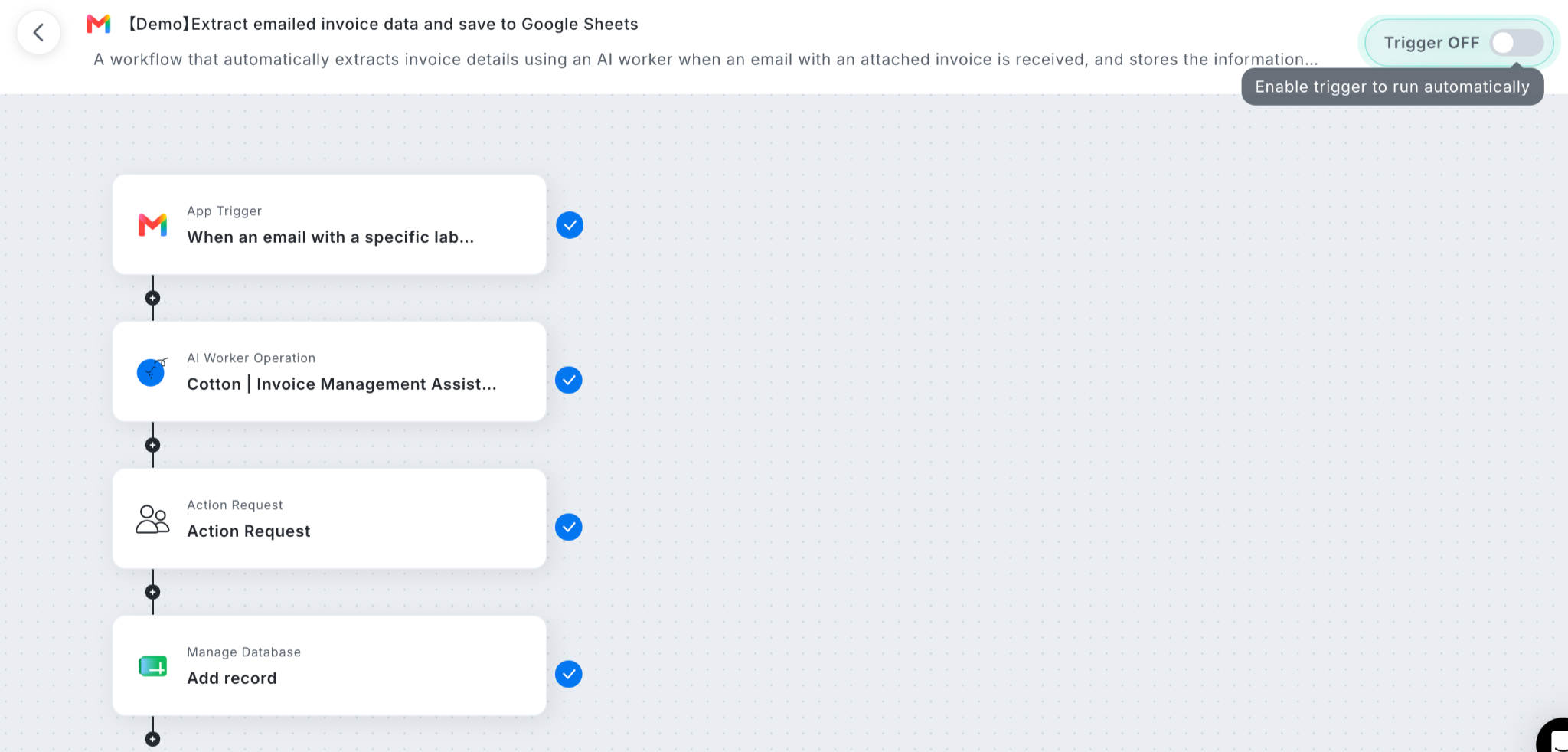
- Option1. Start with a Template:
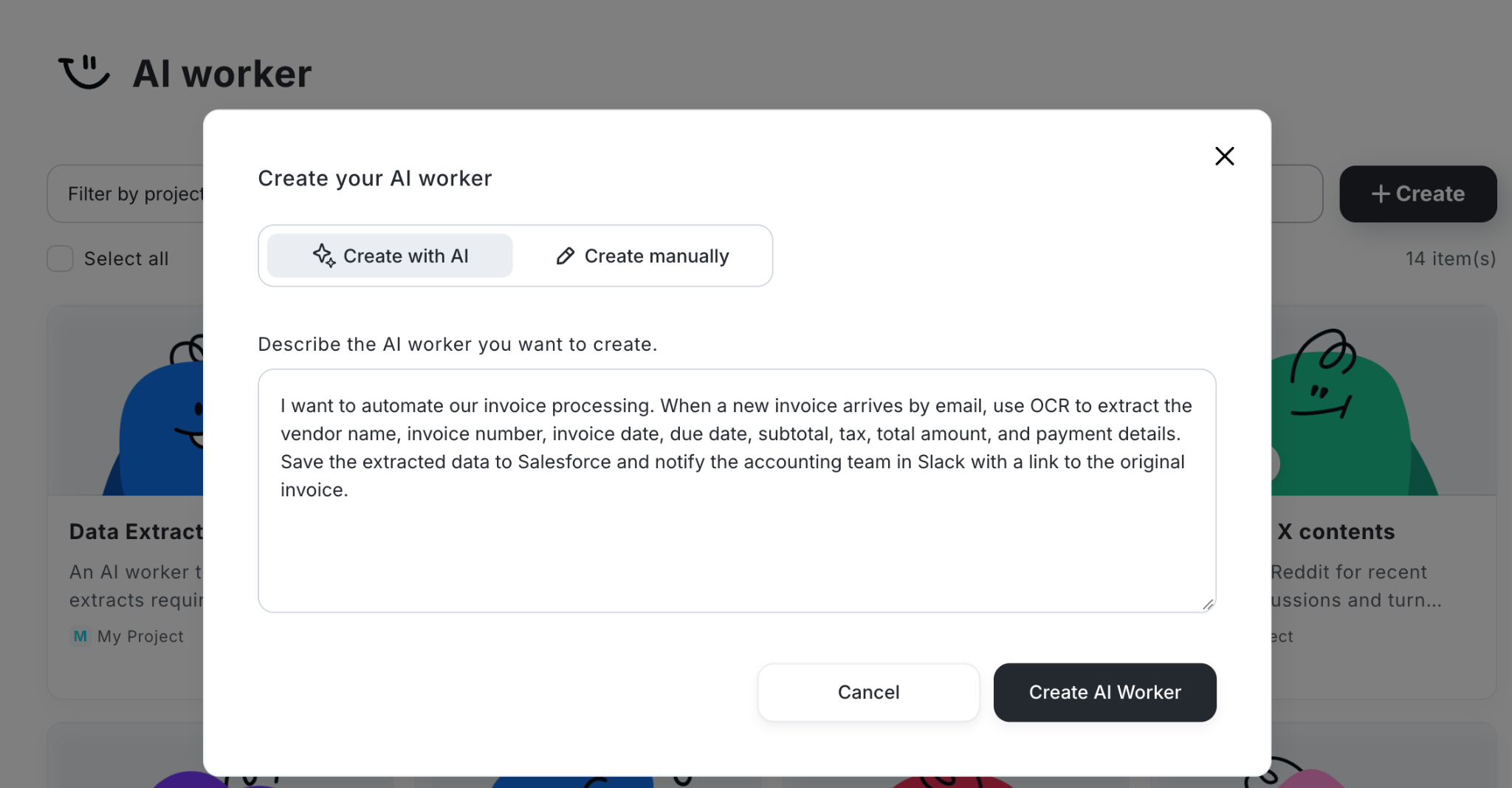
- Option 2. Let AI Worker Build It for You:
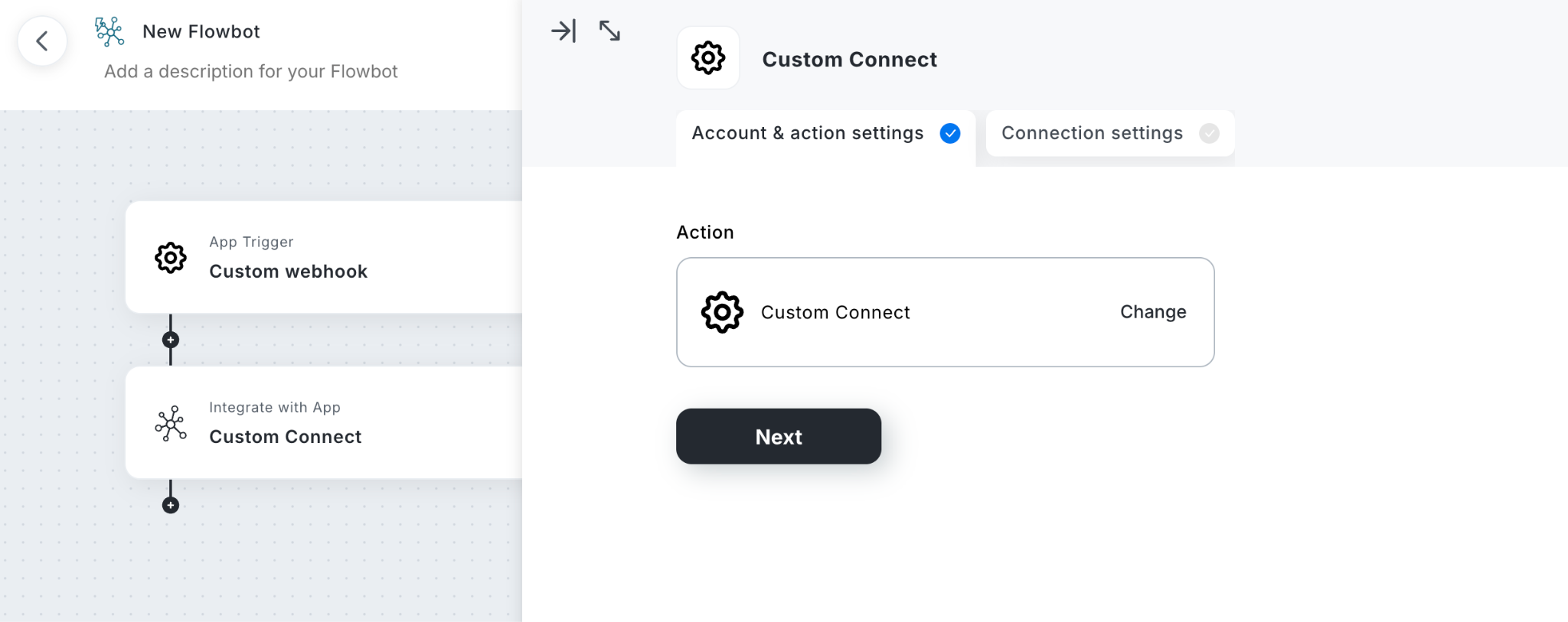
- Option 3. Build a Custom Integration:
Whether you need a simple app connection or a low-code integration platform for more complex business processes, Yoom gives you the flexibility to choose the approach that works for your team.