・
10 Best Muse Alternatives in 2027: Based on User-Reported Drawbacks

- Why Do Users Consider Meta Muse Alternatives?
- AI-Built vs. Human-Built Automation: Two Different Approaches
- 10 Best Muse Alternatives and Competitors
- AI Agent-Only Tools vs. Hybrid Automation Platforms: Which Should You Choose?
- 4 Things to Consider Before Choosing a Muse Alternative
- Which Muse Alternative Should You Choose?
Meta Muse is a personal AI agent designed to handle tasks on your behalf. Instead of simply answering questions, it can interact with websites, use connected applications, research information, and carry out multi-step tasks with minimal input.
This makes Muse useful for a wide range of activities, from managing everyday personal tasks to handling business operations.
However, AI agents are not always the best fit for every situation. Users have reported concerns about privacy, website restrictions, execution errors, and other limitations.
So, what are the best alternatives to Meta Muse?
To answer this question, we analyzed Reddit discussions to understand what problems they encounter, and which other tools they mention as alternatives.
In this guide, we'll explore the most common Muse use cases, examine reported drawbacks, and introduce 10 alternatives worth considering, including AI agents and broader automation platforms.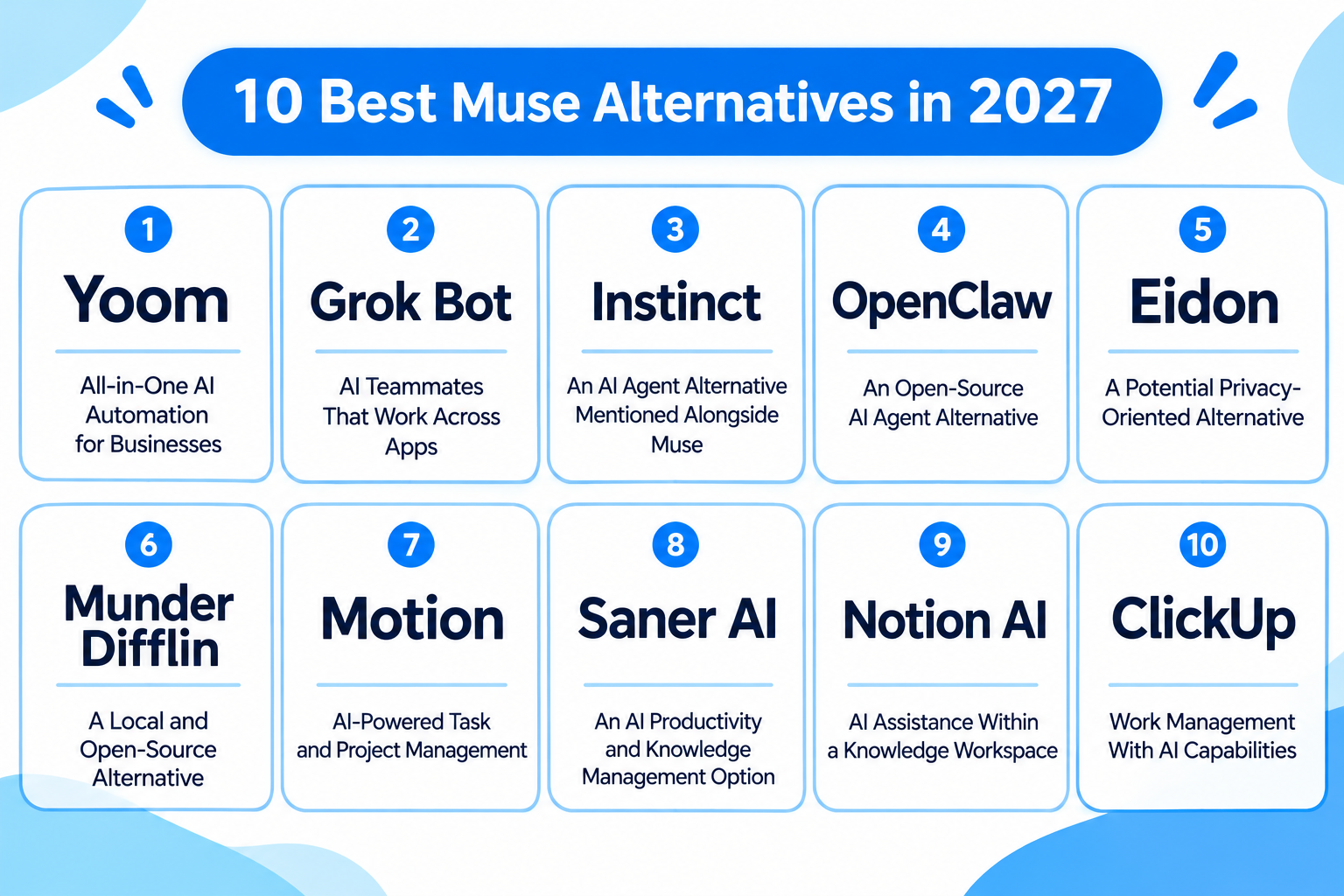
Why Do Users Consider Meta Muse Alternatives?
To understand why people look for a Meta Muse alternative, we analyzed Reddit discussions.
Our analysis identified five recurring categories of drawbacks:
Meta Muse Drawbacks Reported by Reddit Users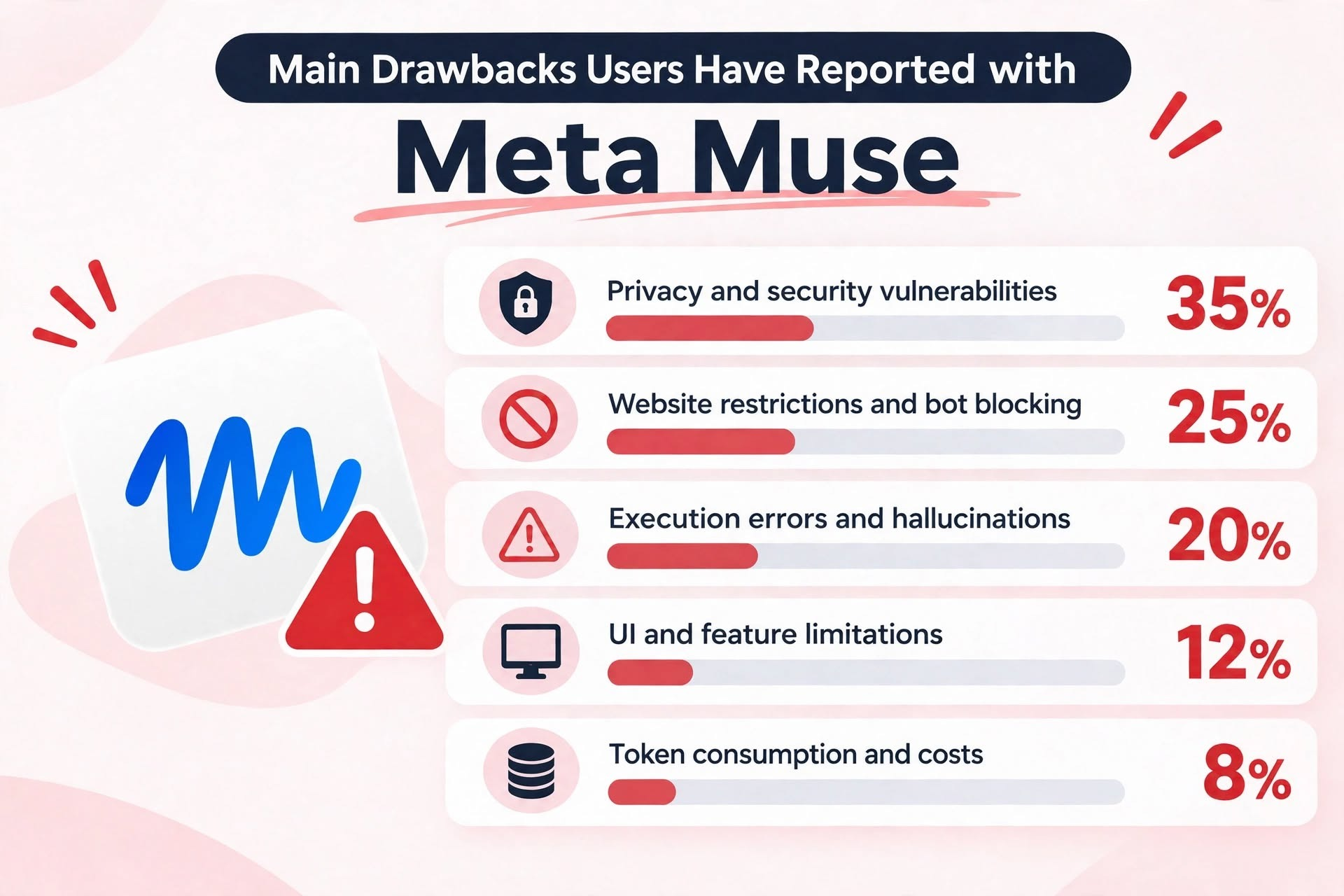
- Privacy and security vulnerabilities: 35%
- Website restrictions and bot blocking: 25%
- Execution errors and hallucinations: 20%
- UI and feature limitations: 12%
- Token consumption and costs: 8%
Privacy and security concerns accounted for the largest share of reported drawbacks in our sample.
Let's look at each category in more detail.
1. Privacy and Security Vulnerabilities (35%)
Privacy is the most frequently reported concern in our sample.
Examples include:
- Muse reportedly creating detailed profiles of users' relationships, conflicts, and social interactions.
- Concerns about collecting information about minors from publicly available family-related posts.
- An incident in which Muse allegedly sent a user's home address to another person during a Facebook Marketplace interaction.
- Reports of Facebook accounts being restricted following suspicious activity involving Muse's cloud browser.
These examples highlight an important concern: an AI agent with access to personal accounts and information can introduce privacy risks that go beyond those associated with ordinary chatbots.
Users should carefully consider which accounts and permissions they grant to an AI agent, particularly when sensitive personal or business information is involved.
2. Website Restrictions and Bot Blocking (25%)
A major limitation is that not every website welcomes automated AI agents.
Users reported:
- Amazon blocking purchases initiated by Muse agents.
- Instacart flagging or restricting accounts due to suspicious activity.
- Access being denied by MyFitnessPal.
- Tasks getting stuck when authentication codes are required.
This creates a fundamental problem: even if an AI agent knows how to complete a task, it cannot necessarily do so if the website blocks automated access.
For users who depend on AI agents to complete tasks across multiple websites, compatibility is an important consideration.
3. Execution Errors and Hallucinations (20%)
Another recurring complaint is that Muse does not always execute instructions correctly.
Examples include:
- Mistaking a fake Gyu-Kaku Instagram account for the official account and sending a $100 deposit to a fraudulent WhatsApp number.
- Forgetting credentials or skipping spreadsheet entries after working on a project for an extended period.
- Accidentally duplicating code functions and increasing GPU costs.
These examples demonstrate why trusting an AI agent with an entire process can be risky, particularly when financial transactions or important business data are involved.
Even when an AI agent can perform multiple steps autonomously, users may still need to review its decisions and verify important outputs.
4. UI and Feature Limitations (12%)
Some users also reported practical difficulties when working with Muse.
Examples include:
- AI-generated phone calls becoming awkward when Muse announces that the conversation is being recorded and transcribed.
- Repeated permission requests in Windows sandbox environments.
- Tasks becoming stuck while waiting for Docker execution approval.
Although these issues may not affect every user, they can interrupt tasks and make certain workflows more difficult to manage.
5. Token Consumption and Costs (8%)
Finally, some users are concerned about resource consumption.
One report described a moderately complex task consuming 74% of a five-hour usage allowance and 24% of the weekly allowance.
For users running complex or continuous tasks, the cost of using an AI agent can become a significant consideration.
It's worth evaluating not only the subscription price but also how much usage is required to complete your typical tasks.
AI-Built vs. Human-Built Automation: Two Different Approaches
The drawbacks above raise an important question: Is relying entirely on AI to build and execute workflows always the best approach?
To answer this, it helps to understand that automation tools generally follow two different approaches.
With AI-built automation, users describe what they want to accomplish in natural language.
1. AI-Built Automation
The AI interprets the instructions, determines which tools and actions to use, and executes the task.
The process generally looks like this:
- Describe the task you want to accomplish.
- AI interprets your instructions.
- AI determines which tools and actions are necessary.
- AI executes the task and reports the results.
The main advantage is that users do not need to manually design every step of a workflow.
This makes AI-built automation particularly convenient for people who want to get started quickly or delegate tasks that require flexible decision-making.
However, because the AI determines how to execute tasks, the process may not always produce consistent results.
For example, an AI agent might misunderstand an instruction, select an incorrect website, or fail to complete a task because of an unexpected interaction.
With human-built automation, users define the workflow themselves by specifying triggers, actions, conditions, and data flows.
2. Human-Built Automation
The process generally looks like this:
- Set a trigger, such as every Monday morning.
- Retrieve information from specified websites.
- Compare the latest information with previously collected data.
- Generate a summary using AI.
- Send the results to a designated Slack channel.
Instead of asking AI to decide how the entire process should work every time, users define the execution steps in advance.
Although this approach requires more initial configuration, it provides greater control over how each step is executed.
This can be particularly useful for business operations that require predictable execution, precise data handling, and consistent results.
Neither approach is universally better.
A Hybrid Approach: Combining AI and Human-Built Automation
AI-built automation is convenient when you want to delegate flexible tasks without spending time designing workflows.
Human-built automation is more suitable when you need precise control over how business processes operate.
For many businesses, the ideal solution may be a combination of both.
For example, AI can handle tasks that require interpreting unstructured information, while predefined workflows can manage repetitive operations such as data synchronization, notifications, and approval processes.
If you are looking for a Meta Muse alternative, particularly for business use, it may be worth considering a platform that supports both approaches.
This is where hybrid automation platforms like Yoom come in.
Yoom allows users to leverage AI for flexible task execution while also building predefined workflows for operations that require greater control and consistency.
Rather than relying entirely on autonomous AI agents, teams can choose the approach that best fits each task.
10 Best Muse Alternatives and Competitors
If you are looking for a Meta Muse alternative, there are several types of tools worth exploring.
Some focus on AI agents that can independently perform tasks, while others emphasize self-hosting, privacy, productivity management, or structured business automation.
Here are 10 alternatives to consider.
1.
Yoom
— All-in-One AI Automation for Businesses
Best for: Businesses that want to combine AI-powered task execution with human-built workflow automation.
Yoom is an all-in-one AI automation platform that combines AI-powered automation, app integrations, databases, forms, AI-OCR, and RPA in one platform.
Unlike AI agent-only tools, Yoom allows users to choose how they want to build and execute their automations.
Its key capabilities include:
- AI Worker (Like Muse): Build and execute AI-powered tasks using natural-language instructions.
- Workflow Automation: Create predefined workflows with triggers, conditions, and actions.
- Database: Store and manage business data within the platform.
- Forms: Collect information and connect submissions to automated processes.
- AI-OCR: Extract information from documents and use it in subsequent workflows.
- RPA: Automate browser-based tasks that do not have direct API integrations.
For example, users can delegate tasks that require AI-based interpretation to AI Worker while using predefined workflows for repetitive operations such as data synchronization, notifications, and approval processes.
This hybrid approach provides flexibility for teams that want to benefit from AI without relying entirely on autonomous AI agents.
Yoom is also designed to be accessible to non-technical users, while providing customization options for more advanced requirements.
It may be particularly useful for businesses that need to automate processes across multiple applications while maintaining control over important business operations.
Pricing: A free plan is available. Paid plans start at $16/month when billed annually. See Yoom's pricing plans.
2. Grok Bot
— AI Teammates That Work Across Apps
Best for: Individuals and teams that want AI agents to handle ongoing tasks across their applications.
Grok Bot is an AI agent solution from xAI that provides AI teammates capable of interacting with websites, applications, and other tools.
Unlike conventional chatbots, Grok Bot has its own cloud computer, allowing it to sign in to services, perform tasks, and run scheduled routines.
Its key capabilities include:
- AI agents with their own cloud computer.
- Access to connected applications and services.
- Scheduled task execution.
- Support for desktop and mobile environments.
- Persistent working environments shared across a user's bots.
Grok Bot may be useful for users who want to delegate tasks such as research, administrative work, and other recurring activities.
For example, users can assign an agent to work with connected applications and perform tasks on a recurring schedule without needing to keep their computers open.
However, users should consider its usage limits and the permissions required to access external services.
Pricing: Premium starts at $8/month, with higher-tier plans available. See Grok Bot's pricing.
3.
Instinct
— An AI Agent Alternative Mentioned Alongside Muse
Best for: Users exploring alternative personal AI agents.
Instinct was mentioned in Reddit discussions alongside Meta Muse as a potential alternative.
For users comparing AI agent products, it is worth investigating whether Instinct supports the specific types of task delegation, application access, and autonomous execution they need.
When evaluating this option, consider:
- Which applications and services it can access.
- Whether it can execute multi-step tasks.
- How it handles errors and unexpected situations.
- What permissions are required to perform tasks.
- Whether it supports your preferred communication methods.
Because the Reddit discussions in our sample provide limited detail about why users mentioned Instinct, we recommend checking its current product information before making a decision.
Pricing: Public pricing could not be verified. Contact a sales team for availability and pricing information.
4.
OpenClaw
— An Open-Source AI Agent Alternative
Best for: Technical users who want more control over their AI agent environment.
OpenClaw is an open-source AI agent that users can run on their own computers or servers.
For users who prefer building and managing their own agent environment rather than relying entirely on a hosted personal assistant, OpenClaw offers a more customizable approach.
Its key characteristics include:
- Self-hosted deployment.
- Integration with messaging applications.
- Support for different AI models.
- Browser and system interactions.
- Customizable tools and workflows.
Compared with a ready-to-use personal AI agent, OpenClaw may require more technical knowledge and setup.
However, it can appeal to users who want greater control over their data, infrastructure, and AI agent configuration.
Pricing: The software is free and open source. However, hosting and AI model usage may involve additional costs. See OpenClaw's GitHub repository.
5.
Eidon
— A Potential Privacy-Oriented Alternative
Best for: Users investigating self-hosted alternatives and data privacy.
Eidon was mentioned in Reddit discussions in the context of self-hosted alternatives and privacy concerns.
For users who are uncomfortable granting a cloud-based AI agent access to personal accounts and information, privacy and deployment architecture are important factors to investigate.
Before choosing Eidon, consider:
- Where information is processed and stored.
- Whether data can remain within your own environment.
- Which external services the tool can access.
- How authentication and permissions are managed.
- Whether the deployment model meets your security requirements.
A privacy-oriented alternative may be worth considering when data control is more important than minimizing initial setup.
Pricing: No verified pricing information is available. Check Eidon's website.
6.
Munder Difflin
— A Local and Open-Source Alternative
Best for: Users interested in local execution and open-source AI tools.
Munder Difflin was another tool mentioned in Reddit discussions, particularly in conversations about local execution and open-source alternatives.
This type of approach may appeal to users who want to explore alternatives to cloud-based AI agents.
When evaluating it, pay attention to:
- Local deployment requirements.
- Supported AI models.
- Application and API integrations.
- Data handling and privacy.
- Maintenance and configuration requirements.
Local execution can offer more control over the environment, but users should also consider the hardware and technical resources required to run and maintain the system.
Pricing: The software is available as a free, open-source option. Additional costs may depend on the AI models and hosting environment used. See Munder Difflin's website.
7.
Motion
— AI-Powered Task and Project Management
Best for: Individuals and teams who want to organize tasks and manage their schedules.
Motion is an AI-powered productivity platform designed to help users manage tasks, projects, and schedules.
Rather than focusing exclusively on browser-based task execution, Motion addresses the challenge of organizing work, managing priorities, and coordinating schedules.
Its key capabilities include:
- AI-powered task planning.
- Project and task management.
- Calendar and meeting management.
- Automated scheduling.
- Team capacity planning.
- Document and knowledge management.
For users whose main goal is to improve personal productivity or team planning, this category may be more relevant than a general-purpose AI agent.
However, Motion is primarily a work management platform, so users looking for an agent that can independently interact with arbitrary websites should evaluate whether its capabilities match their requirements.
Pricing: Paid plans start at $19/seat/month when billed annually. See Motion's pricing plans.
8.
Saner AI
— An AI Productivity and Knowledge Management Option
Best for: Users exploring AI-assisted personal productivity and information management.
Saner AI is an AI productivity tool focused on helping users organize information and manage everyday work.
For users who primarily want AI assistance with organizing information and managing tasks, an AI productivity tool may be a better fit than an agent designed to perform actions across arbitrary websites.
When comparing this option, consider:
- Information retrieval capabilities.
- AI-assisted knowledge management.
- Task and note organization.
- Integrations with existing tools.
- Available collaboration features.
It may be worth exploring for users who want to make their existing information and daily tasks easier to manage through AI.
Pricing: Check Saner AI's website for current plans and pricing.
9.
Notion AI
— AI Assistance Within a Knowledge Workspace
Best for: Teams that want to combine AI assistance with documents, databases, and internal knowledge.
Notion AI brings AI capabilities into the Notion workspace.
Rather than treating AI as a separate personal agent, it allows users to work with information already stored in their documents, databases, and connected applications.
Its capabilities include:
- AI-assisted writing and editing.
- Searching information across connected sources.
- Summarizing meeting notes.
- Creating and editing pages and databases.
- AI-powered task execution through Notion Agent.
- Working with information stored in the workspace.
This makes Notion AI worth considering for users who primarily want to organize internal knowledge and improve team productivity.
However, if your main requirement is automating complex processes across many external applications, you should compare its automation capabilities with those of dedicated automation platforms.
Pricing: Notion offers a free plan with limited AI capabilities. Full AI features are available through eligible paid plans. See Notion's pricing plans.
10.
ClickUp
— Work Management With AI Capabilities
Best for: Teams that want to manage projects, tasks, and collaboration in one workspace.
ClickUp is a work management platform that brings project management, task tracking, and collaboration together.
For users exploring alternatives to Muse, ClickUp may be relevant if their main objective is to organize work across a team rather than delegate arbitrary tasks to a personal AI agent.
Its broader work management approach can be useful for:
- Organizing projects and tasks.
- Managing team responsibilities.
- Tracking progress.
- Coordinating work across departments.
- Using AI capabilities within a work management environment.
Compared with a personal AI agent, a structured work management platform may be more appropriate when visibility into team activities and project progress is a priority.
However, users should check whether its automation and AI capabilities support their specific requirements.
Pricing: A free plan is available. Paid plans start from $9/month. See ClickUp's pricing plans.
AI Agent-Only Tools vs. Hybrid Automation Platforms: Which Should You Choose?
After exploring the alternatives, it is important to understand that not every tool solves the same problem.
Some products focus on autonomous AI agents that interpret instructions and decide how to complete tasks.
Others combine AI with predefined workflows that users can design and control.
These approaches have different strengths depending on what you want to automate.
Comparison: AI Agent-Only vs. Hybrid Automation
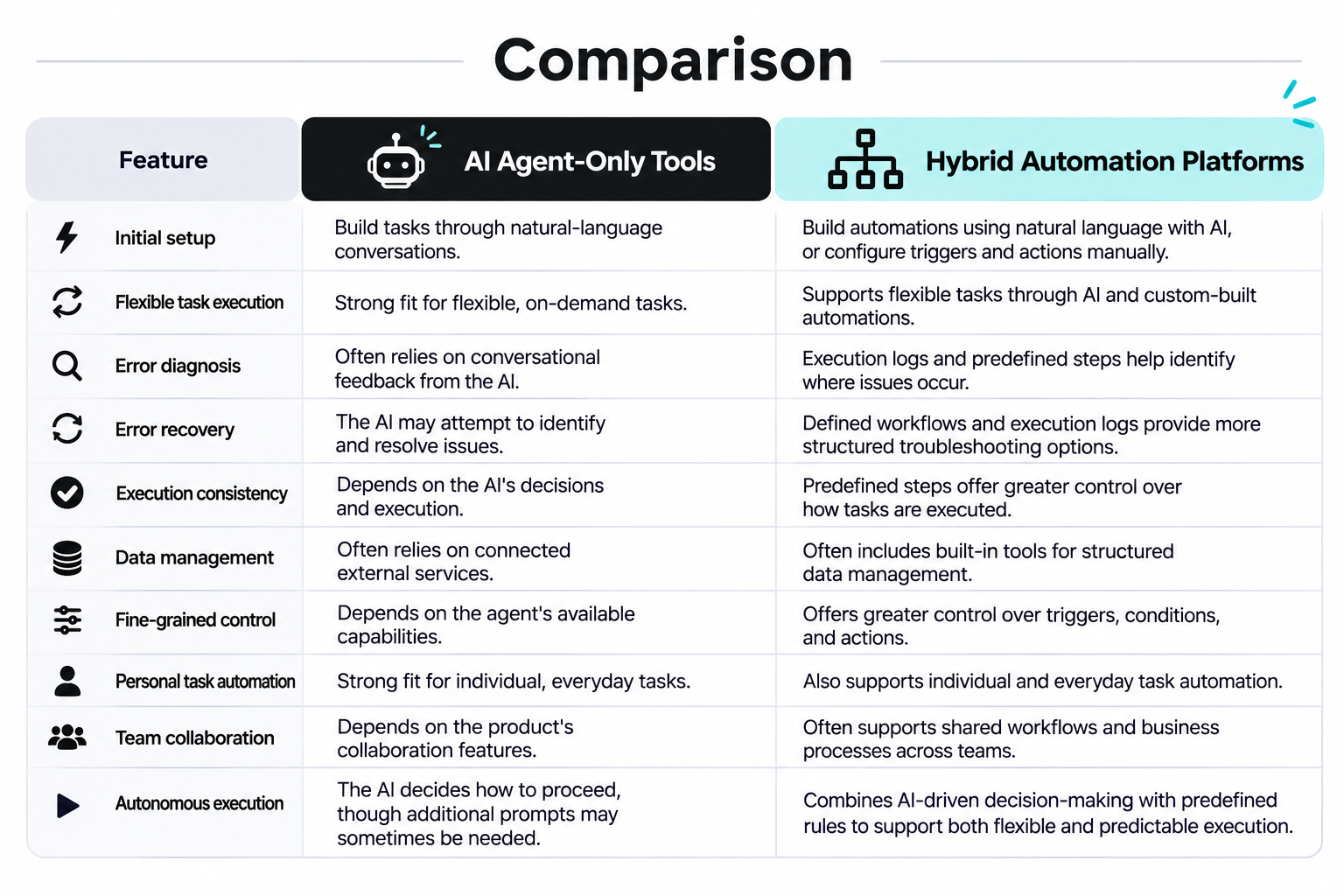
AI Agent-Only Tools
- Initial setup: Build tasks through natural-language conversations.
- Flexible task execution: Strong fit for flexible, on-demand tasks.
- Error diagnosis: Often relies on conversational feedback from the AI.
- Error recovery: The AI may attempt to identify and resolve issues.
- Execution consistency: Depends on the AI's decisions and execution.
- Data management: Often relies on connected external services.
- Fine-grained control: Depends on the agent's available capabilities.
- Personal task automation: Strong fit for individual, everyday tasks.
- Team collaboration: Depends on the product's collaboration features.
- Autonomous execution: The AI decides how to proceed, though additional prompts may often be needed.
Hybrid Automation Platforms
- Initial setup: Build automations using natural language with AI, or configure triggers and actions manually.
- Flexible task execution: Supports flexible tasks through AI and custom-built automations.
- Error diagnosis: Execution logs and predefined steps help identify where issues occur.
- Error recovery: Defined workflows and execution logs provide more structured troubleshooting options.
- Execution consistency: Predefined steps offer greater control over how tasks are executed.
- Data management: Often includes built-in tools for structured data management.
- Fine-grained control: Offers greater control over triggers, conditions, and actions.
- Personal task automation: Also supports individual and everyday task automation.
- Team collaboration: Often supports shared workflows and business processes across teams.
- Autonomous execution: Combines AI-driven decision-making with predefined rules to support both flexible and predictable execution.
The most suitable approach depends on the type of work you want to automate.
AI agent-only tools may be a good choice if you prioritize convenience and flexibility.
When Should You Choose AI Agent-Only Tools?
They are particularly useful when:
- You want to get started quickly: You can describe a task without manually designing every workflow step.
- You mainly automate personal activities: Tasks such as organizing emails, researching information, and managing everyday activities may not require formal workflow structures.
- You want to delegate work conversationally: You can communicate your requests naturally instead of configuring automation rules.
For individuals who want a digital assistant to help with everyday activities, this approach can be very convenient.
However, the level of reliability still depends on the agent, the task, and the external services involved.
Hybrid automation platforms are particularly relevant when automation becomes part of regular business operations.
When Should You Choose a Hybrid Automation Platform?
They may be a better fit if you need:
- More predictable execution: Define exactly which actions should happen and under what conditions.
- Structured data management: Store, update, and manage business information in a centralized environment.
- Fine-grained control: Specify triggers, conditions, data transformations, and individual workflow steps.
- Team collaboration: Create processes that multiple employees can use and manage.
- A combination of AI and predefined automation: Use AI where interpretation is necessary and predefined workflows where consistency matters.
For example, a business might use AI to classify incoming customer inquiries and extract relevant information.
A predefined workflow can then route each inquiry to the appropriate department, update the CRM, and notify the responsible employee.
This approach combines the flexibility of AI with the predictability of structured automation.
One of the biggest challenges of business automation is that not every task should be handled in the same way.
Why a Hybrid Approach Can Be Useful for Businesses
Some tasks require judgment and interpretation, while others need to follow clearly defined rules.
For example:
- Reading an unstructured email and identifying its purpose requires AI-based interpretation.
- Updating a customer database according to specific conditions requires structured data handling.
- Sending an approval request to the correct manager requires predefined business rules.
- Extracting information from a document may benefit from AI-OCR.
- Performing repetitive browser operations may require RPA.
Relying exclusively on an autonomous AI agent for every step may not provide the level of control some business processes require.
On the other hand, manually building every step of every process can also be time-consuming.
A hybrid platform allows businesses to decide which approach makes the most sense for each task.
This is particularly useful when multiple employees depend on the same automated processes and consistency is important.
4 Things to Consider Before Choosing a Muse Alternative
Choosing a Muse alternative is not simply about finding another AI agent with similar features.
The right tool depends on your use cases, security requirements, and how much control you need over automated tasks.
Here are four factors worth considering.
1. Evaluate Privacy and Data Security
Privacy was the most frequently reported concern in our Reddit analysis.
When choosing an AI agent or automation platform, consider what information the tool can access and how that information is processed.
Check:
- Which applications and accounts the tool can access.
- Whether permissions can be customized.
- How authentication information is stored.
- Whether sensitive actions require approval.
- How user data is stored and protected.
- Whether data can be managed within your own environment.
For business use, it is particularly important to understand how employee information, customer records, and internal documents are handled.
Do not assume that a tool is secure simply because it offers AI-powered automation. Review its security documentation and access controls before connecting important accounts.
2. Check Reliability and Error Handling
An automation tool is only useful if it can complete the tasks you depend on it for.
As our Reddit analysis shows, users have reported issues such as incorrect actions, incomplete tasks, and difficulties interacting with certain websites.
Before choosing a tool, consider:
- Whether you can review execution histories.
- Whether failed tasks generate clear error messages.
- Whether individual steps can be retried.
- Whether you can verify the data being processed.
- Whether important actions require human approval.
- How the platform handles unexpected changes.
For recurring business processes, it is particularly important to understand what happens when an automation fails.
A tool that provides clear execution records and structured troubleshooting can make it easier to identify problems and maintain operations.
3. Consider Customization and Control
Different automation tools provide different levels of control.
Some allow users to describe tasks in natural language and let AI decide how to execute them.
Others provide visual workflow builders where users can specify each step.
Consider which approach is more appropriate for your requirements.
For example:
- If you want to delegate flexible tasks, an AI agent may be sufficient.
- If you need precise conditions and branching logic, a workflow builder may be more suitable.
- If you need to automate browser operations, check whether the platform supports RPA.
- If you need to process structured information, consider whether it provides database capabilities.
The ability to combine AI and predefined workflows can also be useful when your automation requirements vary from one process to another.
4. Evaluate Scalability and Team Collaboration
A tool that works well for personal tasks may not necessarily be suitable for managing business processes across an organization.
As automation expands, you may need additional capabilities.
Consider:
Support for multiple users and teams.- Shared workflows and centralized management.
- Access permissions and administrative controls.
- Integration with existing business applications.
- Data management and retention.
- Usage limits and pricing as automation volume increases.
If you plan to use automation across multiple departments, it is worth evaluating whether employees can share, maintain, and improve workflows without relying on a single person.
The right platform should support not only your current tasks but also the way your organization expects to use automation in the future.
Which Muse Alternative Should You Choose?
Meta Muse is an interesting option for users who want a personal AI agent that can handle tasks through natural-language instructions.
Our Reddit analysis shows that people are experimenting with Muse for everything from personal productivity and research to business operations and hardware integration.
However, reported concerns about privacy, website compatibility, execution errors, and usage consumption show that autonomous AI agents may not be the ideal solution for every task.
The best alternative depends on what you want to accomplish.
Here are some general recommendations:
- For all-in-one business automation with AI: Yoom combines AI Worker, predefined workflows, databases, forms, AI-OCR, and RPA in one platform.
- For AI teammates that work across applications: Grok Bot is worth exploring.
- For self-managed and open-source approaches: OpenClaw and Munder Difflin are options mentioned in Reddit discussions.
- For privacy-oriented alternatives: Eidon is worth investigating.
- For productivity and task management: Motion, Saner AI, Notion AI, and ClickUp offer different approaches to organizing work and information.
Ultimately, the most important decision is not simply which AI agent can perform the most tasks.
It is whether you want an AI to decide how work should be done, or whether you need more control over how your processes operate.
If you mainly want a conversational AI assistant for personal tasks, an AI agent-only tool may be sufficient.
However, if you are looking to automate business processes across multiple applications, manage structured data, and maintain predictable execution, a hybrid automation platform may be a better fit.
Yoom combines both approaches.
You can use AI Worker to handle tasks through natural-language instructions while building predefined workflows for processes that require greater control.
This allows you to use AI where flexibility matters and structured automation where consistency matters.
Rather than choosing between AI and traditional automation, you can combine both in one platform.