・
AI Social Listening: How It Works, Tools, and Use Cases

Social media, online reviews, and other digital channels contain a constant stream of customer opinions and conversations.
AI social listening helps businesses collect and analyze this information using AI, making it easier to identify customer sentiment, emerging topics, trends, and other important signals.
But understanding what people are saying is only the first step. The real value comes from connecting these insights to business actions.
What Is AI Social Listening?
AI social listening is the use of artificial intelligence to monitor and analyze online conversations, reviews, and other digital content.
One of its biggest advantages is that it makes it easier to measure online conversations quantitatively.
Traditionally, businesses could collect social media posts, reviews, and other customer feedback, but analyzing large amounts of this information often required significant time and resources. Some companies therefore relied on manual review, making it difficult to consistently analyze every piece of feedback at scale.
This can also make insights more dependent on human judgment. For example, a team reviewing customer comments manually may identify some recurring issues, but it can be difficult to determine exactly how frequently each topic appears or how sentiment changes over time.
AI can process large volumes of unstructured content and turn it into measurable data.
For example, instead of simply knowing that customers are talking about a product, businesses can quantify:
- What percentage of conversations are positive or negative
- Which topics are mentioned most frequently
- How often a particular issue appears
- How customer sentiment changes over time
- Which trends are gaining attention
This quantitative view can reveal patterns that are difficult to see from individual posts or reviews alone.
AI social listening makes this kind of analysis more accessible, allowing businesses to turn large amounts of online conversation into measurable insights without relying entirely on time-consuming manual analysis.
How Does AI Social Listening Work?
AI social listening typically involves four steps:
Collect → Analyze → Identify insights → Take action
1. Collect Online Data
Relevant data is collected from sources such as social media, online reviews, forums, blogs, and other digital channels.
Businesses can monitor brand names, product names, competitors, keywords, or specific topics.
2. Analyze the Data with AI
AI analyzes the collected content to identify patterns and extract useful information.
Depending on the tool, this may include sentiment analysis, topic classification, summarization, keyword extraction, and trend detection.
3. Identify Important Signals
The analysis can reveal signals such as recurring complaints, changes in customer sentiment, emerging topics, or increased discussion around a particular product or competitor.
This helps teams focus on information that may require attention instead of manually reviewing every post or review.
4. Take Action
The final step is to use these insights in actual business processes.
For example, a company might notify a relevant team about a negative review, save customer feedback to a database, prepare a response, or share a summary with sales or marketing teams.
This connection between social signals and business actions is an important part of getting value from AI social listening.
AI Social Listening Use Cases
Where Do Businesses Collect Social Listening Data?
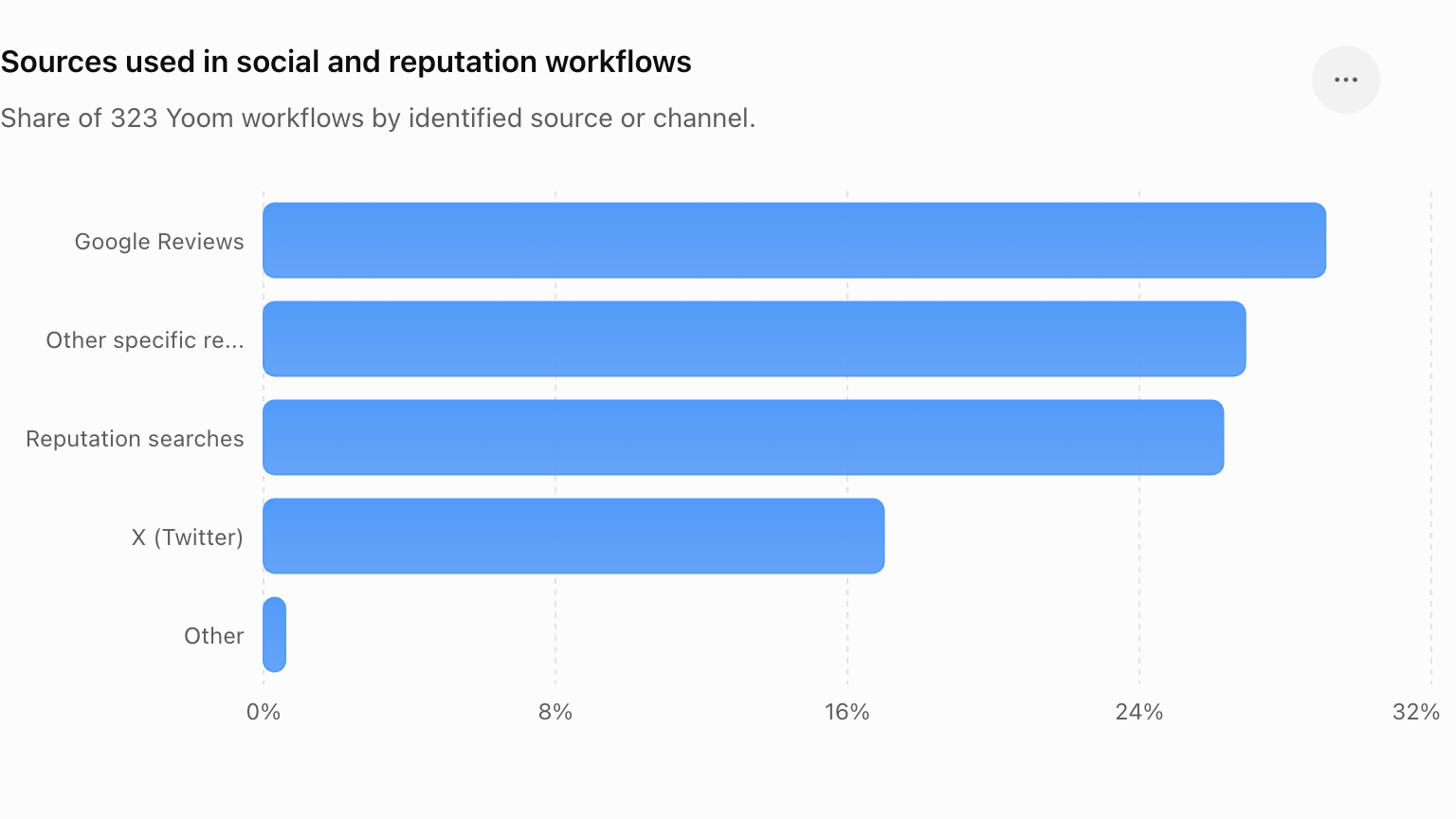
1. Google Reviews — 29.1%
New reviews are collected and often stored in spreadsheets or other systems, particularly for individual stores or locations.
2. Other specific review platforms — 26.9%
Reviews from other identified platforms are similarly collected and processed as part of business workflows.
3. Reputation searches — 26.3%
Businesses search for individual or company names and use the results for internal checks, particularly in sales and purchasing-related processes.
4. X (Twitter) — 17.0%
The workflows identified here were mainly related to publishing and distribution rather than continuous monitoring—for example, automatically posting content generated from emails, YouTube updates, or AI.
5. Other — 0.6%
Other workflows that did not fall into the categories above.
How Is the Collected Data Used?
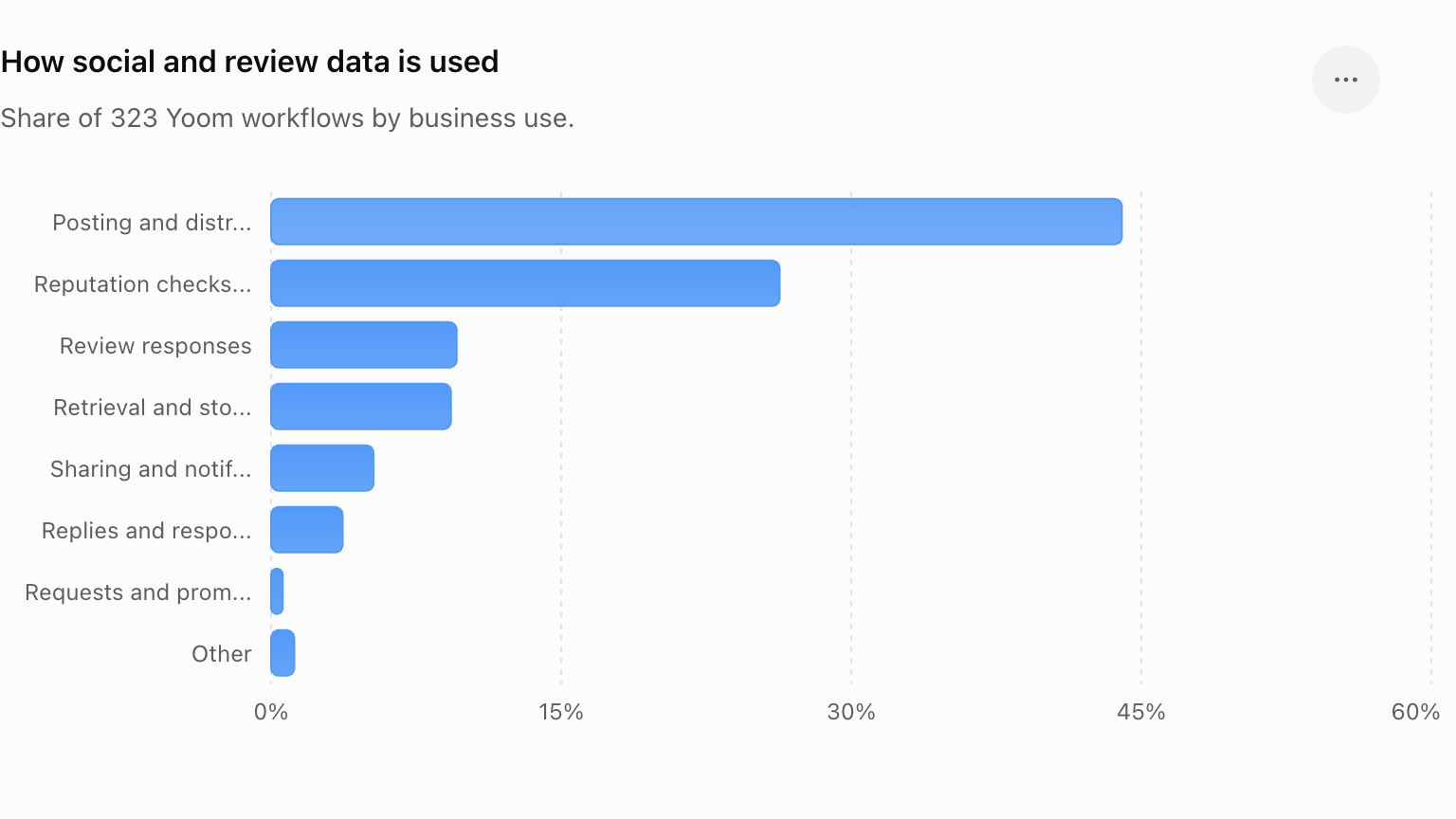
1. Posting and distribution — 44.0%
Social-related information is used to trigger or support content publishing and distribution.
2. Reputation checks and searches — 26.3%
Search results are processed and returned to relevant teams, such as sales or purchasing departments.
3. Review responses — 9.6%
AI is used to support review handling, including generating responses to customer feedback.
4. Retrieval and storage — 9.3%
Reviews and other information are automatically collected and stored for later reference or analysis.
5. Sharing and notifications — 5.3%
Relevant findings are shared with internal teams through tools such as Slack.
6. Replies and responses — 3.7%
Collected information is used to trigger or support a direct response.
7. Requests and promotion — 0.6%
Social-related workflows are used to support requests or promotional activities.
8. Other — 1.2%
Other uses that did not fall into the categories above.
AI Social Listening Tools
There are many AI social listening tools, ranging from dedicated consumer intelligence platforms to social media management and workflow automation tools.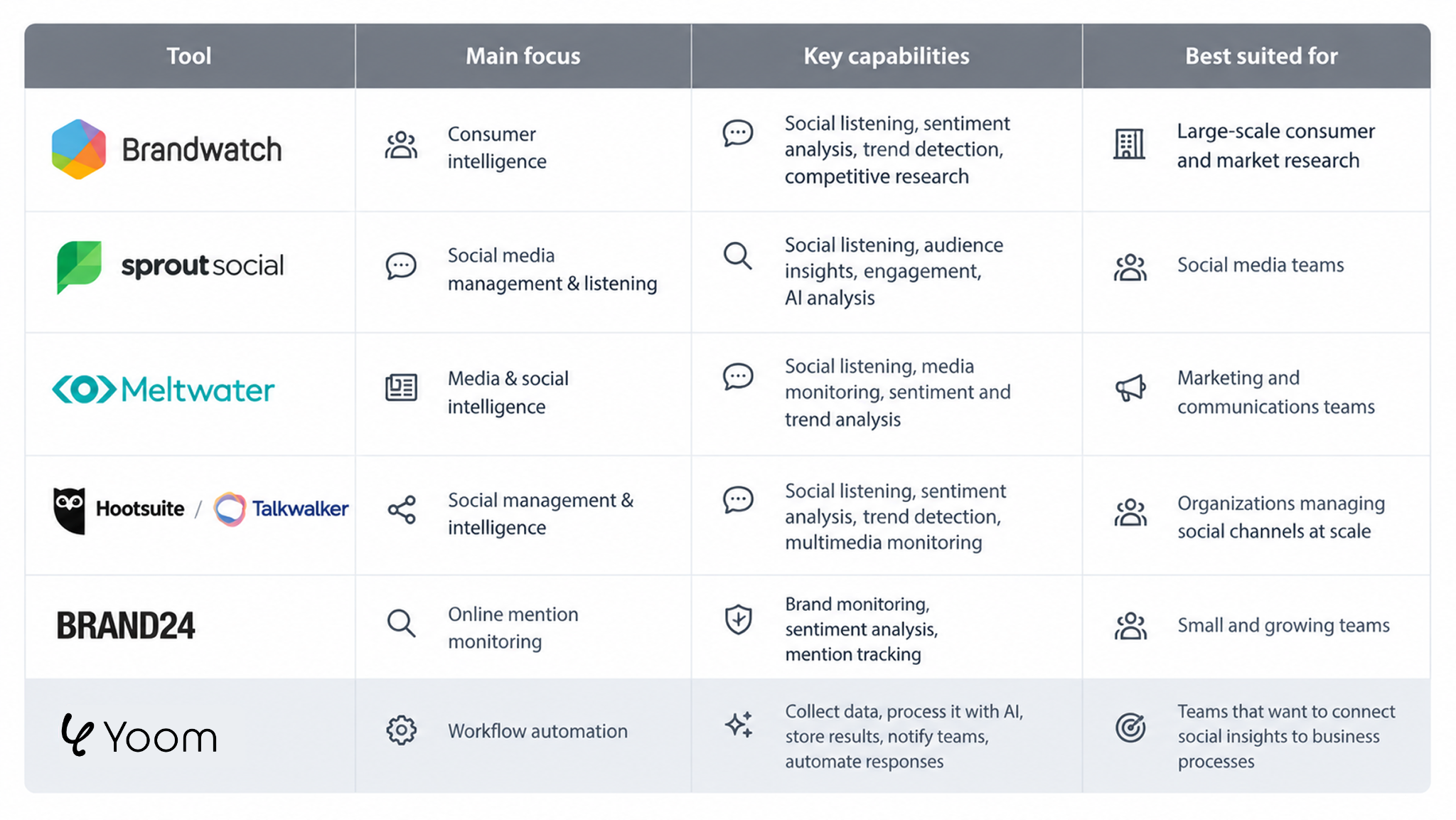
- Brandwatch focuses on consumer intelligence, with social listening, sentiment analysis, trend detection, and competitive research.
- Sprout Social combines social media management with social listening, audience insights, engagement, and AI analysis.
- Meltwater provides media and social intelligence, including social listening, media monitoring, sentiment, and trend analysis.
- Hootsuite / Talkwalker combines social management with social listening, sentiment analysis, trend detection, and multimedia monitoring.
- Brand24 focuses on online mention monitoring, including brand monitoring, sentiment analysis, and mention tracking.
- Yoom focuses on workflow automation, allowing teams to connect AI-powered analysis with data storage, notifications, and other business processes.
Dedicated social listening tools focus primarily on monitoring and analyzing online conversations.
Yoom can complement this process by connecting the information to downstream workflows—for example, saving reviews in a database, notifying a team, or generating a response with AI.
The best choice depends on whether your primary goal is understanding what people are saying or turning those insights into business actions.
Related Workflow Templates

■ Overview
The "Notify Slack when a post is created in a Reddit subreddit" flow is a business workflow that shares the latest community updates with your team in real-time.
Reddit is a platform where a wealth of information gathers through a variety of subreddits, but it's not uncommon to miss posts of interest. Especially in business or project teams, it's crucial to quickly catch up on relevant topics and trends.
By utilizing this workflow, whenever there is a new post in a specific subreddit, a notification is automatically sent to Slack. This allows the entire team to share the latest information, enabling quick decision-making and discussions.
■ Recommended for
- Project leaders who want to share the latest updates from specific Reddit subreddits within their team
- Business professionals who regularly use Slack but want to reduce the time spent on manual information gathering
- Marketing personnel who want to quickly grasp market trends and competitor information and respond swiftly
- Owners of small and medium-sized enterprises who want to automate team information sharing and achieve efficient communication
- Research personnel who want to utilize valuable posts on Reddit without missing them
■ Benefits of using this template
- Efficiency in information sharing: New posts are automatically notified to Slack, eliminating the need for manual checks.
- Automation of tasks: Reduces the effort of information gathering, allowing you to focus on other important tasks.
- Improved team cohesion: Having a common information base strengthens the overall coordination of the team.

■Overview
The workflow "Notify Microsoft Teams when a post with a specific keyword is made on Reddit" is an automated process for sharing important information with your team in real-time. Reddit is a platform where diverse topics are discussed, and it can be challenging to keep track of posts related to specific keywords. By setting up this workflow, notifications are automatically sent to Microsoft Teams whenever a post containing the specified keywords is made, allowing the entire team to quickly catch up on the information. This enhances the efficiency of information gathering and enables swift decision-making.
■Recommended for
- Teams using Reddit as an information-gathering tool
- Companies using Microsoft Teams as their primary communication method
- Marketing professionals who constantly monitor specific topics or market trends
- IT professionals looking to enhance work efficiency by utilizing technical automation tools
■Benefits of using this template
- Faster information sharing: By instantly notifying Teams of important posts on Reddit, the entire team can respond quickly.
- Efficient information management: Eliminates the need for manual information checks, saving time and effort.
- Support for speedy decision-making: Sharing the latest information immediately enables swift and accurate decision-making.
Turn Social Insights into Business Actions with Yoom
Social listening is most valuable when insights can be turned into action.
With Yoom's AI Worker, you can describe what you want to accomplish in your words, and Yoom can build and execute the workflow for you.
For example, you could ask:
“Find negative conversations about [your product] on Reddit from the past week, identify the most urgent issues, and notify our team on Slack.”
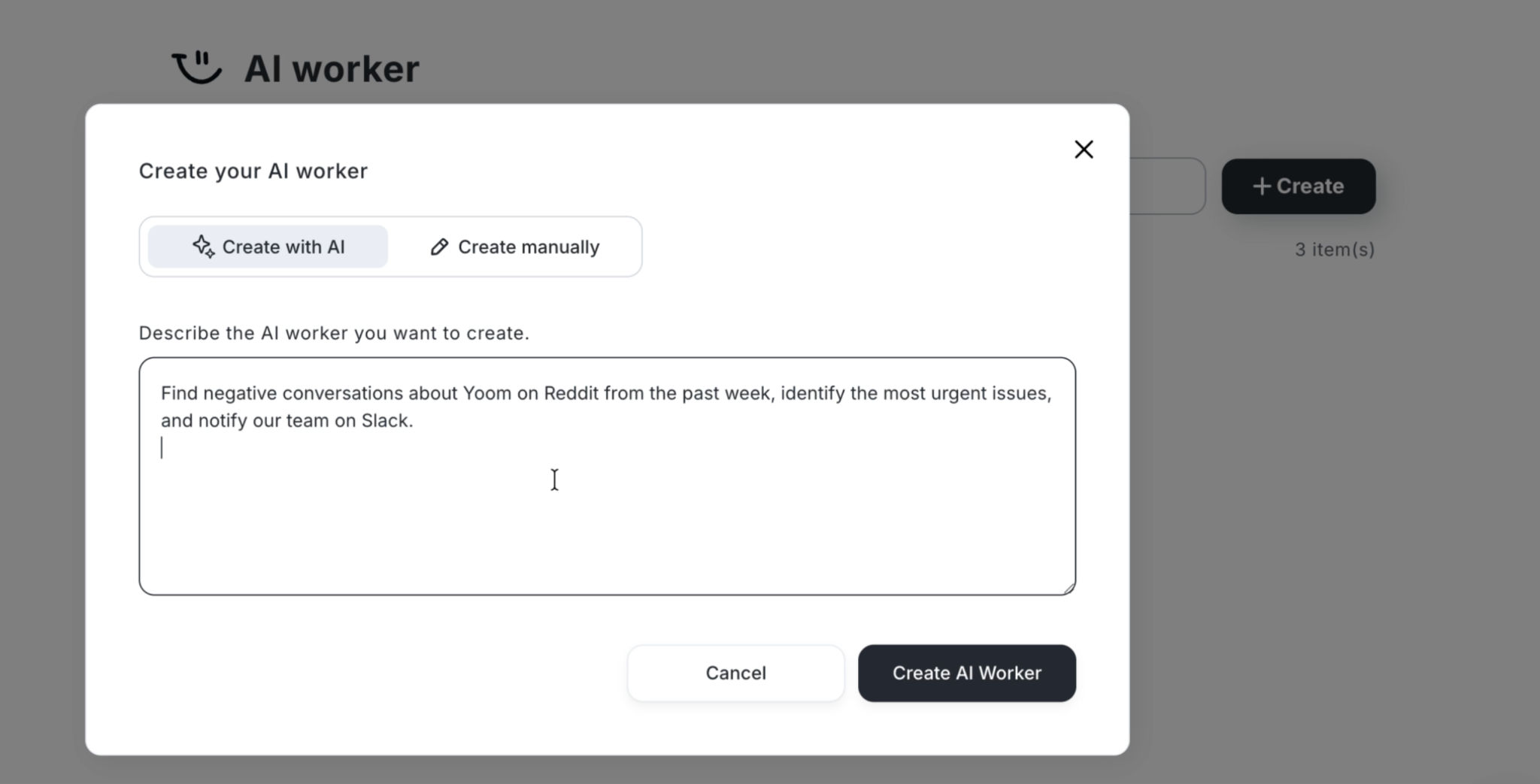
Once you create an AI Worker, the same workflow can be used by other team members without requiring everyone to build the process from scratch. This helps teams maintain a consistent way of analyzing social conversations and identifying important issues.
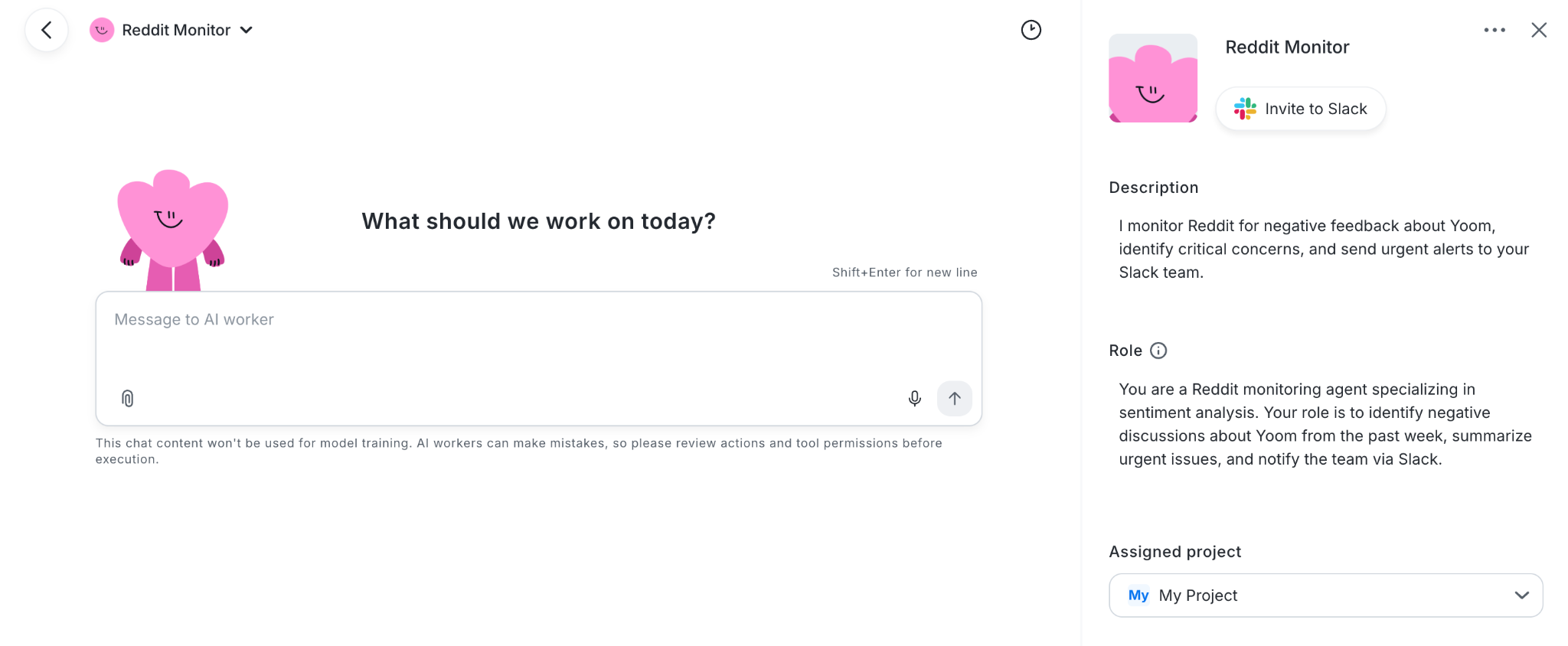
You can also connect AI Workers to other tools and workflows. For example, in addition to notifying your team on Slack, you could create a workflow that sends a separate notification to the person responsible when an issue is identified as highly urgent.
This makes it possible to build workflows such as:
- Analyze social conversations with AI
- Identify negative or urgent issues
- Notify a team in chat tools
- Alert the person responsible for urgent issues
- Save insights to a spreadsheet or database
- Generate review responses
- Share summaries with sales or marketing teams
Instead of collecting social insights and leaving them in a separate tool, Yoom helps you connect them to the next business action.
This makes it possible to go from “What are people saying?” to “What should we do next?” in one workflow.
Related AI Worker Templates




This AI worker analyzes submitted insight images, extracts key metrics, and automates logging to Google Sheets and reporting to Slack. Eliminate manual entry errors and streamline aggregation, so marketing teams can focus on analyzing influencer campaigns.
Use this AI worker to automatically analyze insight images submitted by influencers, extract key metrics such as reach and engagement, record them in Google Sheets, and report them to Slack—all in one flow.
- Marketing teams struggling to convert large volumes of insight images received from influencers into data
- Agencies looking to streamline insight data aggregation and reporting so they can spend more time analyzing campaign performance
- Project leaders who use Google Sheets and Slack to share the latest post performance with their teams
- Define the AI worker’s name, role, and other basic settings.
- Connect Google Drive, Google Sheets, and Slack through My Apps, then configure them as tools for the AI worker.
- Create and edit the AI worker’s skills (instructions). Adjust the detailed steps based on your company’s operational rules and the metrics you want to extract.
- Adjust the metrics to extract under “# Steps” in the skill to focus on the metrics most important to your organization, such as saves and profile visits.
- Set your tracking sheet ID and Slack channel ID for reporting under “# Google Sheets to Use” and “# Notification Channel to Use” in the skill.
- Edit the notification structure in the “# Report to Slack” section to freely customize the reporting format so your team can easily understand it.
- Connect Google Drive, Google Sheets, and Slack with Yoom.
- For basic AI worker settings, see “[AI Worker] Basic Setup Guide.”
- The number of AI workers that can run simultaneously, the number of AI workers you can create, and the available AI models vary depending on your subscription plan.
- The apps and operations available within AI workers are subject to the same usage limits as Flowbots.
- Please note that AI workers consume tasks during test runs just as they do during production runs. For details, see “[AI Worker] How Task Executions Are Calculated.”
- AI workers can perform tasks more accurately when skills are configured in detail. For details, see “[AI Worker] How to Create Skills (Formerly Manuals).”
- The maximum downloadable file size is 300 MB. Depending on the app’s specifications, the limit may be less than 300 MB.
- For details on the file size limits for triggers and each operation, see “About File Size Limits.”

This AI worker analyzes social media posts, assesses risk, and autonomously decides when to log findings in Google Sheets and send notifications to Slack. Automate monitoring to identify early signs of backlash and negative reactions, streamline social media operations, and build a system that protects your brand reputation.
- PR and marketing teams who want to identify negative social media reactions early and respond quickly
- Social media operations teams who want to streamline the review of large volumes of posts and focus only on information that requires action
- Managers who want to delegate consistent, guideline-based risk assessments to AI
- Register the AI worker’s name and role in its basic settings.
- Connect Google Sheets and Slack, the apps used by this AI worker, to Yoom through My Apps.
- Create skills for the AI worker. You can flexibly edit and adjust skill content to match your company’s operating rules.
- Configure details within the skills, such as the Google Sheets destination and Slack notification channel ID.
- In the “# Classification and Assessment Criteria” section of the skill, define criteria that match your company’s standards, such as “【Critical / Signs of Backlash】: Defamation, unjust infringement of rights, spread of misinformation, criticism that violates public order and morals, or a rapid increase in negative reactions within a short period.” Including industry-specific terms and detailed descriptions of situations that require attention improves AI assessment accuracy and delivers results better suited to your operations.
- Change the channel ID in the “# Slack Notification Destination” section of the skill to flexibly adjust which team receives reports based on the case or content.
- You can also freely add or modify the information you want to record by editing the “Item List” in the “# Spreadsheet to Use” section of the skill to fit your operations.
- Connect Google Sheets and Slack with Yoom.
- For basic AI worker settings, see “【AI Worker】Basic Setup Guide”.
- The number of AI workers that can run simultaneously, the number of AI workers you can create, and the available AI models vary depending on your subscription plan.
- The apps and operations available within AI workers are subject to the same usage limits as Flow Bots.
- Please note that AI workers consume tasks during test runs just as they do during production runs. For details, see “【AI Worker】How Task Executions Are Calculated”.
- AI workers are more likely to perform appropriate processing when skills are configured in detail. For details, see “【AI Worker】How to Create Skills (Formerly Manuals)”.