・
Best AI Tools for Social Media in 2027: Create, Manage, and Automate

AI is changing how businesses create, manage, and analyze social media content. From generating posts and captions to scheduling content and monitoring conversations, AI tools can help reduce the time spent on repetitive social media tasks.
But AI social media tools are not all designed for the same purpose. Some focus on content creation, while others help manage social accounts, analyze audience activity, or automate workflows across multiple apps.
In this guide, we'll explore the best AI tools for social media in 2027, what each type of tool can do, and how businesses can use AI to automate social media workflows.
What Are AI Social Media Tools?
AI social media tools use artificial intelligence to help businesses create, manage, and analyze social media content and activity.
Depending on the tool, AI can help with tasks such as generating posts and captions, scheduling content, analyzing performance, monitoring conversations, and automating repetitive workflows.
Are Businesses Using AI Social Media Tools for More Than Content Creation?
AI can be used for much more than generating social media posts. To see how businesses are actually using AI in social media-related workflows, we analyzed Yoom workflow data across three major use cases: review and reputation management, social media publishing, and social media monitoring and analysis.
The results show that businesses are using AI primarily to respond to customer feedback and manage reviews, rather than simply create social media content.
Responding to Reviews and Customer Feedback
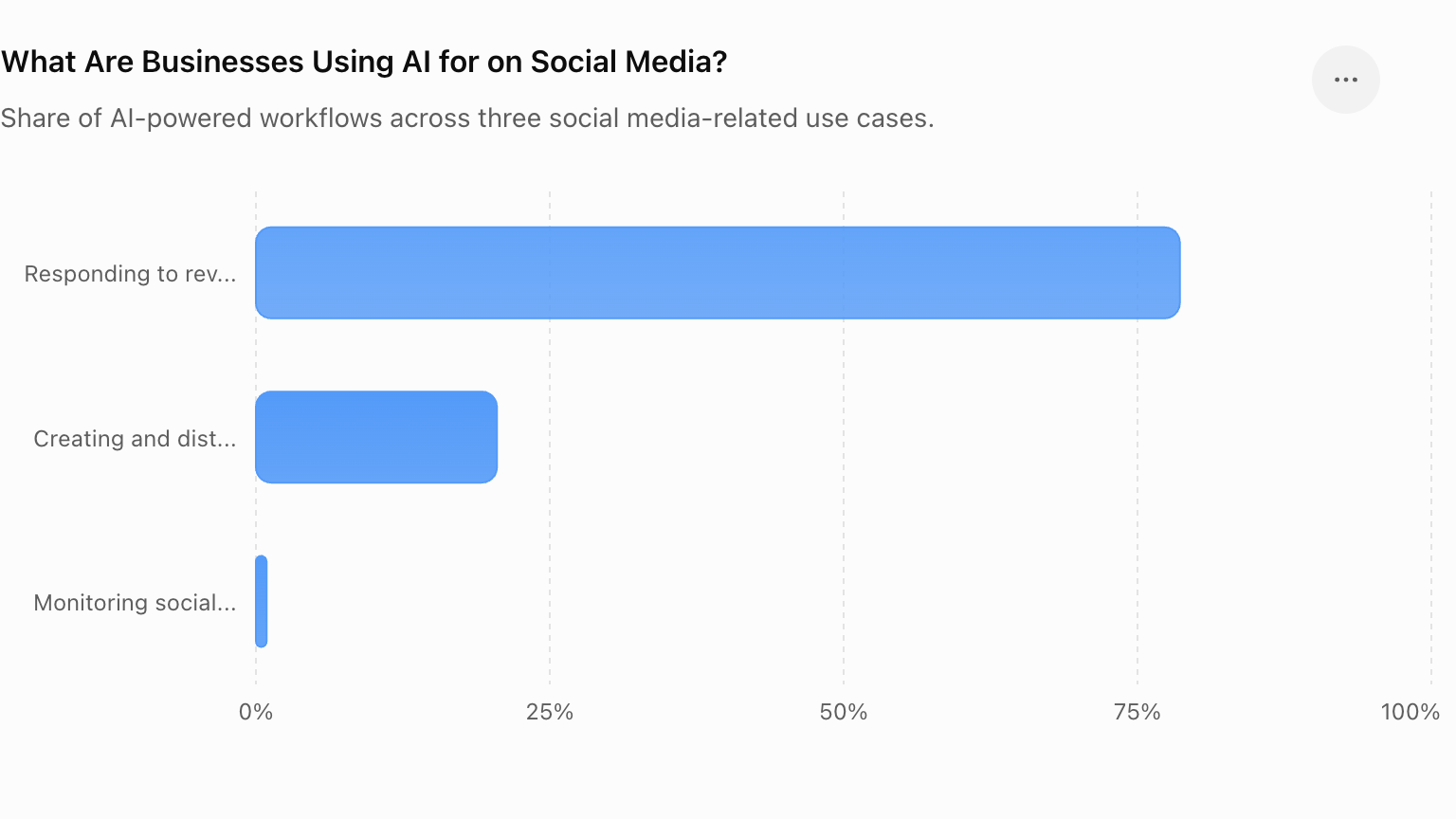
78.6% of the workflows were related to review and reputation management.
These workflows use AI to process customer reviews, help create responses, and support the review management process. In some cases, the AI-generated response is reviewed and approved by a person before being sent.
This makes customer feedback one of the most common areas where businesses are applying AI to social media-related work.
Creating and Distributing Social Media Content
20.5% of the workflows focused on social media publishing and distribution.
AI can be used to generate or transform content before it is published or passed to another service. These workflows show that AI is not only being used to write social media posts, but also as part of a broader process for preparing and distributing content.
Monitoring Social Media and Trends
0.9% of the workflows were related to social media monitoring and analysis.
These workflows handle information such as social media activity and trends, then connect the results to other business processes.
While this represents a smaller share of the workflows analyzed, it shows another way businesses can use AI: not just to create or respond to content, but to process information from social media and use it elsewhere.
Overall, the data suggests that AI in social media is being used across three main areas: responding to customer feedback, creating and distributing content, and monitoring social media activity. Among these, review and reputation management accounted for the largest share.
What Happens After AI Is Used for Social Media?
AI can process reviews, generate responses, prepare social media content, and analyze social media data. But AI is often only one step in a larger workflow. What happens after the AI finishes its task?
We analyzed the follow-up actions configured in AI-powered social media and review-related Yoom workflows. The results show that businesses are not simply using AI and stopping there. They are storing AI-generated results, connecting them to other services, transforming the output, requesting action, and involving people in the process when needed.
From AI Output to Business Action
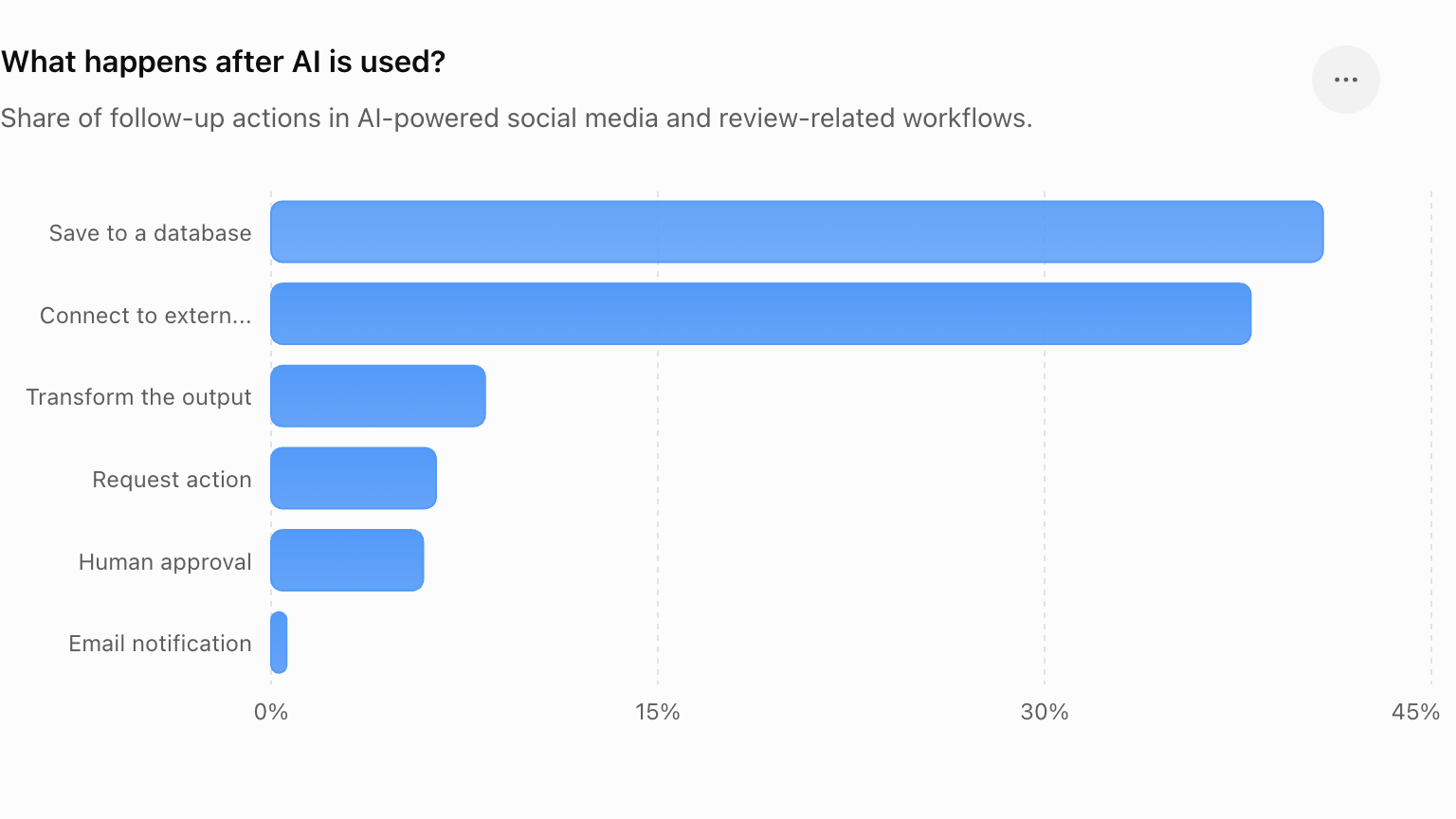
The most common follow-up action was saving data to a database (40.8%), followed by connecting the results to external services (38.0%). Other workflows transformed the output (8.3%), requested action (6.4%), or required human approval (5.9%).
These actions show that AI is increasingly being used as part of a broader business process, rather than as a standalone tool.
For example, a business might use AI to understand a customer review and draft a response. The next steps could involve having a person approve the response, sending it to the customer, recording the interaction in a database, and notifying the relevant team.
Without an end-to-end workflow, these steps may need to be handled manually across multiple tools. With a platform that connects AI with business applications and workflows, however, the process can continue automatically after the AI completes its task.
In other words, AI does not have to be the end of the process. It can be the starting point for the next business action.
Best AI Social Media Tools: Which One Is Right for You?
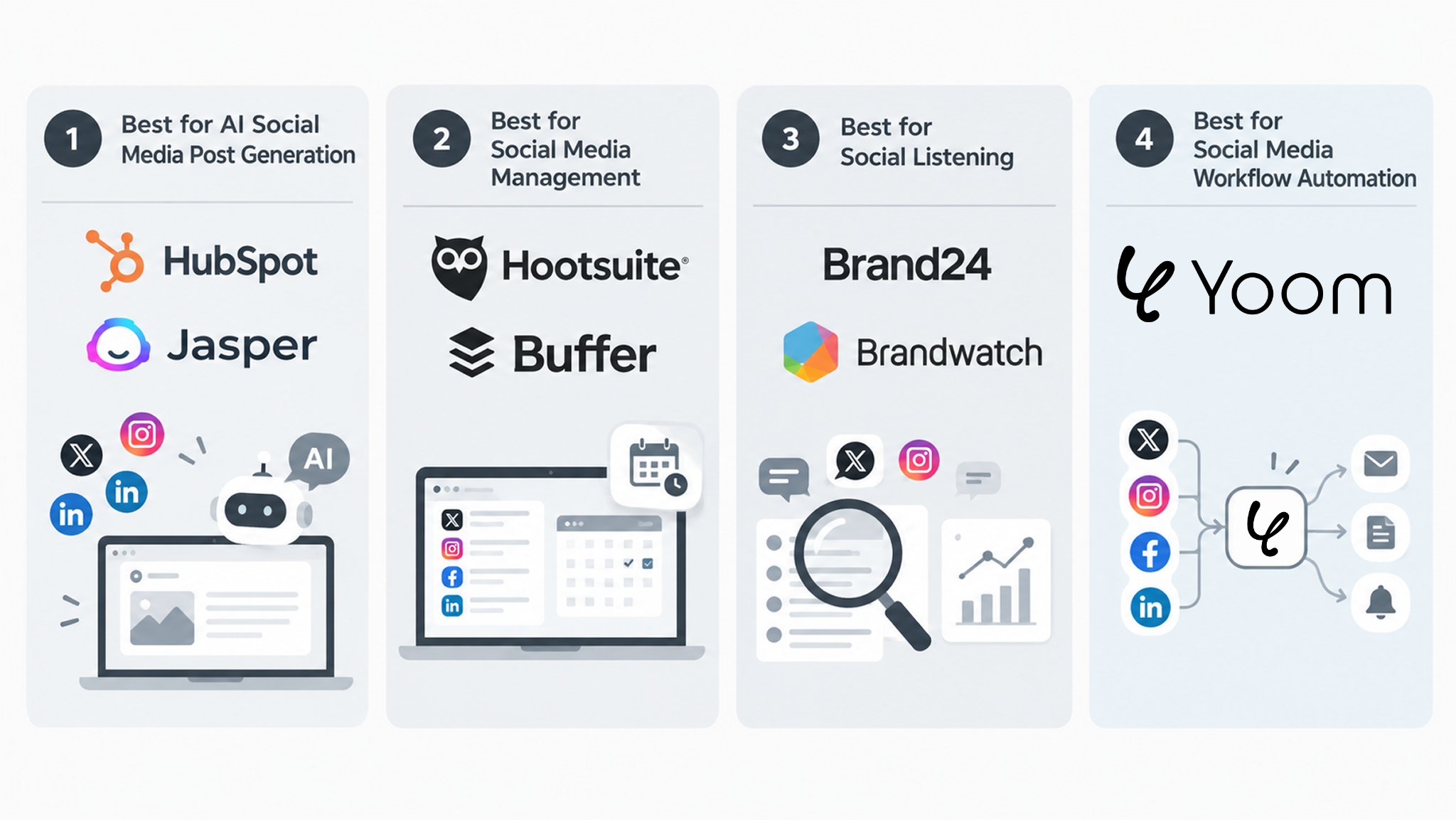
There is no single “best” AI tool for social media. The right tool depends on what you want to accomplish most.
Here are some of the leading AI-powered tools, organized by what they are best suited for.
1. Best for AI Social Media Post Generation: HubSpot and Jasper
If your main goal is to create social media content with AI, tools such as HubSpot and Jasper can help.
These platforms can assist with generating captions, post ideas, and other marketing content, helping teams create content more efficiently. They are particularly useful when content creation itself is the main challenge.
Best for: Businesses that want to use AI to generate and optimize social media content.
2. Best for Social Media Management: Hootsuite and Buffer
For businesses managing multiple social media channels, Hootsuite and Buffer provide tools for planning, scheduling, publishing, and managing social media content.
Their AI features can also support tasks such as generating content ideas and adapting posts. Rather than focusing on a single AI task, these platforms are designed to help teams manage their day-to-day social media operations in one place.
Best for: Teams that want to manage and schedule content across multiple social media channels.
3. Best for Social Listening: Brand24 and Brandwatch
If your priority is understanding what people are saying about your brand or topics related to your business, social listening tools such as Brand24 and Brandwatch may be a better fit.
These platforms can monitor online conversations, mentions, reviews, and other social signals, helping businesses identify trends and understand customer sentiment.
Best for: Businesses that want to monitor online conversations, brand mentions, reviews, and emerging trends.
What is Social Listening?:
https://lp.yoom.fun/en/blog-posts/ai-social-listening
4. Best for Social Media Workflow Automation: Yoom
Unlike the tools above, Yoom is not a social media-specific platform. Instead, it is an all-in-one business automation platform that connects AI with the apps and workflows businesses already use.
This makes it useful when social media or customer feedback is just one part of a larger business process.
For example, a business could use AI to analyze a customer review and generate a response, send the response to a team member for approval, save the result to a database, and notify the relevant team—all within a connected workflow.
This is particularly relevant because, as we saw in the previous section, AI is often only one step in a larger process. After AI processes information, businesses still need to store the results, share them, request approval, or take action.
Yoom can connect these steps so that the workflow continues automatically after the AI has finished its task.
Best for: Businesses that want to connect AI-powered social media or review-related tasks with their broader business processes.
Related Workflow Templates
■Overview ■Benefits of using this template ■Overview This is a flow that retrieves information from Google Sheets every week, organizes it in Gemini, and automatically posts it on X (Twitter). With Yoom, you can easily achieve this flow without the need for programming, as it allows for seamless integration between apps. ■Recommended for ■Benefits of using this template With this flow, you can organize text in Gemini based on the information registered in Google Sheets and automatically post it on X (Twitter) according to a specified schedule. There is no need to manually create or post text, allowing personnel to allocate time to other important tasks. It is suitable for regularly disseminating information about events, seminars, sales, campaigns, products, etc.
The workflow "Post a reminder on X (Twitter) when Shopify inventory falls below a certain number" automates inventory management and disseminates information to customers.
This simultaneously achieves improved inventory management efficiency and enhanced customer communication.
■Recommended for

Additionally, posts can be automatically completed even if you want to disseminate information outside of working hours, such as late at night or on holidays.

Have an Idea? Let AI Worker Build It With You
AI can help with many parts of social media work—from responding to reviews to monitoring conversations and generating content. But the possibilities don't stop there.
You may already have an idea for a workflow that goes beyond what a typical social media tool can do.
With Yoom's AI Worker, you can start by simply describing what you want to accomplish in your words. You don't need to figure out every step, app, or automation rule in advance. AI Worker can help turn your idea into an actionable workflow.
Example 1: Review Response & Tracking
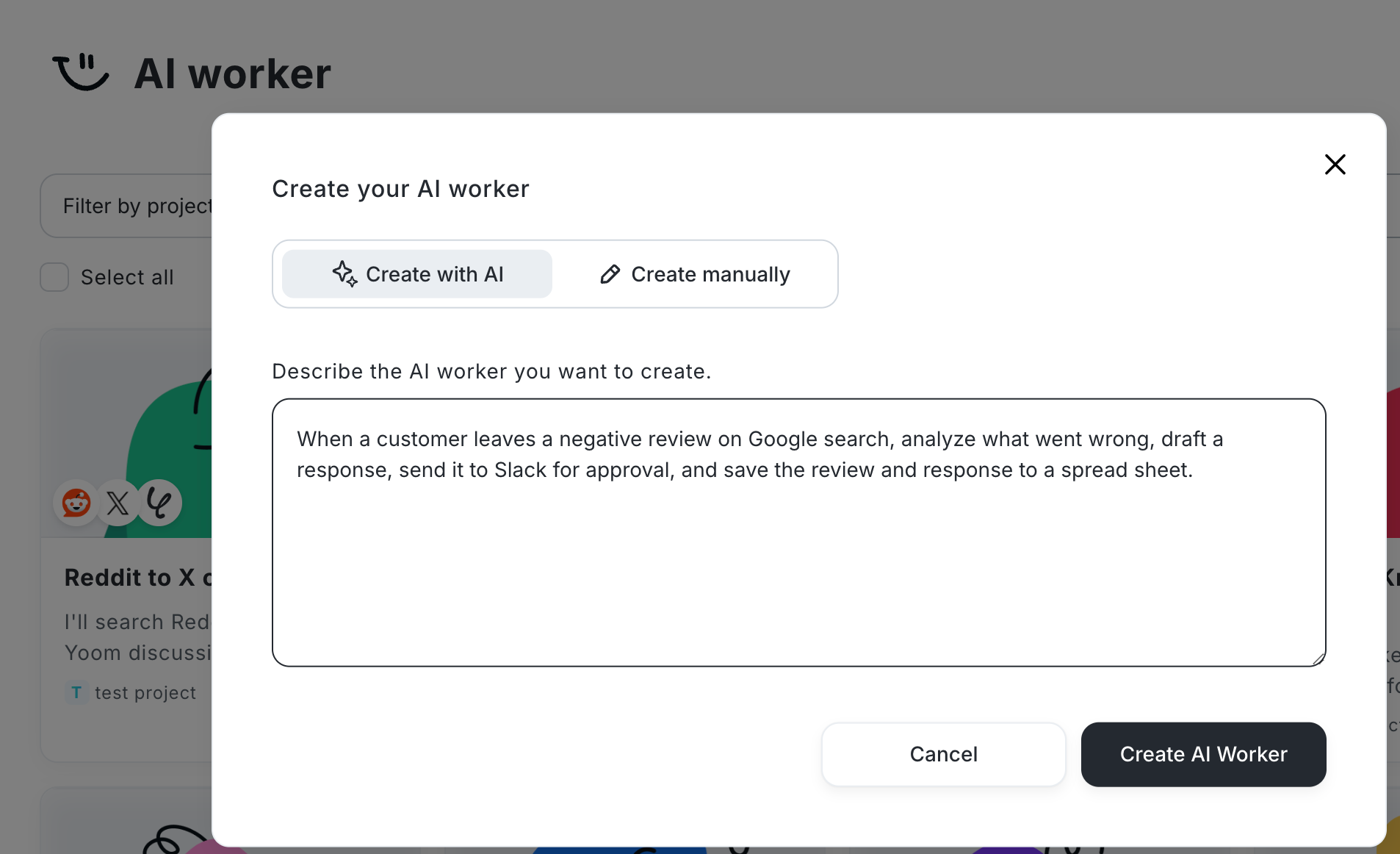
“When a customer leaves a negative review on Google, analyze what went wrong, draft a response, send it to Slack for approval, and save the review and response to a spread sheet.”
AI Worker can connect the different steps—from understanding the review to preparing a response and passing it to the right people.
Example 2: Social Content Researcher & Switcher
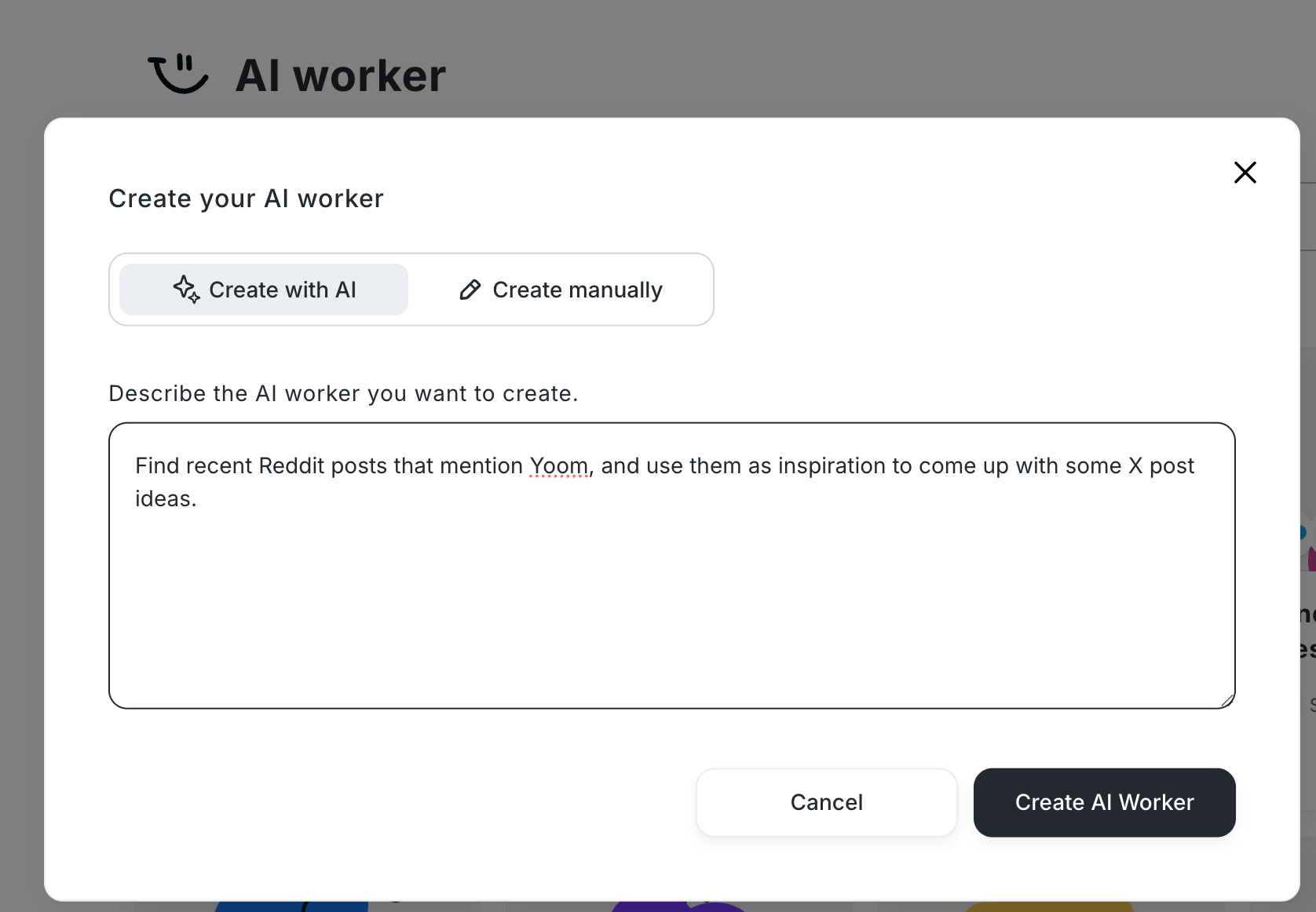
“Find recent Reddit posts that mention Yoom, and use them as inspiration to come up with some X post ideas.”
Instead of using AI only to analyze information, you can generate X posts.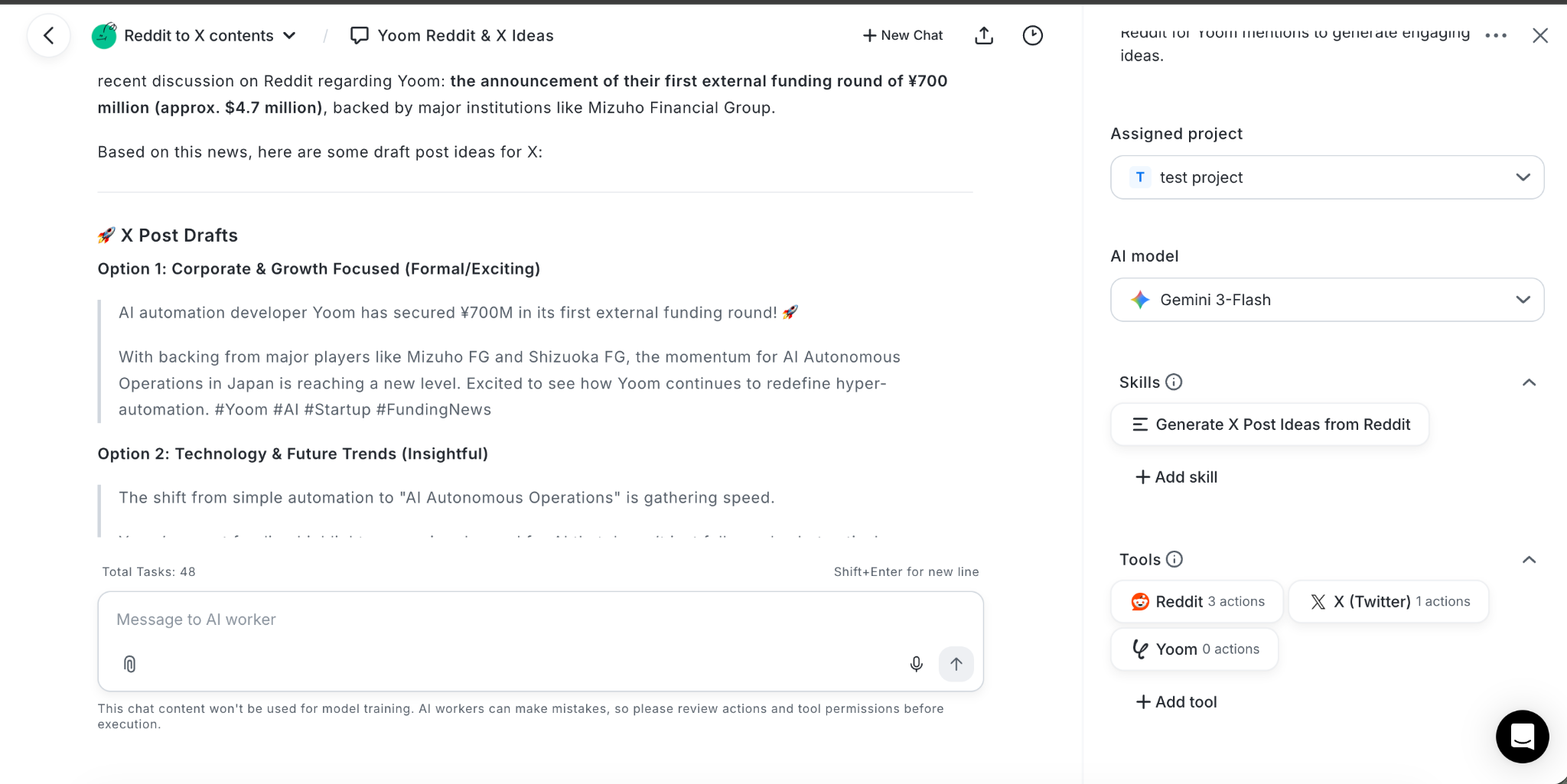
The important part is that you don't have to start with a perfectly defined workflow. Start with an idea. Tell AI Worker what you want to happen, and see what you can build.
From social media signals to customer responses and internal processes, AI can be more than a tool for generating content. It can become the starting point for getting work done.
Related AI Worker Templates


Analyze product information, generate X and Instagram post ideas tailored to your brand image, and automatically save them to Google Sheets. This AI worker reduces the workload of social media management and helps you maintain platform-specific content, making it ideal for streamlining content creation while preserving your brand’s identity.
■Recommended for
- Social media marketers managing many products or frequent posts who spend significant time creating platform-specific post ideas
- PR teams who want to maintain their brand identity while continuously delivering effective content tailored to X and Instagram
- EC site operators who want to streamline everything from organizing product information to creating post copy with limited resources
■AI worker setup flow
- Configure the AI worker’s basic settings as a social media post copywriter, including its “Name” and “Role.”
- Connect Google Sheets as a My App integration and configure an action to record post ideas. You can also switch to another social media management tool or notification app as needed.
- Review the “Skills” that serve as instructions for the AI worker, and adjust them to match your brand image and operational guidelines.
■Customization points for this AI worker
- Freely rewrite the “Tone & Manner” definition under “#Classification and Decision Criteria” in the skill to match your brand character. For example, specify a concrete tone such as “【Friendly and approachable】: Use everyday language, emojis, and a warm, relatable voice” to help the AI generate copy that better aligns with your brand.
- Customize how the “experience (benefit)” customers gain through the product is emphasized under “#Procedure” in the skill, for example, “Copy that highlights a sense of achievement and growth.” Providing specific instructions on the strengths you want to communicate helps generate more persuasive post ideas.
- When recording data in Google Sheets, freely set the destination folder ID and sheet name to match your internal management format.
■Notes
- Connect Google Sheets with Yoom.
- For basic AI worker settings, see “【AI Worker】Basic Setup Guide.”
- The number of AI workers that can run simultaneously, the number of AI workers you can create, and the available AI models vary depending on your subscription plan.
- The apps and operations available within AI workers are subject to the same usage limits as Flowbots.
- Please note that AI workers consume tasks during test runs in the same way as during production runs. For details, see “【AI Worker】How Task Executions Are Calculated.”
- AI workers are more likely to perform appropriate processing when skills are configured in detail. For details, see “【AI Worker】How to Create a Manual.”



This AI worker analyzes submitted insight images, extracts key metrics, and automates logging to Google Sheets and reporting to Slack. Eliminate manual entry errors and streamline aggregation, so marketing teams can focus on analyzing influencer campaigns.
Use this AI worker to automatically analyze insight images submitted by influencers, extract key metrics such as reach and engagement, record them in Google Sheets, and report them to Slack—all in one flow.
- Marketing teams struggling to convert large volumes of insight images received from influencers into data
- Agencies looking to streamline insight data aggregation and reporting so they can spend more time analyzing campaign performance
- Project leaders who use Google Sheets and Slack to share the latest post performance with their teams
- Define the AI worker’s name, role, and other basic settings.
- Connect Google Drive, Google Sheets, and Slack through My Apps, then configure them as tools for the AI worker.
- Create and edit the AI worker’s skills (instructions). Adjust the detailed steps based on your company’s operational rules and the metrics you want to extract.
- Adjust the metrics to extract under “# Steps” in the skill to focus on the metrics most important to your organization, such as saves and profile visits.
- Set your tracking sheet ID and Slack channel ID for reporting under “# Google Sheets to Use” and “# Notification Channel to Use” in the skill.
- Edit the notification structure in the “# Report to Slack” section to freely customize the reporting format so your team can easily understand it.
- Connect Google Drive, Google Sheets, and Slack with Yoom.
- For basic AI worker settings, see “[AI Worker] Basic Setup Guide.”
- The number of AI workers that can run simultaneously, the number of AI workers you can create, and the available AI models vary depending on your subscription plan.
- The apps and operations available within AI workers are subject to the same usage limits as Flowbots.
- Please note that AI workers consume tasks during test runs just as they do during production runs. For details, see “[AI Worker] How Task Executions Are Calculated.”
- AI workers can perform tasks more accurately when skills are configured in detail. For details, see “[AI Worker] How to Create Skills (Formerly Manuals).”
- The maximum downloadable file size is 300 MB. Depending on the app’s specifications, the limit may be less than 300 MB.
- For details on the file size limits for triggers and each operation, see “About File Size Limits.”