・
AI Workflow Automation: How to Build Smarter Business Processes

AI is becoming part of everyday work. Employees use AI to summarize documents, analyze data, draft content, research information, and make decisions faster.
But adding AI to individual tasks does not automatically make a business process smarter.
McKinsey’s 2026 State of AI survey found that 80% of respondents say AI has improved their individual productivity, while only 37% report a positive impact on their organization’s EBIT. The gap suggests that the challenge is no longer simply getting people to use AI—it is finding ways to embed AI into the way work actually gets done.
The organizations seeing the greatest impact are taking a broader approach. Rather than simply adding AI to existing processes, AI high performers are redesigning workflows around what AI can do. Nearly three-quarters of these organizations report fundamentally redesigning workflows because of their AI use.
This is where AI workflow automation comes in.
Instead of treating AI as a standalone tool, businesses can build workflows where AI handles tasks that require understanding, analysis, or generation, while automation handles predictable steps and people remain involved where human judgment is needed.
The result is not simply an AI-powered task, but a smarter end-to-end business process.
From AI Tools to AI-Powered Workflows
Many businesses already use AI for individual tasks such as researching information, extracting data, or generating content. The next step is to connect those AI capabilities to the processes surrounding them.
Consider a simple document-processing task. An employee might upload a document to an AI tool, extract the information they need, and then manually enter the results into another system. With an AI-powered workflow, the process can instead be triggered automatically when the document arrives, have AI extract and interpret the information, and then pass the results to the appropriate applications or people.
The difference is not simply whether AI is used. It is where AI sits within the process and what happens before and after the AI step.
A typical AI-powered workflow might look like:
Trigger → AI processing → Data or application update → Human review → Next action
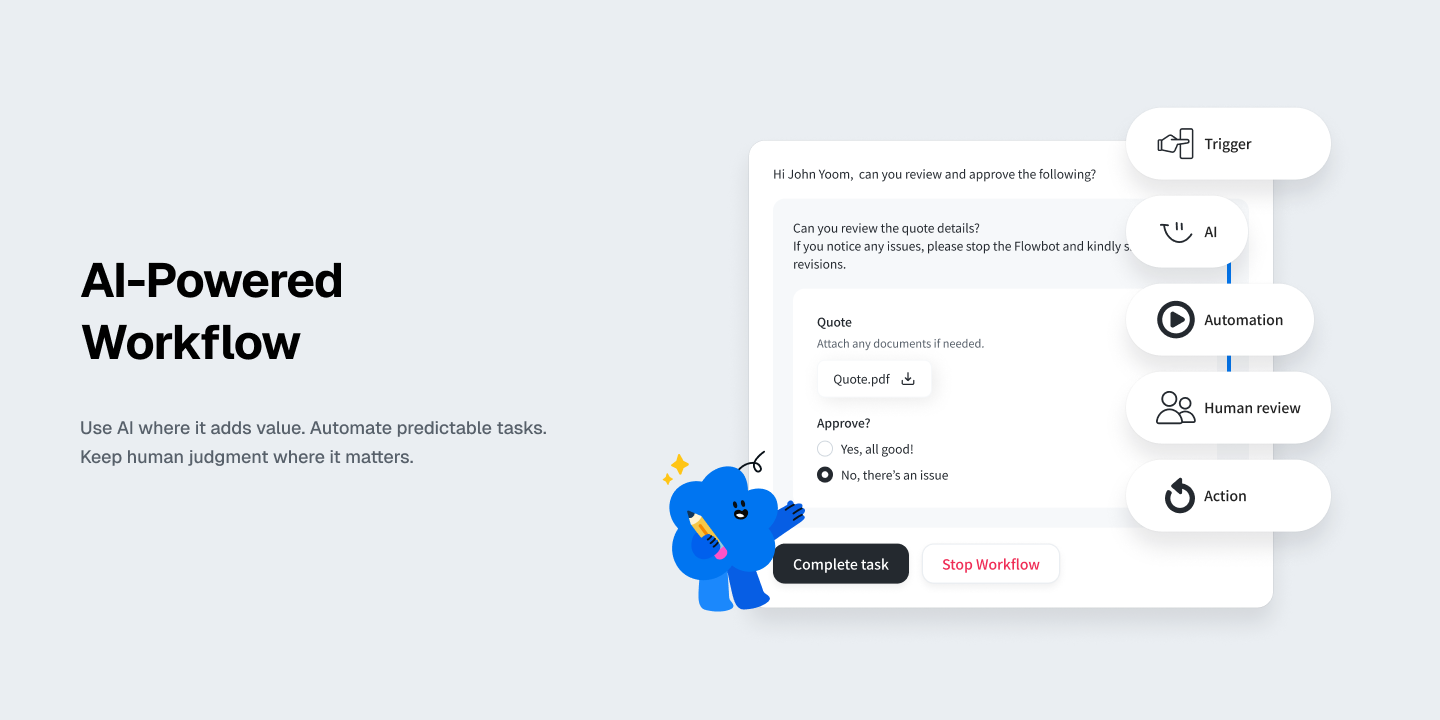
This approach allows AI to handle tasks that require interpretation or generation while the rest of the workflow continues automatically.
What AI Tasks Are Most Commonly Used in Workflows?
AI can support a wide range of tasks within an automated workflow. But which AI capabilities are actually used most often in real-world business workflows?
Yoom’s first-party usage data from 2026 provides a look at how AI Workers are being used in production workflows. Among Yoom’s built-in AI capabilities, the most frequently used include:
- Web search and research
- OCR for images and PDFs
- Retrieving content from specified URLs
- Retrieving database records
- Retrieving lists of database records
- X search
These use cases show that AI is often used within workflows for tasks that involve finding, reading, extracting, and interpreting information—areas where AI can handle work that is difficult to manage with fixed rules alone.
At the same time, AI is only one part of these workflows. The information processed by AI can be passed to other applications and systems, triggering the next step automatically. Rather than replacing an entire process, AI can handle the parts that require understanding or interpretation, while automation connects those outputs to the actions that follow.
How to Design an AI-Powered Workflow
Building an AI-powered workflow does not mean handing an entire business process over to AI. A more effective approach is to assign each part of the process to the technology or person best suited to handle it.
A typical AI-powered workflow can be structured as:
Trigger → AI → Automation → Human review → Action
Each step has a different role:
- Trigger: Starts the workflow when an event occurs, such as receiving an email, submitting a form, uploading a file, or updating a record.
- AI: Handles tasks that require understanding, interpretation, research, classification, extraction, or generation.
- Automation: Takes care of predictable, rule-based actions such as updating records, moving data between applications, sending notifications, or creating documents.
- Human review: Handles decisions, approvals, exceptions, or other situations where human judgment is important.
- Action: Completes the next business step based on the AI output, automated processing, or human decision.
The key is not to use AI for every step. Instead, AI should be used where it adds value, while predictable tasks remain automated and important decisions can stay with people.
Example: Combining AI, Automation, and Human Review
Consider an email management workflow. Instead of asking AI to handle the entire process, each part of the workflow can be assigned to the most appropriate component:
Email received → AI categorizes importance → Workflow assigns it to the right person → Human reviews and responds
In this example, AI handles the part that requires understanding and classification, while automation takes care of routing the information. The person responsible can then review the email and decide how to respond.
This approach makes AI part of an end-to-end process rather than treating it as a standalone tool.
Try a similar workflow with Yoom:


■Overview
The workflow "When an email is received in Gmail, categorize its importance with Gemini and assign it to the responsible person" aims to streamline email management.
■Who We Recommend This Template For
- Business professionals who use Gmail regularly and spend a lot of time processing emails
- Team leaders who are unsure about determining the importance of emails and are looking for efficient task allocation
- IT personnel who want to automate their operations using Gemini
- Small business owners who want to improve the speed and quality of email responses
- Customer support teams who feel challenged by the allocation of email responses among multiple team members
■Benefits of Using This Template
- Time-saving in email processing: Automatically analyzing and categorizing emails received in Gmail eliminates the need for manual sorting.
- Faster response: Automatic assignment to the responsible person based on importance allows for timely responses.
- Improved consistency in operations: Unified standards for importance assessment with Gemini ensure consistent response quality across the team.
- Increased productivity: With automated processes, team members can focus on more creative tasks.
Build AI-Powered Workflows with Yoom
AI-powered workflows can combine AI with existing business applications to handle tasks that require research, analysis, and decision-making, while automation takes care of the predictable steps that follow.
Yoom brings these capabilities together in a single workflow. With AI Worker, you can assign AI a specific role and provide instructions for how it should handle tasks within your business processes.
Example: AI-Powered Lead Qualification
Lead qualification can involve researching companies, evaluating them against your ideal customer profile (ICP), and determining how leads should be handled. These tasks can be time-consuming when performed manually for every lead.
With Yoom, you can configure an AI Worker as an MQL qualification specialist and connect it to the applications your team already uses, such as Salesforce and Slack.
This allows the AI Worker to evaluate leads based on consistent qualification criteria and established processes, reducing the variability that can result from relying on individual judgment alone.
Try this AI Worker template:



An AI worker that researches company websites using lead data in Salesforce and evaluates ICP fit based on your company’s guidelines. It also considers past activity history, then updates Salesforce and reports results to Slack—all in one workflow.
- Sales and marketing professionals who manually qualify large volumes of lead information stored in Salesforce and have limited time for core sales activities
- Team leaders who use their own MQL qualification criteria and want to evaluate lead potential consistently, prevent reliance on individual knowledge, and reflect results in Salesforce
- Organizational leaders who want to streamline everything from company research and outreach angle creation to Slack reporting to speed up initial engagement after acquiring leads
- Set basic information for the AI worker as an MQL qualification specialist, including its "Name" and "Role."
- Connect Salesforce and Slack, which are used within the AI worker, to Yoom through My Apps, then configure each action.
- In "Skills," which serve as instructions for the AI worker, configure your MQL qualification criteria and notification destination details.
- Adjust skill details as needed based on your workflows and operating rules to customize the AI worker for your actual environment.
- In the "#MQL Qualification Criteria" section of the skill, define your target company profile and exclusion criteria in detail. This helps the AI accurately understand your operating rules and make highly accurate fit assessments.
- In the "#Notification Channel to Use" section of the skill, enter the Slack channel ID for reporting. Specify a channel dedicated to a particular project or team to enable smooth information sharing.
- In the summary generation in Step 4, specify "outreach angles" tailored to your company's strengths and the solutions you want to propose. This provides output that sales representatives can use directly.
- Connect Salesforce and Slack with Yoom.
- Salesforce is available on the Mini plan and above. If you are on the Free or Personal plan, Flowbot operations and Data Connect configured for Salesforce will result in errors.
- Paid plans, including the Mini, Team, and Success plans, offer a two-week free trial. During the free trial, you can use apps subject to plan restrictions. For more details, see the Pricing Plans page.
- For basic AI worker settings, see "[AI Worker] Basic Setup Guide."
- The number of AI workers that can run simultaneously, the number of AI workers you can create, and the available AI models vary depending on your subscription plan.
- Apps and operations available within AI workers are subject to the same usage limits as Flowbots.
- AI workers consume tasks during test runs in the same way as production runs. For details, see "[AI Worker] How Task Executions Are Calculated."
- Configuring skills in detail helps AI workers perform the appropriate processes. For details, see "[AI Worker] How to Create Skills (Previously Manuals)."
AI workflow automation is not about replacing every step of a business process with AI. The goal is to combine AI, automation, and human judgment in the places where each works best.
With Yoom, AI can be integrated into the business applications and processes your team already uses, allowing you to move from using AI for individual tasks to embedding it into end-to-end workflows.