・
Why AI Adoption Is Falling Short Despite Record AI Investment

AI investment is accelerating at an unprecedented pace.
Gartner forecasts that worldwide spending on artificial intelligence will reach $2.52 trillion in 2026, a 44% increase from the previous year. At the same time, AI adoption is becoming increasingly widespread across businesses.
A 2026 survey of nearly 6,000 senior business executives by the National Bureau of Economic Research (NBER) found that 69% of firms actively use AI. AI is no longer an experimental technology used by a small group of early adopters. For many businesses, it is already part of everyday work.
Yet there is a striking gap between AI adoption and measurable impact.
In the same NBER study, 90% of executives reported no impact from AI on their firm's employment or productivity over the previous 3 years.
So, if businesses are investing more in AI and actively adopting it, why isn't that adoption consistently translating into measurable business impact?
AI Adoption Challenges: Why Businesses Struggle to Put AI Into Practice
Adopting AI does not automatically mean transforming the way a business operates.
For many organizations, the first step toward AI adoption is simply giving employees access to AI tools. Employees may use generative AI to write emails, summarize documents, analyze information, or generate ideas. These applications can save time on individual tasks, but they do not necessarily change the broader workflow around those tasks.
This creates an important distinction: using AI and integrating AI into business processes are not the same thing.
AI is often used as a standalone tool
One common challenge is that AI is still treated as a separate tool rather than part of an existing business process.
For example, an employee might receive an inquiry, copy the message into an AI tool, ask AI to classify or summarize it, and then manually transfer the result to a CRM, spreadsheet, or internal communication tool.
The AI may perform its part of the task efficiently. But the surrounding process remains manual.
In this scenario, AI adoption improves one step of the workflow without necessarily improving the workflow itself.
Manual work remains around AI
Another challenge is the amount of work that happens before and after AI is used.
Employees still need to collect information, move data between applications, review AI-generated outputs, notify other team members, update records, and take follow-up actions.
As a result, the productivity gains from AI can be limited by the manual processes surrounding it.
The problem is not necessarily that AI is incapable of doing more. Rather, AI may not yet be connected to the systems and processes where the actual work takes place.
From AI Adoption to AI-Powered Workflows
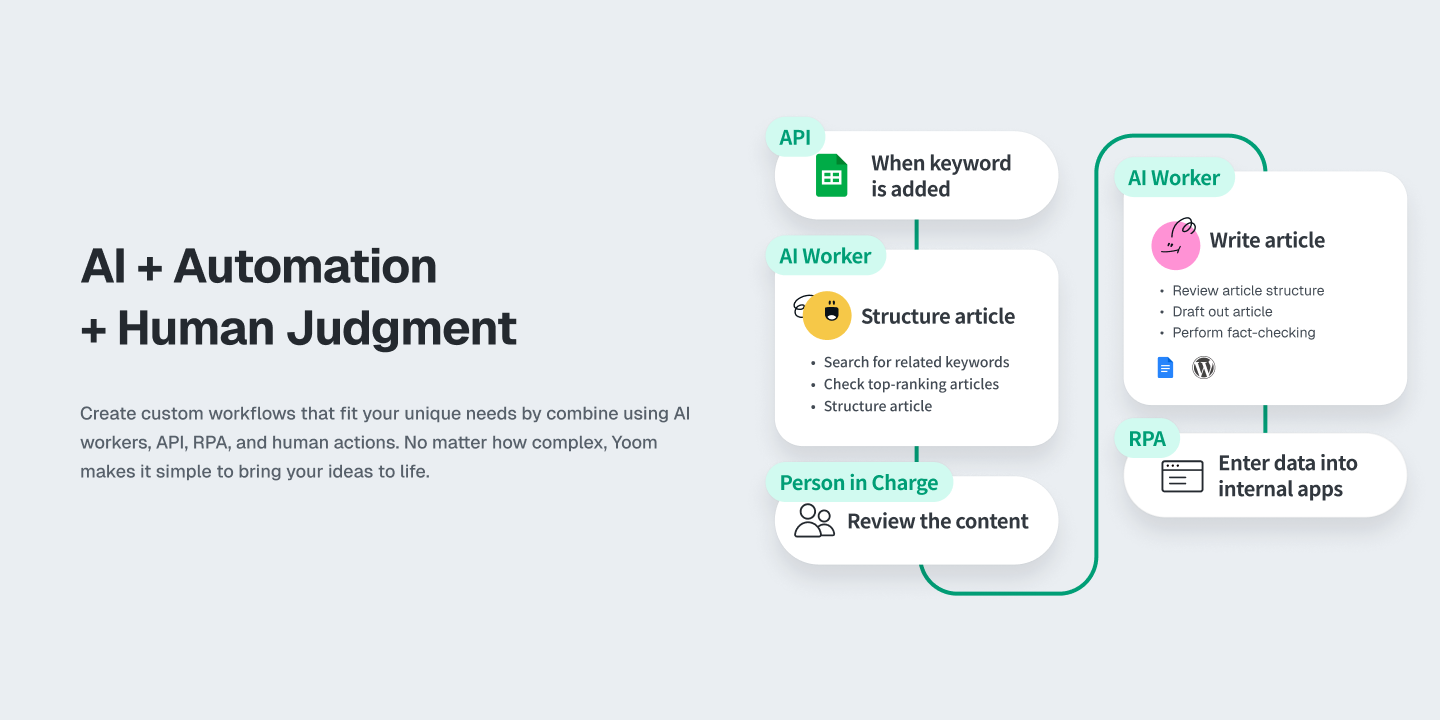
If simply adopting AI is not enough to transform business processes, the next step is to integrate AI into the workflows where work already happens.
An AI-powered workflow connects AI capabilities with the applications, data, and actions that make up a business process. Instead of asking employees to use AI separately and then manually act on its output, AI becomes one part of a broader workflow.
For example, AI can analyze incoming information, classify a request, extract key details, summarize a document, or generate a response. Once the AI completes its task, other steps in the workflow can happen automatically—such as updating a record, sending a notification, routing the request to the right person, or triggering the next process.
This creates a division of roles between AI and automation.
AI can handle tasks that require understanding, judgment, or generation, while automation can handle predictable, rule-based actions.
Reducing Dependence on Individual AI Knowledge
There is another benefit to embedding AI directly into workflows:it can reduce reliance on individual users' knowledge of how to use AI and their prompting techniques.
When employees interact directly with AI tools, the quality and format of the output can vary depending on how each person writes their prompts, interprets the results, and performs follow-up actions. Even when employees use the same AI tool, the process can produce different results from person to person.
By embedding AI into a predefined workflow, organizations can standardize how information is provided to AI and how its output is handled. Employees do not necessarily need to decide how to prompt the AI each time. Instead, the AI step can follow the same predefined instructions and process as part of the workflow.
This can make AI-assisted processes more consistent and reproducible across users, reducing the degree to which outcomes depend on individual prompting skills.
The goal is therefore not simply to introduce AI into the workplace, but to make AI part of how work gets done—while making the process more consistent and less dependent on individual users.
As AI adoption continues to expand, this shift—from using AI as a tool to embedding AI into workflows—may become increasingly important for turning AI capabilities into measurable business value.
How Businesses Are Using AI in Their Workflows
What does AI adoption actually look like when AI is embedded into everyday business processes?
To see what AI adoption looks like in practice, we analyzed workflow data from Yoom users. The data shows that businesses are already using AI across a wide range of routine tasks—not simply as a standalone tool, but as part of larger workflows.
Here are some of the most common business tasks where AI is being used within Yoom workflows:
- Attendance, inventory, and data checks — Analyzing and checking data
- Sales list creation and company research — Researching and organizing information
- Invoice and document processing — Extracting information with OCR
- Meeting and call transcription and summarization — Transcribing and summarizing conversations
- Customer inquiries and first-line support — Classifying and responding to inquiries
- News and information research — Collecting and summarizing information
- Translation and text transformation — Translating and rewriting content
- Review and feedback responses — Generating responses
- Email sorting and classification — Classifying incoming emails
- Contract review — Extracting and reviewing key information
Based on Yoom workflow data from users in Japan.
These use cases reveal a common pattern: AI is often used for tasks that require understanding, classification, extraction, summarization, or generation.
For example, AI can extract information from an invoice, classify an incoming email, summarize a meeting, or research a company. These are tasks that traditionally require people to read and interpret information before deciding what to do next.
But AI is only one part of these workflows.
Once AI has completed its task, the workflow can continue with predefined actions. Information can be transferred to another application, a record can be updated, a notification can be sent to the appropriate person, or the next process can be triggered automatically.
This combination allows businesses to divide work according to what AI and automation each do best.
AI handles tasks that require interpretation or generation. Automation handles predictable, repeatable actions. Humans can step in when judgment or approval is needed.
This is particularly important for business processes that involve large amounts of information but follow a relatively consistent sequence of steps.
For example, an invoice workflow might use AI to read and extract information from a document, then automatically pass the extracted data to an accounting system. A customer support workflow might use AI to classify an inquiry and then route it to the appropriate team. A sales workflow might use AI to research companies and organize the findings before adding them to a sales database.
These examples show that AI adoption does not have to mean replacing an entire business process with AI.
Instead, businesses can start by identifying specific steps where AI can add value and then connect those steps to the rest of the workflow.
The result is a more practical approach to AI adoption: rather than asking where AI can be used in isolation, businesses can ask where AI can improve an existing process.
Try an AI Worker with Yoom:

This AI worker searches and extracts relevant information from your storage when users ask a question, then responds with a summary and source URLs. It eliminates the need to review PDFs, sales meeting notes, manuals, and other internal resources one by one—ideal for sales and operations teams looking to reduce research time, or teams that want to share and log search results in chat tools, databases, and more.
- Teams with a large volume of internal documents who spend too much time searching for necessary information
- Sales and operations teams who need to reference sales meeting notes and manuals across multiple documents
- Teams that want to consolidate, share, and log knowledge search results in chat tools or databases
- "Skills" are:
- Instructions that enable the AI worker to perform tasks. For detailed setup instructions, see "[AI Worker] How to Create Skills (Formerly Manuals)."
- "Tools Used" are:
- Tools the AI worker uses to perform tasks. Simply tell the AI which tools your company regularly uses, and you can freely customize where data is retrieved from and where it is sent.
- The number of AI workers that can run simultaneously, the number of AI workers that can be created, and the available AI models vary depending on your subscription plan.
- The apps and operations available within AI workers are subject to the same usage limits as Flowbots.
- Please note that AI workers consume tasks during test runs in the same way as production runs. For details, see "[AI Worker] How Task Executions Are Calculated."
Human-AI Collaboration: Finding the Right Balance
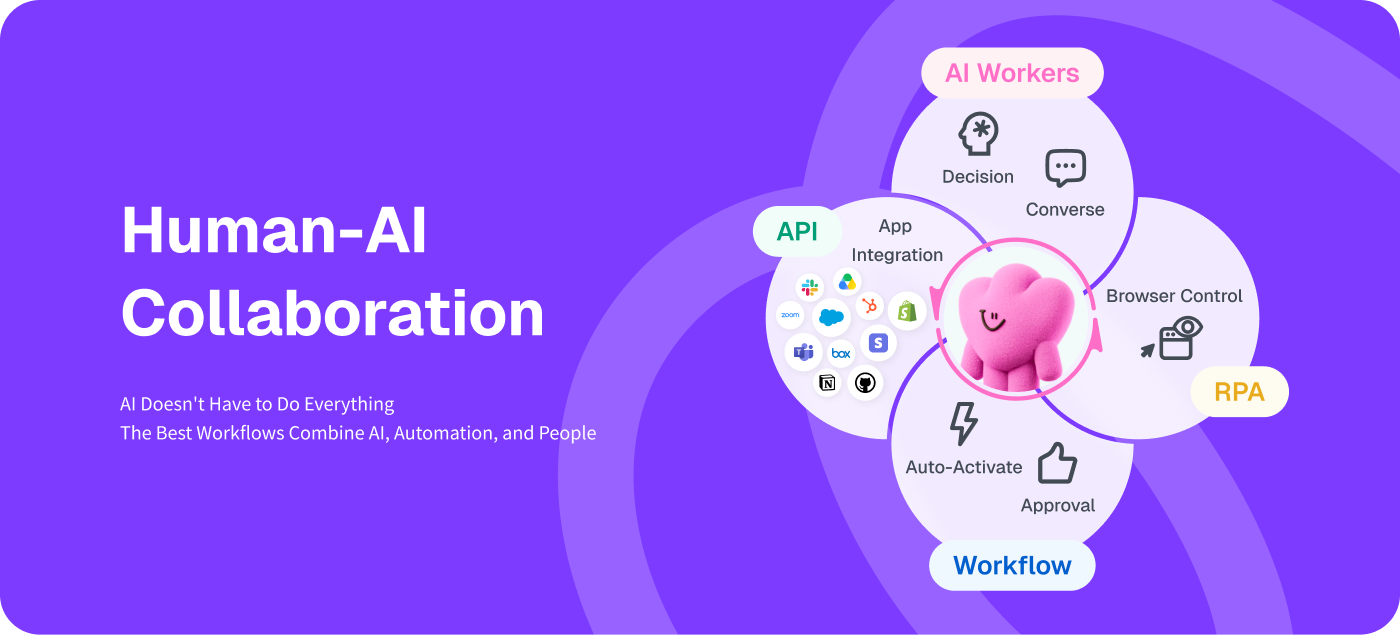
AI-powered workflows do not mean taking humans out of the process entirely. In many cases, the most effective approach is to combine AI, automation, and human judgment according to their respective strengths.
Yoom brings these capabilities together within a single workflow.
The goal of AI adoption is not simply to replace human work with AI. It is to combine the strengths of AI, automation, and people within the same workflow.
As businesses move beyond simply adopting AI tools, this kind of human-AI collaboration may be the next step toward making AI a practical part of how work gets done.
Try human-collaboration workflows with Yoom:


■Overview
The workflow "When an email is received in Gmail, categorize its importance with Gemini and assign it to the responsible person" aims to streamline email management.
■Who We Recommend This Template For
- Business professionals who use Gmail regularly and spend a lot of time processing emails
- Team leaders who are unsure about determining the importance of emails and are looking for efficient task allocation
- IT personnel who want to automate their operations using Gemini
- Small business owners who want to improve the speed and quality of email responses
- Customer support teams who feel challenged by the allocation of email responses among multiple team members
■Benefits of Using This Template
- Time-saving in email processing: Automatically analyzing and categorizing emails received in Gmail eliminates the need for manual sorting.
- Faster response: Automatic assignment to the responsible person based on importance allows for timely responses.
- Improved consistency in operations: Unified standards for importance assessment with Gemini ensure consistent response quality across the team.
- Increased productivity: With automated processes, team members can focus on more creative tasks.

■Overview
The flow "Receive an email containing specific keywords and send a DM notification to the person in charge on Slack" is a business workflow to ensure important emails in Gmail are not missed and can be responded to promptly.
■Recommended for
- Business professionals who use Gmail regularly and want to prevent missing important emails
- Managers who want to facilitate smooth communication within the team using Slack
- Business personnel who want to automate tasks based on specific keywords and improve efficiency
- Companies that want to strengthen the integration between email and chat tools and speed up information sharing
■Benefits of using this template
- Enables quick response: You will be promptly notified when important emails arrive, improving response speed.
- Improves information sharing efficiency: Information is shared with the entire team through Slack, facilitating smooth collaboration.
- Automates tasks: Automatic notifications based on specific keywords eliminate the need for manual checks, saving time.