・
Top AI Email Automation Solutions in 2027

AI email automation can mean very different things depending on the tool you use. Some solutions help you summarize emails or draft replies directly in your inbox. Others provide a dedicated email experience, while automation platforms connect email with AI and the other business tools you already use.
So which approach is right for you?
In this guide, we'll compare three ways to use AI email automation, explain what each approach can and cannot do, and look at how businesses are actually using AI in email workflows based on anonymized Yoom workflow data.
3 Ways to Automate Email with AI
There are three main approaches to AI email automation: built-in AI assistants, dedicated AI email clients, and custom no-code workflows.
Each approach solves a slightly different problem.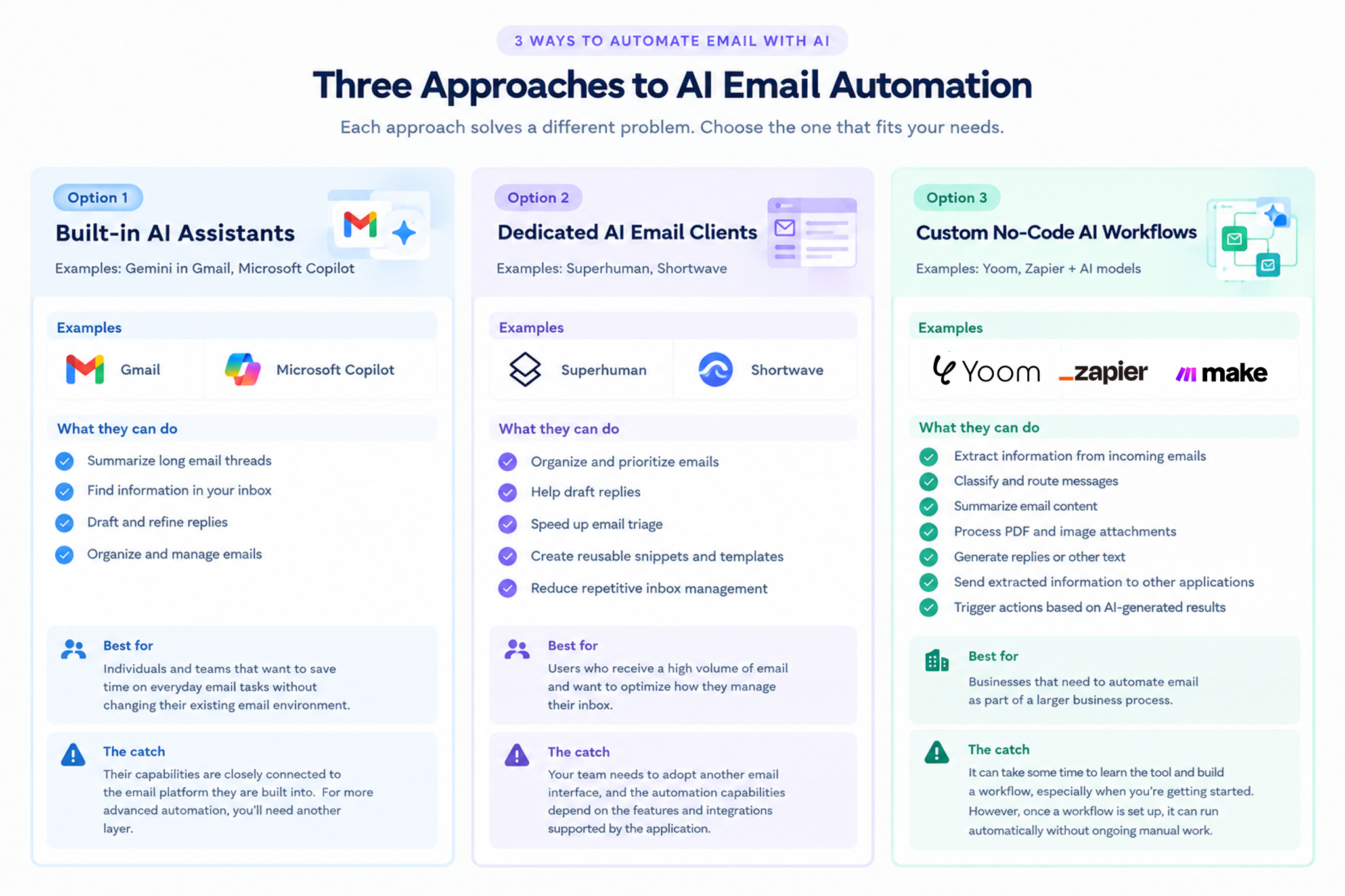
Option 1: Built-in AI Assistants
Tool Examples: Gemini in Gmail, Microsoft Copilot
AI assistants built into popular email platforms are one of the easiest ways to get started with AI email automation.
✨ What they can do
- 📝 Summarize long email threads
- 🔎 Find information in your inbox
- ✍️ Draft and refine replies
- 📂 Organize and manage emails
👥 Best for
Individuals and teams that want to save time on everyday email tasks without changing their existing email environment.
⚠️ The catch
Their capabilities are closely connected to the email platform they are built into. If you want to extract information from an email and send it to a CRM, update a database, notify a team in Slack, or trigger different actions based on the email content, you'll generally need another automation layer.
Option 2: Dedicated AI Email Clients
Tool Examples: Superhuman, Shortwave
Dedicated AI email clients provide a new email experience designed around productivity and AI.
✨ What they can do
- 📥 Organize and prioritize emails
- ✍️ Help draft replies
- ⚡ Speed up email triage
- 📋 Create reusable snippets and templates
- 🔄 Reduce repetitive inbox management
👥 Best for
Users who receive a high volume of email and want to optimize how they manage their inbox.
⚠️ The catch
Your team needs to adopt another email interface, and the automation capabilities depend on the features and integrations supported by the application.
Option 3: Custom No-Code AI Workflows
No-code automation platforms take a different approach. Instead of replacing your email client, they connect your existing email account with AI and the other applications used in your business.
✨ What they can do
- 🔎 Extract information from incoming emails
- 🏷️ Classify and route messages
- 📝 Summarize email content
- 📎 Process PDF and image attachments
- ✍️ Generate replies or other text
- 🔗 Send extracted information to other applications
- ⚙️ Trigger actions based on AI-generated results
🏢 Best for
Businesses that need to automate email as part of a larger business process.
⚠️ The catch
It can take some time to learn the tool and build a workflow, especially when you're getting started. The tradeoff is that once a workflow is set up, it can continue running automatically without requiring ongoing manual work.
Comparing AI Email Automation Solutions
The best AI email automation solution depends on what you want to automate.
Some tools focus primarily on improving the email experience. Others are designed to connect email with the rest of your business processes.
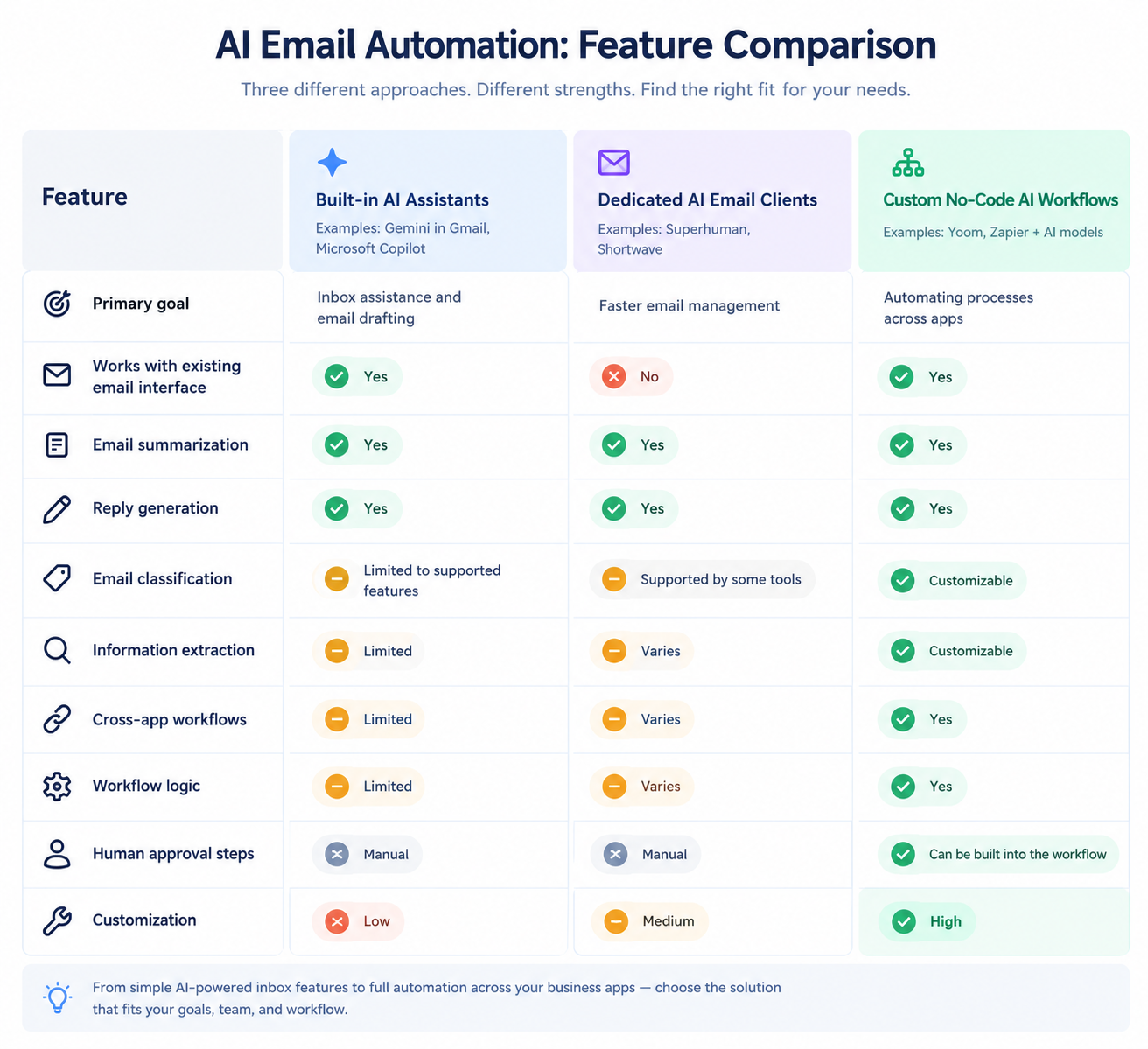
The three approaches differ mainly in their level of customization, cross-app capabilities, and how deeply they can be integrated into business workflows.
For everyday inbox tasks, built-in assistants and dedicated AI email clients can be useful. For processes that involve multiple applications, business rules, or structured data, custom no-code workflows provide more flexibility.
What Businesses Actually Automate with AI Email Workflows
AI email automation is often associated with automatically writing and sending replies.
But is that how businesses are actually using AI?
To explore this question, we analyzed Yoom workflow data from email-triggered automation workflows that were active during a 90-day period from June 18 to September 16, 2026.
The analysis excluded recipe-distribution workspaces and AI Workers and focused on customer usage.
Of these 2,813 email-triggered automation, approximately about 30% included an AI step.
The results reveal a different picture of AI email automation: AI is often used to process information inside emails and then pass that information to the next step of a business workflow.
Information Extraction Is the Most Common AI Task
Among AI-enabled email workflows, information extraction was the most common AI task.
- 🔎 Information extraction: 69.7%
- 📄 OCR: 14.4%
- 🔄 Data transformation: 11.3%
- 📝 Summarization: 11.3%
- ✍️ Text generation: 6.0%
*Percentages are based on the number of AI-enabled email-triggered templates and may not sum to 100% because a single template can use multiple AI tasks.
Information extraction was used in approximately 70% of AI-enabled email-triggered templates.
By comparison, text generation—including use cases such as generating email replies—was used in approximately 6% of templates.
This suggests that, in Yoom's workflow data, AI email automation is used more often to turn information contained in emails or attachments into structured data than to generate email text.
For example, an incoming email might contain:
- A customer inquiry
- An order number
- Product information
- Contact details
- Invoice information
- Other structured or unstructured business data
AI can extract the relevant information and pass it to the next step of the workflow.
AI Email Automation Goes Beyond the Inbox
The next question is what happens after AI processes an email.
Looking at the immediate step following an AI action in email-triggered workflows over the past 90 days, we analyzed the distribution by execution count. The percentages below represent each next-step type's share of all recorded immediate next-step executions following an AI action.
Next step after AI:
- 🤖 Another AI action: 28.6%
- 🔀 Conditional branching: 21.0%
- 🗄️ Database update: 18.3%
- 🔗 External app action: 12.1%
- ✅ Complete: 8.8%
- 🔄 Data formatting : 5.3%
- ⚙️ RPA :1.7%
- 📧 Email sending or replying : 0.6%
- 👤 Human review : 0.01%
This shows that AI is often one step within a larger workflow.
After an email is processed, the workflow may use the result to make a decision, update a database, trigger another AI task, or perform an action in another application.
By comparison, email sending or replying accounted for less than 1% of immediate next steps after an AI action.
In other words, AI email automation does not necessarily end with another email. AI can instead act as a processing step that moves information into the next stage of a business process.
Do You Need Human Approval?
Human approval was the immediate next step after an AI action in just 0.01% of executions in the 90-day dataset.
This does not mean that human oversight is unnecessary in every AI workflow. Rather, it shows that many workflows are designed to continue automatically after AI processing.
When the AI has enough context and the outcome follows predefined rules or business requirements, a separate approval step may not be necessary. Human review can instead be added selectively to workflows where judgment or verification is important.
The goal is not to remove humans from every process, but to place human judgment where it adds the most value.
Try AI Email Automation with Yoom
The examples above show how AI can process email content and trigger actions beyond the inbox. You can try similar workflows with Yoom's ready-made templates.
Automate Email Tasks with Gemini
Use Gemini to summarize, classify, and organize incoming emails as part of your existing workflows.
■Overview
This workflow allows you to summarize and notify the content in Gemini when you receive an email in Outlook. This automation enables you to catch up on necessary information accurately while saving time.
With Yoom, you can easily connect apps without the need for programming.
■Recommended for
- Business professionals who receive a large number of emails daily and want to manage their content efficiently
- Those who want to incorporate email summarization using Gemini
- Those who want to automate notifications for important emails by integrating with Outlook
- Those interested in automating business workflows and want to utilize Yoom
- Leaders who want to facilitate smooth information sharing within their team
■Benefits of using this template
- Accurate understanding of email content
・Gemini automatically summarizes and efficiently organizes information - Never miss important notifications
・Notifications are provided along with summaries, allowing for immediate necessary actions - Improved work efficiency
・The automated workflow reduces the hassle of manual processing


■Overview
The workflow "When an email is received in Gmail, categorize its importance with Gemini and assign it to the responsible person" aims to streamline email management.
■Who We Recommend This Template For
- Business professionals who use Gmail regularly and spend a lot of time processing emails
- Team leaders who are unsure about determining the importance of emails and are looking for efficient task allocation
- IT personnel who want to automate their operations using Gemini
- Small business owners who want to improve the speed and quality of email responses
- Customer support teams who feel challenged by the allocation of email responses among multiple team members
■Benefits of Using This Template
- Time-saving in email processing: Automatically analyzing and categorizing emails received in Gmail eliminates the need for manual sorting.
- Faster response: Automatic assignment to the responsible person based on importance allows for timely responses.
- Improved consistency in operations: Unified standards for importance assessment with Gemini ensure consistent response quality across the team.
- Increased productivity: With automated processes, team members can focus on more creative tasks.

■Overview
The workflow "Summarize email content with Gemini and add it to Google Sheets" streamlines information management.
By summarizing and adding it to the database, the readability of the information is improved.
■Recommended for
- Those who frequently use email for business operations
- Those who need to quickly summarize and share email content
- Those who manage data and information using Google Sheets
- Those who want to reduce manual summarization and input errors to work more efficiently
- Those who receive a large volume of emails and want to work efficiently even in a busy work environment
■Benefits of using this template
By using the flow to summarize email content with Gemini and add it to Google Sheets, you can gain the following benefits.
First, since information processing is done quickly, the task of automatically organizing important email content into Google Sheets becomes smoother.
This reduces manual input tasks and improves work efficiency.
Additionally, centralized management of summarized information makes information sharing easier and strengthens team collaboration.
Furthermore, reducing manual input errors increases data accuracy.
This improves work productivity and allows you to allocate extra time to other important tasks.
Automate Email Tasks with ChatGPT
ChatGPT can also be used to process incoming emails and connect the results to other business processes.

■Overview
The workflow "Receive inquiry emails in Outlook, generate responses with ChatGPT, convert to PDF, and reply" is a business workflow designed to improve efficiency and quality in customer support.
By utilizing this flow, emails received in Outlook are automatically analyzed by ChatGPT, which generates appropriate responses.
■Recommended for
- Customer support representatives who want to efficiently handle a large volume of inquiry emails
- IT administrators who want to integrate with Outlook and streamline operations through automation
- Companies that want to leverage ChatGPT to provide quick responses and improve customer satisfaction
- Sales teams that want to standardize replies in PDF format and simplify document management
- Executives who want to advance process automation and allocate human resources to other important tasks
■Benefits of using this template
- Efficient inquiry handling: Automatically generating responses and creating PDFs reduces response time.
- Consistent quality maintenance: Response generation by ChatGPT ensures a constant level of quality.
- Reduction of work errors: Automation prevents human errors and ensures accurate replies.
- Reduction of workload: Automating routine tasks reduces staff burden, allowing focus on other important tasks.
■Overview
The flow "Summarize emails with ChatGPT and translate with Dify upon receipt" is a business workflow that automates the understanding of email content and multilingual support.
By utilizing this flow bot, you can automate email summarization and translation, enabling efficient email processing.
■Recommended for
- Business professionals who receive a large number of emails daily and want to quickly grasp their content
- Teams or individuals involved in international operations who require communication in multiple languages
- Those looking to streamline email processing and reduce the burden of manual summarization and translation
- Executives or managers in companies with multilingual interactions who wish to advance business automation
■Benefits of using this template
Receiving a large volume of emails daily requires effort to understand their content and translate them if necessary.
Especially when conducting business globally, the need for multilingual support increases.
This flow allows for automatic summarization and translation of emails, significantly reducing the time spent on manual tasks.
Additionally, the integration of ChatGPT and Dify ensures high-quality summarization and translation.

■Overview
This workflow allows for seamless organization and sharing of information by automatically summarizing received emails with ChatGPT and recording the organized information in Notion. This automation enables accurate understanding of important email content and simplifies information sharing across the team.
With Yoom, you can easily connect apps without the need for programming.
■Recommended for
- Business professionals who receive a large volume of emails daily and want to manage their content efficiently
- Those who want to organize information using ChatGPT and Notion
- Project leaders who want to automatically summarize email content and share it with their team
- IT personnel considering the automation of business workflows
■Benefits of using this template
- Save time on email tasks
・Automating the email summarization process reduces the time spent on manual work. - Centralized information management
・Summarized content is automatically recorded in Notion, allowing for easy verification and management of information in one place. - Improved team sharing efficiency
・Sharing on Notion makes it easier for the entire team to access the latest information. - Efficient and accurate summarization
・With ChatGPT's AI capabilities, it is possible to efficiently produce summaries that accurately extract important points.
Explore More AI Email Automation Templates
These are just a few examples of how AI can be used to process email content and connect it with other business tasks.