・
Procurement Automation | Simplify Purchase Orders and P2P Workflows

Managing purchase orders (POs) and supplier payments can take a lot of time when your team relies on paper forms, email, and spreadsheets.
For example, when an employee needs to buy office supplies or software, they may have to email their manager and wait for approval.Once the purchase is approved, someone creates a purchase order as a PDF, sends it to the supplier, and later enters the invoice details into accounting software by hand.
These manual tasks slow down purchasing, increase the risk of errors, and make it harder to track company spending.
Traditional procurement software can help, but some platforms are expensive, take months to set up, and are difficult for employees to use.
Procurement automation offers another way to manage purchasing.By connecting the apps your team already uses, you can automate tasks such as collecting purchase requests, getting approvals, creating purchase orders, and processing invoices.
This approach also helps businesses automate their procure-to-pay (P2P) process—the series of steps from requesting a purchase to paying the supplier—without having to replace all their existing software.
What the Data Shows: How Businesses Use Procurement Automation
This analysis examines active procurement workflows on Yoom to explore how businesses automate purchase orders and supplier management.
The findings cover processing times, the apps businesses connect, and how they use AI to check invoices.
1. Purchase Orders Processed in a Median of 12 Minutes
Manual purchasing can take days when employees have to wait for email replies, create documents, and enter the same information into multiple systems.
With procurement automation, these steps can happen in one connected workflow.
Here are the processing times observed across the analyzed workflows: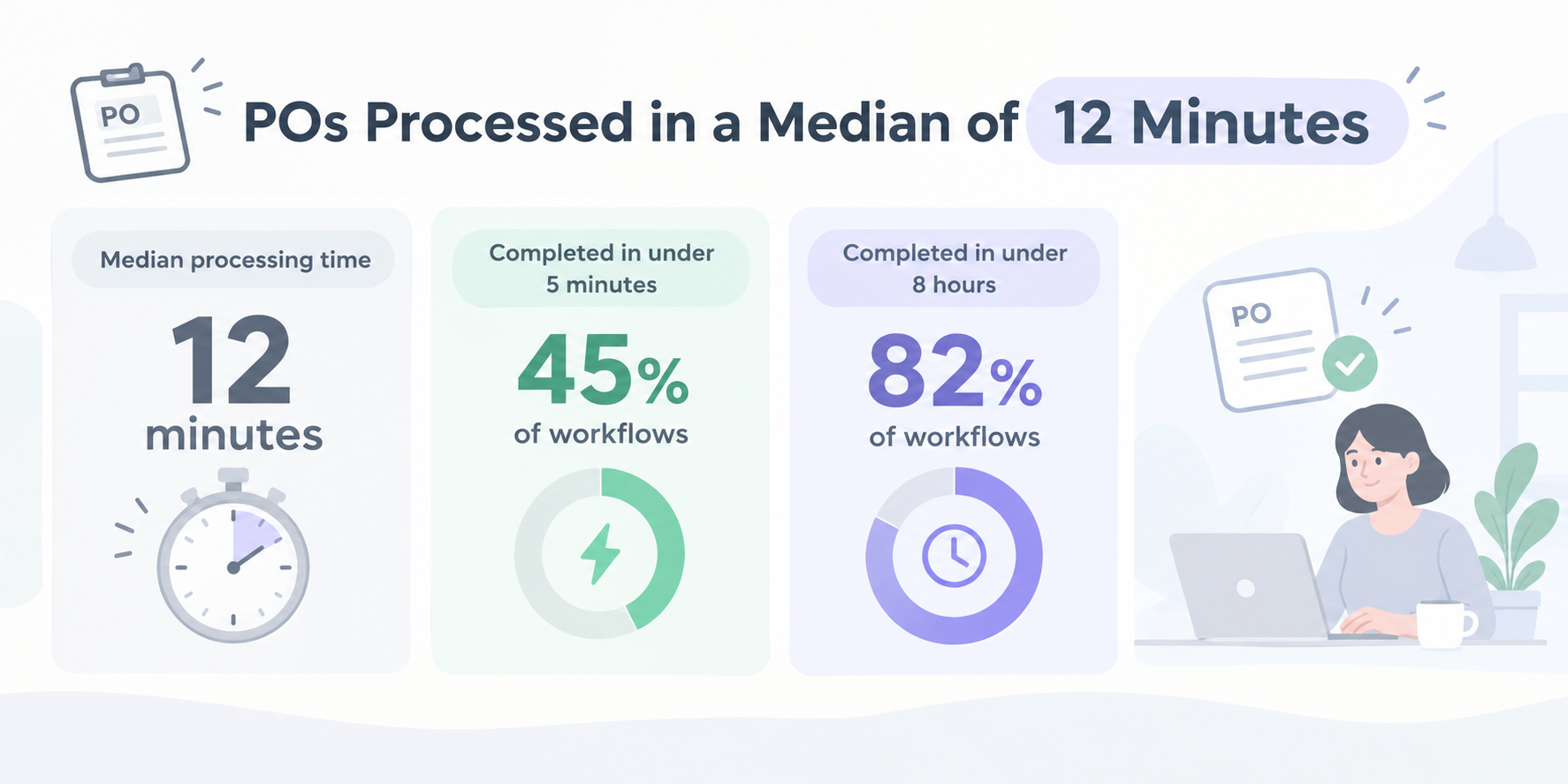
- Median processing time: 12 minutes
- Completed in under 5 minutes: 45% of workflows
- Completed in under 8 hours: 82% of workflows
For example, when an employee submits a purchase request, their manager can receive a notification in Slack or Microsoft Teams. The manager can approve or reject the request, and the system can automatically create a purchase order PDF and email it to the supplier.
This reduces the need to follow up on emails or create documents manually.
2. How Businesses Build P2P Automation Workflows in Practice
A purchasing process often involves several apps. One collects purchase requests, another handles approvals, and others create documents or store financial records.
In the analyzed workflows, each purchasing process included an average of 7.4 steps.
Two common setups stood out.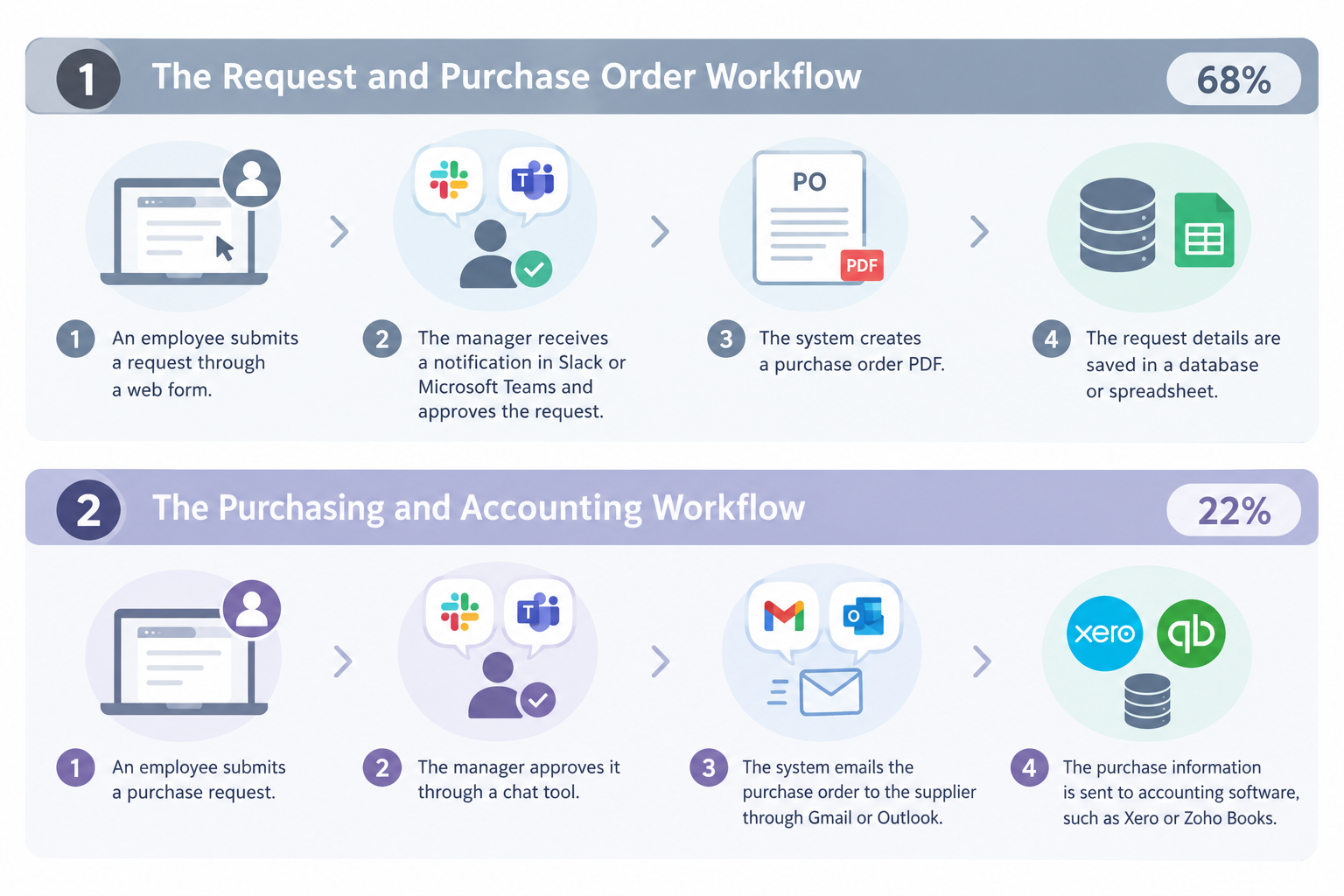
①The Request and Purchase Order Workflow (68% of Workflows)
This setup focuses on collecting requests, getting approval, and creating purchase orders.
- An employee submits a request through a web form.
- The manager receives a notification in Slack or Microsoft Teams and approves the request.
- The system creates a purchase order PDF.
- The request details are saved in a database or spreadsheet.
This workflow helps teams manage purchases in a consistent way and keep a record of each request.
②The Purchasing and Accounting Workflow (22% of Workflows)
This setup connects purchasing with supplier communication and accounting.
- An employee submits a purchase request.
- The manager approves it through a chat tool.
- The system emails the purchase order to the supplier through Gmail or Outlook.
- The purchase information is sent to accounting software, such as Xero or Zoho Books.
By connecting these apps, businesses can reduce duplicate data entry and keep purchasing records up to date.Related Automation Templates:


■Overview
The flow "Upload files to Microsoft SharePoint after approval when a file is created in OneDrive" is a business workflow that automates the file approval process and management of storage locations.
This helps maintain consistency in file management and reduces the effort required for approval tasks.
■Recommended for
- IT personnel in companies that use OneDrive and Microsoft SharePoint on a daily basis
- Team leaders who find the file approval process time-consuming
- Owners of small and medium-sized enterprises considering workflow automation
- Project managers who want to centralize file management across multiple projects
- Office staff who find manual file transfers and approval tasks cumbersome
■Benefits of using this template
- Efficiency in approval tasks: By automating the process from file creation to approval and uploading to Microsoft SharePoint, the manual effort can be reduced.
- Improved consistency in file management: Using Microsoft SharePoint as a centralized storage location facilitates smooth file sharing across the team.
- Error prevention: Automation reduces human errors, enabling accurate file management.
- Effective use of time: Automating repetitive tasks allows employees to focus on more important work.
- Flexible integration: By utilizing Yoom's API integration feature, it is easy to integrate with other SaaS applications.

■Overview
This is a flow where once a file is stored in Google Drive, it receives approval and is sent using Gmail integration.
■Recommended for
1. Those who need to manage and process forms from client companies
・Sales assistants and accounting staff
・Office staff and office managers
2. Companies using Google Drive
・General affairs department, office staff, and customer service personnel
・Accounting and HR personnel
3. Those looking to reduce manual input tasks and automate processes
・Owners of small and medium-sized enterprises aiming for operational efficiency
・General affairs and office staff with many data entry tasks
・Marketing personnel utilizing digital tools for operations
■Benefits of using this template
・By automating the process from approval to email sending triggered by file storage, it reduces manual work and improves operational efficiency.
・The automated completion of the process helps prevent errors from manual input.
■Notes
Please integrate Yoom with both Google Drive and Gmail.
3. AI Matches Invoices to Purchase Orders with a 91.2% Success Rate
When a supplier sends an invoice, the finance team needs to check that the billed items and amounts match the original purchase order and the goods or services received.
This process is known as three-way matching. It helps businesses identify incorrect charges and avoid paying invoices that do not match their purchase records.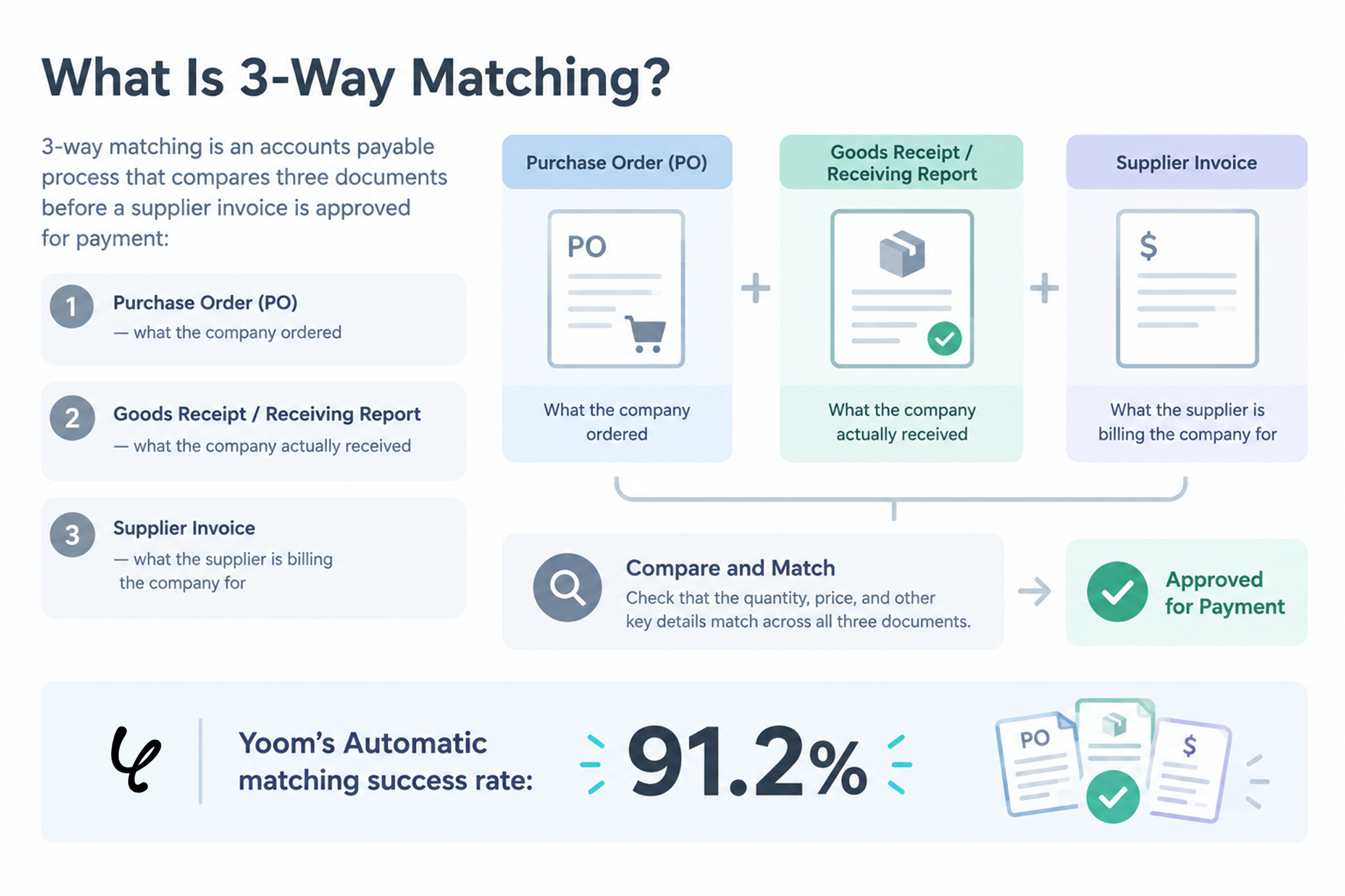
The analysis found the following:
- Workflows using AI for three-way matching: 18.5% of analyzed enterprise workflows
- Automatic matching success rate: 91.2%
In these workflows, AI-powered optical character recognition (AI-OCR) reads information from invoices. The system then compares the extracted details with purchase orders and other records stored in a database.
For invoices that match, the system can continue processing without someone having to check every detail manually.
The remaining 8.8% of invoices may require manual review when the automatic matching process cannot identify a match.
This can happen when the item names on a purchase order and an invoice differ significantly, such as when a supplier uses an abbreviation that was not used in the original purchase order.
By handling invoices that match automatically, AI reduces the amount of manual checking and allows employees to focus on cases that need closer attention.
How Different Industries Use Procurement Automation
Our analysis found that procurement workflows were commonly used in three industries: manufacturing, IT and startups, and construction and real estate.
Although all three use procurement automation to reduce manual work, their workflows differ depending on their business needs. Manufacturing companies focus on inventory management, IT companies prioritize fast approvals, and construction firms need to manage purchasing requests and related documents across projects.
Here is how procurement automation works in each industry.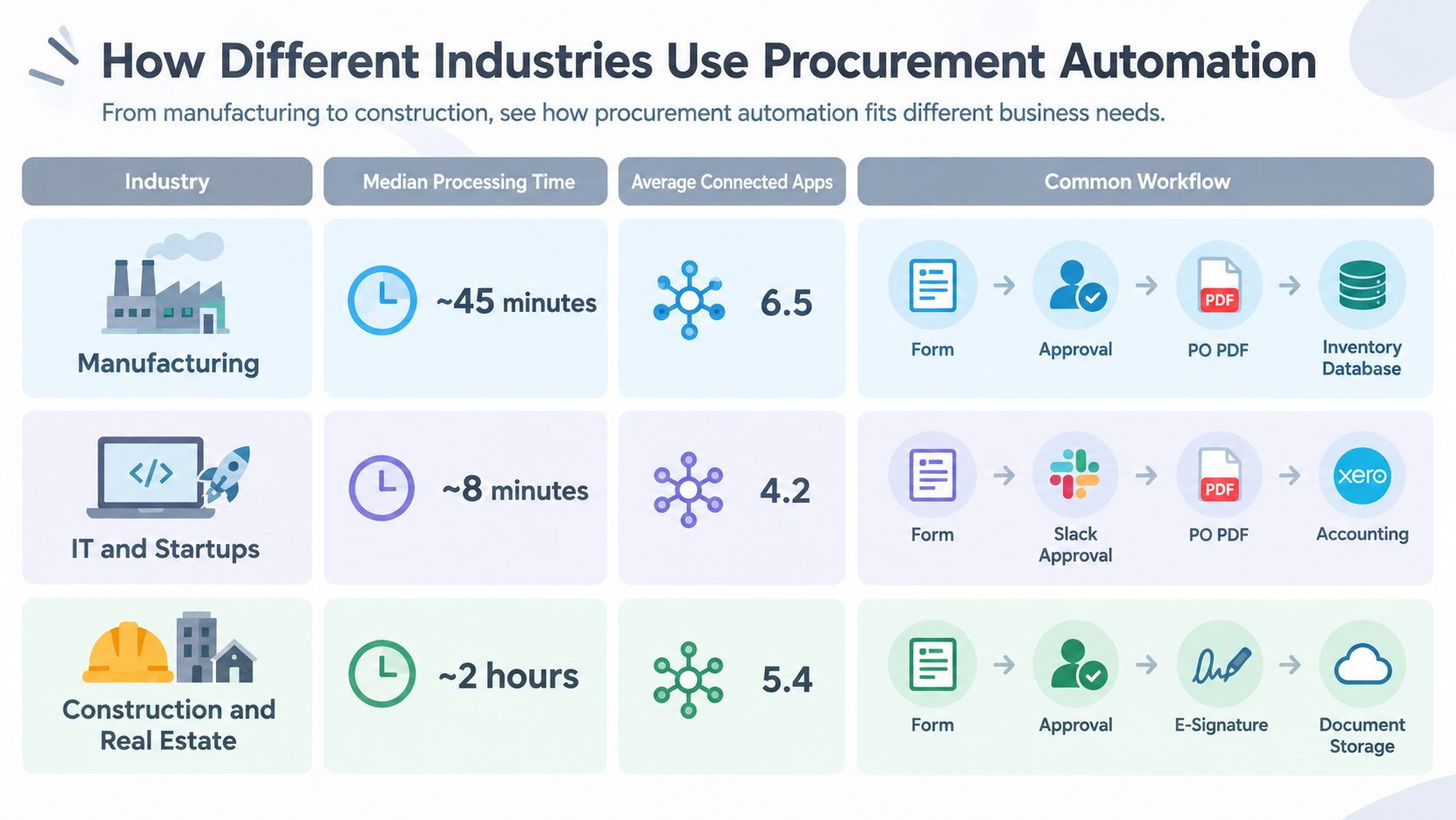
- Manufacturing
- Median Speed: ~45 minutes
- Connected Apps: 6.5
- Common Workflow: Form → Approval → PO PDF → Inventory Database
- IT & Startups
- Median Speed: ~8 minutes
- Connected Apps: 4.2
- Common Workflow: Form → Slack Approval → PO PDF → Accounting
- Construction & Real Estate
- Median Speed: ~2 hours
- Connected Apps: 5.4
- Common Workflow: Form → Approval → E-Signature → Document Storage
Manufacturing: Connect Purchasing with Inventory Records
Manufacturing companies often need to check whether purchased materials and parts match their inventory records.
By connecting purchase requests, approval steps, and inventory databases, teams can keep purchasing information organized.
In the analyzed manufacturing workflows, 42.1% used AI for three-way invoice matching. This helps explain why invoice checking and record accuracy are important parts of purchasing automation in this industry.
IT and Startups: Make Purchase Approvals Faster
Technology companies often purchase software subscriptions, cloud services, and other tools.
When employees need approval for a purchase, waiting for email replies can slow down their work.
The analyzed IT and startup workflows had a median processing time of approximately 8 minutes. More than 80% used Slack or Microsoft Teams for approvals, according to the analyzed data.
Sending requests directly to a chat tool makes it easier for managers to review them without switching between multiple apps.
Construction and Real Estate: Manage Approvals and Documents Digitally
Construction companies may need to purchase materials, arrange subcontractor services, and manage documents from different project sites.
Connecting purchase requests with electronic signature tools, such as DocuSign or CloudSign, helps teams handle approvals and agreements digitally.
These workflows can also store purchase orders and related documents in a central location, making them easier to find when needed.
Procurement Automation Software: 4 Tools to Consider
The right procurement automation software depends on your company's needs.
Here are four options to consider.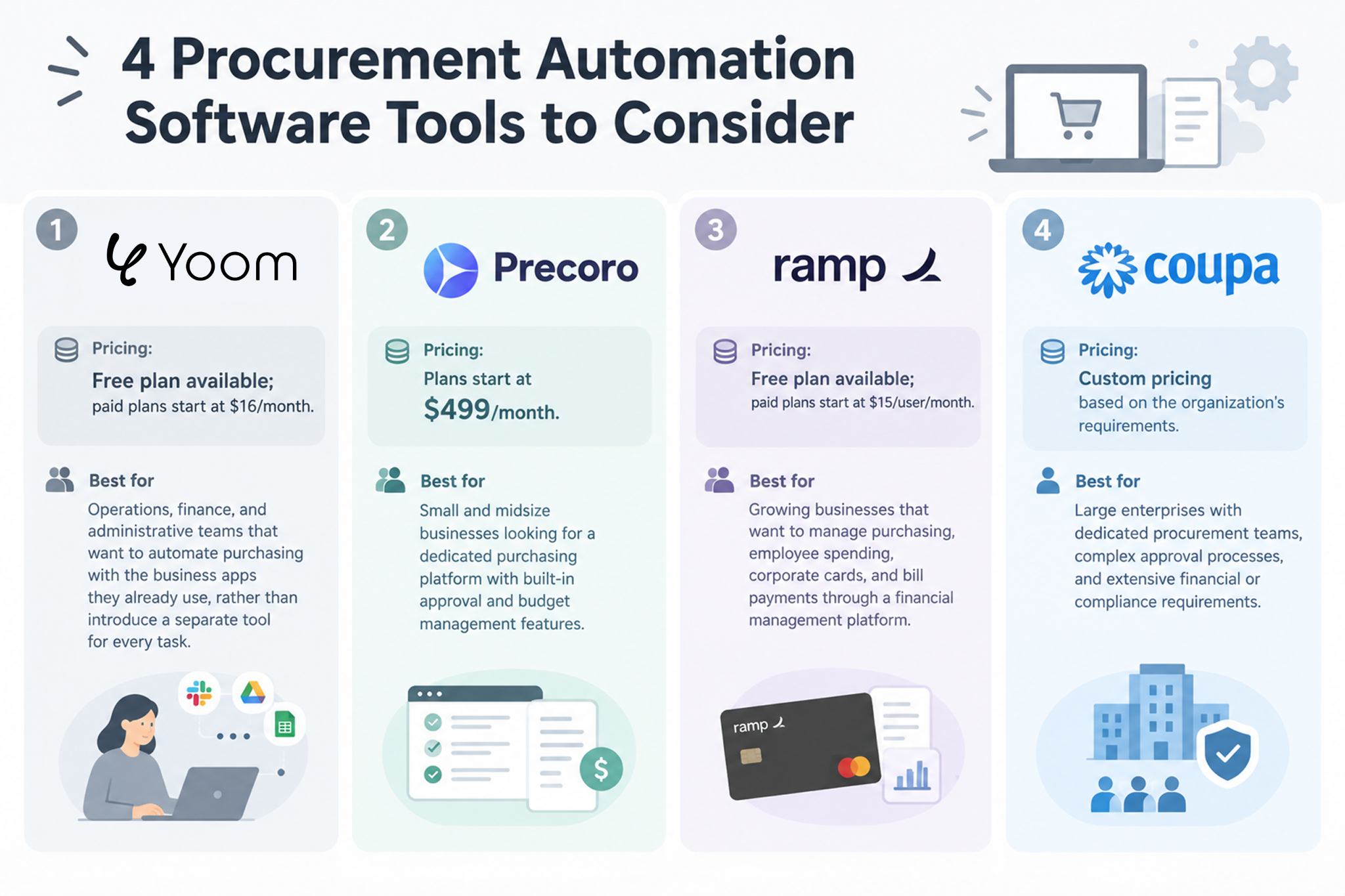
1. Yoom
Yoom is an AI-powered workflow automation platform that connects business apps and helps teams automate repetitive tasks without writing code.
Pricing: Free plan available; paid plans start at $16/month.
Main uses
- Collecting purchase requests through web forms
- Sending approval requests to Slack or Microsoft Teams
- Creating purchase order PDFs automatically
- Saving purchase information in a database
- Reading invoice details with AI-OCR and checking them against purchase records
Key features
Yoom connects the different steps of a purchasing process in one workflow. For example, when a manager approves a request, Yoom can create a purchase order, email it to the supplier, and update the company's records.
Teams can also use AI to read information from invoices and other documents.
More than 80% of workflows on Yoom are built by non-engineers, making the platform accessible to people without programming experience.
Best for
Operations, finance, and administrative teams that want to automate purchasing with the business apps they already use, rather than introduce a separate tool for every task.
2. Precoro
Precoro is procurement management software designed for small and midsize businesses.
Pricing: Plans start at $499/month.
Main uses
- Managing purchase requests and purchase orders
- Organizing supplier and product information
- Setting up approval processes
- Tracking purchasing budgets
Key features
Precoro focuses on purchasing management. It helps businesses organize requests, manage approvals, and keep track of spending within a dedicated procurement system.
The platform provides a centralized environment for managing procurement processes, making it easier for purchasing teams to standardize and monitor purchasing activities.
Best for
Small and midsize businesses looking for a dedicated purchasing platform with built-in approval and budget management features.
3. Ramp
Ramp is a financial management platform that combines corporate cards, expense management, accounts payable, and purchasing features.
Pricing: Free plan available; paid plans start at $15/user/month.
Main uses
- Managing corporate cards
- Tracking employee expenses
- Reviewing purchase requests
- Managing bills and payments
Key features
Ramp connects purchasing decisions with company spending. For example, businesses can manage purchase approvals alongside corporate card limits and expense records.
The platform brings purchasing, employee spending, cards, expenses, and payments into a broader financial management environment.
Best for
Growing businesses that want to manage purchasing, employee spending, corporate cards, and bill payments through a financial management platform.
4. Coupa
Coupa is an enterprise spend management platform designed to help large organizations manage purchasing and company-wide spending.
Pricing: Custom pricing based on the organization's requirements.
Main uses
- Managing purchasing across departments and regions
- Managing suppliers and purchasing processes
- Monitoring supply chain risks
- Supporting financial controls and compliance
Key features
Coupa offers a broad set of procurement and spend management features, including connections to enterprise systems such as SAP and Oracle.
Its range of features can support organizations with complex purchasing processes and requirements across multiple regions.
Best for
Large enterprises with dedicated procurement teams, complex approval processes, and extensive financial or compliance requirements.
New to P2P Automation? Start Small
When you're new to procurement automation, it can be tempting to automate the entire procure-to-pay (P2P) process at once. However, connecting every step—from purchase requests and approvals to purchase orders, invoice processing, and payment—can make the process feel overwhelming and make it easier to give up before your workflow is complete.
A better approach is to start with one part of the process and expand your workflow over time. For example, you could begin by automating purchase requests and approvals, then add purchase order generation and invoice processing as your needs evolve.
With Yoom, you don't have to build every workflow from scratch.There are two ways to get started, even if you're new to workflow automation:
- Start with a template: Choose a ready-made workflow for a common task, then customize it to fit your purchasing process.
- Let AI Worker help build your workflow: Describe the task you want to automate in plain language, and AI Worker helps you build a workflow around your requirements.
Starting with a smaller workflow lets you experience the benefits of automation sooner, then expand it step by step.
Related Templates:


■Overview
This is a flow to add purchasers to the SendGrid contact list when an order is placed on Shopify.
With Yoom, you can easily achieve this flow without the need for programming, as it allows for integration between apps.
■Recommended for
1. Those who run an e-commerce site on Shopify and conduct email marketing with SendGrid
・Those who want to improve work efficiency by automating the process of adding contacts to SendGrid, eliminating the need for manual entry
2. Those who want to conduct effective email marketing to purchasers
・Those who want to enhance customer engagement and increase repeat purchase rates
■Benefits of using this template
By implementing the flow [Add purchasers to the SendGrid contact list when an order is placed on Shopify], you can eliminate the manual task of registering customer information to SendGrid when an order is placed on Shopify. Customer information is automatically added to the SendGrid contact list, allowing you to quickly utilize it for email marketing strategies.
This enables you to efficiently conduct marketing activities and swiftly implement strategies that lead to increased sales.
■Notes
・Please integrate Yoom with both Shopify and SendGrid.
・Shopify is an app available only on the Team Plan and Success Plan. If you are on the Free Plan or Mini Plan, the operation and data connection of the flow bot you set will result in an error, so please be careful.
・Paid plans such as the Team Plan and Success Plan offer a 2-week free trial. During the free trial, you can use apps that are subject to restrictions.
・Triggers can be set to activate at intervals of 5 minutes, 10 minutes, 15 minutes, 30 minutes, or 60 minutes.
・Please note that the shortest activation interval varies depending on the plan.


■Overview
The flow "Generate a draft with ChatGPT based on Microsoft Teams messages and create a PDF" is a business workflow that automates document creation by leveraging communication within the team.
In this flow, ChatGPT automatically generates drafts based on the message content collected from Microsoft Teams and creates PDFs in Google Docs, achieving efficient and consistent document creation.
■Recommended for
- Team leaders who want to efficiently document interactions in Microsoft Teams
- IT personnel who want to automate document creation using ChatGPT
- Employees aiming to streamline operations by summarizing daily communications into PDFs
■Benefits of using this template
- Reduce document creation time: By automatically drafting and converting Microsoft Teams messages into PDFs, it reduces the time spent on manual compilation.
- Consistent quality documents: The drafts generated by ChatGPT ensure that documents maintain content consistency and quality.
- Simplify business processes: By automating the entire workflow, it eliminates complex procedures and supports efficient business operations.
Related AI Worker:



This AI worker autonomously reviews inventory data in Google Sheets, calculates optimal order quantities, generates purchase order PDFs, and creates Gmail email drafts. Improve inventory accuracy and reduce manual workload while streamlining ordering processes and preventing human error.
■Who this AI worker is for
- Team members who spend significant time every day checking inventory levels and calculating order quantities, and want to focus on their core work
- Operations managers who want to automate routine tasks such as creating purchase orders and preparing emails while minimizing human error
- Business owners who want to manage inventory and ordering in Google Sheets more efficiently and intelligently
■AI worker setup flow
- Configure basic settings such as the AI worker's "Name" and "Role" to define the purpose of the workflow.
- Connect Gmail and Google Sheets used in the AI worker to Yoom, then configure the required actions. You can also replace these with other apps you regularly use.
- Create and edit the "Skills" that serve as instructions for the AI worker to match your company's inventory management rules and operations.
■Customization points for this AI worker
- In the Skill, set the ID of your active Google Sheet in the "Inventory Management Sheet File ID" field.
- Adjust instructions related to the "Calculation Logic" in the Skill, such as "{Subject to 10% Consumption Tax}: Total of 'Quantity × Unit Price × 10%' for products where the tax rate in column P is 10%," to calculate more accurate order quantities based on your company's ordering criteria.
- Customize the Gmail "Message Body" instruction, for example, "Summarize the purchase order request in a professional tone," to generate email drafts that include your company's specified greetings and templates.
- Add detailed settings, such as consumption tax rates and calculation rules, to the Skill based on your company's accounting standards to create accurate documents tailored to your operations.
■Notes
- Connect Gmail and Google Sheets to Yoom.
- For basic AI worker settings, see "[AI Worker] Basic Setup Guide."
- The number of AI workers that can run simultaneously, the number of AI workers you can create, and the available AI models vary depending on your plan.
- The apps and operations available within AI workers are subject to the same usage limits as Flowbots.
- Please note that AI workers consume tasks during test runs in the same way as production runs. For details, see "[AI Worker] How Task Executions Are Calculated."
- AI workers are more likely to process tasks appropriately when Skills are configured in detail. For details, see "[AI Worker] How to Create a Manual."
- Please note that retrieving large volumes of data exceeding 20 items or performing loop processing within an AI worker may consume a significant number of tasks.

Automatically determine approval routes based on request details and manage the entire process—from notifying approvers and routing requests to the next approver to sending rejection notices, reporting completion, and recording approval history. Ideal for administrative and accounting teams managing expense reimbursements or purchase requests manually, as well as managers looking to streamline progress tracking for approval workflows with multiple steps.
In addition, set the people responsible for approvals as “Teammates” in advance so the AI worker can automatically send approval requests to the approvers it identifies.
- What are “Skills”?
They are the instructions the AI worker follows to perform tasks. For detailed setup instructions, see “[AI worker] How to Create Skills (formerly Manuals).” - What are “Tools”?
These are the tools the AI worker uses to perform tasks. Simply tell the AI which tools your company uses regularly, and you can freely configure where data is retrieved from and where it is sent.
- The number of AI workers that can run simultaneously, the number of AI workers you can create, and the AI models available to you vary depending on your plan.
- The apps and operations available within an AI worker are subject to the same usage limits as Flowbot.
- Please note that AI workers consume tasks during test runs just as they do during production runs. For details, see “[AI worker] How Task Execution Counts Are Calculated.”
FAQs
Q:What Is P2P Automation?
A:
Procure-to-pay (P2P) automation uses software and automated workflows to streamline the purchasing process, from purchase requests and approvals to purchase orders, invoicing, and payments.
In simple terms:
Request → Approval → Purchase Order → Receipt → Invoice → Payment
It connects procurement and accounts payable, helping businesses manage purchasing more efficiently and maintain visibility over spending.