・
Order-to-Cash (O2C) Automation Software: Automate O2C With Your Existing Tools

The order-to-cash (O2C) process covers everything that happens from receiving a customer order to receiving payment. It can include entering order details, creating and signing contracts, creating invoices, and recording payments.
For many companies, these tasks involve several different teams and software tools.Sales may use Salesforce or HubSpot, while finance may use QuickBooks or Xero. Contracts may be managed in DocuSign or PandaDoc.
When these tools are not connected, employees often have to copy information from one system to another. This can take time and increase the risk of mistakes.
Order to cash automation helps solve this problem. Instead of replacing all existing software with one large ERP system, companies can connect the tools they already use and automate the flow of information between them.
For example, when a sales deal is marked as won, an automated workflow can create the required contract, send it for signature, create an invoice after the contract is signed, and notify the finance team.
This approach allows companies to improve their O2C process without replacing their entire software stack.
How Modern Companies Use Order to Cash Automation
Based on an analysis of active workflows on Yoom, this benchmark shows how companies connect their existing software to automate the O2C process.
1. Companies Use Multiple Tools for O2C
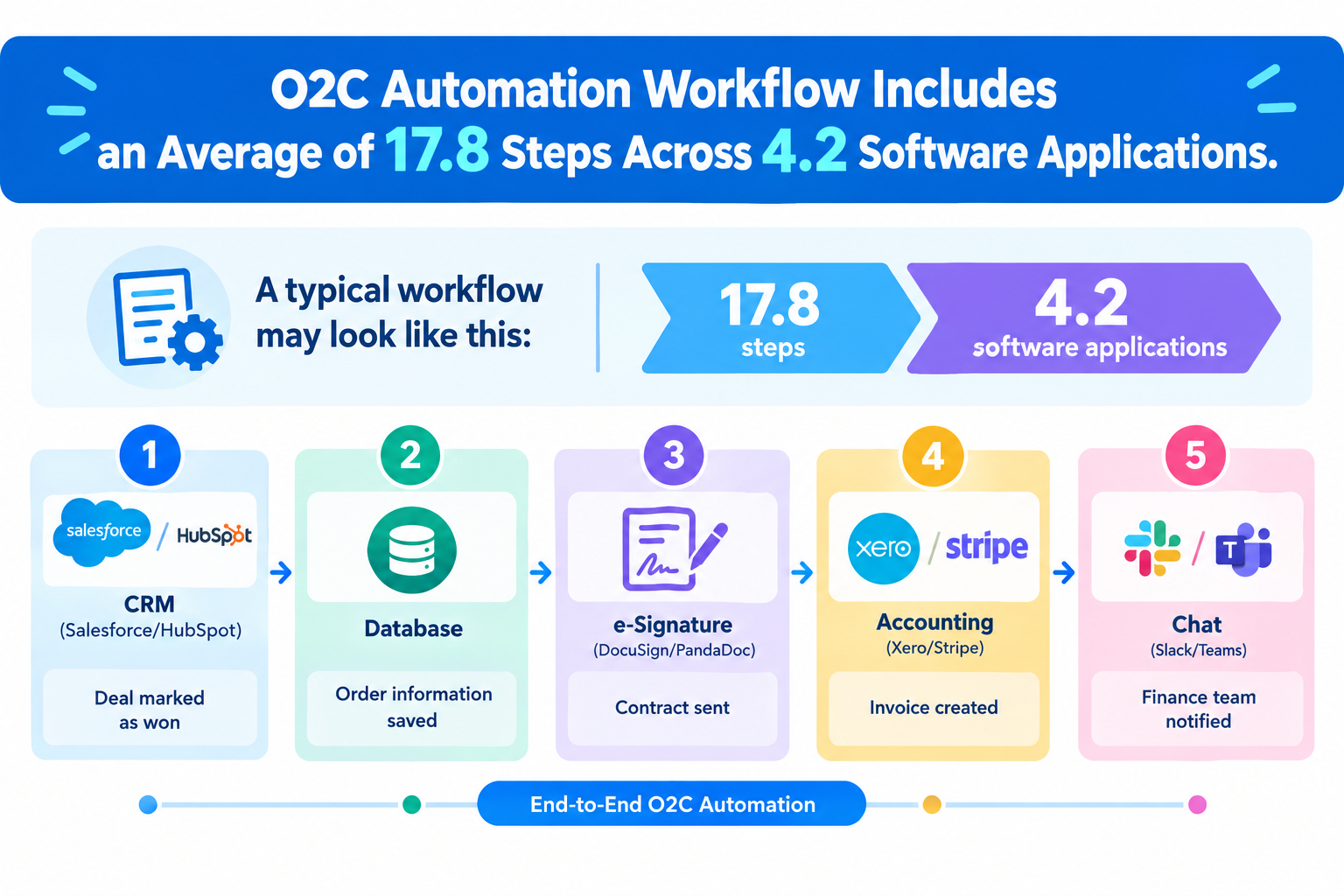
Companies rarely manage the entire order-to-cash process in one system.
Our data shows that a typical O2C automation workflow includes an average of 17.8 steps across 4.2 software applications.
Instead of moving everything into one system, companies often connect the tools they already use.
A typical workflow may look like this:
CRM (Salesforce/HubSpot) → Deal marked as won
→ Database → Order information saved
→ e-Signature (DocuSign/PandaDoc) → Contract sent
→ Accounting (Xero/Stripe) → Invoice created
→ Chat (Slack/Teams) → Finance team notified
With order to cash automation software, information can move between these systems automatically. Employees do not need to enter the same customer or order information multiple times.
Related O2C Templates:


■Overview
This is a flow to create a payment link from Salesforce to Stripe and send it via email.
By using Yoom, you can easily connect apps without programming.
By using a trigger with a Chrome extension, you can directly activate the trigger from Salesforce.
■Recommended for
1. Those who use Salesforce for customer and sales management
・Those who want to efficiently handle billing tasks and quickly complete payments
2. Those who use Stripe for payment processing
・Those who want to automate the process of generating payment links directly from Salesforce and sending them to customers
■Benefits of using this template
By utilizing an automated flow that creates a payment link from Salesforce to Stripe and sends it via email, you can eliminate the manual effort of generating links and sending emails.
This improves operational efficiency and enables quicker response to customers.
Additionally, reducing manual errors enhances reliability for customers.
In particular, speeding up and ensuring accuracy in billing tasks contributes to improved cash flow and supports smooth business operations overall.
■Notes
・Please integrate Yoom with both Salesforce and Stripe.
・Stripe and Salesforce are apps available only with the Team Plan and Success Plan. If you are on the Free Plan or Mini Plan, the operations and data connections set in the Flowbot will result in errors, so please be careful.
・Paid plans such as the Team Plan and Success Plan offer a 2-week free trial. You can use restricted apps during the free trial period.
・For instructions on setting up triggers using the Chrome extension, please refer to here.
■Overview
The flow "Send contracts via Docusign when the opportunity stage is updated in Salesforce" is a business workflow that supports the smooth progress of the sales process.
When the stage of an opportunity is changed in Salesforce, a contract is automatically sent to the client via Docusign. This integration eliminates the need for manual contract sending tasks, significantly reducing the time and effort of the sales team. Additionally, by utilizing Docusign's electronic signature feature, the period until contract conclusion is shortened, achieving overall operational efficiency.
■Recommended for
- Sales representatives who use Salesforce for opportunity management and want to reduce the hassle of sending contracts
- Those who want to implement electronic contracts using Docusign but are unsure about how to integrate it with Salesforce
- Team leaders or managers who want to advance the automation of the sales process and improve operational efficiency
- Executives or business improvement personnel who want to shorten the time to contract conclusion and accelerate the sales cycle
■Benefits of using this template
Since contracts are automatically sent via Docusign when the opportunity stage is updated in Salesforce, the hassle of manually sending contracts is eliminated.
Electronic signatures with Docusign reduce the time to contract conclusion, supporting swift sales activities.
Automation prevents human errors in contract work, ensuring accurate contract procedures.

■Overview
Are you spending too much time and effort manually transferring deal information managed in the CRM tool Bitrix24 to the accounting software Xero? Although this is a critical task where errors are not acceptable, it can become a significant burden for the person responsible. By integrating Bitrix24 with Xero, this workflow automates the entire process from deal creation to invoice issuance, eliminating the effort of manual data entry and helping prevent human error.
■Who Is This Template For?
- Anyone who manually manages deals in Bitrix24 and issues invoices in Xero
- Anyone who finds transferring data between Bitrix24 and Xero time-consuming and inefficient
- Anyone who wants to streamline the transfer of billing information from sales to accounting and improve overall productivity
■Benefits of Using This Template
- When a deal is created in Bitrix24, an invoice is automatically created in Xero, allowing you to spend the time previously used for data transfer on other tasks
- Prevent human errors such as manually entering incorrect amounts or customer information and failing to issue invoices, improving operational accuracy
■How the Flowbot Works
- First, connect Bitrix24 and Xero to Yoom
- Next, select Bitrix24 as the trigger and set the action to “When a new deal is created”
- Then, set the Bitrix24 “Get deal information” action as an operation to retrieve the details of the deal that triggered the flow
- Next, use the Bitrix24 “Get contact information” action to retrieve the customer information associated with the deal
- Then, use the AI feature’s “Extract text” action to extract the information required to create an invoice from the retrieved data
- Finally, set the Xero “Create an invoice” action as an operation to create an invoice based on the information retrieved and extracted in the previous steps
■Customization Options for This Workflow
- In the AI text extraction operation, specify the items you want to include on the invoice, such as the company name, amount, and product name, from the information retrieved from Bitrix24
- In the Xero invoice creation action, configure the mapping to specify which data, such as values retrieved from Bitrix24 or extracted by AI, should be applied to each field
※“Trigger”: An action that starts the flow; “Operation”: An action that processes data within the flow after the trigger starts
■Notes
- Connect both Bitrix24 and Xero to Yoom.
- You can select a trigger interval of 5, 10, 15, 30, or 60 minutes.
- Please note that the shortest available trigger interval varies by plan.
- Enter the Xero Contact ID in the Comment field of the contact linked to Bitrix24’s “New Deal.”
2. What Starts the O2C Process?
The order-to-cash process can start in different ways depending on how a company receives orders.
Our workflow data shows several common starting points: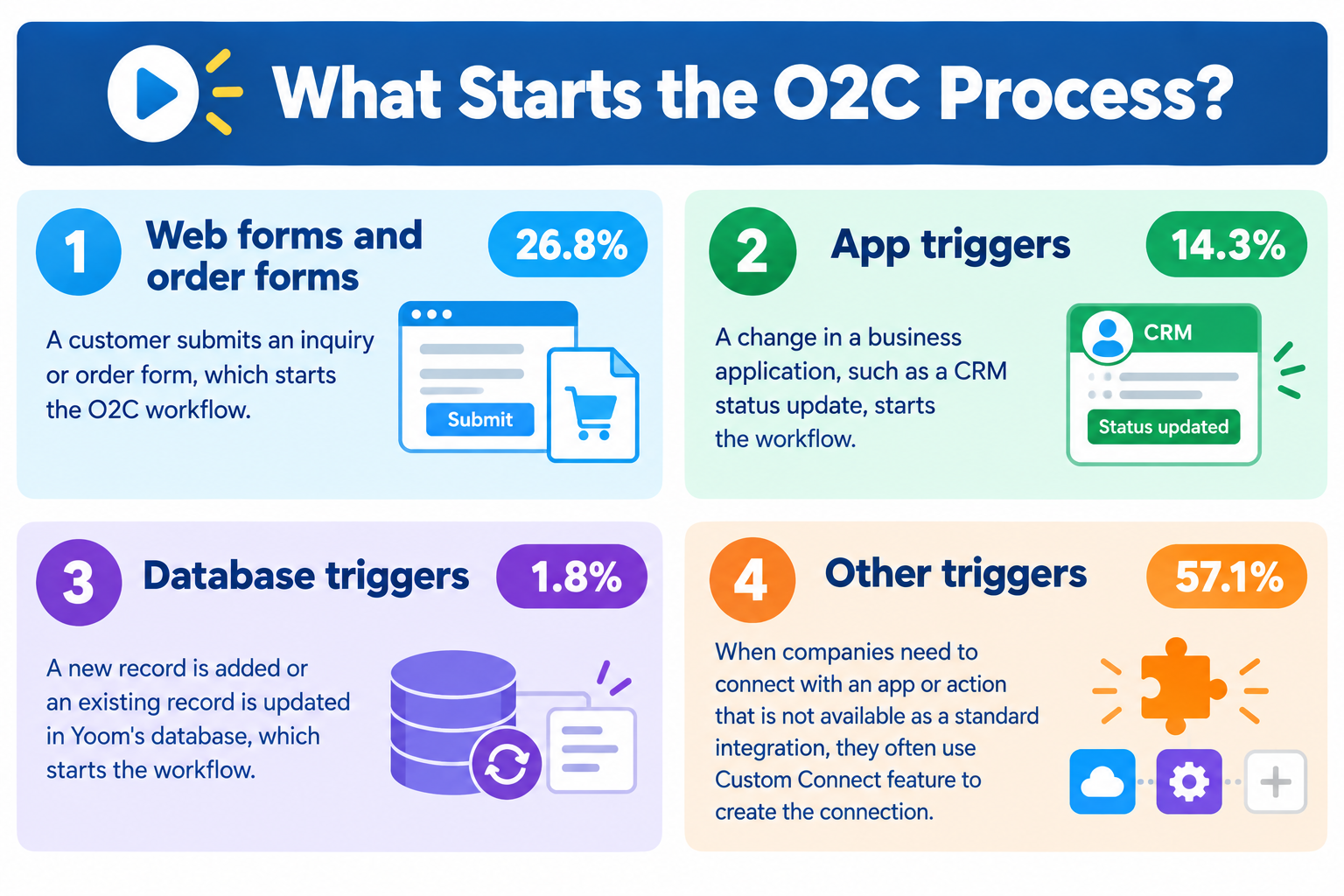
- Web forms and order forms (26.8%): A customer submits an inquiry or order form, which starts the O2C workflow.
- App triggers (14.3%): A change in a business application, such as a CRM status update, starts the workflow.
- Database triggers (1.8%): A new record is added or an existing record is updated in Yoom's database, which starts the workflow.
- Other triggers (57.1%): The workflow is started manually or the trigger type could not be identified. *When companies need to connect with an app or action that is not available as a standard integration, they often use Yoom's Custom Connect feature to create the connection.
The important point is that O2C automation can start automatically when a specific event happens. Employees do not always need to manually start each step.
3. From Order to Invoice in 45–60 Seconds
One of the main benefits of order to cash automation is faster processing.
In a manual process, information may need to move from the sales team to the finance team before an invoice can be created. Depending on the company, this can take hours or even days.
With an automated workflow, these steps can happen immediately after the required information becomes available.
In O2C workflows we analyzed, the time from the initial trigger to document creation, accounting updates, and a final notification in Slack was approximately 45 to 60 seconds.
Faster invoice creation can help companies receive payments sooner and reduce the time spent waiting for invoices to be processed.
4. Automated Document Generation Is Included in 72% of O2C Process
Order to cash automation is not only about moving information between software applications.
Business documents are also an important part of the O2C process.
Our data shows that about 72% of O2C workflows include automated document generation or issuance.
For example, O2C automation can:
- Automatically generate PDF invoices and quotes
- Fill in a standard document template with customer and order information
- Send documents for electronic signature
This allows employees to automate both data entry and document-related tasks.
5. Keeping Human Approval in the Process
Not every step needs to be fully automated.
For financial processes, companies may want an employee to check important information before an invoice is sent to a customer.
Our data shows that around 40% of O2C workflows include a human approval step.
For example, an automated workflow can create a draft invoice in QuickBooks and send a message to the finance manager in Slack or Microsoft Teams.
The manager can then review the invoice and approve it before it is sent.
This approach combines automation with human review. Routine work is handled automatically, while employees can still make the final decision when necessary.
Related O2C Templates:


■Who This Template Is For
- Anyone who finds contract and application processes using Google Forms and DocuSign time-consuming
- Anyone who wants to standardize workflows by eliminating mistakes in manual approval requests and document delivery
- Anyone who wants to move beyond routine document delivery tasks and focus on core responsibilities
■Benefits of Using This Template
- Automate the process from form response to approval and document delivery, reduce the time spent on manual work, and focus on more productive tasks.
- Eliminate manual data entry and email creation to prevent human errors such as incorrect recipients and missing attachments, improving operational accuracy.
■Flow Bot Workflow
- First, connect Google Forms and DocuSign to Yoom.
- Next, select Google Forms as the trigger and set the action to “When a response is submitted to the form.”
- Then, select “Request action from an assignee” as the operation and request action based on the Google Forms response.
- Finally, select DocuSign as the operation and set the “Create and send an envelope from a template” action to run after approval.
■Customization Options
- In the Google Forms trigger settings, specify the form ID you want to use as the starting point for the automation.
- With the “Request action from an assignee” feature, you can freely set the assignee and request details. You can also include information collected through Google Forms in the request message as variables.
- In the DocuSign action, you can specify the template to send and recipient details. You can also dynamically set recipients and other fields using form responses as variables.
■Notes
- Connect both Google Forms and DocuSign to Yoom.
- You can select a trigger interval of 5, 10, 15, 30, or 60 minutes.
- Please note that the shortest available trigger interval varies by plan.
- For details on how to retrieve response content when using Google Forms as a trigger, see “How to Retrieve Response Content with the Google Forms Trigger.”


■Overview
This is a flow that notifies Slack when a specific file is approved and stored in Google Drive.
■Recommended for
1. Personnel responsible for following up with newly hired individuals
・HR recruiters and administrative staff
・Corporate general affairs department
2. Senior personnel responsible for HR management
・Department heads of various departments
・Team leaders and project leaders
3. Those looking to reduce manual input tasks and automate processes
・Owners of small and medium-sized enterprises aiming for operational efficiency
・Administrative staff handling multiple tasks
■Benefits of using this template
・By automating the entire process, you can significantly improve operational efficiency by eliminating the hassle of communication and manual input.
■Notes
・Please integrate Yoom with both Google Drive and Slack.
6. How AI Is Used in O2C Automation
AI is also being used to automate tasks that are difficult to handle with simple rules.
In our data, approximately 15% of O2C workflows use AI features.
One common example is processing purchase orders (POs).
For example, a customer may send a purchase order as a PDF attachment by email. Instead of asking an employee to manually read the document and enter the information, AI can:
- Read the purchase order
- Extract information such as product names, quantities, and prices
- Compare the information with existing order or customer data
- Send the information to the next system in the workflow
This can reduce manual data entry and help employees process incoming orders more quickly.
Top Order-to-Cash Automation Software for 2026
When choosing an order to cash automation software, companies have several options.
Some platforms focus on connecting existing business applications. Others provide specialized tools for finance teams, billing, payments, or older business systems.
Here are four options to consider.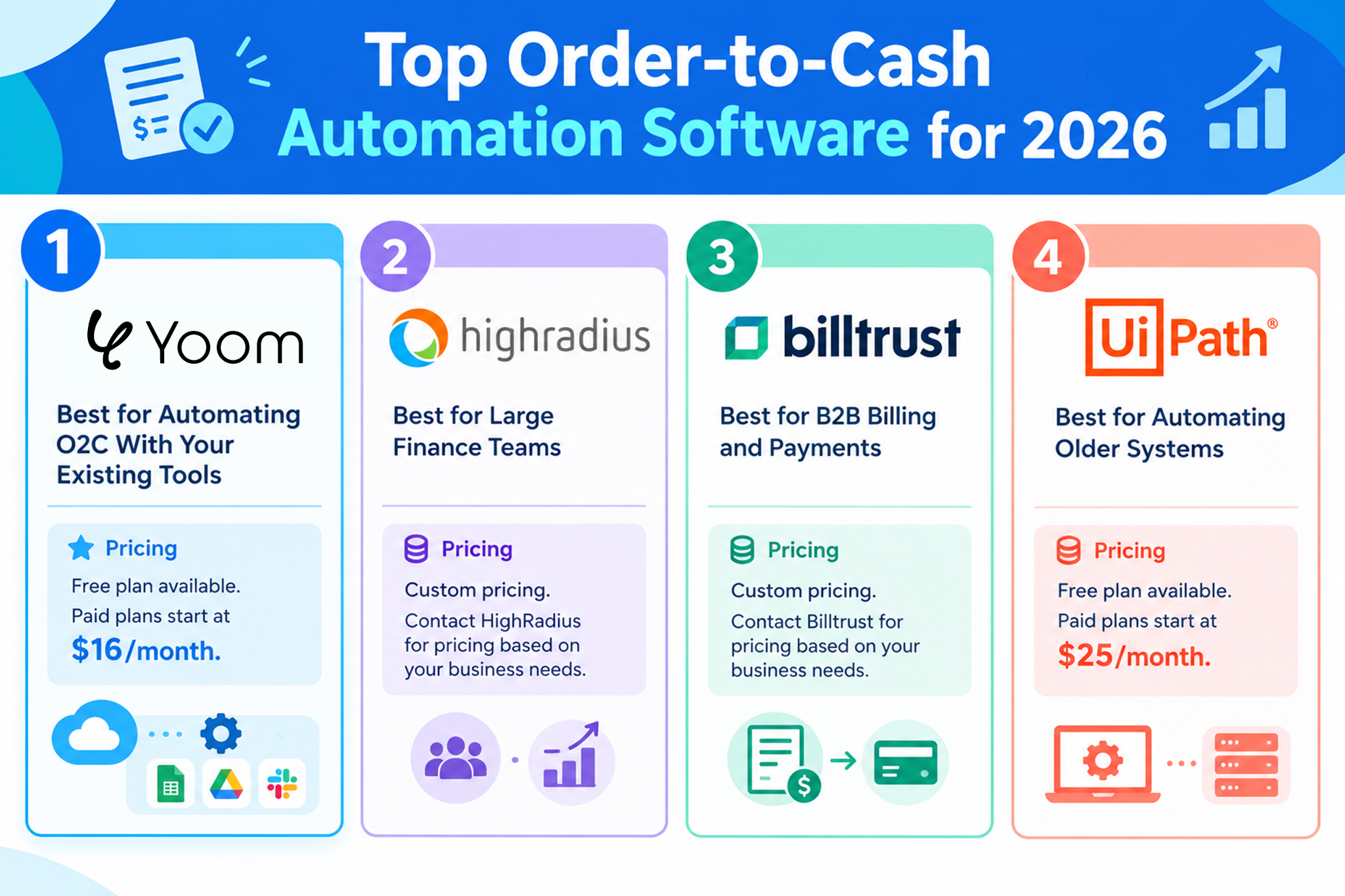
1. Yoom: Best for Automating O2C With Your Existing Tools
Yoom is a no-code automation platform that helps businesses connect their existing software and automate business processes.
- How it handles O2C: Yoom can connect CRM, e-signature, accounting, database, and communication tools in one workflow.
- Key advantages: No-code setup, document and PDF generation, approval steps through Slack, and AI-powered document processing.
- Pricing: Free plan available. Paid plans start at $16/month.
- Best for: Businesses and RevOps teams that want to automate their O2C process without replacing their existing software.
For example, a company can create a workflow that starts when a deal is marked as won in Salesforce, creates a contract in DocuSign, and then creates an invoice in QuickBooks after the contract is signed.
2. HighRadius: Best for Large Finance Teams
HighRadius is an order-to-cash software platform designed for large finance organizations.
- How it handles O2C: It helps automate areas such as credit management, invoicing, collections, and payment processing.
- Key advantages: Finance-focused features and AI capabilities for large-scale financial operations.
- Pricing: Custom pricing. Contact HighRadius for pricing based on your business needs.
- Best for: Large enterprises with complex finance operations and existing ERP systems.
HighRadius is a good option for companies that need specialized tools for managing large volumes of financial transactions.
3. Billtrust: Best for B2B Billing and Payments
Billtrust focuses on billing and payment processes for B2B companies.
- How it handles O2C: It helps businesses automate invoice delivery and payment collection.
- Key advantages: Tools for digital invoicing, payment processing, and managing customer billing.
- Pricing: Custom pricing. Contact Billtrust for pricing based on your business needs.
- Best for: Manufacturers, distributors, wholesalers, and other B2B companies that process a large number of invoices.
Billtrust is especially useful for companies looking to improve the billing and payment parts of their O2C process.
4. UiPath: Best for Automating Older Systems
UiPath is an automation platform that uses software robots to perform repetitive tasks.
- How it handles O2C: Software robots can perform tasks such as opening applications, copying information, downloading documents, and entering data.
- Key advantages: It can automate tasks even when older business software does not easily connect with modern applications.
- Starting at
- Pricing: Free plan available. Paid plans start at $25/month
- Best for: Companies that still rely on older or custom-built business systems.
UiPath can be useful when a company cannot easily connect an older system directly to its other business applications.
Build Your First O2C Automation With Yoom
You do not need to replace your existing business tools or build one large system to start O2C automation.
With Yoom, you can connect the tools you already use and automate individual tasks step by step. This makes it easier to start small and expand your O2C automation over time.
Start Small With Yoom Templates and AI Worker
Instead of trying to build one large workflow that covers the entire O2C process, start with one task that takes time or requires repetitive data entry.
For example:
- Connect your CRM and accounting tool: When a deal is marked as won, automatically create the required order or invoice information.
- Connect your e-signature tool: When the order is confirmed, automatically create and send the contract.
- Add an approval step: Send the draft invoice to the finance team for review before sending it to the customer.
- Add more steps as needed: Save documents, update your database, notify your team, or trigger another workflow.
You can gradually connect these individual tasks to create a larger O2C process.
Related O2C Workflow Templates:

■Overview
The flow "Send a payment link via Stripe when a deal is closed in HubSpot" is a business workflow that automates the payment process after a deal is closed.
This streamlines the process from order to payment, reducing the burden on the sales team.
By utilizing Yoom to integrate HubSpot and Stripe and leveraging API and RPA functions, manual tasks can be reduced, enabling efficient business operations.
■Recommended for
- Sales representatives who manage deals using HubSpot and want to streamline the payment process after a deal is closed
- Business owners or managers who use Stripe and want to automate the sending of payment links
- IT personnel or system administrators who want to optimize business processes by integrating multiple SaaS applications
■Benefits of using this template
- Improved operational efficiency: Payment links are automatically sent after a deal is closed, eliminating the need for manual email creation and link generation.
- Reduction of human error: Automation prevents mistakes such as missed or incorrect sending of payment links.
- Faster customer response: Quickly sending payment links improves response speed to customers, enhancing satisfaction.

■Overview
This is a flow that notifies Microsoft Teams when a payment is made via Stripe.
■Recommended for
1. Companies that accept payments via Stripe
・Those managing completed payments on Stripe
・Those utilizing it to streamline online payments
2. Those who use Microsoft Teams as their main communication tool
・Those using it as a means of communication within the team
■Benefits of using this template
Stripe is a tool that can lead to improved customer satisfaction as it allows for a wide range of payment methods.
However, having to manually confirm completed payments on Stripe can be a factor that hinders productivity.
By utilizing this flow, you can immediately notify Microsoft Teams when a payment is completed on Stripe, facilitating smooth information sharing within the team.
Knowing the completion of payments quickly allows for smooth subsequent operations, thereby improving efficiency.
■Notes
・Please integrate both Stripe and Microsoft Teams with Yoom.
・Stripe is an app available only on the Team Plan and Success Plan. If you are on the Free Plan or Mini Plan, the operations and data connections of the flow bot you set will result in errors, so please be careful.
・Paid plans such as the Team Plan and Success Plan offer a 2-week free trial. During the free trial, you can use apps that are subject to restrictions.
・Microsoft365 (formerly Office365) has a home plan and a general business plan (Microsoft365 Business), and if you are not subscribed to the general business plan, authentication may fail.
Related AI Worker Templates:

Calculate payment due dates based on each client’s payment terms using billing data, then log them in management sheets such as Google Sheets and create notification messages for Slack, Chatwork, and more. Ideal for accounting and finance teams looking to prevent late payments before they happen.
- What are “skills”?
- They are the instructions the AI worker follows to process tasks. For detailed configuration instructions, see [AI worker] How to Create Skills (Formerly Manuals).
- What are “tools”?
- These are the tools the AI worker uses to process tasks. Simply tell the AI which tools your organization normally uses, and you can freely configure where data is retrieved from and where it is output.
- The number of AI workers that can run simultaneously, the number of AI workers you can create, and the AI models available to you vary by plan.
- The apps and operations available within AI workers are subject to the same usage limits as Flowbot.
- AI workers consume tasks during test runs just as they do during production runs. For details, see [AI worker] How to Calculate the Number of Tasks Executed.
Customize Your O2C Workflow as Your Business Grows
One advantage of using a workflow automation platform is that you do not have to decide everything in advance.
With Yoom, you can easily add or remove actions, add conditions, and change how information moves between your tools as your business needs change.
For example, you might start with a simple workflow:
CRM → Accounting
Later, you can add more steps:
CRM → Contract → Approval → Accounting → Customer Notification
You can also add conditions, such as sending an approval request only when the order amount exceeds a certain amount.
This makes your O2C automation more flexible than trying to build one large, fixed process from the beginning.